1. Уводзіны
The AJA V2Analog is a compact, high-quality mini-converter designed to convert HD/SD-SDI signals to analog component or composite video. This device is engineered for professional video workflows, providing reliable signal conversion for various applications.
Its versatility allows for complete integration into any workflow, making it a valuable asset in any video production environment.

Малюнак 1: Пярэдняя і бакавая часткі view of the AJA V2Analog Mini-Converter, highlighting input and output ports.
2. Інфармацыя па бяспецы
Калі ласка, уважліва прачытайце ўсе інструкцыі па тэхніцы бяспекі перад выкарыстаннем прылады. Захоўвайце гэтую інструкцыю для далейшага выкарыстання.
- Не падвяргайце прыладу ўздзеянню дажджу, вільгаці або экстрэмальных тэмператур.
- Забяспечце належную вентыляцыю, каб прадухіліць перагрэў.
- Use only the specified power supply (5-20 VDC).
- Пазбягайце падзення прылады або моцных удараў.
- Звяртайцеся да кваліфікаванага абслугоўваючага персаналу.
3. Усталёўка і падключэнне
Follow these steps to set up your AJA V2Analog converter:
- Падключэнне сілкавання: Connect the appropriate power supply (5-20 VDC) to the "POWER" input on the converter.
- Уваход SDI: Connect your HD/SD-SDI source to the "SDI IN" BNC connector.
- Аналагавы выхад: Connect the Y/G, Pb/B, and Pr/R BNC outputs to your analog component or composite display/device. Ensure correct color component matching (Y/G for Luminance/Green, Pb/B for Blue Difference, Pr/R for Red Difference).
- Падключэнне USB (неабавязкова): For firmware updates or configuration, connect a USB cable from the "USB" port on the converter to your computer.
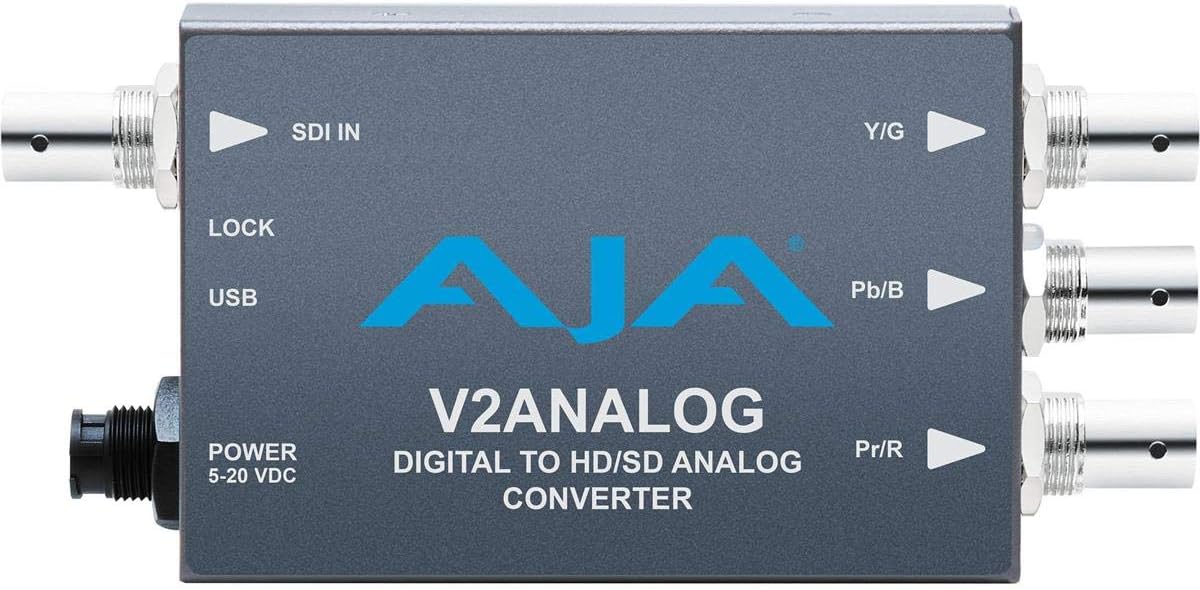
Малюнак 2: Верх view of the AJA V2Analog Mini-Converter, illustrating port labels for connection.
4. Інструкцыя па эксплуатацыі
Once all connections are made, power on the device. The V2Analog will automatically detect the incoming SDI signal format and convert it to the appropriate analog output. The "LOCK" LED indicator will illuminate when a stable SDI signal is detected and locked.
4.1. Signal Compatibility
The V2Analog supports various HD and SD SDI formats. It is designed to convert these digital signals to standard analog component (YPbPr) or composite (CVBS) outputs.
4.2. Канфігурацыя (пашыраная)
Advanced configuration options, such as output format selection or color space adjustments, may be available via AJA's Mini-Config software, accessible through the USB port. Refer to the AJA webсайт з найноўшым праграмным забеспячэннем і падрабязнымі інструкцыямі па канфігурацыі.
5. Тэхнічнае абслугоўванне
The AJA V2Analog is designed for reliable operation with minimal maintenance. Follow these guidelines:
- Уборка: Для чысткі вонкавых паверхняў прылады выкарыстоўвайце мяккую сухую тканіну. Не выкарыстоўвайце вадкія або аэразольныя ачышчальнікі.
- Абнаўленні прашыўкі: Periodically check the AJA website for firmware updates. Keeping the firmware current ensures optimal performance and compatibility.
- захоўванне: Калі прылада не выкарыстоўваецца працяглы час, захоўвайце яе ў прахалодным, сухім месцы, удалечыні ад прамых сонечных прамянёў і экстрэмальных тэмператур.
6. Выпраўленне непаладак
If you encounter issues with your V2Analog, refer to the following common problems and solutions:
| праблема | Магчымая прычына | Рашэнне |
|---|---|---|
| Няма відэавыхаду | No power; Incorrect SDI input; Incorrect analog output connection; No signal lock. | Check power supply; Verify SDI source is active and connected to "SDI IN"; Ensure Y/G, Pb/B, Pr/R are connected correctly to display; Check "LOCK" LED. |
| Distorted or colored video | Incorrect analog output format; Loose connections. | Ensure display is set to correct input type (component/composite); Tighten all BNC connections. |
| "LOCK" LED not illuminated | No valid SDI input signal. | Verify SDI source is active and sending a compatible signal. Check SDI cable integrity. |
If the problem persists, contact AJA Technical Support for further assistance.
7. Тэхнічныя характарыстыкі
| Асаблівасць | Дэталь |
|---|---|
| мадэль | V2ANALOG |
| Марка | АЯ |
| Увод | HD/SD-SDI (BNC) |
| Выхад | Component (Y/G, Pb/B, Pr/R BNC), Composite (selectable) |
| Тып інтэрфейсу | USB, SDI, Component |
| Магутнасць | 5-20 В пастаяннага току |
| Памеры (Д х Ш х У) | 7.2 х 5.7 х 4.2 цалі |
| Вага | 1.35 фунта |
| UPC | 091131246023 |
8. Падтрымка і гарантыя
For technical support, product registration, or warranty information, please visit the official AJA webсайт або звярніцеся ў службу падтрымкі кліентаў. Канкрэтныя гарантыйныя ўмовы могуць адрознівацца ў залежнасці ад рэгіёна і даты пакупкі.
АЯ Webсайт: www.aja.com


