Уводзіны
The Wasabi Mango UHD430 Real 4K HDMI 2.0 Monitor is a high-performance display featuring a 43-inch LG AH-IPS panel, delivering stunning 3840 x 2160 UHD 4K resolution. Designed for clarity and vibrant colors, this monitor supports 10-bit color depth and offers wide viewныя вуглы.
Асноўныя функцыі ўключаюць у сябе:
- 43-inch LG AH-IPS LED Backlit Panel for superior image quality.
- UHD 4K (3840 x 2160) resolution for incredibly detailed visuals.
- 1.06 billion colors (10-bit) for rich and accurate color reproduction.
- Multiple connectivity options: HDMI 2.0 (x2), HDMI 1.4a (x2), DisplayPort 1.2 (x1), D-Sub, USB 3.0 Hub.
- 60Hz refresh rate via DisplayPort 1.2 and HDMI 2.0 for smooth motion.
- Built-in 10W + 10W speakers for integrated audio.

Выява: спераду view of the Wasabi Mango UHD430 4K monitor, showcasing its sleek design and a remote control for operation.
Змест пакета
Калі ласка, пастаўце галачку для наступных пунктаў:
- Wasabi Mango UHD430 Monitor
- Кабель DisplayPort
- Кабель HDMI
- Remote Control (Note: Text on remote may be in Korean)
- Power Cable (110~240V adapter + US plug)
- Кабель USB-канцэнтратар
- Screws for stand
- Аптычны аўдыякабель
- Кіраўніцтва карыстальніка
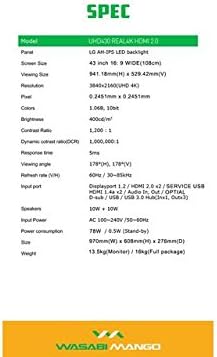
Image: A visual representation of the monitor's dimensions and a list of all accessories included in the package, such as various cables, remote control, and stand screws.
Настройка
1. Зборка падстаўкі
- Асцярожна пакладзеце манітор экранам уніз на мяккую чыстую паверхню, каб пазбегнуць драпін.
- Attach the stand base to the monitor using the provided screws. Ensure it is securely fastened.
2. Падключэнне да крыніцы харчавання
- Connect the power cable to the monitor's power input port.
- Падключыце другі канец кабеля харчавання да заземленай электрычнай разеткі.
3. Падключэнне да прылады-крыніцы
The monitor supports various input types. Choose the appropriate cable for your device:
- DisplayPort 1.2: For optimal 4K @ 60Hz performance, use the included DisplayPort cable. Connect one end to the monitor's DisplayPort input and the other to your computer's DisplayPort output.
- HDMI 2.0: For 4K @ 60Hz, use an HDMI 2.0 cable. Connect to one of the HDMI 2.0 ports on the monitor.
- HDMI 1.4a: Supports 4K @ 30Hz. Connect to one of the HDMI 1.4a ports.
- D-Sub: For analog connections.
- Канцэнтратар USB 3.0: Connect the USB Hub cable from your computer to the monitor's USB 3.0 input to enable the monitor's USB ports.
Note: Using a longer (over 1.5m) or low-quality DisplayPort/HDMI cable may limit the refresh rate to 30Hz at 4K resolution.
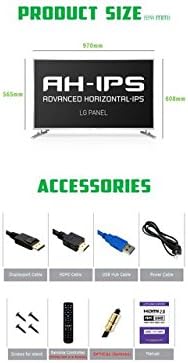
Image: The back panel of the monitor, illustrating the arrangement of power input, DisplayPort, HDMI, D-Sub, and USB ports for connection.
Кіраванне маніторам
Уключэнне/выключэнне харчавання
- Націсніце кнопку харчавання на маніторы або пульце дыстанцыйнага кіравання, каб уключыць або выключыць манітор.
Выбар уводу
- Use the "Input" button on the remote control to cycle through available input sources (DisplayPort, HDMI1, HDMI2, HDMI3, HDMI4, D-Sub).
Экраннае меню (OSD).
The OSD menu allows you to adjust various display settings. Use the remote control to navigate:
- Націсніце кнопку «Меню», каб адкрыць экраннае меню.
- Use the arrow keys (Up/Down/Left/Right) to navigate through menu options.
- Press "OK" or "Enter" to select an option or confirm a setting.
- Press "Exit" or "Menu" again to close the OSD.
Звычайныя налады экраннага меню ўключаюць:
- Налады малюнка: Brightness, Contrast, Color Temperature, Sharpness.
- Налады гуку: Гучнасць, адключэнне гуку.
- Выбар уводу: Manual input source selection.
- Налады экраннага меню: Мова экраннага меню, празрыстасць экраннага меню, час чакання экраннага меню.
- Іншыя налады: Aspect Ratio, ECO Mode.

Image: The monitor displaying content, with the remote control visible, indicating its use for navigating the monitor's functions and settings.
Тэхнічнае абслугоўванне
Чыстка манітора
- Заўсёды адключайце манітор ад разеткі перад чысткай.
- Выкарыстоўвайце мяккую безворсовую тканіну, злёгку dampвадой або неабразіўным ачышчальнікам для экрана.
- Не распыляйце ачышчальнік непасрэдна на экран.
- Пазбягайце выкарыстання бензолу, разбаўляльніка, аміяку або абразіўных ачышчальнікаў, бо яны могуць пашкодзіць паверхню дысплея.
- Акуратна працярыце экран, каб выдаліць пыл і плямы.
Агульны догляд
- Трымайце манітор далей ад прамых сонечных прамянёў, крыніц цяпла і празмернай колькасці пылу.
- Забяспечце належную вентыляцыю вакол манітора, каб прадухіліць перагрэў.
- Не стаўце цяжкія прадметы на манітор або яго кабелі.
- Пазбягайце падзення манітора або моцных удараў.
Ліквідацыю непаладак
| праблема | Магчымая прычына | Рашэнне |
|---|---|---|
| Няма сілы | Сеткавы кабель не падключаны; разетка не працуе. | Пераканайцеся, што кабель харчавання надзейна падключаны да манітора і разеткі. Праверце разетку з іншай прыладай. |
| Няма сігналу / пусты экран | Incorrect input source selected; Video cable loose or faulty; Source device not powered on. | Press "Input" button on remote to select correct source. Check video cable connections. Ensure source device is on and outputting video. |
| Выява скажоная або размытая | Incorrect resolution setting; Faulty video cable; Graphics card driver issue. | Set display resolution to 3840x2160. Try a different video cable. Update graphics card drivers. |
| Няма аўдыя | Volume too low or muted; Audio cable not connected (if using external speakers); Incorrect audio output selected on source device. | Increase volume or unmute. Ensure audio is routed correctly from source device to monitor. |
| Пульт дыстанцыйнага кіравання не працуе | Batteries are dead or incorrectly inserted; Obstruction between remote and monitor. | Replace batteries. Ensure clear line of sight to the monitor's IR receiver. |
Тэхнічныя характарыстыкі
| Асаблівасць | Дэталь |
|---|---|
| Назва мадэлі | UHD430 Real 4K HDMI 2.0 |
| Тып панэлі | LG AH-IPS LED Backlight |
| Памер экрана | 43 inches (109.2 cm), 16:9 Wide |
| дазвол | 3840 x 2160 UHD 4K |
| Колеры | 1.06 Billion (10-bit) |
| Каэфіцыент кантраснасці | 1200:1 |
| Каэфіцыент дынамічнай кантраснасці | 1,000,000:1 |
| Яркасць | 400 кд/м² |
| Час водгуку | 5 мс (ад G да G) |
| Viewing кут | 178 градусаў па гарызанталі, 178 градусаў па вертыкалі |
| Частата абнаўлення | 60 Hz (DisplayPort 1.2 & HDMI 2.0), 30 Hz (HDMI 1.4a) |
| Уваходныя парты | DisplayPort 1.2 x1, HDMI 2.0 x2, HDMI 1.4a x2, D-Sub x1, USB 3.0 Hub (In x1, Out x3) |
| Аўдыё | 10W + 10W Speakers |
| Увод магутнасці | Пераменны ток 100-240В / 50-60Гц |
| Энергаспажыванне | 78W (Operating) / 0.5W (Stand-by) |
| Памеры (Ш х У х Г) | 970 мм х 608 мм х 276 мм (з падстаўкай) |
| Вага | 13.5 kg (Monitor) / 18 kg (Full package) |
Image: A graphic detailing the technical specifications of the UHD430 monitor, such as screen size, resolution, and refresh rate.
Гарантыя і падтрымка
The Wasabi Mango UHD430 monitor comes with a manufacturer's warranty. Please refer to the warranty card included in your package for specific terms and conditions.
Defective Pixel Policy: For the UHD430 SE model, 0-15 defective pixels (including dead/stuck/sub pixels) are permitted under the warranty policy.
For technical support or service inquiries, please contact your retailer or the official Wasabi Mango support channels. Keep your purchase receipt and product serial number handy for faster service.


