1. Уводзіны
The MikroTik RB3011UiAS-RM is a high-performance multi-port router designed for advanced networking environments. It features an ARM architecture CPU, ten Gigabit Ethernet ports (divided into two switch groups), an SFP cage, and a SuperSpeed USB 3.0 port. This device is housed in a 1U rackmount enclosure and includes a touchscreen LCD panel, a serial console port, and Power over Ethernet (PoE) output functionality on the last Ethernet port. This manual provides detailed instructions for the installation, configuration, and operation of your RB3011UiAS-RM RouterBOARD.
2. Змесціва ўпакоўкі
Verify that all items are present in your package before proceeding with installation.
- MikroTik RB3011UiAS-RM RouterBOARD Unit
- Адаптар сілкавання
- Rackmount Ears (2)
- Мантажныя шрубы і аксэсуары

Малюнак 2.1: Спераду view of the MikroTik RB3011UiAS-RM RouterBOARD, showing the 10 Gigabit Ethernet ports, SFP cage, USB 3.0 port, and LCD panel.

Figure 2.2: Included power adapter for the RB3011UiAS-RM RouterBOARD.

Figure 2.3: Various mounting screws and accessories for the RouterBOARD.
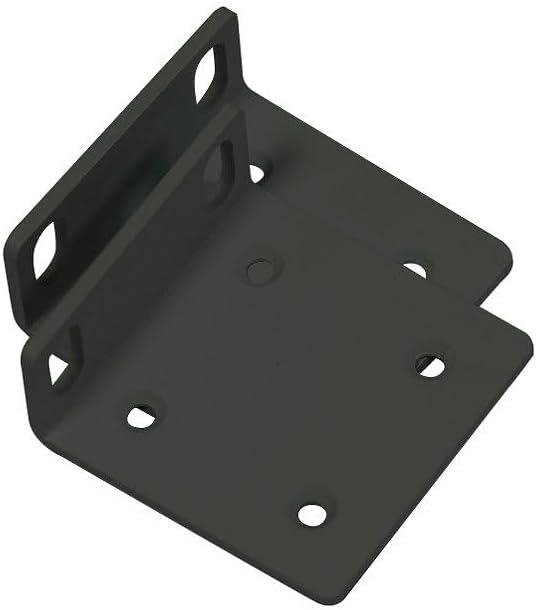
Figure 2.4: Rackmount ears for installing the RB3011UiAS-RM into a standard 1U rack.
3. Абсталяванне скончыласяview
The RB3011UiAS-RM is equipped with a range of ports and indicators for versatile networking applications.
3.1 Пярэдняя панэль
- Парты Ethernet (1-10): Ten 10/100/1000 Gigabit Ethernet ports. Ports 1-5 form one switch group, and ports 6-10 form another. Port 10 supports PoE output.
- Клетка SFP: One SFP port for fiber optic connections.
- Порт USB 3.0: One SuperSpeed USB 3.0 Type A port for external storage or 3G/4G modems.
- ВК-панэль: A touchscreen LCD for device status monitoring and basic configuration.
- Кнопка скіду: Used for resetting the device to factory defaults or entering RouterBOOT mode.
- Святлодыёд харчавання: Паказвае стан харчавання.
- Святлодыёд карыстальніка: Programmable LED for custom indications.
3.2 Задняя панэль
- Раз'ём харчавання: Для падключэння адаптара харчавання, які ўваходзіць у камплект.
- Serial Console Port: RJ45 serial port for console access.
- Шруба зазямлення: For connecting a grounding wire.
4. Настройка
4.1 Фізічная ўстаноўка
- Ўстаноўка ў стойку:
- Attach the two rackmount ears to the sides of the device using the provided screws.
- Secure the device into a standard 1U rack using appropriate rack screws.
- Усталёўка на працоўны стол:
- Place the device on a flat, stable surface. Ensure adequate ventilation around the unit.
4.2 Падключэнне харчавання
- Connect the included power adapter to the power jack on the rear panel of the RB3011UiAS-RM.
- Падключыце адаптар сілкавання да адпаведнай разеткі.
- The Power LED on the front panel should illuminate, indicating the device is receiving power.
4.3 Пачатковая канфігурацыя
- Падключыцеся да ПК: Connect an Ethernet cable from your computer to any of the Gigabit Ethernet ports (e.g., Ether2) on the RB3011UiAS-RM.
- Доступ да аперацыйнай сістэмы маршрутызатара:
- Адкрыйце a web браўзер і перайдзіце па IP-адрасе па змаўчанні (звычайна http://192.168.88.1).
- Alternatively, use the MikroTik WinBox utility for a graphical interface.
- Імя карыстальніка па змаўчанні адмін with no password. It is highly recommended to set a strong password immediately after initial login.
- Базавая канфігурацыя: Follow the on-screen prompts or refer to the RouterOS documentation for initial network setup, including WAN and LAN configurations.
5. Operating the RouterBOARD
5.1 Канфігурацыя сеткі
The RB3011UiAS-RM runs MikroTik's RouterOS, offering extensive configuration options. Access RouterOS via WinBox or web браўзэр (WebFig) to manage network settings.
- WAN Setup: Configure your internet connection on the designated WAN port (e.g., Ether1). This typically involves setting up DHCP client, static IP, or PPPoE.
- Настройка лакальнай сеткі: Configure IP addresses, DHCP server, and other local network settings for the LAN ports.
- Брандмаўэр: Implement firewall rules to secure your network.
- Маршрут: Configure static or dynamic routing protocols as needed.
5.2 Выкарыстанне порта USB 3.0
The USB 3.0 port can be used for:
- Знешняя памяць: Connect a USB drive for network storage (NAS functionality) or for storing RouterOS backups and logs.
- 3G/4G мадэм: Connect a compatible USB 3G/4G modem to provide cellular internet connectivity.
5.3 Выкарыстанне порта SFP
The SFP cage supports various SFP modules for fiber optic connections, allowing for high-speed uplinks or connections to other fiber-enabled devices.
5.4 Выхад PoE
Ethernet port 10 supports Passive PoE output, which can power other PoE-compatible devices such as IP cameras or wireless access points, provided they operate within the supported voltagе дыяпазон.
5.5 ВК-панэль
The touchscreen LCD panel displays real-time device status, including CPU load, memory usage, and port activity. It also allows for basic configuration adjustments directly from the device.
6. Тэхнічнае абслугоўванне
6.1 Абнаўленне прашыўкі
Regularly update RouterOS firmware to ensure optimal performance, security, and access to new features. Download the latest firmware from the official MikroTik website and follow the update instructions provided in RouterOS documentation.
6.2 Рэзервовае капіраванне і аднаўленне канфігурацыі
It is recommended to regularly back up your device configuration. This can be done through WinBox or WebFig. Backups can be saved to your computer or an attached USB storage device. In case of configuration loss or device replacement, you can restore your settings from a saved backup file.
6.3 Ачыстка
Keep the device clean and free from dust to ensure proper ventilation and prevent overheating. Use a soft, dry cloth for cleaning. Do not use liquid cleaners or aerosols.
7. Выпраўленне непаладак
This section addresses common issues you might encounter with your RB3011UiAS-RM.
- Няма харчавання:
- Пераканайцеся, што адаптар сілкавання надзейна падключаны як да прылады, так і да спраўнай разеткі.
- Праверце, ці правільна працуе адаптар харчавання.
- Няма падключэння да сеткі:
- Check Ethernet cable connections to ensure they are secure and functional.
- Verify IP address settings on your computer and the router.
- Check firewall rules in RouterOS that might be blocking traffic.
- Ensure the WAN connection is active and configured correctly.
- Павольная хуткасць сеткі:
- Check for high CPU or memory usage on the router via RouterOS.
- Ensure all connected devices are operating at their expected speeds (e.g., Gigabit connections).
- Inspect for network loops or misconfigurations.
- Прылада не адказвае:
- Паспрабуйце перазагрузіць прыладу, адключыўшы і зноў падключыўшы сілкаванне.
- If the device remains unresponsive, consider performing a factory reset (see below).
7.1 Скід да заводскіх налад
Каб скінуць налады прылады да заводскіх налад:
- Пераканайцеся, што прылада выключана.
- Націсніце і ўтрымлівайце кнопку скіду.
- While holding the reset button, power on the device.
- Continue holding the button until the user LED starts flashing.
- Release the button. The device will now boot with factory default settings.
Папярэджанне: Performing a factory reset will erase all custom configurations.
8. Тэхнічныя характарыстыкі
| Асаблівасць | Дэталь |
|---|---|
| мадэль | РБ3011УіАС-РМ |
| Архітэктура працэсара | ARM |
| Парты Ethernet | 10 х 10/100/1000 гігабітны Ethernet |
| Парты SFP | 1 |
| Парты USB | 1 х USB 3.0 тыпу A |
| АЗП | 1 ГБ |
| Памер захоўвання | 128 Мб |
| PoE In | Пасіўнае PoE |
| Выхадныя парты PoE | Ether10 (Passive PoE) |
| Аперацыйная сістэма | RouterOS |
| Памеры | 443 х 92 х 44 мм (17.44 х 3.62 х 1.73 цалі) |
| Вага | 850 грама (1.87 фунта) |
| Агароджа | 1U для стойкі |
| Асаблівасці | Touchscreen LCD, Serial Console Port |
9. Гарантыя і падтрымка
Каб атрымаць інфармацыю аб гарантыі і тэхнічнай падтрымцы, звярніцеся да афіцыйнага сайта MikroTik. webсайт або звярніцеся да аўтарызаванага рэсэлера MikroTik. Захоўвайце пацвярджэнне пакупкі для прэтэнзій па гарантыі.


