Уводзіны
This manual provides comprehensive instructions for the setup, operation, and maintenance of your GPX Digital AM/FM Clock Radio, model C224B. Please read this manual thoroughly before using the device to ensure proper functionality and to maximize your user experience. Keep this manual for future reference.
Прадукт скончаныview
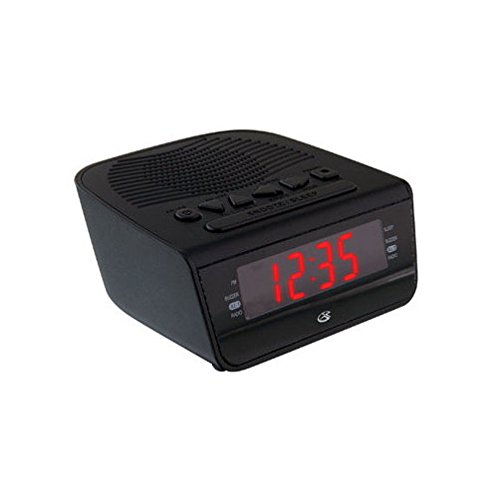
Малюнак 1: Фронт view of the GPX Digital AM/FM Clock Radio. This image shows the compact black unit with its digital display and control buttons.
The GPX Digital AM/FM Clock Radio (C224B) is designed for reliable timekeeping and audio entertainment. Key features include a clear multi-display clock, AM/FM radio tuner, dual alarm functionality, and a battery backup option to ensure continuous operation during power interruptions. Its compact and modern design makes it suitable for various indoor settings.
Настройка
1. Распакаванне
Carefully remove the clock radio from its packaging. Ensure all components are present: the clock radio unit and the power adapter.
2. Падключэнне сілкавання
- Plug the power adapter into the DC input jack located on the back of the clock radio.
- Plug the other end of the power adapter into a standard wall outlet (AC 120V, 60Hz).
- The display will illuminate, indicating the unit is receiving power.
3. Усталёўка рэзервовага акумулятара (неабавязкова)
Для рэзервовага харчавання падчас выхадуtages, install batteries (not included).
- Знайдзіце батарэйны адсек на ніжняй частцы прылады.
- Адкрыйце крышку батарэйнага адсека.
- Insert the required batteries (e.g., 2 x AAA, check unit for specific type) according to the polarity markings (+ and -).
- Надзейна зачыніце крышку батарэйнага адсека.
Заўвага: Batteries are for backup only and will not power the display or radio functions continuously. They preserve time and alarm settings during a power interruption.
Інструкцыя па эксплуатацыі
1. Усталёўка часу
- Націсніце і ўтрымлівайце УСТАНОВА ЧАСУ кнопку, пакуль дысплей не пачне міргаць.
- Выкарыстоўвайце ГАДЗІНА і ХВІЛІНА кнопкі для рэгулявання часу.
- Прэса УСТАНОВА ЧАСУ яшчэ раз, каб пацвердзіць і выйсці з рэжыму налады часу.
2. Налада будзільнікаў (Будзільнік 1 і Будзільнік 2)
This unit features dual alarms, allowing you to set two independent wake-up times.
- Націсніце і ўтрымлівайце БУДЗІЛЬНІК 1 НАБОР (або БУДЗІЛЬНІК 2 НАБОР) button until the alarm time flashes.
- Выкарыстоўвайце ГАДЗІНА і ХВІЛІНА buttons to adjust the desired alarm time.
- Прэса БУДЗІЛЬНІК 1 НАБОР (або БУДЗІЛЬНІК 2 НАБОР) зноў, каб пацвердзіць час.
- Immediately after confirming the time, use the РЭЖЫМ ТРЫВОГІ button to select the alarm source: ЗУМЕР or РАДЫЁ.
- The alarm icon (e.g., AL1 or AL2) will appear on the display, indicating the alarm is active.
To turn off an alarm, press the corresponding БУДЗІЛКА 1 УКЛ./ВЫКЛ. (або БУДЗІЛКА 2 УКЛ./ВЫКЛ.) button. The alarm icon will disappear.
3. Праца з AM/FM-радыё
- Націсніце РАДЫЁ ВКЛ/ВЫКЛ кнопка для ўключэння радыё.
- Націсніце ГУРТ кнопка для пераключэння паміж дыяпазонамі AM і FM.
- Выкарыстоўвайце НАСТРОЙКА + or МЕЛОДЫЯ - кнопкі для ручной налады на патрэбную станцыю.
- To automatically scan for the next available station, press and hold НАСТРОЙКА + or МЕЛОДЫЯ - на некалькі секунд.
- Адрэгулюйце гучнасць, выкарыстоўваючы ОБ'ём + or АБ'ЁМ - кнопкі.
- Каб выключыць радыё, націсніце РАДЫЁ ВКЛ/ВЫКЛ кнопку зноў.
4. Функцыя паўтору будзільніка
Калі гучыць будзільнік, націсніце кнопку СНАОЗ кнопку, каб часова адключыць будзільнік прыблізна на 9 хвілін. Пасля перыяду паўторнага сігналу будзільнік зноў загучыць.
5. Функцыя сну
Функцыя сну дазваляе радыё прайграваць на працягу зададзенага часу, перш чым аўтаматычна выключыцца.
- Пакуль гучыць радыё, націсніце кнопку СПАЦЬ некалькі разоў націскайце кнопку, каб пераключацца паміж даступнымі часамі сну (напрыклад, 90, 60, 30, 15 хвілін, ВЫКЛ).
- Радыё аўтаматычна выключыцца праз выбраны час.
Тэхнічнае абслугоўванне
1. Уборка
To clean the unit, wipe the exterior with a soft, slightly damp cloth. Do not use abrasive cleaners or solvents, as these may damage the finish. Ensure the unit is unplugged before cleaning.
2. Замена батарэі
If the battery backup function is not working, or if the unit loses time during a power outage, the backup batteries may need replacement. Follow the "Battery Backup Installation" steps in the Setup section to replace them.
Ліквідацыю непаладак
| праблема | Магчымая прычына | Рашэнне |
|---|---|---|
| Прылада не ўключаецца. | Адаптар сілкавання не падключаны або няспраўная разетка. | Пераканайцеся, што адаптар сілкавання надзейна падключаны да прылады і да спраўнай разеткі. Паспрабуйце іншую разетку. |
| Сігналізацыя не гучыць. | Будзільнік не настроены, гучнасць будзільніка занадта нізкая або будзільнік выключаны. | Verify alarm time and source (buzzer/radio) are set correctly. Ensure alarm is activated (icon visible). Increase radio volume if alarm source is radio. |
| Дрэнны прыём радыё. | Слабы сігнал або перашкоды. | Adjust the position of the unit or the antenna (if external). Move away from other electronic devices that may cause interference. |
| Час/налады страчаны пасля адключэння харчаванняtage. | Рэзервовыя акумулятары разрадзіліся або не ўсталяваныя. | Install fresh backup batteries or replace existing ones. |
Тэхнічныя характарыстыкі
- мадэль: C224B
- Крыніца харчавання: AC 120V, 60Hz (main); Battery Powered (backup)
- Тып дысплея: Святлодыёдны лічбавы дысплей
- Дыяпазоны радыё: AM/FM
- Памеры (прыбл.): 5.12 цалі Ш х 5.12 цалі В
- Вага (прыбл.): 3 фунта
- колер: Чорны
- матэрыял: Пластыкавыя
Гарантыя і падтрымка
For warranty information or technical support, please refer to the warranty card included with your product or visit the official GPX website. Do not attempt to repair this unit yourself, as this may void your warranty.
GPX Official Webсайт: www.gpx.com


