Уводзіны
The Yaesu FT-25R is a robust and reliable 144 MHz VHF FM handheld transceiver designed for clear and efficient communication. This manual provides essential information for the safe and effective operation of your device, covering setup, basic functions, and maintenance.
Інфармацыя па бяспецы
- Прачытайце ўсе інструкцыі: Before operating the transceiver, thoroughly read and understand all instructions provided in this manual.
- Antenna safety: Never touch the antenna during transmission. Avoid operating the transceiver near unshielded blasting caps or in explosive atmospheres.
- Сыход за батарэяй: Use only the specified battery pack and charger. Do not short-circuit, incinerate, or disassemble the battery pack.
- Ўздзеянне вады: While the FT-25R has an IP54 rating for dust and splash protection, avoid submerging the unit in water.
- Абарона слыху: Prolonged exposure to high volume levels can cause hearing damage. Adjust the volume to a comfortable level.
Змест пакета
Пераканайцеся, што ваш пакет змяшчае наступныя элементы:
- Yaesu FT-25R Transceiver Unit
- Антэна
- Акумулятар
- Зарадная прылада
- Заціск для рамяня
- Кіраўніцтва карыстальніка (гэты дакумент)
Прадукт скончаныview
Familiarize yourself with the various parts of your FT-25R transceiver.
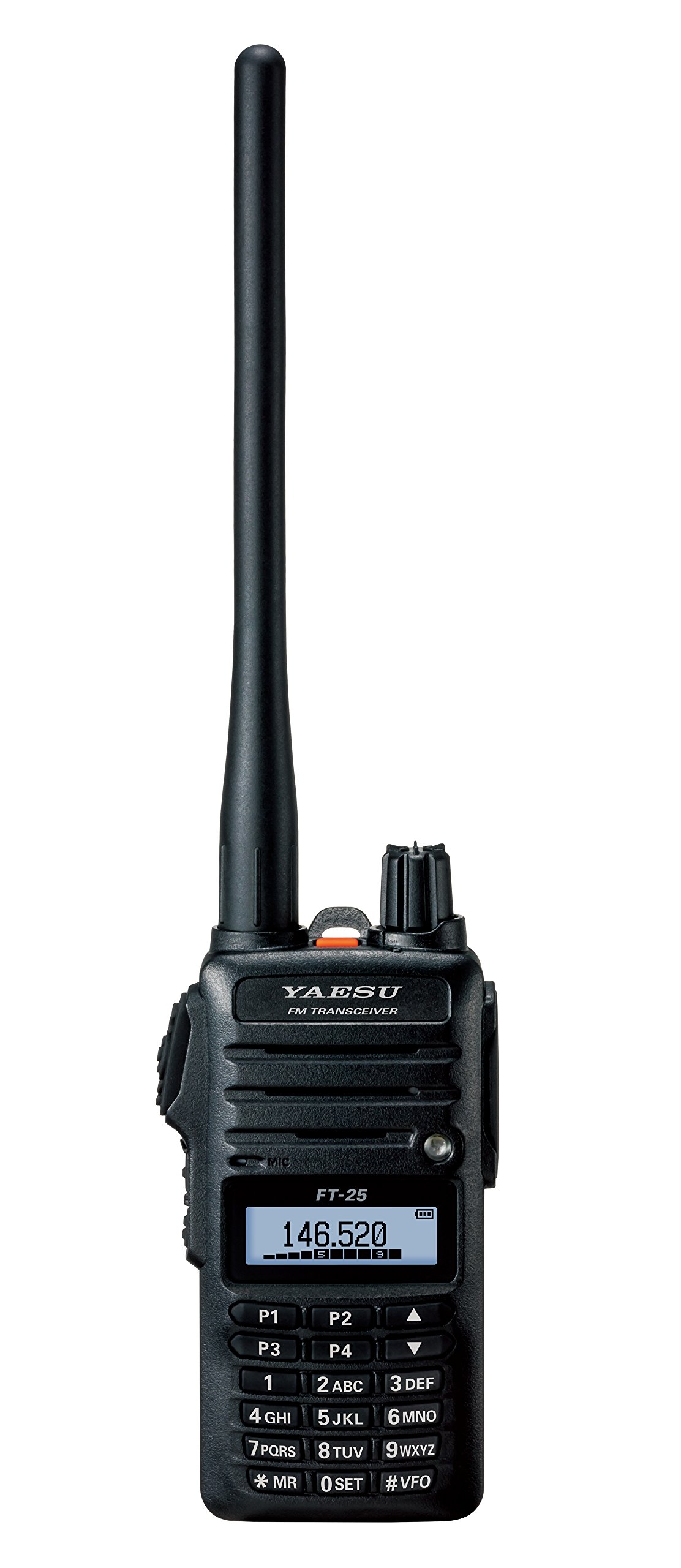
Малюнак 1: Фронт view of the Yaesu FT-25R transceiver, showing the antenna, volume/power knob, display, and keypad. The display shows "146.520" MHz, indicating the current operating frequency. The keypad includes numerical inputs and function keys like P1-P4, MR, SET, and VFO.
Ключавыя кампаненты:
- Антэна: Для перадачы і прыёму радыёсігналаў.
- Ручка гучнасці/магутнасці: Controls power ON/OFF and audio volume.
- ВК-дысплей: Паказвае частату, нумар канала, стан батарэі і іншыя працоўныя індыкатары.
- Клавіятура: Used for frequency entry, channel selection, and accessing various functions.
- Кнопка PTT (Націсні і размаўляй): Located on the side, press to transmit.
- Раз'ём дынаміка/мікрафона: Для знешніх аўдыёаксэсуараў.
Настройка
1. Усталёўка і зарадка акумулятара:
- Ensure the transceiver is powered off.
- Align the battery pack with the battery compartment on the back of the transceiver.
- Устаўце акумулятарную батарэю на месца, пакуль яна надзейна не зашчоўкне.
- Connect the battery charger to a power outlet and then to the charging port on the transceiver or battery pack.
- Allow the battery to charge fully before first use (refer to charger indicator for status).
2. Мацаванне антэны:
- Screw the supplied antenna clockwise onto the antenna connector on the top of the transceiver until it is finger-tight. Do not overtighten.
3. Усталёўка заціску для рамяня:
- Attach the belt clip to the designated area on the back of the transceiver using the provided screws.
Базавая аперацыя
1. Power On/Off and Volume:
- To power on, rotate the Volume/Power knob clockwise until it clicks.
- To adjust volume, continue rotating the knob.
- Каб выключыць прыладу, павярніце ручку супраць гадзіннікавай стрэлкі, пакуль не пачуеце пстрычку.
2. Frequency Selection (VFO Mode):
- Націсніце #VFO key to enter VFO (Variable Frequency Oscillator) mode.
- Use the numeric keypad to directly enter the desired frequency (e.g., 146520 for 146.520 MHz).
- Акрамя таго, выкарыстоўвайце УВЕРХ/УНІЗ arrow keys (above 2ABC and 5JKL) to tune the frequency in steps.
3. Перадача і прыём:
- To receive, simply listen to the speaker. The display will show the current frequency.
- Каб перадаць, націсніце і ўтрымлівайце PTT button on the side of the transceiver. Speak clearly into the microphone.
- Адпусціце PTT кнопку, каб вярнуцца ў рэжым прыёму.
Пашыраныя магчымасці
1. Memory Channel Programming:
- Наладзьцеся на патрэбную частату ў рэжыме VFO.
- Націсніце *MR key to enter Memory Recall mode.
- Select an empty memory channel using the УВЕРХ/УНІЗ клавішы са стрэлкамі.
- Націсніце і ўтрымлівайце *MR key again until you hear a beep, indicating the frequency is saved.
2. Сканаванне:
- The FT-25R supports various scanning functions (e.g., VFO scan, Memory scan). Consult the full manual for detailed instructions on activating and customizing scan modes.
3. Squelch Adjustment:
- The squelch circuit mutes background noise when no signal is present. Adjust the squelch level via the menu (0 КОМПЛЕКТ key) to an appropriate level where noise is suppressed but weak signals can still be received.
Тэхнічнае абслугоўванне
- Уборка: Выкарыстоўвайце мяккі, damp cloth to clean the exterior of the transceiver. Do not use harsh chemicals or abrasive cleaners.
- Сыход за батарэяй: To prolong battery life, avoid overcharging or completely discharging the battery frequently. Store the transceiver and battery in a cool, dry place when not in use for extended periods.
- Антэна: Periodically check the antenna connection for tightness.
Ліквідацыю непаладак
| праблема | Магчымая прычына | Рашэнне |
|---|---|---|
| Няма ўлады | Акумулятар разраджаны або няправільна ўсталяваны. | Зарадзіце акумулятар або ўсталюйце яго правільна. |
| Немагчыма перадаваць або прымаць | Incorrect frequency, squelch too high, or antenna not connected. | Verify frequency, adjust squelch, check antenna connection. |
| Дрэнная якасць гуку | Low battery, weak signal, or external interference. | Charge battery, move to an area with better signal, check for interference sources. |
Тэхнічныя характарыстыкі
| Асаблівасць | Дэталь |
|---|---|
| Марка | ЯЭСУ |
| Нумар мадэлі | FT-25R |
| Дыяпазон частот | 144 MHz VHF (Mono Band) |
| Вага прадмета | 8.4 унцыі (прыблізна 238 грамаў) |
| Памеры прадукту | 3 х 1.5 х 5 цалі (прыблізна 7.6 х 3.8 х 12.7 см) |
| Міжнародны рэйтынг абароны | IP54 (Dust and Splash Protection) |
| Колькасць каналаў | 1 |
| UPC | 702685259222, 788026159512 |
Гарантыя і падтрымка
The Yaesu FT-25R transceiver comes with a Гарантыя 3 год from the date of purchase. This warranty covers manufacturing defects under normal use. For warranty claims or technical support, please contact your authorized Yaesu dealer or visit the official Yaesu website for service information.
For further assistance, refer to the comprehensive user manual available on the Yaesu support portal or contact customer service.


