Уводзіны
This manual provides instructions for the setup and operation of your Anderic RR7096TR thermostatic remote control. This remote is designed as a replacement for specific Hampton Bay and Harbor Breeze ceiling fan remotes, offering control over fan speeds, light functions (including dimming), reverse, light delay, fan auto, and light timer features, along with thermostatic temperature settings.
Please read this manual thoroughly before use to ensure proper installation and functionality.
Важная інфармацыя па бяспецы
- Always ensure the power to the ceiling fan is turned off at the circuit breaker before performing any installation or maintenance.
- Do not expose the remote control to water or excessive moisture.
- Захоўвайце батарэі ў месцах, недаступных дзецям.
- Утылізуйце выкарыстаныя батарэі адказна ў адпаведнасці з мясцовымі правіламі.
- Выкарыстоўвайце толькі пазначаны тып батарэек (4 батарэек тыпу ААА).
Змест пакета
Your Anderic RR7096TR package includes:
- Тэрмастатычны пульт дыстанцыйнага кіравання Anderic RR7096TR
- Насценны кранштэйны (з двума шрубамі для мацавання)
- Інструкцыя па эксплуатацыі (гэты дакумент)
Заўвага: для працы патрэбныя 4 батарэйкі тыпу ААА, яны не ўваходзяць у камплект.

Выява: спераду і ззаду view of the Anderic RR7096TR remote control, showing the display and button layout on the front, and the battery compartment on the back.

Image: The Anderic RR7096TR remote control securely placed in its clear wall mount bracket, demonstrating how it can be stored for easy access.
Настройка і спалучэнне
The Anderic RR7096TR remote control requires aligning dip switches to match your ceiling fan receiver for proper operation. This unit has 16 different code combinations.
1. Устаноўка батарэі
- Зніміце крышку батарэйнага адсека на задняй частцы пульта дыстанцыйнага кіравання.
- Устаўце 4 батарэйкі тыпу ААА, сачыце за правільнай палярнасцю (+/-).
- Замяніце крышку батарэйнага адсека.
2. Setting the Dip Switches (Code Matching)
To ensure the remote communicates with your ceiling fan, the dip switches inside the remote must match the dip switches on your fan's receiver unit.
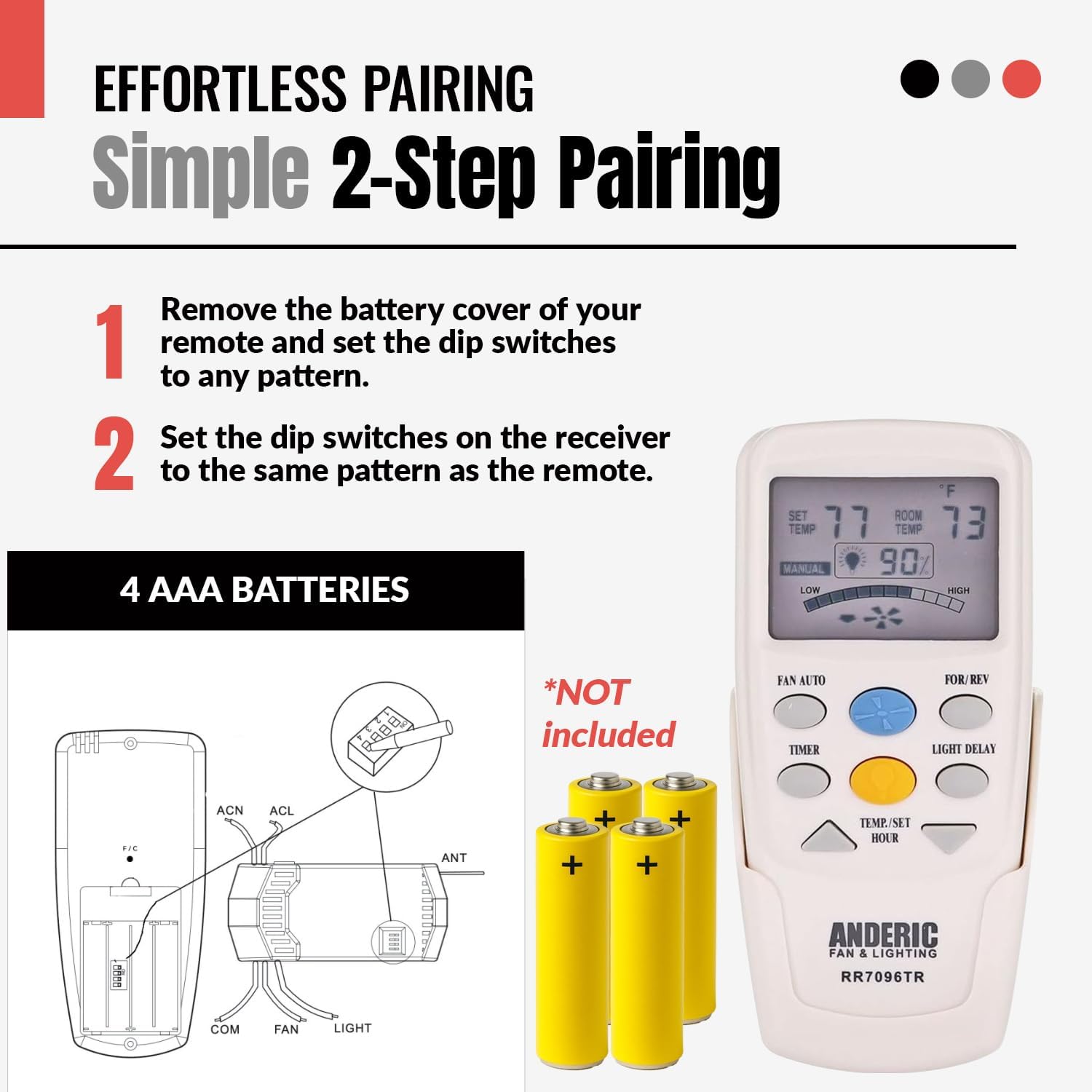
Image: A visual guide illustrating the two-step pairing process. Step 1 shows removing the battery cover and setting dip switches on the remote. Step 2 shows setting the dip switches on the fan receiver to match the remote's pattern. A diagram of the remote's battery compartment and a separate diagram of the receiver's wiring and dip switches are included.
- На пульце:
- Зніміце вечка батарэі.
- Locate the dip switches inside the battery compartment.
- Using a small screwdriver or ballpoint pen, slide the switches to your desired "up" or "down" position. Note: The factory setting is typically all "up". Avoid using this position if possible to prevent interference.
- Замяніце крышку батарэйнага адсека.
- На прыёмніку:
- Пераканайцеся, што сілкаванне вентылятара на столі адключана з дапамогай аўтаматычнага выключальніка.
- Access the receiver unit, typically located in the fan's canopy.
- Locate the dip switches on the receiver.
- Slide these switches to the exact same positions (up or down) as you set them on your remote control.
- Reassemble the fan canopy and restore power at the circuit breaker.

Image: A technical diagram showing the internal layout of the remote control (Transmitter, Fig. A) and the fan receiver (Receiver, Fig. B), highlighting the location of the code switches (dip switches) in both units. This visual aid is crucial for correctly matching the settings.
Важна: When installing the remote control, ensure your fan is operated in "HIGH SPEED" and the light is in the "ON" condition at the switch knob (if applicable) before setting the dip switches on the receiver.
Інструкцыя па эксплуатацыі
The Anderic RR7096TR remote provides comprehensive control over your ceiling fan and light functions.
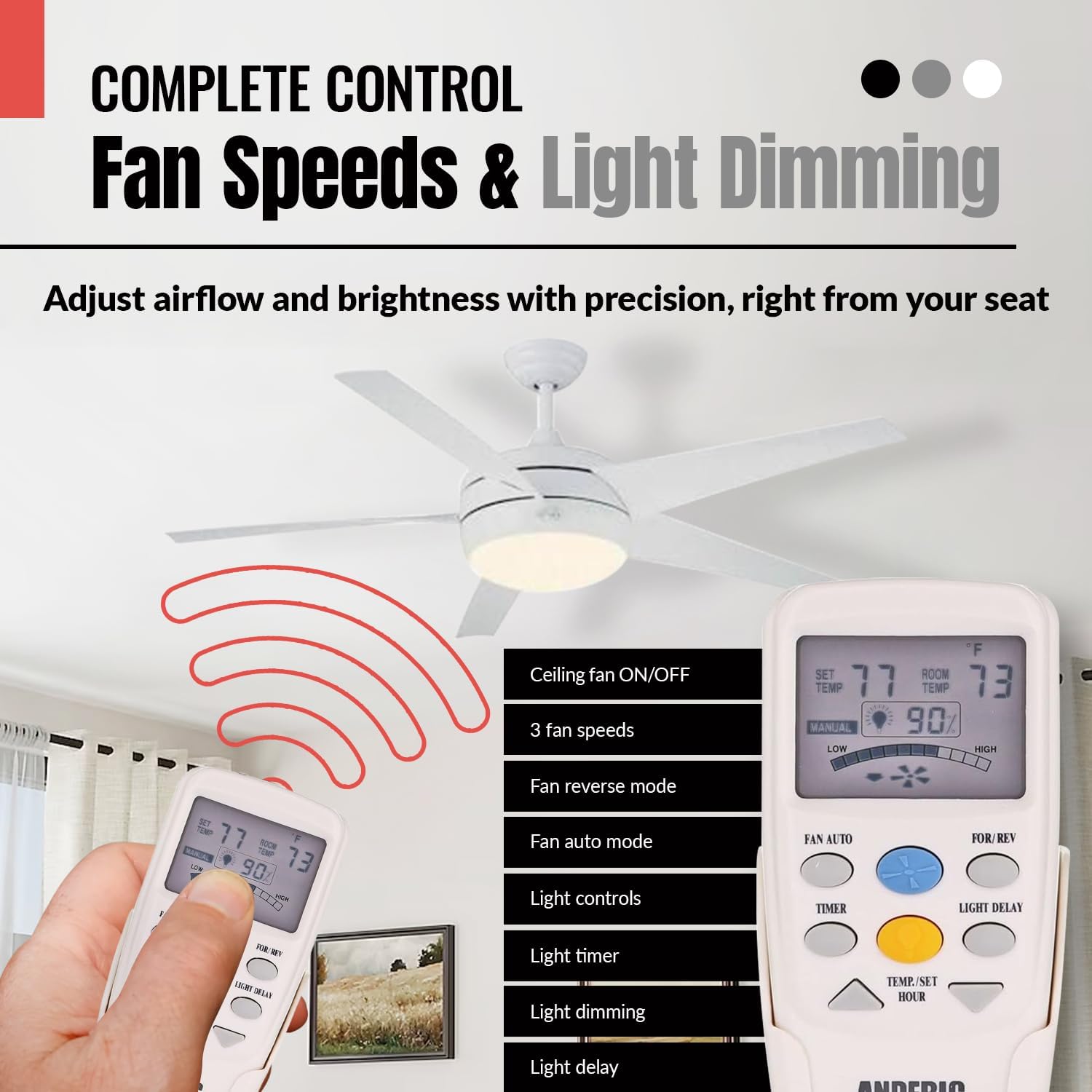
Image: The Anderic RR7096TR remote control in use, with a ceiling fan visible in the background. The remote's display shows temperature and light percentage, and a list of features like 3 fan speeds, fan reverse mode, fan auto mode, light controls, light timer, light dimming, and light delay are highlighted.
Кіраванне вентылятарам
- Кнопкі хуткасці вентылятара: Typically labeled Low, Medium, High, or represented by fan blade icons, these buttons adjust the fan's rotation speed.
- Кнопка выключэння вентылятара: Выключае вентылятар.
- FOR/REV (Forward/Reverse) Button: Changes the direction of the fan blades. This is useful for seasonal comfort (downward airflow for cooling in summer, upward airflow for circulating warm air in winter).
- FAN AUTO Button: Activates the automatic fan mode, which adjusts fan speed based on the room temperature detected by the remote's thermostatic sensor.
Кіраванне святлом
- Светлавая кнопка: Turns the fan light on or off.
- Зацямненне: Press and hold the light button to dim or brighten the light. Release when the desired brightness is reached. Note: Dimming functionality requires incandescent bulbs. LED or CFL bulbs may not dim properly.
- LIGHT DELAY Button: Activates a delay feature for the light to turn off after a set period.
- LIGHT TIMER Button: Sets a timer for the light to remain on for a specific duration.
Thermostatic Features
- The remote displays both the УСТАВІЦЬ ТЭМП (desired temperature) and ТЭМП (current room temperature).
- Выкарыстоўвайце ТЭМП./УСТАНОЎКА ГАДЗІНЫ up/down arrow buttons to adjust the desired set temperature.
- In FAN AUTO mode, the fan will adjust its speed to help maintain the set temperature.
Сумяшчальнасць
The Anderic RR7096TR is designed to replace original Hampton Bay and Harbor Breeze ceiling fan remotes with specific FCC IDs and model numbers. It replaces remotes such as CHQ8BF7096T, CHQ8BT7096T, CHQ7096T, and UC7096T that include a "Reverse" button.
Compatible with (but not limited to) the following Hampton Bay ceiling fan models:
- 523 127 Windward II 54 in Ceiling Fan
- 523 342 Windward II 54 in Ceiling Fan
- 523127 Windward II 54 in Ceiling Fan
- 523342 Windward II 54 in Ceiling Fan
- 54WWD
- 55295 Windward II 54 in Ceiling Fan
- 7658GM01
- CHQ8BT7096T
- TRC100L
- Windward II 54 in Ceiling Fan

Image: The Anderic RR7096TR remote control displayed alongside a list of compatible Hampton Bay ceiling fan models, emphasizing its broad compatibility.
Важныя заўвагі па сумяшчальнасці:
- This remote does not work with up lights. If your original remote controls both down lights and up lights, this replacement will only control the down lights.
- This remote does NOT replace FAN-9T models. Always check the model number on the back of your original remote.
- If your original Hampton Bay remote model CHQ8BT7096T has a RED light button, this replacement remote will not control the lights.
Ліквідацыю непаладак
| праблема | Магчымая прычына | Рашэнне |
|---|---|---|
| Пульт не кіруе вентылятарам/святлом. | Няправільныя налады DIP-перамыкачоў. | Verify that the dip switches on the remote and receiver match exactly. Refer to "Setting the Dip Switches" section. |
| Пульт не кіруе вентылятарам/святлом. | Разраджаныя або няправільна ўсталяваныя батарэйкі. | Replace batteries with fresh 4 AAA batteries, ensuring correct polarity. |
| Light not dimming properly. | Non-incandescent bulbs (LED/CFL). | Ensure incandescent bulbs are used for proper dimming functionality. |
| Remote not working for Windward III Fans. | Known compatibility limitation. | This remote will not fully work for Windward III Fans, especially if they have up lights. |
| Remote not controlling lights for CHQ8BT7096T with RED light button. | Канкрэтнае абмежаванне сумяшчальнасці. | This remote is not compatible with the light function of CHQ8BT7096T remotes that have a red light button. |
Тэхнічныя характарыстыкі
- мадэль: RR7096TR
- Марка: Андэрыкавы
- Крыніца харчавання: 4 х ААА батарэі (не ўключаны)
- Памеры прадукту: 7 х 3 х 1.25 цалі
- Вага прадмета: 3.2 унцыі
- асаблівасць: Ergonomic design, Thermostatic control
- колер: Слановая косць
- Максімальная колькасць падтрымоўваных прылад: 1 (Ceiling Fan)

Image: The Anderic RR7096TR remote control with overlaid measurements indicating its approximate dimensions (e.g., 6 inches in length, 2 inches in width, 1 inch in depth), illustrating its compact and comfortable size.
Гарантыя і падтрымка
Пульт дыстанцыйнага кіравання Anderic RR7096TR пастаўляецца з 1-гадовая гарантыя на замену.
For technical support, warranty claims, or further assistance, please contact Anderic customer service through their official webсайт або прадаўца, дзе быў набыты тавар.
Вы можаце наведаць Крама Anderic на Amazon для атрымання дадатковай інфармацыі.


