Уводзіны
The Casio CTK-2550 Digital Keyboard is a versatile 61-key portable piano designed for beginners and enthusiasts. It offers a wide array of sounds, rhythms, and learning features to enhance your musical journey. This manual provides essential information for setting up, operating, and maintaining your keyboard.

Выява: спераду view of the Casio CTK-2550 61-Key Portable Piano Keyboard, showcasing its black body, white and black keys, control panel, and built-in speakers.
Асноўныя характарыстыкі
- 61 стандартная клавіша: Provides a full range for playing various musical pieces.
- 400 тонаў: A diverse selection of instrument sounds, including pianos, electric pianos, organs, guitars, basses, synths, and drum kits.
- 100 рытмы: Accompaniment patterns across various genres like 8 Beat, 16 Beat, Ballad, Dance, Pops, Rock, Jazz, European, Latin, World, and Piano Rhythms.
- 50 Dance Music Patterns: Dedicated mode for creating electronic dance music, including EDM, House, and Hip-Hop styles.
- 60 Song Bank: Built-in songs for listening and learning, categorized into World, Event, Piano/Classics, and User Songs.
- Step-Up Lesson System: An integrated learning system to help users practice and master songs.
- Адказ на дотык: Keys respond to playing dynamics, allowing for expressive performances.
- Нахіл колы: For adding expressive pitch variations to notes.
- Chordana Play App Integration: Connects with the Chordana Play app for expanded learning and functionality.
- Партатыўны дызайн: Lightweight and can be battery-powered for on-the-go use.
Настройка
1. Распакоўка і кампаненты
Carefully remove all components from the packaging. Ensure you have the Casio CTK-2550 keyboard, the included power supply, and the music stand.
2. Attaching the Music Stand
Locate the wire-frame music stand. Insert its prongs into the designated slots at the top rear of the keyboard. This stand is used to hold sheet music or a tablet.
3. Уключэнне клавіятуры
The CTK-2550 can be powered in two ways:
- Адаптар пераменнага току: Connect the included AC adapter to the DC 9.5V power input jack on the rear panel of the keyboard and then plug it into a wall outlet.
- батарэі: For portable use, the keyboard can be powered by six AA-size alkaline batteries. Open the battery compartment on the underside of the keyboard and insert the batteries, ensuring correct polarity.
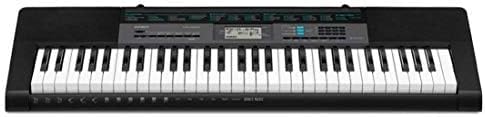
Image: Close-up of the rear panel of the Casio CTK-2550, showing the power input, audio in, phones/output, USB, and sustain pedal jacks.
Інструкцыя па эксплуатацыі
1. Уключэнне/выключэнне харчавання і гучнасць
- Націсніце УЛАДА кнопка для ўключэння або выключэння клавіятуры.
- Адрэгулюйце агульную гучнасць з дапамогай АБ'ЁМ slider located on the left side of the control panel.
2. Selecting Tones (Sounds)
The CTK-2550 features 400 built-in tones. To select a tone:
- Націсніце ТОН кнопка.
- Use the number pad or the + / - buttons to enter the desired tone number. A list of tones is printed on the keyboard's panel.
Examples of Tone Categories: Piano (001-014), Electric Piano (015-028), Organ (043-064), Guitar (065-078), Bass (079-088), Synth-Lead (166-202), Drum Set (395-400).
3. Playing Rhythms (Accompaniment)
The keyboard includes 100 rhythms for automatic accompaniment. To use rhythms:
- Націсніце RHYTHM/SONG BANK CONTROLLER кнопка.
- Use the number pad or + / - buttons to select a rhythm.
- Прэса ПУСК/СТОП to begin the rhythm.
- Адрэгулюйце тэмп з дапамогай ТЭМП кнопкі.
Examples of Rhythm Categories: 8 Beat (001-003), Dance (011-015), Rock (021-026), Jazz (027-033), World (054-087), Piano Rhythms (091-100).
4. Dance Music Mode
Engage the Dance Music Mode to create and play along with 50 electronic dance music patterns.
- Націсніце DANCE MUSIC кнопка.
- Select a pattern (e.g., EDM 01-35, House 36-45, Hip-Hop 46-50).
- Use the keys to trigger different phrases and build your track.
5. Song Bank and Lesson System
The 60-song bank allows you to listen to pre-recorded songs or use the Step-Up Lesson System to learn them.
- Націсніце БАНК ПЕСЕН кнопка.
- Select a song using the number pad or + / - кнопкі.
- Выкарыстоўвайце СЛУХАЙЦЕ, САЧЫЦЬ, або ФРАЗА functions to engage with the lesson system.
6. Touch Response and Pitch Bend
- The keys are touch-sensitive, meaning the volume and tone will change based on how hard or soft you press them.
- Выкарыстоўвайце ПІТЧ БЭНД wheel on the left side of the keyboard to smoothly raise or lower the pitch of notes while playing.
Сувязь
The rear panel of the CTK-2550 offers several connection options:
- PHONES/OUTPUT (Standard Stereo Jack): Connect headphones for private practice or connect to an external PA system/ampліфікатар для ampліфікаваны гук.
- AUDIO IN (3.5mm Stereo Mini Jack): Connect an external audio player (like a smartphone or tablet) to play along with your favorite music through the keyboard's speakers.
- СУСТЭЙН Джэк: Connect an optional sustain pedal for extended note decay, similar to a traditional piano.
- USB (тып B): Connect the keyboard to a computer or smart device (Android/Apple) for MIDI data transfer, allowing use with digital audio workstation (DAW) software or educational apps like Chordana Play.
Тэхнічныя характарыстыкі
| Асаблівасць | Дэталь |
|---|---|
| Марка | Casio |
| Назва мадэлі | ЧТК-2550 |
| Колькасць ключоў | 61 |
| Поліфанія | 48 нот |
| Тоны | 400 AHL Tones |
| Рытмы | 100 рытмаў |
| Патэрны танцавальнай музыкі | 50 |
| Банк песень | 60 песень |
| Lesson Function | Сістэма паступовых урокаў |
| Сувязь | USB (MIDI), Audio In, Phones/Output, Sustain |
| Крыніца харчавання | AC Adapter (9.5V DC) or 6x AA Batteries |
| Вага прадмета | 7.3 фунта |
| Памеры прадмета | 12.09 х 37.24 х 3.62 цалі |
Тэхнічнае абслугоўванне
- Уборка: Wipe the keyboard with a soft, dry cloth. For stubborn dirt, use a slightly damp тканінай і старанна высушыце. Пазбягайце абразіўных ачышчальнікаў або растваральнікаў.
- захоўванне: Захоўвайце клавіятуру ў прахалодным, сухім месцы, удалечыні ад прамых сонечных прамянёў, экстрэмальных тэмператур і высокай вільготнасці.
- Апрацоўка: Avoid dropping the keyboard or subjecting it to strong impacts. Do not place heavy objects on the keys.
- Сыход за батарэяй: Калі вы выкарыстоўваеце батарэі, выміце іх, калі клавіятура не будзе выкарыстоўвацца на працягу доўгага часу, каб прадухіліць уцечку.
Ліквідацыю непаладак
- Няма гуку:
- Праверце, ці ўключана харчаванне і ці павышана гучнасць.
- Ensure headphones are not plugged in if you intend to use the speakers.
- Verify that the correct tone is selected.
- Клавішы не рэагуюць:
- Праверце сілкаванне.
- If using batteries, ensure they are fresh and correctly inserted.
- Скажоны гук:
- Паменшыце гучнасць.
- Ensure external audio devices connected to AUDIO IN are not set too high.
- Праблемы з падключэннем праграмы:
- Пераканайцеся, што кабель USB надзейна падлучаны.
- Check app settings and device compatibility.
Гарантыя і падтрымка
The Casio CTK-2550 comes with a 1-гадовая гарантыя на дэталі і працу. For technical support, service, or warranty claims, please refer to the contact information provided in your product's warranty card or visit the official Casio webсайт.
Каб атрымаць дадатковыя рэсурсы і інфармацыю пра прадукт, наведайце Крама Casio на Amazon.


