1. Прадукт скончыўсяview
The Fender Monterey Bluetooth Speaker delivers clear, powerful audio with a design inspired by classic Fender amplifiers. This speaker is engineered for high-fidelity sound reproduction, featuring 120 watts of power, two woofers, and two tweeters. It supports audio streaming via Bluetooth and direct connection through a 3.5mm auxiliary jack or RCA inputs.
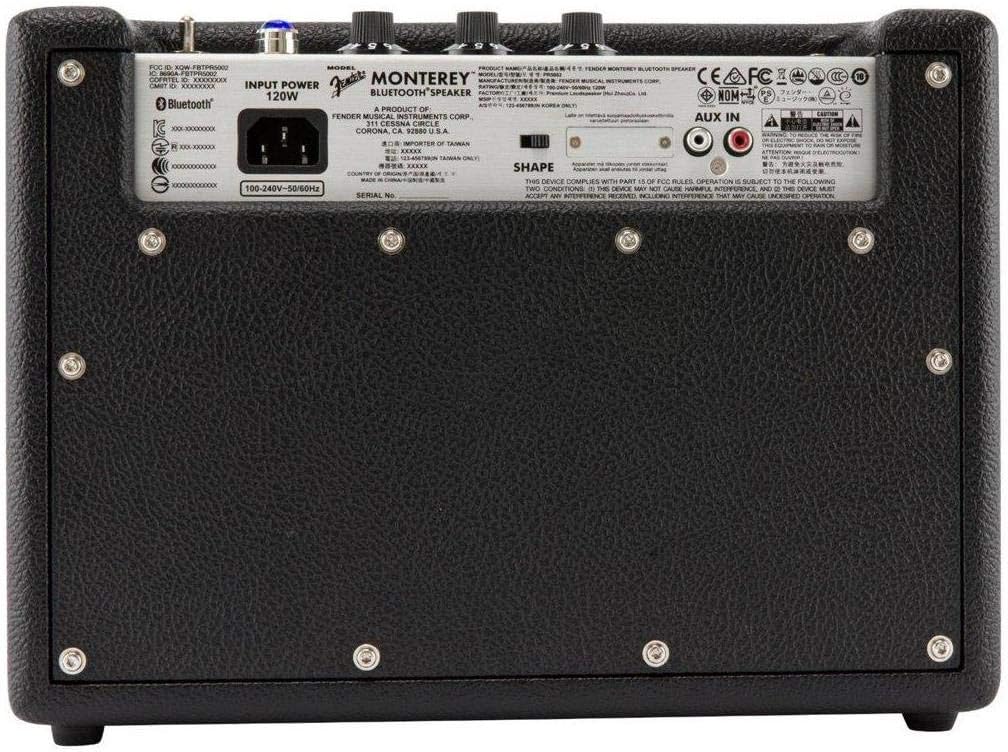
Малюнак 1: Спераду view of the Fender Monterey Bluetooth Speaker, showcasing its classic amplifier-inspired grille and Fender logo.
2. Што ў скрынцы
Праверце, ці ўсе пералічаныя ніжэй прадметы ўваходзяць у вашу ўпакоўку:
- Fender Monterey Bluetooth Speaker
- Дапаможны кабель 3.5 мм
- RCA кабель
- Сілавы кабель
3. Кіраўніцтва па наладцы
3.1 Падключэнне харчавання
- Ensure the speaker's volume control is set to minimum before connecting power.
- Connect the supplied power cable to the AC input on the rear panel of the speaker.
- Падключыце другі канец шнура сілкавання да адпаведнай разеткі (100-240 В, 50/60 Гц).
- Flip the power switch on the top panel to the "ON" position. The speaker will emit a chime indicating it is powered on.
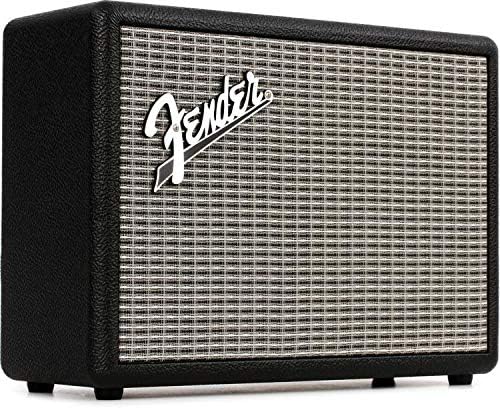
Figure 2: Rear panel of the Fender Monterey speaker, showing the power input and auxiliary connections.
3.2 Спалучэнне па Bluetooth
- Калі дынамік уключаны, націсніце кнопку ПАРА button on the top panel. The Bluetooth indicator light will begin to flash, indicating it is in pairing mode.
- On your audio device (smartphone, tablet, computer), navigate to the Bluetooth settings.
- Select "Fender Monterey" from the list of available devices.
- Once successfully paired, the Bluetooth indicator light on the speaker will turn solid blue, and a confirmation chime will sound.
3.3 Auxiliary Input Connection
For devices without Bluetooth, use the provided 3.5mm auxiliary cable or RCA cable.
- 3.5mm Aux: Connect one end of the 3.5mm cable to your audio device's headphone jack and the other end to the МІНІ input on the speaker's top panel.
- RCA: Connect the RCA cable to your audio device's RCA outputs and the other end to the RCA inputs on the speaker's rear panel.
Select the appropriate source (BLUETOOTH, МІНІ, або RCA) з дапамогай КРЫНІЦА кнопку на верхняй панэлі.

Figure 3: Top panel controls of the Fender Monterey speaker, including Volume, Treble, Bass, Source, and Pair buttons.
4. Інструкцыя па эксплуатацыі
4.1 Прайграванне аўдыя
- Ensure your audio source is connected and selected (Bluetooth, Mini, or RCA).
- Пачніце прайграванне аўдыё з падлучанай прылады.
- Адрэгулюйце АБ'ЁМ knob on the speaker's top panel to your desired listening level.
4.2 Рэгулятары тону
The Fender Monterey speaker features dedicated controls for customizing your sound:
- ТРЭБЛЯ: Adjusts the high-frequency response of the audio. Turn clockwise for brighter sound, counter-clockwise for warmer sound.
- БАС: Adjusts the low-frequency response of the audio. Turn clockwise for more bass, counter-clockwise for less bass.
- ФОРМА: A toggle switch located on the rear panel. This control modifies the overall tonal character, offering different sound profiles. Experiment with both positions to find your preferred sound.
5. Тэхнічнае абслугоўванне
- Уборка: Use a soft, dry cloth to clean the speaker's exterior. Avoid abrasive cleaners, solvents, or sprays that may damage the finish.
- захоўванне: Калі дынамік не выкарыстоўваецца працяглы час, захоўвайце яго ў прахалодным, сухім месцы, удалечыні ад прамых сонечных прамянёў і экстрэмальных тэмператур.
- Вентыляцыя: Ensure proper ventilation around the speaker to prevent overheating. Do not block any ventilation openings.
- Ўздзеянне вадкасці: Keep the speaker away from liquids. In case of accidental spills, immediately disconnect power and allow it to dry completely before re-use.
6. Выпраўленне непаладак
Няма сілы
- Ensure the power cable is securely connected to both the speaker and a working wall outlet.
- Verify the power switch on the top panel is in the "ON" position.
- Праверце працаздольнасць разеткі, падключыўшы да яе іншую прыладу.
Без гуку
- Confirm the correct audio source (Bluetooth, Mini, or RCA) is selected using the КРЫНІЦА кнопка.
- Павялічыць АБ'ЁМ knob on the speaker and the volume on your connected audio device.
- If using Bluetooth, ensure the device is properly paired and connected. Try re-pairing if necessary.
- If using auxiliary inputs, ensure cables are fully inserted and not damaged.
Праблемы спалучэння Bluetooth
- Ensure the speaker is in pairing mode (flashing Bluetooth indicator). Press the ПАРА button if it's not flashing.
- Move your audio device closer to the speaker to ensure it's within range.
- Turn off and on the Bluetooth function on your audio device.
- If the speaker was previously paired with another device, disconnect it from that device first.
7. Тэхнічныя характарыстыкі
| Нумар мадэлі | 6960200000 |
| Марка | Крыло |
| Выхад ватtage | 120 ват |
| Канфігурацыя дынаміка | Two woofers, two tweeters |
| Сувязь | Bluetooth, 3.5mm Auxiliary Input, RCA Input |
| Памеры прадукту (Д х Ш х У) | 9.3 цалі х 16.8 цалі х 14.6 цалі (23.6 см х 42.7 см х 37.1 см) |
| Вага прадмета | 18.6 фунта (8.44 кг) |
| Колер | Чорны |
| Вытворца | Fender Musical Instruments Corp. |
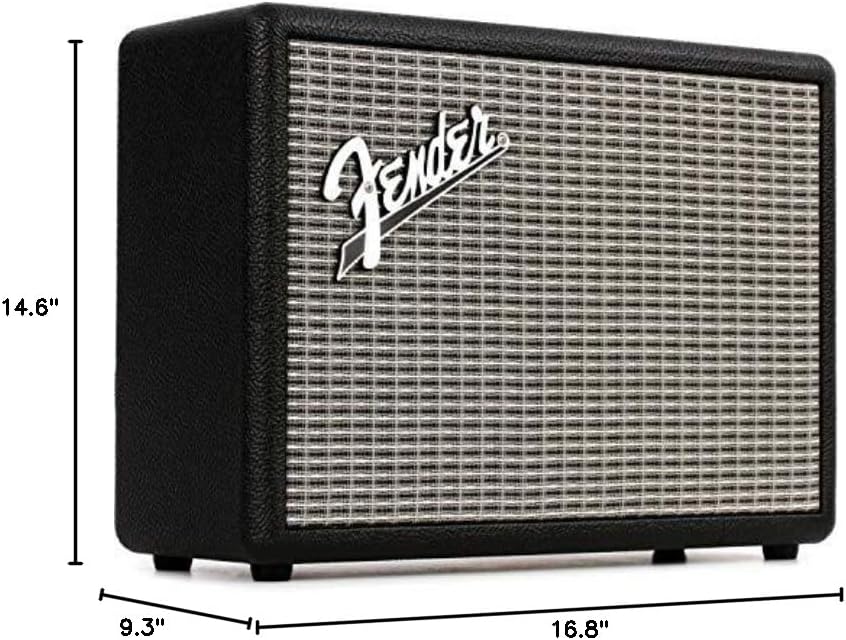
Figure 4: Dimensions of the Fender Monterey Bluetooth Speaker.
8. Гарантыя і падтрымка
For warranty information, product registration, or technical support, please refer to the official Fender webсайт або звярніцеся ў службу падтрымкі кліентаў Fender. Захоўвайце пацвярджэнне пакупкі для прэтэнзій па гарантыі.
Інтэрнэт-рэсурсы: www.fender.com


