Уводзіны
Дзякуй за пакупкуasing the OontZ Angle 3 Ultra Portable Bluetooth Speaker by Cambridge Soundworks. This manual provides essential information for setting up, operating, maintaining, and troubleshooting your speaker. Designed for superior sound quality and durability, the OontZ Angle 3 Ultra features a 14-watt output, rich bass, IPX7 waterproofing, and an impressive 30-meter Bluetooth range. Enjoy up to 20 hours of playtime on a single charge.

Image: The OontZ Angle 3 Ultra Portable Bluetooth Speaker, showcasing its sleek black, triangular design with control buttons on one end.
Настройка
1. У камплекце
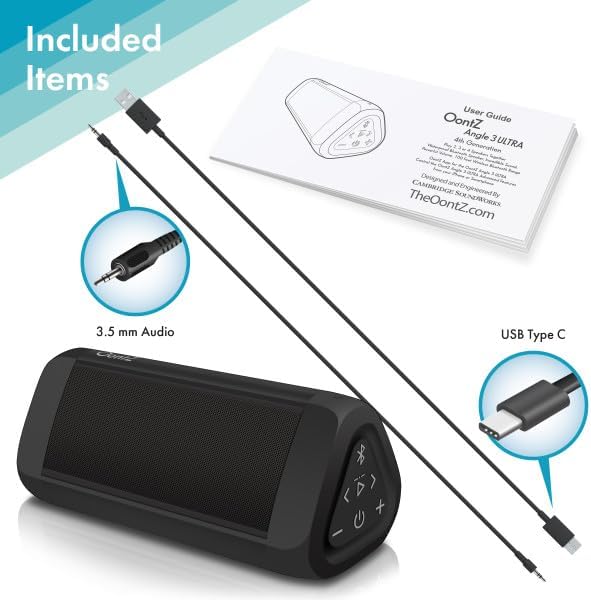
Image: The OontZ Angle 3 Ultra speaker along with its accessories: a Quick Start Guide, a 3.5mm audio cable, and a USB Type-C charging cable.
Перад першым выкарыстаннем пераканайцеся, што ўсе кампаненты наяўныя:
- OontZ Angle 3 Ultra Bluetooth Speaker
- Quick Start Guide (Full manual available online)
- Аўдыёкабель 3.5 мм
- Зарадны кабель USB Type-C
2. Зарадка дынаміка
The speaker comes with a built-in rechargeable Lithium-ion battery. For optimal performance, fully charge the speaker before first use.
- Locate the charging port on the side of the speaker, protected by a rubber flap.
- Connect the supplied USB Type-C charging cable to the speaker's charging port.
- Connect the other end of the USB cable to a USB wall charger (not included) or a computer USB port.
- The charging indicator light will illuminate. A full charge takes approximately 20 hours for the first charge, and subsequent charges will be faster.

Выява: буйны план view of the speaker's side, showing the 3.5mm AUX input and the USB-C charging port, typically protected by a waterproof flap.
3. Спарванне Bluetooth
Pair your OontZ Angle 3 Ultra with your Bluetooth-enabled device (smartphone, tablet, laptop).
- Уключыце дынамік, націснуўшы і ўтрымліваючы кнопку харчавання (⏻) until the indicator light flashes blue.
- На прыладзе перайдзіце ў налады Bluetooth і пераканайцеся, што Bluetooth уключаны.
- Look for "OontZ Angle 3 Ultra" in the list of available devices and select it.
- Once paired, the speaker will emit a confirmation tone, and the indicator light will turn solid blue.
4. Падключэнне праз AUX-уваход
You can connect non-Bluetooth devices using the 3.5mm audio cable.
- Connect one end of the 3.5mm audio cable to the AUX IN port on the speaker.
- Падключыце другі канец да раздыма для навушнікаў або аўдыёвыхаду вашай прылады.
- Дынамік аўтаматычна пераключыцца ў рэжым AUX.
5. Pairing Two Speakers for Stereo Sound (OontZ Dual Wireless Stereo)
Enhance your audio experience by wirelessly connecting two OontZ Angle 3 Ultra speakers for impressive stereo separation.

Image: Two OontZ Angle 3 Ultra speakers positioned to provide stereo sound, with two individuals enjoying music in an outdoor setting.
- Ensure both OontZ Angle 3 Ultra speakers are charged and powered on.
- Адключыце абедзве калонкі ад усіх раней спалучаных прылад Bluetooth.
- On one speaker (this will be the Left Channel), press and hold the Bluetooth button (Ⓑ) for 3 seconds until you hear a tone.
- On the second speaker (this will be the Right Channel), press and hold the Bluetooth button (Ⓑ) for 3 seconds until you hear a tone.
- The speakers will automatically connect to each other. Once connected, you will hear a confirmation tone, and the indicator lights on both speakers will turn solid blue.
- Now, connect your audio device to the Left Channel speaker via Bluetooth as described in "Bluetooth Pairing" above.
- For video audio, connect your device or TV to the Left Channel speaker using the 3.5mm audio cable.
Інструкцыя па эксплуатацыі
1. Элементы кіраванняview
| Кнопка/індыкатар | Функцыя |
|---|---|
| ⏻ (Сіла) | Націсніце і ўтрымлівайце, каб уключыць/выключыць харчаванне. |
| + (павялічыць гучнасць) | Націсніце, каб павялічыць гучнасць. |
| - (Памяншэнне гучнасці) | Націсніце, каб паменшыць гучнасць. |
| ▷ (Прайграванне/Паўза) | Націсніце, каб прайграць/прыпыніць музыку. |
| < (Previous Track) | Націсніце, каб перайсці да папярэдняга трэку. |
| > (Next Track) | Націсніце, каб перайсці да наступнай дарожкі. |
| Ⓑ (Bluetooth) | Press to disconnect current Bluetooth device and enter pairing mode. Press and hold for 3 seconds to initiate OontZ Dual Wireless Stereo pairing. |
| Светлавы індыкатар | Flashes blue for pairing, solid blue for connected, red for charging. |
2. Гучная сувязь
The OontZ Angle 3 Ultra has a built-in microphone for hands-free calls.
- Пры паступленні званка музыка прыпыняецца. Націсніце кнопку ▷ кнопку, каб адказаць на выклік.
- Каб завяршыць званок, націсніце ▷ кнопку зноў.
- Каб адхіліць выклік, націсніце і ўтрымлівайце ▷ кнопку на працягу 2 секунд.
- Каб актываваць Siri або Google Assistant, націсніце і ўтрымлівайце ▷ button for 2 seconds when not on a call.
3. Waterproof Features (IPX7)
The OontZ Angle 3 Ultra is IPX7 certified, meaning it is fully waterproof and can be immersed in water up to 1 meter (3.3 feet) for up to 30 minutes.
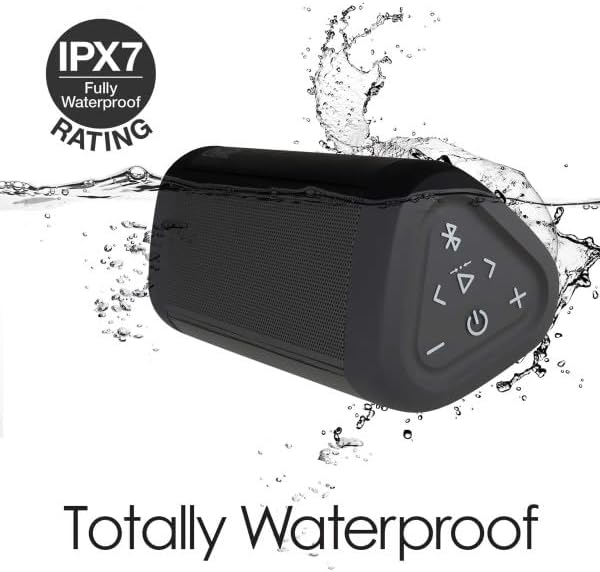
Image: The OontZ Angle 3 Ultra speaker shown partially submerged in water, illustrating its IPX7 waterproof capability.
- Ensure the rubber flap covering the charging and AUX ports is securely closed before exposing the speaker to water.
- Ideal for use by the pool, at the beach, or in the shower.
- Do not expose to salt water or chemicals. Rinse with fresh water after exposure to chlorinated water.
Тэхнічнае абслугоўванне
1. Уборка
Для чысткі дынаміка выкарыстоўвайце мяккую губкуamp тканіна. Не выкарыстоўвайце абразіўныя ачышчальнікі або растваральнікі.
2. Захоўванне
Захоўвайце дынамік у прахалодным, сухім месцы, удалечыні ад прамых сонечных прамянёў і экстрэмальных тэмператур.
3. Сыход за батарэяй
Каб падоўжыць тэрмін службы батарэі:
- Пазбягайце частай поўнай разрадкі акумулятара.
- Рэгулярна зараджайце дынамік, нават калі ён не выкарыстоўваецца, каб падтрымліваць акумулятар у працоўным стане.
- Do not expose the speaker to temperatures above 60°C (140°F).
Ліквідацыю непаладак
| праблема | Рашэнне |
|---|---|
| Дынамік не ўключаецца. | Пераканайцеся, што акумулятар зараджаны. Падключыце дынамік да крыніцы харчавання з дапамогай кабеля USB-C. |
| Няма гуку або нізкі ўзровень гучнасці. | Check the volume level on both the speaker and your connected device. Ensure the speaker is properly paired via Bluetooth or connected via AUX. |
| Немагчыма падключыцца праз Bluetooth. | Ensure the speaker is in pairing mode (flashing blue light). Turn off and on Bluetooth on your device. Move the speaker closer to your device. Disconnect from other Bluetooth devices. |
| Скажэнне гуку на высокай гучнасці. | Reduce the volume on the speaker or your connected device. Ensure the audio source is not distorted. |
| OontZ Dual Wireless Stereo not connecting. | Ensure both speakers are disconnected from other Bluetooth devices. Follow the pairing steps carefully, ensuring both speakers are in pairing mode for stereo connection. |
Тэхнічныя характарыстыкі
Key technical specifications for the OontZ Angle 3 Ultra Portable Bluetooth Speaker:
- Нумар мадэлі: SWOA3UBLK
- Памеры (Д х Ш х У): 16.26 х 7.11 х 7.11 см (6.4 х 2.8 х 2.8 цалі)
- Вага: 480 грама (1.06 фунта)
- Выходная магутнасць дынаміка: 14 ват
- Версія Bluetooth: 4.2
- Бесправадны дыяпазон: Up to 30 meters (100 feet) unobstructed
- Тэрмін службы батарэі: Да 20 гадзін (пры 2/3 аб'ёму)
- Рэйтынг воданепранікальнасці: IPX7 (можна апускаць у ваду на глыбіню да 1 метра на працягу 30 хвілін)
- Падключэнне: Bluetooth, 3.5mm AUX Input, USB-C Charging
- Кампаненты ў камплекце: Speaker, 3.5mm Audio Cable, USB-C Charging Cable, Quick Start Guide

Image: Diagram showing the dimensions of the OontZ Angle 3 Ultra speaker: 6.5 inches in length, 3 inches in width, and 2.75 inches in height.
Гарантыя і падтрымка
For detailed warranty information and customer support, please visit the official OontZ website. The full localized manual is also available there.
Афіцыйны Webсайт: www.theoontz.com
Cambridge Soundworks is committed to providing high-quality audio products and customer satisfaction.


