1. Прадукт скончыўсяview
The Dell XPS 13 9370 is a compact and powerful 13.3-inch laptop designed for productivity and entertainment. It features a virtually borderless InfinityEdge display and is powered by an 8th Generation Intel Core i5 processor.
Асноўныя функцыі ўключаюць у сябе:
- 8th Generation Intel Core i5-8250U Processor: Provides efficient performance with up to 3.4 GHz speed.
- 52WHr Long-Lasting Battery: Designed for extended use, supported by a 45W AC adapter for charging.
- 128GB SSD Storage: Offers fast boot-up and application loading times. Note: This model does not include an optical drive.
- 13.3-inch FHD (1920 x 1080) InfinityEdge Display: Delivers a vibrant and immersive visual experience with minimal bezels.
- Windows 10 Operating System: Experience fast start-ups, a familiar yet expanded Start menu, and new ways to get tasks done.
- Універсальнае падключэнне: Includes 2x Thunderbolt 3 ports with PowerShare, DC-In & DisplayPort functionality, and 1x USB 3.1 Gen 1 (USB Type-C) port.
- Максімальная памяць: Supports up to 64 GB of RAM (8GB installed).

Выява: Пад вуглом view of the Dell XPS 13 9370 laptop, highlighting its slim design and InfinityEdge display.
2. Кіраўніцтва па наладцы
2.1 Распакоўка і першапачатковы агляд
Carefully remove the laptop and all accessories from the packaging. Verify that all components are present: Dell XPS 13 9370 laptop, power adapter, and any included documentation.
2.2 Падключэнне адаптара сілкавання
Connect the power adapter to a wall outlet and then to one of the Thunderbolt 3 (USB-C) ports on your laptop. The battery will begin charging automatically. It is recommended to fully charge the battery before first use.

Выява: Левы бок view of the Dell XPS 13 9370, illustrating the placement of the Thunderbolt 3 ports for power and connectivity.
2.3 Першая загрузка і ўстаноўка Windows
Націсніце кнопку харчавання, каб уключыць ноўтбук. Выконвайце інструкцыі на экране, каб завяршыць працэс усталёўкі Windows 10. Гэта ўключае выбар рэгіёна, падключэнне да сеткі Wi-Fi і стварэнне ўліковага запісу карыстальніка.
2.4 Падключэнне перыферыйных прылад
Выкарыстоўвайце даступныя парты для падключэння знешніх прылад:
- Парты Thunderbolt 3 (USB-C): For charging, high-speed data transfer, and connecting external displays via DisplayPort.
- USB 3.1 Gen 1 (USB Type-C) Port: For connecting standard USB devices with an appropriate adapter (sold separately).
- Счытвальнік карт MicroSD: Для пашырэння сховішча або пераносу files з карт памяці.
- Камбінаваны раз'ём для навушнікаў/мікрафона: Для ўваходу і выхаду гуку.

Выява: правы бок view of the Dell XPS 13 9370, showing the USB-C port, MicroSD card slot, and headphone/microphone combo jack.
3. Operating Your Dell XPS 13 9370
3.1 Клавіятура і сэнсарная панэль
The Dell XPS 13 9370 features a full-size Chiclet keyboard and a precision touchpad. The touchpad supports multi-touch gestures for enhanced navigation in Windows 10.

Выява: зверху ўніз view of the Dell XPS 13 9370, showcasing the keyboard layout and large touchpad.
3.2 Функцыі дысплея
The 13.3-inch FHD InfinityEdge display offers a resolution of 1920x1080 pixels. Its virtually borderless design maximizes screen space for an immersive viewing experience. The display is LED-backlit with a 60Hz refresh rate.
3.3 WebКамера выкарыстання
Інтэграваны webcam is located below the display. For optimal video call quality, ensure adequate lighting and adjust your viewing angle as needed. Note that the camera's placement may require slight adjustments to your posture during video conferences.
3.4 Аўдыё
The laptop is equipped with integrated speakers for audio output and an integrated microphone for voice input. Adjust audio settings via the Windows 10 sound control panel.
4. Тэхнічнае абслугоўванне і догляд
4.1 Сыход за акумулятарам
To maximize the lifespan of your 52WHr Lithium-Ion battery:
- Пазбягайце экстрэмальных тэмператур.
- Не пакідайце ноўтбук падключаным да сеткі з зарадам 100% на працягу доўгага часу.
- Perform regular full discharge/recharge cycles (once every few months).
- Use the provided 45W AC adapter for charging.
4.2 Чыстка ноўтбука
Выкарыстоўвайце мяккую безворсовую тканіну, злёгку dampened with water or a screen cleaner to clean the display. For the keyboard and chassis, use a soft cloth. Avoid harsh chemicals or abrasive materials.
4.3 Абнаўленне праграмнага забеспячэння
Regularly check for and install Windows 10 updates to ensure optimal performance, security, and compatibility. Dell also provides driver and firmware updates through its support webсайт.
4.4 Кіраванне сховішчам
The 128GB SSD provides fast storage. To maintain performance, regularly delete unnecessary fileвыдаліце невыкарыстоўваныя праграмы і падумайце аб выкарыстанні воблачнага сховішча для вялікіх files.
5. Ліквідацыю распаўсюджаных праблем
5.1 Праблемы з харчаваннем
- Ноўтбук не ўключаецца: Пераканайцеся, што адаптар сілкавання надзейна падключаны, а акумулятар дастаткова зараджаны. Паспрабуйце ўтрымліваць кнопку харчавання 15-20 секунд для апаратнага перазагрузкі.
- Акумулятар не зараджаецца: Verify the power adapter is functioning and connected to a working outlet. Check the charging port for any debris.
5.2 Праблемы з дысплеем
- Няма адлюстравання: Падключыце знешні манітор, каб праверыць, ці праблема звязана з унутраным дысплеем ноўтбука. Паспрабуйце перазагрузіць ноўтбук.
- Мігценне экрана: Абнавіце драйверы відэакарты. Адрэгулюйце частату абнаўлення дысплея ў наладах Windows.
5.3 Webcam Not Found
If your system reports "Can't find the camera" or the webcam is not functioning:
- Check Windows privacy settings to ensure camera access is enabled for applications.
- Абнаўленне webcam drivers from the Dell support webсайт.
- Перазагрузіце ноўтбук.
5.4 Праблемы з прадукцыйнасцю
- Павольная прадукцыйнасць: Close unnecessary applications, check for malware, and ensure Windows and drivers are up to date.
- Перагрэў: Ensure ventilation vents are clear. Consider using the laptop on a hard, flat surface.
6. Тэхнічныя характарыстыкі
| Асаблівасць | Спецыфікацыя |
|---|---|
| Марка | Dell |
| Назва мадэлі | Dell XPS 13 9370 |
| Працэсар | 8th Generation Intel Core i5-8250U (3.4 GHz Max Speed) |
| Аператыўная памяць | 8 ГБ DDR4 (1866 МГц) |
| Захоўванне | 128 ГБ SSD (цвёрдацельны назапашвальнік) |
| Дысплей | 13.3-inch FHD (1920 x 1080) InfinityEdge LED Display |
| Графіка | Інтэграваная відэакарта Intel UHD Graphics 620 |
| Аперацыйная сістэма | Windows 10 хатняя |
| Парты | 2x Thunderbolt 3 (PowerShare, DC-In & DisplayPort), 1x USB 3.1 Gen 1 (USB Type-C), MicroSD Card Reader, Headphone/Microphone Combo Jack |
| Бесправоднае падключэнне | Wi-Fi (802.11a), Bluetooth |
| акумулятар | 52 Watt Hours Lithium Ion |
| Вага | 2.67 фунта |
| Колер | Ружовае золата |
| Нумар мадэлі | XPS9370-5033GLD-PUS |
| UPC | 884116305033 |
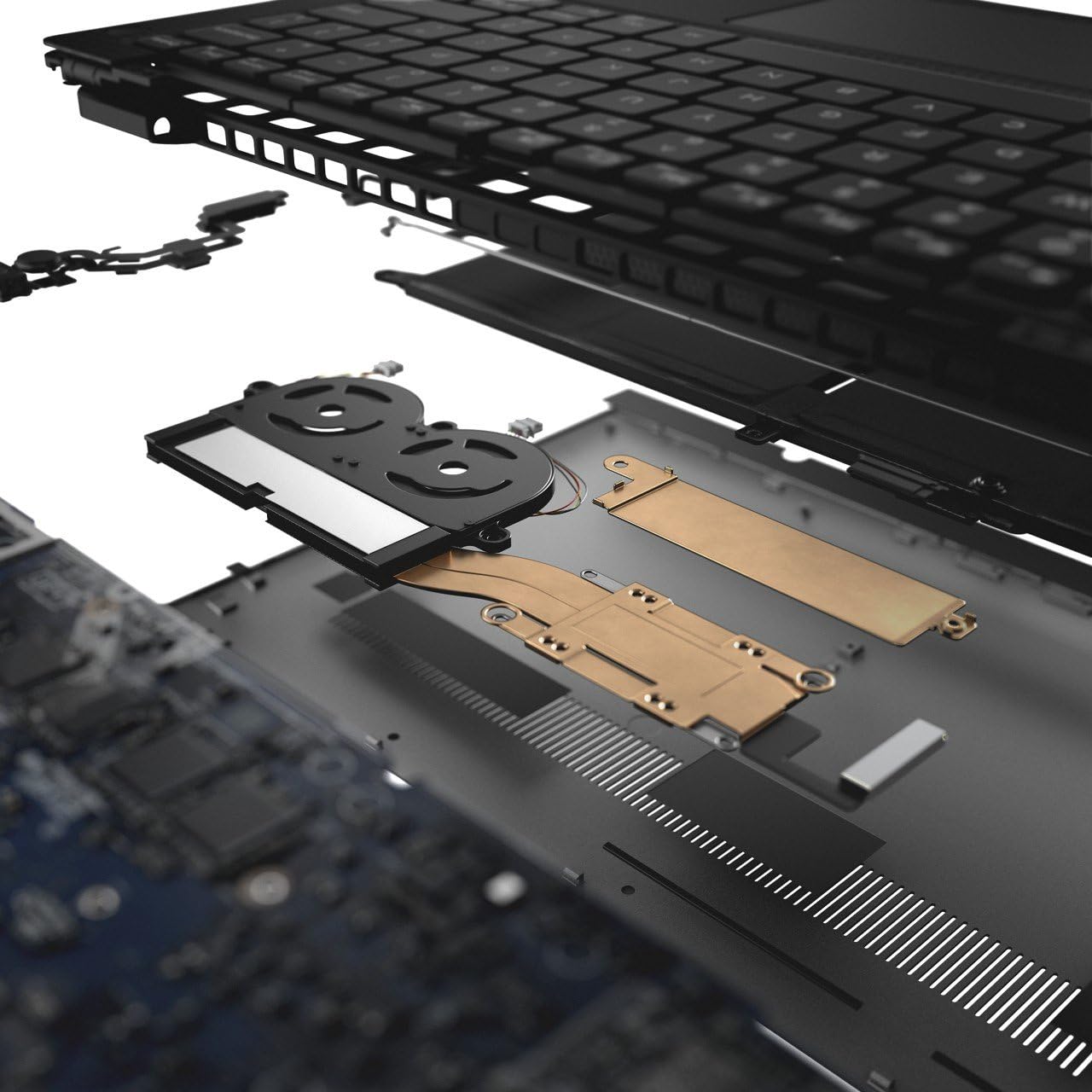
Выява: Выбухнула view of the Dell XPS 13 9370, illustrating its internal components and compact engineering.
7. Гарантыя і падтрымка
7.1 Гарантыя на выраб
Your Dell XPS 13 9370 comes with a 1 Year Mail In Service warranty. Please refer to the warranty documentation included with your product for full terms and conditions.
7.2 Падтрымка кліентаў
For technical assistance, driver downloads, or further support, please visit the official Dell Support website or contact Dell customer service. Have your service tag or express service code ready for faster assistance.
8. Відэа пра прадукты
8.1 Dell XPS 13 Product Overview
Відэа: Кароткі аглядview of the Dell XPS 13, highlighting its design and key features. This video provides a visual introduction to the laptop's aesthetics and functionality.


