1. Уводзіны
The Sena SF1 Bluetooth Communication System is designed to provide essential communication features for motorcycle riders. This system facilitates 2-way intercom communication with a passenger, allowing for clear conversations up to 100 meters (110 yards) in open terrain. It also enables seamless connectivity with your mobile device for streaming music, managing phone calls, and receiving turn-by-turn GPS directions. Key features include VOX Phone commands, Audio Overlay, Quick Charging, and microphone mute options, enhancing your riding experience with convenience and safety.
2. Змесціва ўпакоўкі
The Sena SF1 package includes the following components:
- Sena SF1 Main Unit
- Шлем Clamp Камплект
- Выступоўцы
- Правадной бум-мікрафон
- Правадной мікрафон
- USB Power & Data Cable (USB-C type)
- Накладкі на ліпучках для дынамікаў
- Velcro Pad for Wired Boom Microphone
- Velcro Pad for Wired Microphone
- Падушачкі для дынамікаў (тоўстыя)
- Універсальны гаечны ключ
Note: The specific component "Sena 843-01297" refers to the main unit or a specific part number within the kit.
3. Прадукт скончыўсяview
The Sena SF1 unit features a sleek, low-profile design with intuitive controls for easy operation while riding.

Малюнак 3.1: Верх View of Sena SF1 Main Unit. This image displays the top of the Sena SF1 communication system, highlighting the central control button and the plus (+) and minus (-) buttons for volume and navigation. A blue indicator light is visible at the top center.

Малюнак 3.2: Пад вуглом View of Sena SF1 Main Unit. An angled perspective of the SF1 unit, showing its compact form factor and the arrangement of its primary control buttons. The blue indicator light is also visible.
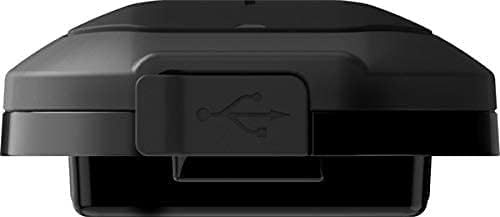
Figure 3.3: Sena SF1 USB Charging Port. This image focuses on the USB charging port, typically located on the side or bottom of the unit, protected by a rubber flap to ensure water resistance.

Figure 3.4: Sena SF1 Side View with Helmet Clamp. бок view of the SF1 unit attached to a helmet clamp, illustrating how the unit integrates with the helmet and the connection points for speakers and microphone cables.
3.1 Элементы кіравання і індыкатары
- Цэнтральная кнопка: Multi-functional button for power, pairing, and call management.
- (+) Кнопка: Increases volume, navigates forward through menus or tracks.
- (-) Кнопка: Decreases volume, navigates backward through menus or tracks.
- Святлодыёдны індыкатар: Displays device status (power, charging, Bluetooth connection).
4. Ўстаноўка
Proper installation ensures optimal performance and comfort. The SF1 is designed to fit on almost any helmet.
4.1 Mounting the Main Unit
- Choose a suitable location on the left side of your helmet for the clamp адзінка.
- Аслабце шрубы на шлеме clamp and slide it between the outer shell and the inner padding of the helmet. Tighten the screws securely.
- Alternatively, use the adhesive mount if the clamp unit is not suitable for your helmet type. Ensure the surface is clean and dry before applying.
- Slide the SF1 main unit onto the mounted clamp пакуль ён не стане на месца.
4.2 Усталёўка дынамікаў і мікрафона
- Attach the speakers to the Velcro pads inside the helmet's ear pockets. Use the thick speaker pads if needed for better fit and audio quality.
- Connect the speaker cables to the main unit.
- For full-face helmets, attach the wired microphone to the inside of the chin bar using the Velcro pad. Position it close to your mouth.
- For open-face or modular helmets, attach the wired boom microphone to the inside of the helmet, ensuring it is positioned correctly for clear voice pickup.
- Route all cables neatly under the helmet padding to avoid interference and ensure comfort.
5. Настройка
5.1 Уключэнне/выключэнне
- Уключэнне: Націсніце і ўтрымлівайце Цэнтральная кнопка і (+) Кнопка на працягу 1 секунд.
- Выключэнне: Націсніце і ўтрымлівайце Цэнтральная кнопка і (+) Кнопка на працягу 5 секунд.
5.2 Bluetooth Pairing with Mobile Phone
- With the SF1 powered off, press and hold the Цэнтральная кнопка for 5 seconds until the LED flashes red and blue alternately, indicating pairing mode.
- На мабільным тэлефоне ўключыце Bluetooth і знайдзіце прылады.
- Select "Sena SF1" from the list of detected devices.
- If prompted, enter PIN "0000". The LED will turn blue when pairing is successful.
5.3 Intercom Pairing (2-Way)
- Ensure both SF1 units are powered on.
- On one unit, press and hold the Цэнтральная кнопка for 5 seconds until the LED flashes red.
- On the second unit, press and hold the Цэнтральная кнопка for 5 seconds until the LED flashes red.
- The units will automatically pair and connect. The LED on both units will turn blue.
5.4 Прыкладанне Sena Utility
For advanced configuration and firmware updates, download the Sena Utility App from your smartphone's app store. The app allows you to customize settings, manage speed dial presets, and access a quick guide.
6. Інструкцыя па эксплуатацыі
6.1 Рэгулятар гучнасці
- Павялічыць гучнасць: Націсніце (+) Кнопка.
- Паменшыць гучнасць: Націсніце (-) Кнопка.
6.2 Музычныя функцыі
- Прайграванне/прыпыненне музыкі: Націсніце Цэнтральная кнопка на працягу 1 секунд.
- Наступны трэк: Націсніце (+) Кнопка на працягу 1 секунд.
- Папярэдні трэк: Націсніце (-) Кнопка на працягу 1 секунд.
6.3 Функцыі тэлефонных званкоў
- Адказаць на званок: Націсніце Цэнтральная кнопка.
- Завяршыць выклік: Націсніце Цэнтральная кнопка на працягу 2 секунд.
- Адхіліць выклік: Націсніце Цэнтральная кнопка for 2 seconds when a call is incoming.
- Voice Dial (VOX Phone): Націсніце Цэнтральная кнопка на працягу 3 секунд.
- Адключэнне мікрафона: Націсніце (+) Кнопка і (-) Кнопка simultaneously for 1 second during a call.
6.4 Інтэрком-сувязь
- Пачатак/завяршэнне дамафона: Націсніце Цэнтральная кнопка.
- Audio Overlay: The SF1 supports Audio Overlay, allowing you to listen to music or GPS instructions while engaged in intercom conversation. The audio levels will adjust automatically.
6.5 GPS-навігацыя
Once paired with your smartphone, turn-by-turn GPS directions from your navigation app will be transmitted directly to your SF1 speakers. Audio Overlay ensures that navigation prompts are heard even during other audio activities.
7. Тэхнічнае абслугоўванне
7.1 Зарадка акумулятара
- Connect the SF1 to a USB power source using the provided USB Power & Data Cable.
- The LED indicator will turn red during charging and blue when fully charged.
- Поўная зарадка звычайна займае прыблізна 1.5 гадзіны.
- The SF1 offers a talk time of up to 13 гадзіны на поўнай зарадцы.
- The Quick Charging feature allows for faster charging when time is limited.
7.2 Ачыстка і захоўванне
- Працярыце прыладу мяккай дamp тканіна. Не выкарыстоўвайце рэзкія хімікаты або растваральнікі.
- Ensure the USB port cover is securely closed to maintain water resistance.
- Store the SF1 in a cool, dry place when not in use.
8. Выпраўленне непаладак
8.1 Скід да заводскіх налад
If the SF1 is not functioning correctly, a factory reset may resolve the issue. To perform a factory reset, press and hold the Цэнтральная кнопка for 12 seconds until the LED flashes red rapidly. Then, tap the Цэнтральная кнопка to confirm. The unit will power off and reset to default settings.
8.2 Агульныя праблемы
- Няма харчавання: Ensure the battery is charged. Connect to a charger and check the LED indicator.
- Няма аўдыя: Check speaker connections. Ensure volume is not at minimum. Re-pair with your device.
- Адключэнне дамафона: Ensure both units are within range (100 meters in open terrain) and re-initiate intercom connection.
- Праблемы спалучэння Bluetooth: Ensure the SF1 is in pairing mode (red and blue flashing LED) and your phone's Bluetooth is enabled. Try restarting both devices.
9. Тэхнічныя характарыстыкі
| Асаблівасць | Дэталь |
|---|---|
| Назва мадэлі | SF1 |
| Версія Bluetooth | 4.1 |
| Дыяпазон Bluetooth | Up to 100 meters (110 yards) in open terrain |
| Дамафон | 2-баковы |
| Час размовы | Да 13 гадзін |
| Час зарадкі | 1.5 гадзіны |
| Кантроль шуму | Advanced Noise Cancellation |
| Воданепранікальнасць | Водатрывалы |
| Вага | 3.52 унцыі (0.1 кілаграма) |
| Памеры (Д х Ш х У) | 3.94 х 1.57 х 2.36 цалі |
| Матэрыял | Пластыкавыя |
| Метад кантролю | Дакранацца |
| Тып батарэі | Літый-палімер (у камплекце) |
| Сумяшчальныя прылады | Electronic devices with Bluetooth capabilities |
10. Гарантыя і падтрымка
10.1 Інфармацыя аб гарантыі
Sena products are covered by a limited warranty against manufacturing defects. The EU Spare Part Availability Duration is 2 years. For specific warranty terms and conditions, please refer to the official Sena webсайт або звярніцеся ў службу падтрымкі кліентаў. Захоўвайце пацвярджэнне пакупкі для прэтэнзій па гарантыі.
10.2 Падтрымка кліентаў
For technical assistance, troubleshooting, or general inquiries, please visit the official Sena website for support resources, FAQs, and contact information. You can also utilize the Sena Utility App for quick access to support and product information.


