Уводзіны
This manual provides essential information for setting up, operating, maintaining, and troubleshooting your Intel NUC 7 Business Mini PC (model NUC7i5DNKPC). This compact and powerful PC is designed for business environments, featuring a 7th Generation Intel Core i5 processor, 256GB NVMe SSD, 8GB DDR4-2133 memory, and Windows 10 Pro. It includes Intel vPro Technology for remote manageability and enhanced security, and Intel HD Graphics 620 supporting dual 4K monitors.
Што ў скрынцы
Праверце наяўнасць усіх прадметаў у камплекце:
- Intel NUC 7 Business Mini PC Unit
- Мантажная пласціна VESA
- Power Supply/Adapter (Note: An AC power cord is not included and must be supplied by the user. A 3-prong "laptop style" cord with 3 round pins in a triangle formation is required.)
- Інструкцыя па эксплуатацыі (гэты дакумент)
Прадукт скончаныview
Familiarize yourself with the ports and features of your Intel NUC.
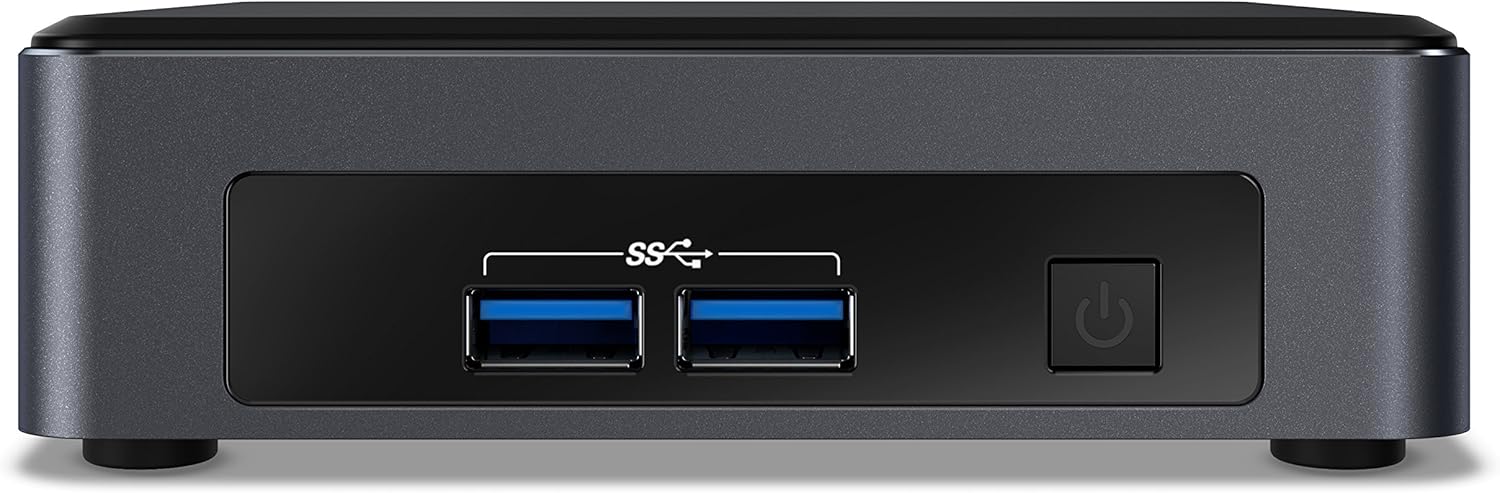
Малюнак 1: Пярэдняя панэль. This image shows the front of the Intel NUC 7 Business Mini PC. It features two USB 3.0 ports (marked with "SS" for SuperSpeed) and a power button on the right side.

Малюнак 2: Задняя панэль. This image displays the rear of the Intel NUC 7 Business Mini PC. From left to right, it includes a 19V DC power input, two HDMI ports (one labeled "Protected UHD"), an Ethernet port, and two additional USB 3.0 ports.

Figure 3: Internal Access. This image shows the Intel NUC 7 Business Mini PC with its top cover partially removed, illustrating access to internal components for potential upgrades or maintenance.
Настройка
- Падключыце харчаванне: Connect the power adapter to the 19V DC input port on the rear of the NUC. Plug the AC power cord (not included) into the power adapter and then into a wall outlet.
- Падключэнне дысплея: Connect your monitor(s) to the HDMI ports on the rear of the NUC using HDMI cables. The NUC supports dual 4K displays.
- Падключэнне перыферыйных прылад: Connect your USB keyboard, mouse, and any other USB devices to the available USB 3.0 ports (two on the front, two on the rear).
- Падключэнне да сеткі (неабавязкова): For a wired internet connection, connect an Ethernet cable from your router or modem to the Ethernet port on the rear of the NUC. For wireless connectivity, the NUC includes built-in Wi-Fi and Bluetooth.
- Уключэнне: Press the power button located on the front panel of the NUC. The system will boot up.
- Initial Windows 10 Pro Setup: Follow the on-screen instructions to complete the initial setup of Windows 10 Pro, including language, region, network settings, and user account creation.
Інструкцыя па эксплуатацыі
- Асноўная аперацыя: Once Windows 10 Pro is set up, you can use the NUC like any standard desktop computer. Launch applications, browse the web, and manage files.
- Падтрымка падвойнага дысплея: Utilize the two HDMI ports to connect multiple monitors for an extended desktop experience. Configure display settings within Windows.
- Тэхналогія Intel vPro: This NUC includes Intel vPro Technology, enabling remote management and enhanced security features. Consult your IT administrator or Intel documentation for specific vPro setup and usage.
- Выключэнне/Перазагрузка: To properly shut down or restart the NUC, use the options available in the Windows Start Menu. Avoid simply unplugging the power cable to prevent data loss.
Тэхнічнае абслугоўванне
- Уборка: Keep the NUC clean by gently wiping the exterior with a soft, dry cloth. Do not use liquid cleaners directly on the device. Ensure ventilation openings are free from dust and obstructions.
- Абнаўленні праграмнага забеспячэння: Regularly update Windows 10 Pro and Intel drivers to ensure optimal performance, security, and compatibility. Access Windows Update through the Settings menu.
- Рэзервовае капіраванне даных: Перыядычна рабіце рэзервовыя копіі важных дадзеных на знешні дыск або ў воблачнае сховішча, каб прадухіліць іх страту.
Ліквідацыю непаладак
- Няма харчавання / сістэма не ўключаецца:
- Ensure the power adapter is securely connected to the NUC and a working power outlet.
- Verify that you are using a compatible 3-prong AC power cord with the power adapter. This cord is not included with the NUC.
- Праверце разетку з іншай прыладай.
- Няма адлюстравання на маніторы:
- Check that the HDMI cables are securely connected to both the NUC and the monitor.
- Пераканайцеся, што манітор уключаны і настроены на правільную крыніцу ўваходнага сігналу (HDMI 1, HDMI 2 і г.д.).
- Try connecting to a different HDMI port on the NUC or using a different monitor/cable if available.
- Няма падключэння да Інтэрнэту:
- For wired connections, ensure the Ethernet cable is properly connected and your router/modem is working.
- For wireless connections, check Wi-Fi settings in Windows to ensure you are connected to the correct network and the signal is strong.
- Restart your router/modem and the NUC.
- Праблемы з прадукцыйнасцю сістэмы:
- Пераканайцеся, што Windows і драйверы абноўленыя.
- Check for background applications consuming excessive resources using Task Manager.
- Забяспечце належную вентыляцыю, каб прадухіліць перагрэў.
Тэхнічныя характарыстыкі
| Асаблівасць | Дэталь |
|---|---|
| Назва мадэлі | Intel NUC 7 Business |
| Нумар мадэлі | BLKNUC7I5DNKPC1 |
| Працэсар | 7th Generation Intel Core i5-7300U (2.6 GHz CPU Speed) |
| Аперацыйная сістэма | Windows 10 Pro |
| АЗП | 8GB DDR4-2133 (Max 32GB, 1 slot available) |
| Захоўванне | 256 ГБ NVMe SSD |
| Графіка | Інтэграваная відэакарта Intel HD Graphics 620 |
| Відэавыхад | 2x HDMI (Supports dual 4K displays, Max Resolution: 3840 x 2160 pixels) |
| Парты USB | 4x USB 3.0 (Total) |
| Сетка | Ethernet, Wi-Fi (802.11b/g/n), Bluetooth |
| Асаблівасці | Intel vPro Technology, Hardware TPM 2.0, Microphone |
| Памеры (ДхШхВ) | 5.59 х 4.88 х 4.49 цалі |
| Вага | 2.2 фунта |
| Колер | Чорны |
| UPC | 735858382656 |
Інфармацыя аб гарантыі
The Intel NUC 7 Business Mini PC comes with a 3-гадовая абмежаваная гарантыя. For detailed terms and conditions, please refer to the official Intel warranty documentation or visit the Intel support webсайт. Захоўвайце пацвярджэнне пакупкі для прэтэнзій па гарантыі.
Падтрымка
For further assistance, technical support, driver downloads, or additional documentation, please visit the official Intel support website. You can typically find support resources by searching for "Intel NUC support" or by navigating to Афіцыйная старонка падтрымкі Intel.


