1. Уводзіны
This manual provides detailed instructions for the installation, operation, and maintenance of the Aja KONA HDMI 4-Channel Capture Card (Model: KONA HDMI4R-R0). Please read this manual thoroughly before using the product to ensure proper setup and optimal performance. Retain this manual for future reference.
2. Прадукт скончыўсяview
The Aja KONA HDMI is a high-performance PCIe capture card designed for professional video workflows. It features four HDMI inputs, enabling multi-channel HD or dual-channel UltraHD video capture. This card is ideal for applications requiring reliable, low-latency video and image capture on compatible Mac OS systems.
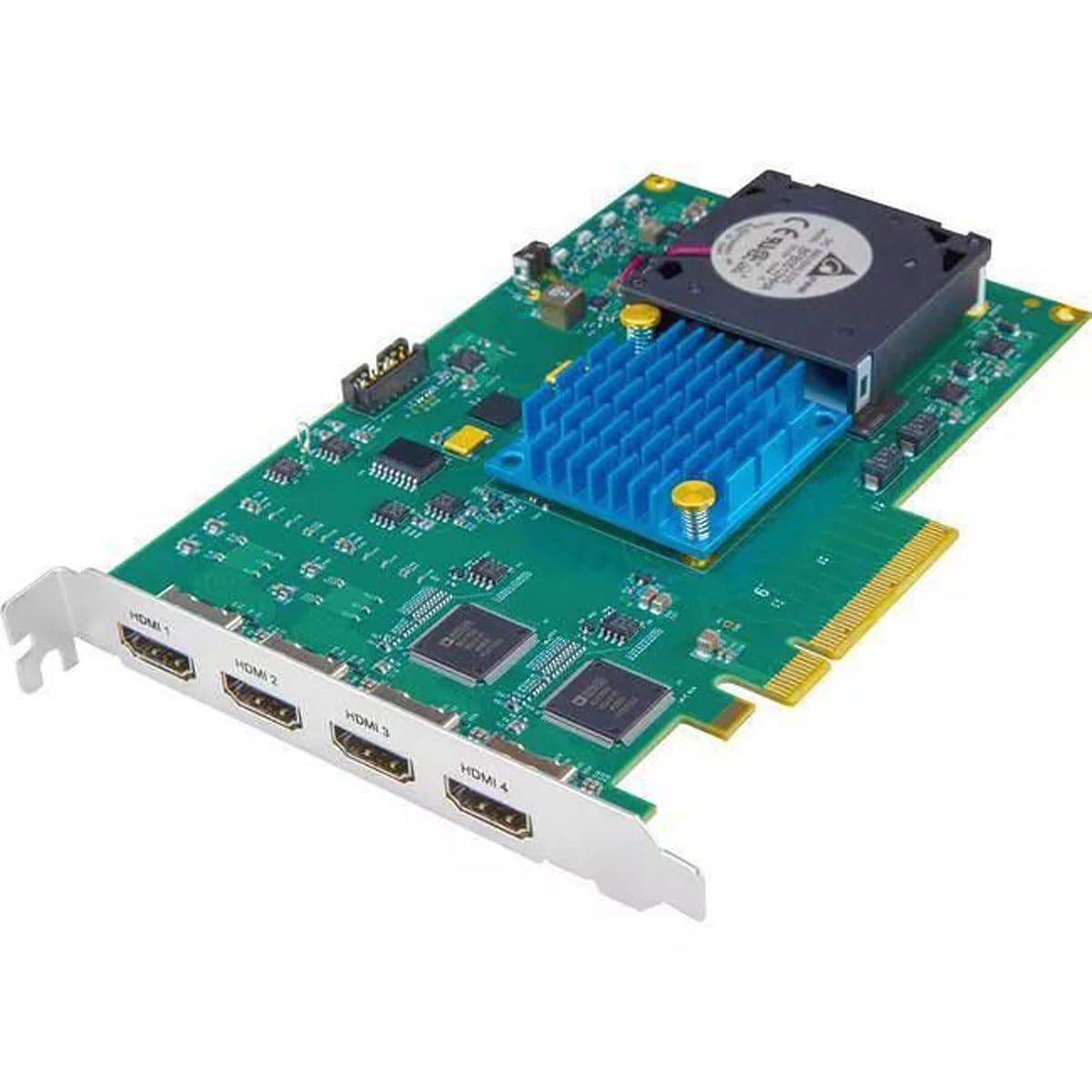
Малюнак 2.1: Aja KONA HDMI 4-Channel Capture Card. This image displays the overall structure of the PCIe card, including the cooling fan and heatsink, which are crucial for maintaining optimal operating temperatures during intensive video capture tasks.
3. Асноўныя магчымасці
- 4K/UltraHD Capture: Supports high-resolution video capture for demanding professional applications.
- Multi-Channel HD: Capable of capturing multiple HD video streams simultaneously.
- Нізкая затрымка: Designed for minimal delay between input and captured output, crucial for live production and monitoring.
- Лёгкая ўстаноўка: Streamlined installation process for quick integration into existing systems.
- Stable Streaming: Ensures consistent and reliable video stream delivery.
- Падключэнне HDMI: Utilizes HDMI for versatile input compatibility with various cameras and video sources.
4. Сістэмныя патрабаванні
To ensure proper functionality of the KONA HDMI capture card, your system must meet the following minimum requirements:
- Аперацыйная сістэма: Mac OS X (specific version may vary, refer to Aja's official website for the latest compatibility).
- Абсталяванне: Mac computer with an available compatible PCIe slot.
- Сумяшчальныя прылады: Cameras or other video sources with HDMI output.
5. Інструкцыі па ўсталёўцы
Follow these steps to install your Aja KONA HDMI capture card:
- Выключэнне і адключэнне: Completely shut down your Mac computer and disconnect all power cables and peripherals.
- Адкрыць корпус кампутара: Carefully open your computer's chassis to access the internal components. Refer to your computer's manual for specific instructions on opening the case.
- Знайдзіце слот PCIe: Identify an available PCIe slot compatible with the KONA HDMI card.
- Install the Card: Gently insert the KONA HDMI card into the PCIe slot, ensuring it is seated firmly. Secure the card with the retaining bracket screw, if applicable.
- Закрыць справу і аднавіць падключэнне: Close the computer case and reconnect all power cables and peripherals.
- Ўстаноўка драйвераў: Power on your computer. Download and install the latest drivers and software from the official Aja webсайт (www.aja.com/support). Follow the on-screen instructions for driver installation.
- Падключыце крыніцы HDMI: Connect your HDMI video sources to the HDMI input ports on the KONA HDMI card.

Малюнак 5.1: HDMI Input Ports. This image highlights the four distinct HDMI input ports (HDMI 1, HDMI 2, HDMI 3, HDMI 4) on the capture card, where external video sources are connected.
6. Інструкцыя па эксплуатацыі
Once the KONA HDMI card is installed and drivers are in place, you can begin capturing video:
- Launch Capture Software: Open your preferred video capture or editing software that supports Aja hardware (e.g., Adobe Premiere Pro, Final Cut Pro, OBS Studio).
- Select KONA HDMI: Within your software's settings, select the Aja KONA HDMI as your video input device.
- Configure Input Settings: Adjust resolution, frame rate, and audio settings to match your source material and desired output. The KONA HDMI supports various resolutions up to 4K/UltraHD.
- Start Capture: Initiate the capture process within your software. Monitor the input to ensure proper signal detection and quality.
- Multi-Channel/Dual-Channel Use: For multi-channel HD or dual-channel UltraHD capture, configure your software to utilize the multiple HDMI inputs as required. Refer to your software's documentation for specific multi-input setup procedures.
7. Тэхнічнае абслугоўванне
The Aja KONA HDMI card is designed for reliable operation with minimal maintenance. However, consider the following to ensure longevity:
- Абнаўляць драйверы: Regularly check the Aja website for the latest driver and firmware updates to ensure compatibility and optimal performance.
- Забяспечце належную вентыляцыю: Ensure your computer case has adequate airflow to prevent overheating, especially during prolonged capture sessions. The card's integrated fan and heatsink require clear space to function effectively.
- Чысціня: Periodically inspect the card for dust accumulation, particularly on the fan and heatsink. Use compressed air to gently clean dust from the components while the computer is powered off and disconnected.
8. Выпраўленне непаладак
If you encounter issues with your KONA HDMI card, refer to the following common problems and solutions:
- Сігнал не выяўлены:
- Verify that the HDMI cables are securely connected to both the source and the KONA HDMI card.
- Ensure the video source is powered on and outputting a signal.
- Check your capture software settings to confirm the KONA HDMI is selected as the input device and the correct input port is chosen.
- Confirm that the input resolution and frame rate from your source are supported by the KONA HDMI card.
- Poor Video Quality/Dropped Frames:
- Ensure your computer meets or exceeds the recommended system requirements, especially regarding CPU, RAM, and storage speed.
- Update your KONA HDMI drivers and firmware to the latest versions.
- Check for other applications consuming significant system resources.
- Verify the quality of your HDMI cables; try a different cable if necessary.
- Card Not Recognized by System:
- Ensure the card is properly seated in the PCIe slot. Power off, reseat the card, and power on again.
- Verify that the correct drivers for your operating system are installed.
- Check your computer's Device Manager (or System Information on Mac) to see if the card is listed.
For further assistance, please refer to the Aja support webсайт або звярніцеся да іх тэхнічнай падтрымкі.
9. Тэхнічныя характарыстыкі
| Асаблівасць | Дэталь |
|---|---|
| Марка | Aja |
| Назва мадэлі | KONA HDMI4R-R0 |
| Нумар мадэлі | 4178729 |
| Абсталяванне інтэрфейсу | PCIe |
| Дазвол відэазахопу | Up to 4K/UltraHD, 1080p |
| Аперацыйная сістэма | Mac OS X |
| Рэкамендуемае выкарыстанне | Video Recording, Image Capture |
| Асаблівасці | 4K/UltraHD Capture, Low Latency, Easy Setup, Stable Streaming |
| АВ выхад | HDMI (4 уваходу) |
| Сумяшчальныя прылады | Camera, other HDMI video sources |
| Мінімальныя сістэмныя патрабаванні | Mac computer with a compatible PCIe slot |
| Памеры прадмета | 9 х 6 х 3 цалі |
| UPC | 812321031003 |
| GTIN | 812321031003 |
10. Гарантыя і падтрымка
Aja products are backed by a manufacturer's warranty. For detailed information regarding warranty coverage, terms, and conditions, please refer to the warranty card included with your product or visit the official Aja webсайт.
For technical support, driver downloads, and additional resources, please visit the Aja support page:


