1. Уводзіны
Дзякуй за пакупкуasing the Mistral Stand Fan MSF040. This manual provides essential information for the safe and efficient operation, assembly, maintenance, and troubleshooting of your new fan. Please read these instructions thoroughly before use and retain them for future reference.

Figure 1: Fully assembled Mistral Stand Fan MSF040. This image displays the fan's overall design, including the circular base, adjustable stand pole, and the fan head with its protective grille.
2. Важныя інструкцыі па бяспецы
Каб знізіць рызыку пажару, паражэння электрычным токам або траўмаў, заўсёды выконвайце наступныя асноўныя меры бяспекі:
- Перад выкарыстаннем гэтага вентылятара прачытайце ўсе інструкцыі.
- Пераканайцеся, што аб'ём блока харчаванняtage адпавядае на этыкетцы з характарыстыкамі вентылятара.
- Do not operate any fan with a damaged cord or plug. If the cord or plug is damaged, contact qualified service personnel for repair or replacement.
- Адключайце вентылятар ад разеткі, калі ён не выкарыстоўваецца, перад чысткай або перад перамяшчэннем.
- Не апускайце вентылятар, вілку або шнур у ваду або іншыя вадкасці.
- Keep the fan out of reach of children and pets. Close supervision is necessary when the fan is used near children.
- Не ўстаўляйце пальцы або якія-небудзь прадметы праз рашотку падчас працы вентылятара.
- Пастаўце вентылятар на ўстойлівую, роўную паверхню, каб ён не перакуліўся.
- Не выкарыстоўвайце вентылятар у вільготных або damp месцы, такія як ванныя пакоі або пральні.
- Не блакуйце вентыляцыйныя адтуліны і не працуйце побач з шторамі або іншымі матэрыяламі, якія могуць перашкаджаць патоку паветра.
3. Змесціва ўпакоўкі
Пасля адкрыцця ўпакоўкі пераканайцеся, што ўсе наступныя кампаненты наяўныя:
- Fan Motor Unit with Rear Grille
- лопасці вентылятара
- Пярэдняя рашотка
- Grille Locking Nut
- Капялюшык ляза
- Stand Pole (Upper and Lower sections)
- Круглае падстава
- Шруба для мацавання падставы
- Шнур харчавання (інтэграваны)
- Кіраўніцтва карыстальніка
4. Інструкцыя па зборцы
Follow these steps to assemble your Mistral Stand Fan MSF040:
- Збярыце аснову: Place the stand pole onto the round base. Secure it from underneath the base using the provided base fixing screw. Ensure it is tightened firmly.
- Прымацуеце блок рухавіка: Insert the fan motor unit onto the top of the stand pole. Secure it with the pole locking screw, if present, or by twisting until it clicks into place.
- Install the Rear Grille: Place the rear grille onto the motor unit, aligning the notches. Secure it with the grille locking nut, turning clockwise until tight.
- Mount the Fan Blade: Slide the fan blade onto the motor shaft, ensuring the pin on the shaft aligns with the groove on the blade. Secure it with the blade cap, turning counter-clockwise until tight.
- Attach the Front Grille: Position the front grille over the rear grille, aligning the clips. Secure the front grille by pressing the clips firmly around the edge until it is fully closed.
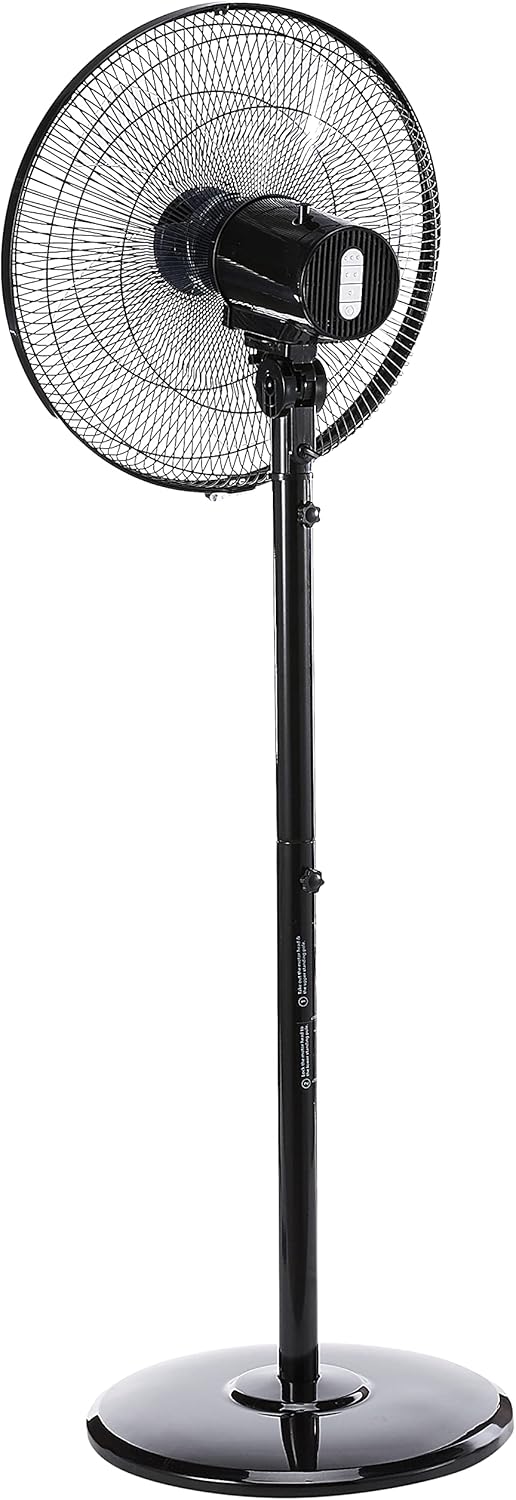
Малюнак 2: бок view of the fan, illustrating the adjustable height feature of the stand pole. The pole can be extended or retracted to suit different user preferences.
5. Інструкцыя па эксплуатацыі
Once assembled, your Mistral Stand Fan MSF040 is ready for operation:
- Падключэнне сілкавання: Устаўце вілку харчавання ў прыдатную электрычную разетку.
- Уключэнне/выключэнне харчавання: Use the power button on the control panel to turn the fan on or off.
- Выбар хуткасці: The fan offers 3 speed selections. Press the speed control buttons on the control panel to cycle through low, medium, and high settings.
- Ваганні: To activate the left and right oscillation, press the oscillation button on the control panel. Press it again to stop oscillation.
- Рэгуляванне нахілу: The fan head can be tilted 30° up or down. Gently adjust the fan head to your desired angle.
- Рэгуляванне вышыні: The stand pole features a convertible height mechanism. Loosen the height adjustment knob on the stand pole, adjust to the desired height, and then tighten the knob firmly.

Малюнак 3: Буйны план view of the fan's control panel, featuring tactile buttons for power, speed selection, and oscillation.
6. Тэхнічнае абслугоўванне і ачыстка
Regular cleaning and maintenance will ensure optimal performance and extend the lifespan of your fan:
- Заўсёды адключайце вентылятар ад сеткі з разеткі перад чысткай.
- Працірайце вонкавыя паверхні вентылятара мяккай губкайamp тканіна. Не выкарыстоўвайце абразіўныя ачышчальнікі або растваральнікі.
- For thorough cleaning of the fan blades, the front grille can be carefully removed. Refer to the assembly instructions in reverse order for safe disassembly and reassembly.
- Перад тым, як зноў падключыць вентылятар да сеткі і пачаць яго эксплуатацыю, пераканайцеся, што ўсе дэталі цалкам сухія.
- Захоўвайце вентылятар у прахалодным, сухім месцы, калі ён не выкарыстоўваецца працяглы час.
7. Выпраўленне непаладак
Калі ў вас узніклі праблемы з вентылятарам, звярніцеся да наступных распаўсюджаных праблем і іх рашэнняў:
- Вентылятар не ўключаецца:
- Праверце, ці надзейна падключаны шнур харчавання да спраўнай электрычнай разеткі.
- Пераканайцеся, што кнопка харчавання на панэлі кіравання націснутая.
- Verify that the household circuit breaker or fuse has not tripped.
- Fan makes unusual noise:
- Unplug the fan and check for any obstructions (e.g., loose debris, wires) in the fan blades or grilles.
- Ensure all parts are securely assembled and tightened.
- Fan does not oscillate:
- Ensure the oscillation button on the control panel has been pressed.
Калі пасля праверкі гэтых пунктаў праблема не знікне, звярніцеся ў службу падтрымкі кліентаў.
8. Тэхнічныя характарыстыкі
| Асаблівасць | Дэталь |
|---|---|
| Марка | МІСТРАЛЬ |
| мадэль | MSF040 |
| Дызайн электрычнага вентылятара | Падлогавы вентылятар / Вентылятар на падстаўцы |
| Тып клінка | 5 ABS blade |
| Выбар хуткасці | 3 хуткасці |
| асцыляцый | Left & right oscillation |
| Рэгуляванне нахілу | 30° up & down |
| Рэгуляванне вышыні | Convertible height |
| Тып кантролера | Button Control (Tactile) |
| Матэрыял | Пластыкавыя |
| Колер | Чорны |
| Крыніца харчавання | Правадная электрычная |
| Вага прадмета | 5.35 кілаграма |
| Уключаныя кампаненты | Шнур |

Figure 4: Close-up of the power plug, indicating the corded electric power source for the fan.
9. Гарантыя і падтрымка
Your Mistral Stand Fan MSF040 comes with a 2 год мясцовай (Сінгапур) гарантыіКалі ласка, захавайце пацвярджэнне пакупкі для прэтэнзій па гарантыі.
For technical support, service, or warranty inquiries, please contact Mistral customer service through their official channels. Refer to the product packaging or the official Mistral webсайт для кантактных дадзеных.