Уводзіны
The Sharp Atomic Clock provides precise timekeeping and temperature monitoring for your home or office. Featuring a large, easy-to-read display, this clock automatically synchronizes with the atomic time signal (WWVB) broadcast from Fort Collins, Colorado, ensuring accuracy without manual adjustments. It also includes a wireless outdoor sensor to display both indoor and outdoor temperatures.
Асаблівасці прадукту
- Atomic Time Accuracy: Automatically synchronizes with the WWVB atomic time signal for precise timekeeping.
- Jumbo 3" Easy-to-Read Numbers: Large digital display for clear visibility of time, date, and temperature.
- Indoor/Outdoor Temperature Display: Monitors both indoor ambient temperature and outdoor temperature via a wireless sensor.
- Бесправадны вонкавы датчык: Transmits outdoor temperature data to the main unit.
- Харчаванне ад батарэі: Operates on batteries for flexible placement (batteries not included).
- Automatic Daylight Saving Time (DST) Adjustment: Automatically adjusts for daylight saving time changes.
- Часавыя паясы, якія можна выбраць: Allows selection of various US time zones.
- 12/24-гадзінны фармат: Магчымасць адлюстравання часу ў 12-гадзінным або 24-гадзінным фармаце.
- Celsius/Fahrenheit Display: Switch between Celsius and Fahrenheit temperature units.
Змест пакета
Please ensure all items are present before proceeding with setup.
- Sharp Atomic Clock Main Unit
- Бесправадны вонкавы датчык
- Кіраўніцтва па эксплуатацыі
Note: Batteries are not included. The main unit requires 2 AA batteries, and the outdoor sensor requires 2 AA batteries.
Настройка
1. Устаноўка батарэі
- Адкрыйце батарэйны адсек на задняй панэлі галоўнага блока гадзінніка.
- Insert 2 AA batteries, observing the correct polarity (+ and -).
- Зачыніце крышку батарэйнага адсека.
- Open the battery compartment on the wireless outdoor sensor.
- Insert 2 AA batteries into the outdoor sensor, observing the correct polarity.
- Close the outdoor sensor's battery compartment cover.
2. Initial Synchronization and Settings
After battery installation, the clock will attempt to receive the WWVB atomic time signal and connect to the outdoor sensor. This process may take several minutes or up to 24 hours depending on your location and environmental interference.
- Часавы пояс: Press the "TIME ZONE" button (often labeled "UP TIME ZONE") on the back of the clock to cycle through available time zones (PST, MST, CST, EST). Select your desired time zone.
- 12/24-гадзінны фармат: Press the "12/24" button to switch between 12-hour and 24-hour display.
- Цэльсій/Фарэнгейт: Press the "°C/°F" button to toggle between Celsius and Fahrenheit temperature display.
- Outdoor Sensor Pairing: If the outdoor temperature does not appear, press the "CHANNEL" button on the main unit to search for the sensor signal. Ensure the outdoor sensor is within range and not obstructed.
For optimal signal reception, place the clock away from large metal objects, electronic devices, and areas with heavy concrete or brick walls. The outdoor sensor should be placed in a shaded, dry location, protected from direct sunlight and precipitation, for accurate readings.
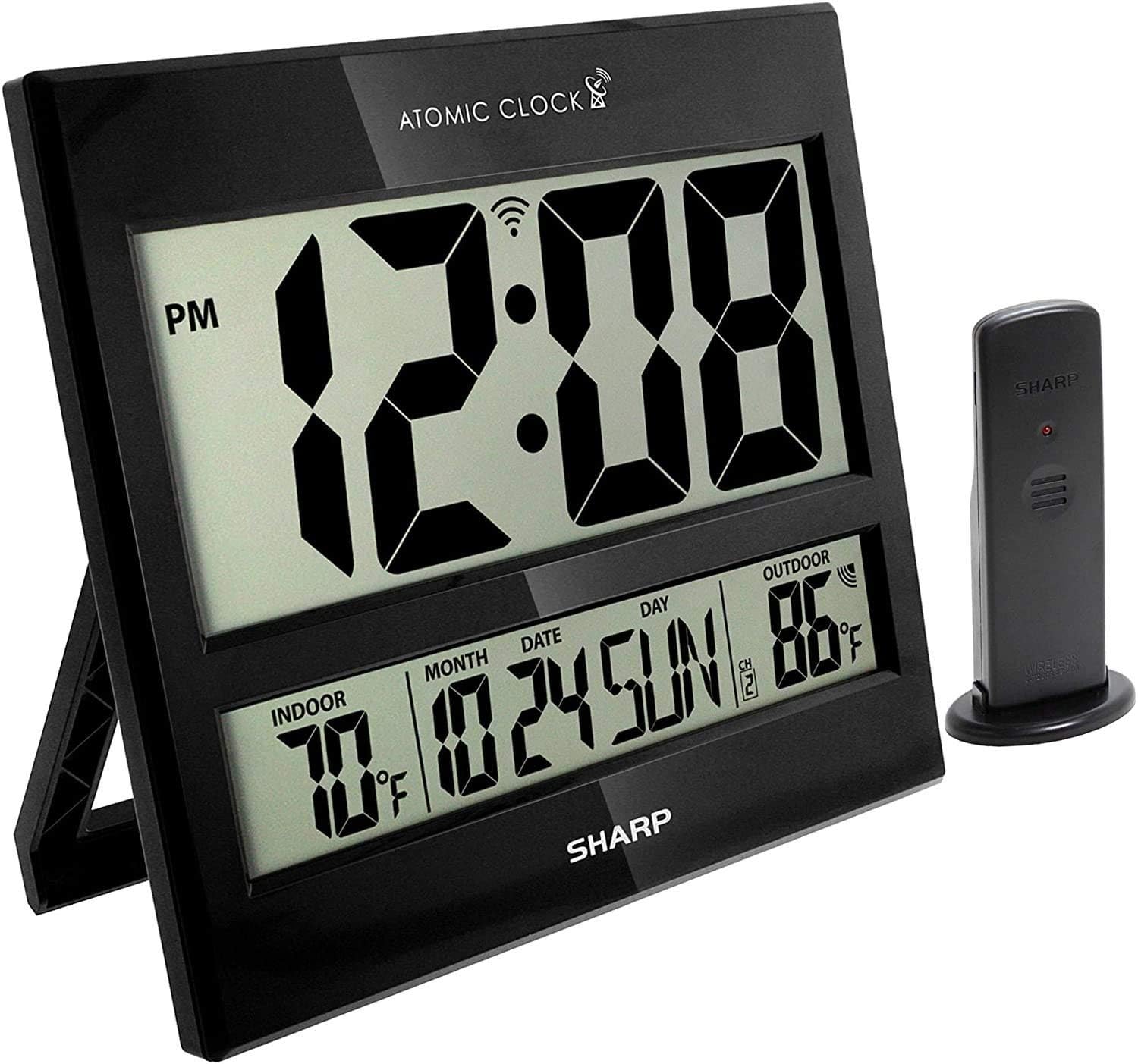
Image: The Sharp Atomic Clock main unit displaying time, indoor temperature, date, and outdoor temperature, alongside its wireless outdoor sensor.
Аперацыя
Адлюстраванне інфармацыі
The clock's large LCD screen displays the following information:
- Час: Current time in selected 12-hour or 24-hour format.
- Індыкатар PM: Displays "PM" for afternoon hours in 12-hour format.
- Atomic Signal Indicator: Shows the status of the WWVB atomic time signal reception.
- Тэмпература ў памяшканні: Current temperature measured by the main unit.
- Month/Date/Day: Current calendar information.
- Вонкавая тэмпература: Current temperature measured by the wireless outdoor sensor.
- Канал вонкавага датчыка: Indicates the channel the outdoor sensor is transmitting on.
- Індыкатар разраду батарэі: An icon will appear when batteries are low and need replacement.
Button Functions (Rear Panel)
| Кнопка | Функцыя |
|---|---|
| КАЛЕНДАР | Press and hold for 2 seconds to manually set calendar (Year, Month, Date, Language). Use UP/DOWN buttons to change values. |
| ЧАС | Press and hold for 2 seconds to manually set time (DST ON/OFF, Hour, Minute). Use UP/DOWN buttons to change values. |
| 12/24 | Switches between 12-hour and 24-hour time display. |
| КАНАЛ | Press to switch between outdoor sensor channels (1, 2, 3). Press and hold for 2 seconds to pair with the outdoor sensor. |
| ° C / ° F | Пераключэнне паміж адлюстраваннем тэмпературы ў градусах Цэльсія і Фарэнгейта. |
| ХВАЛЯ | Initiates a manual search for the WWVB atomic time signal. |
| СКІД | Resets the clock to factory default settings. Requires a pointed object (e.g., paperclip). |
| UP / TIME ZONE | Increases values during manual setting. Press to cycle through time zones. |
| УНІЗ | Decreases values during manual setting. |
Тэхнічнае абслугоўванне
- Замена батарэі: Replace batteries in both the main unit and outdoor sensor when the low battery indicator appears on the display. Always replace all batteries at the same time with new ones.
- Уборка: Clean the clock and sensor with a soft, dry cloth. Do not use abrasive cleaners or solvents.
- Размяшчэнне вонкавага датчыка: Periodically check the outdoor sensor's location to ensure it remains protected from extreme weather conditions, direct sunlight, and moisture.
Ліквідацыю непаладак
- Clock not syncing with atomic time:
- Ensure the clock is placed away from electronic interference (TVs, computers, microwaves).
- Try placing the clock near a window facing Fort Collins, Colorado (if applicable to your region).
- Press the "WAVE" button to initiate a manual signal search.
- Пачатковая сінхранізацыя можа заняць да 24 гадзін.
- Outdoor temperature not displaying or incorrect:
- Check batteries in the outdoor sensor.
- Ensure the outdoor sensor is within the effective transmission range (typically up to 100 feet, line of sight).
- Press the "CHANNEL" button on the main unit to re-establish connection.
- Verify the outdoor sensor is placed in a location protected from direct sunlight and rain, which can affect readings.
- Дысплей цьмяны або пусты:
- Replace all batteries in the main unit with fresh ones.
- Пераканайцеся, што батарэйкі ўстаўлены з правільнай палярнасцю.
- Няправільны час або дата:
- Праверце, ці выбраны правільны гадзінны пояс.
- Check if Daylight Saving Time (DST) setting is correct for your region.
- If atomic signal is not received, manually set the time and date using the "TIME" and "CALENDAR" buttons.
Тэхнічныя характарыстыкі
| Асаблівасць | Дэталь |
|---|---|
| Марка | Востры |
| Нумар мадэлі | 8541848315 |
| UPC | 049353998732 |
| Колер | Чорны глянец |
| Тып дысплея | Лічбавы ВК |
| Асаблівасць | Atomic Time Synchronization (WWVB), Indoor/Outdoor Temperature |
| Памеры прадукту | 13"W x 1.5"H (Main Unit) |
| Крыніца харчавання | Харчаванне ад батарэі |
| Неабходная колькасць батарэй | Main Unit: 2 AA; Outdoor Sensor: 2 AA |
| Матэрыял | Пластыкавыя |
| Тып мацавання | Wall Mount / Tabletop Stand |
| Выкарыстанне ў памяшканні/на вуліцы | Indoor (Main Unit), Outdoor (Sensor) |
Гарантыя і падтрымка
Sharp products are manufactured to high-quality standards. For warranty information, technical support, or service inquiries, please refer to the contact information provided with your product packaging or visit the official Sharp webсайт. Захоўвайце чэк аб куплі як пацвярджэнне пакупкі для гарантыйных прэтэнзій.