1. Уводзіны
The GameMax Mirage 120mm PC Cooling Fan is designed to provide efficient cooling for computer components while offering customizable RGB lighting. This fan features a dual-ring Rainbow LED design, a hydraulic bearing for quiet operation, and a 7-blade fan structure. It is compatible with 5V addressable 3-pin Aura Sync systems, allowing for synchronized lighting effects with compatible motherboards or controllers.

Выява 1.1: Спераду view of the GameMax Mirage fan with active Rainbow LED lighting.
2. Інфармацыя па бяспецы
- Перад устаноўкай або абслугоўваннем пераканайцеся, што камп'ютар выключаны і адключаны ад разеткі.
- Handle components with care to avoid damage from static electricity. Consider using an anti-static wrist strap.
- Do not force connectors. Ensure correct orientation before plugging in cables.
- Keep the fan away from liquids and excessive moisture.
- Do not attempt to disassemble the fan unit beyond what is described in this manual.
3. Змесціва ўпакоўкі
Праверце, ці ёсць усе прадметы ў вашай упакоўцы:
- 1 x GameMax Mirage 120mm PC Cooling Fan
- 4 х крапежных шруб
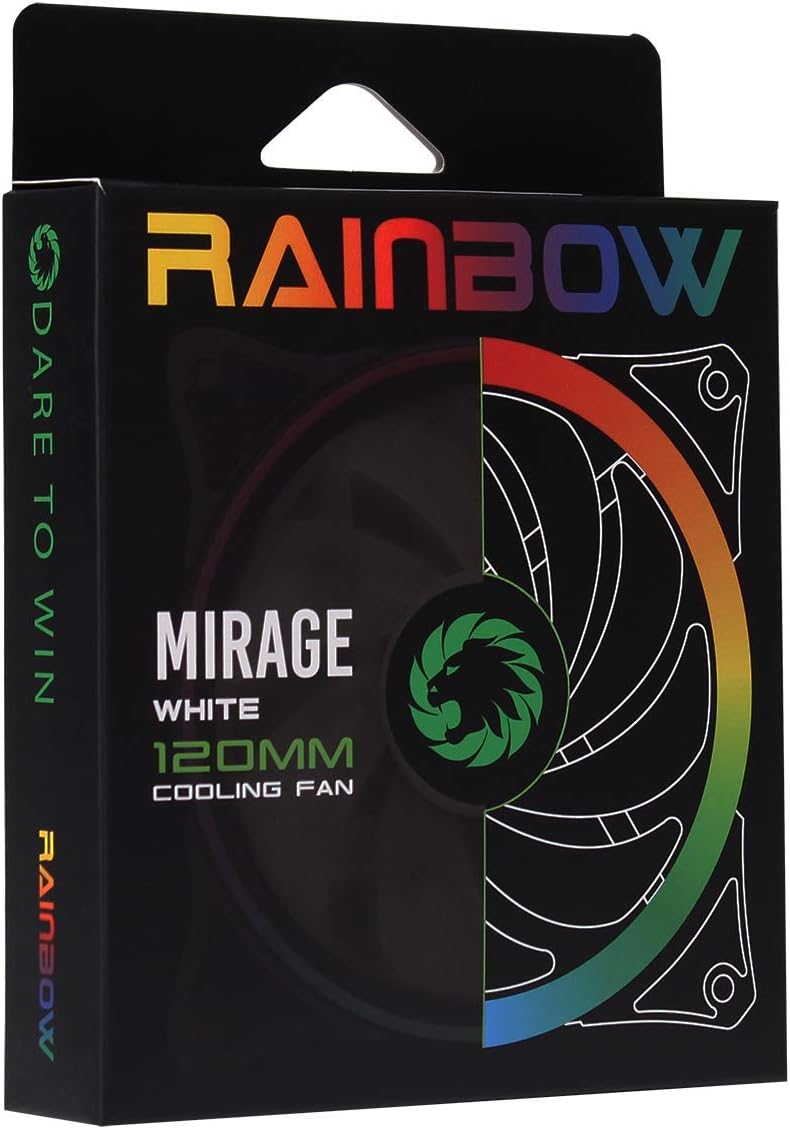
Image 3.1: Retail packaging for the GameMax Mirage fan.
4. Настройка і ўстаноўка
Follow these steps to install your GameMax Mirage 120mm PC Cooling Fan:
- Падрыхтуйце сваю сістэму: Power off your computer and unplug it from the power outlet. Open your computer case to access the fan mounting locations.
- Устанавіце вентылятар: Position the fan in your desired location (e.g., case front, rear, top, or radiator). Ensure the airflow direction is correct for your cooling setup. Use the four included mounting screws to secure the fan to the chassis or radiator. The fan features rubber pads on the corners to help reduce vibration.
- Падключэнне вентылятара: Locate the 3-pin power connector on the fan cable. Connect this cable to an available 3-pin fan header on your motherboard or a fan controller.
- Connect RGB Lighting: Locate the 5V addressable 3-pin Aura connector on the fan cable. Connect this to a compatible 5V ARGB header on your motherboard (often labeled 'VDG' or 'ARGB') or an external RGB controller/hub. Warning: Do not connect this to a 12V RGB header, as it will damage the LEDs.

Image 4.1: The 3-pin power connector (top) and 5V addressable 3-pin Aura connector (bottom).
The fan cables are braided for improved aesthetics and durability, helping to keep your build neat and tidy.
5. Інструкцыя па эксплуатацыі
Once installed, the GameMax Mirage fan operates as follows:
- Рэгуляванне хуткасці вентылятара: The fan speed is controlled via the 3-pin power connector. If connected to a motherboard fan header, the speed can typically be adjusted through your motherboard's BIOS/UEFI settings or dedicated software.
- Кіраванне RGB-падсветкай: The Rainbow LED lighting is controlled via the 5V addressable 3-pin Aura connector.
- If connected to a compatible motherboard (e.g., ASUS Aura Sync, MSI Mystic Light, Gigabyte RGB Fusion, ASRock Polychrome Sync), you can use the motherboard's software to customize lighting effects, colors, and synchronization with other ARGB components.
- If connected to an external RGB hub/controller, refer to the instructions provided with your specific hub/controller for lighting customization options.

Малюнак 5.1: Пад вуглом view of the GameMax Mirage fan showcasing its dual-ring Rainbow LED lighting.
6. Тэхнічнае абслугоўванне
Рэгулярнае тэхнічнае абслугоўванне дапамагае забяспечыць аптымальную прадукцыйнасць і даўгавечнасць вашага вентылятара астуджэння:
- Ачыстка ад пылу: Periodically inspect the fan blades and frame for dust accumulation. Use compressed air or a soft brush to gently remove dust. Ensure the fan is powered off and unplugged before cleaning.
- Праверка кабеля: Occasionally check the power and RGB cables for any signs of wear or damage.
7. Выпраўленне непаладак
- Вентылятар не круціцца:
- Ensure the 3-pin power connector is securely plugged into a functional fan header on the motherboard or controller.
- Check motherboard BIOS/UEFI settings to ensure the fan header is enabled and configured correctly.
- LEDs Not Lighting Up or Incorrect Colors:
- Verify the 5V addressable 3-pin Aura connector is securely connected to a compatible 5V ARGB header (not 12V RGB).
- Ensure your motherboard's RGB software or external controller is properly installed and configured.
- If using a splitter or hub, ensure it is powered and functioning correctly.
- Празмерны шум:
- Check for any cables or obstructions interfering with the fan blades.
- Ensure the fan is securely mounted and the rubber pads are properly seated to absorb vibrations.
- Dust accumulation can cause imbalance and noise; clean the fan as described in the Maintenance section.
8. Тэхнічныя характарыстыкі
| Асаблівасць | Спецыфікацыя |
|---|---|
| мадэль | MIRAGEWHITE FINS |
| Памер вентылятара | 120 мм х 120 мм х 25 мм (0.98 х 4.72 х 4.72 цалі) |
| Тып падшыпніка | Гідраўлічны падшыпнік |
| лопасці вентылятара | 7 лязоў |
| Тып святлодыёда | Addressable Rainbow LED (Dual-Ring) |
| Раз'ём харчавання вентылятара | 3-кантактны |
| Раз'ём RGB | 5V Addressable 3-Pin Aura Connector |
| Аперацыйная Voltage | 5 Volts (for RGB) / 12 Volts (for fan motor, typical for 3-pin) |
| Намінальны ватtage | 3 ват |
| Максімальная хуткасць кручэння | 1800 XNUMX абаротаў у хвіліну |
| Узровень шуму | Прыкладна 25 дБ(А) |
| Матэрыял | Rubber (for vibration dampening) |

Малюнак 8.1: Спіна view of the GameMax Mirage fan, displaying the product label with model and electrical specifications.
9. Гарантыя і падтрымка
Каб атрымаць інфармацыю аб гарантыі і тэхнічнай падтрымцы, звярніцеся да афіцыйнага сайта GAMEMAX. webсайт або звярніцеся да прадаўца. Захоўвайце пацвярджэнне пакупкі для прэтэнзій па гарантыі.