1. Уводзіны
Дзякуй за пакупкуasing the Rockville ROCKSTRIP 252 LED Light Bar. This manual provides essential information for the safe and optimal operation of your device. Please read these instructions thoroughly before use and retain them for future reference.

Фронт view of the Rockville ROCKSTRIP 252 LED Light Bar displaying various colors.
Official product video demonstrating the Rockville ROCKSTRIP 252 LED Light Bar's features and lighting effects.
2. Што ў скрынцы
- Rockstrip 252 LED Light Bar
- 2 х мацавання кранштэйнаў
- Пульт дыстанцыйнага кіравання
- Сеткавы шнур
- Кіраўніцтва карыстальніка (гэты дакумент)
- Інфармацыя аб гарантыі
3. Прадукт скончыўсяview
The ROCKSTRIP 252 is a versatile LED light bar designed for stage, DJ, and event lighting. It features 252 bright RGB LEDs, offering dynamic color mixing and various control options.
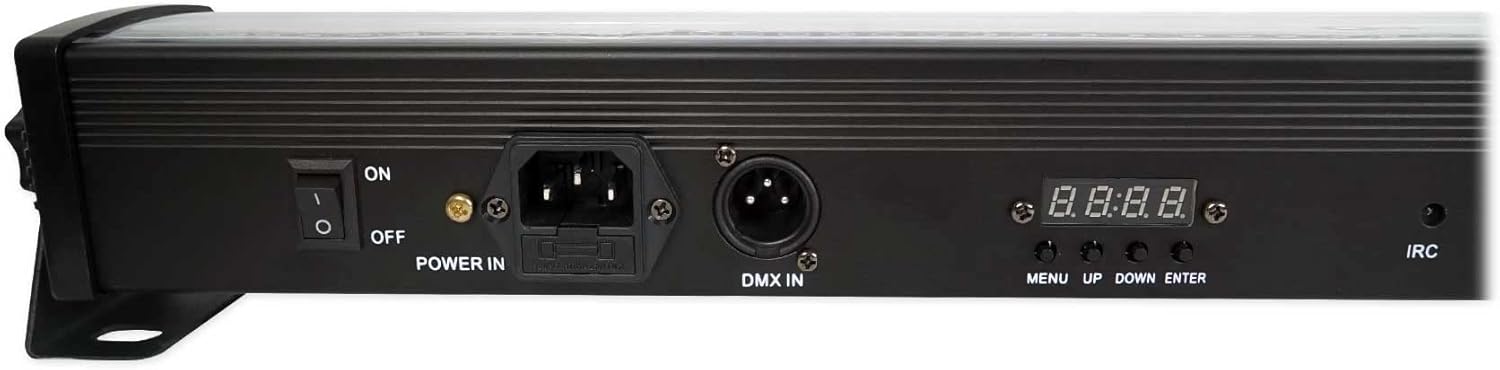
Тыл view of the ROCKSTRIP 252, highlighting the power input, DMX input, and control panel with menu buttons and LED display.
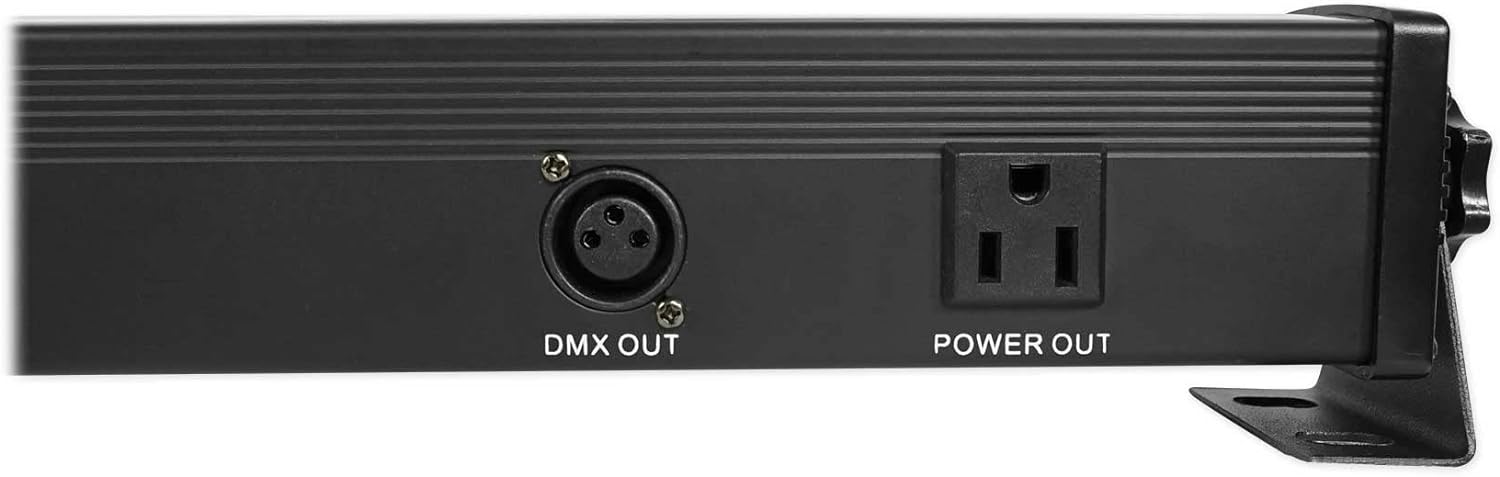
Тыл view of the ROCKSTRIP 252, showing the DMX output and power output for daisy-chaining multiple units.
4. Настройка
4.1 Мантаж
The ROCKSTRIP 252 comes with adjustable mounting brackets for flexible placement. These brackets allow for floor standing, wall mounting, or truss mounting using appropriate clamps (прадаецца асобна).
Official product video demonstrating how to place and position the Rockville ROCKSTRIP 252 LED Light Bar using its mounting brackets for various setups.
- Attach the included mounting brackets to the sides of the light bar using the provided screws and knobs.
- Пераканайцеся, што кранштэйны надзейна замацаваны.
- Position the light bar as desired (e.g., on a flat surface, against a wall, or attached to a truss). Adjust the angle using the knobs on the brackets.
4.2 Падключэнне харчавання
Connect the included power cord to the 'POWER IN' port on the rear of the unit and then to a standard electrical outlet. The unit features a 'POWER OUT' port for daisy-chaining power to additional ROCKSTRIP 252 units (up to 20 units maximum).
4.3 Master/Slave Setup
To synchronize multiple ROCKSTRIP 252 units without a DMX controller, use the Master/Slave mode.
Official product video demonstrating how to set up Master-Slave mode on the Rockville ROCKSTRIP 252 LED Light Bar.
- Designate one unit as the Master. This unit will control all other connected units.
- Connect the 'DMX OUT' of the Master unit to the 'DMX IN' of the first Slave unit using a DMX cable.
- For additional Slave units, connect the 'DMX OUT' of the previous Slave unit to the 'DMX IN' of the next Slave unit, forming a daisy chain.
- On each Slave unit, use the control panel to navigate to the Slave mode (usually indicated as 'SL.01', 'SL.02', etc.) and select a Slave ID.
- Set the Master unit to any desired operating mode (e.g., Auto, Sound Active, Static Color). The Slave units will mirror the Master's settings.
4.4 DMX Control Setup
The ROCKSTRIP 252 supports 3, 4, 5, or 7-channel DMX modes for advanced control via a DMX controller.
Official product video demonstrating how to set up a DMX controller with the Rockville ROCKSTRIP 252 LED Light Bar.
- Connect the 'DMX OUT' of your DMX controller to the 'DMX IN' of the first ROCKSTRIP 252 unit.
- For multiple units, connect the 'DMX OUT' of the first unit to the 'DMX IN' of the next, and so on.
- On each ROCKSTRIP 252 unit, use the control panel to select the desired DMX channel mode (e.g., 3CH, 4CH, 5CH, 7CH).
- Set a unique DMX address for each unit. The first unit typically starts at A001, the second at A001 + (number of channels), and so forth.
- Refer to the DMX guide in the full owner's manual for detailed channel assignments and functions.
4.5 Налада дыстанцыйнага кіравання
The ROCKSTRIP 252 includes a wireless remote control for convenient operation.
Official product video demonstrating how to set up and use the remote control with the Rockville ROCKSTRIP 252 LED Light Bar.

The included DMX LED Remote Controller, showing buttons for Auto, Sound, DMX, Black Out, Red, Green, Blue, White, Jump, Fade, Color, Flash, and numbered presets.
- Ensure the light bar is powered on.
- Point the remote directly at the IRC sensor on the light bar's control panel.
- Use the buttons on the remote to select various modes, colors, and effects.
5. Рэжымы працы
The ROCKSTRIP 252 offers several built-in operating modes:
- Аўтаматычны рэжым: Cycles through pre-programmed light shows. Use the number buttons on the remote to select different auto programs.
- Актыўны рэжым гуку: Lights react to ambient sound. Use the remote to switch between sound banks and adjust sensitivity.
- Статычны каляровы рэжым: Displays a single, solid color. Select Red, Green, Blue, or White directly from the remote, or use the 'Color' button to cycle through additional colors.
- Рэжым строб: Flashes a selected color at an adjustable speed. Activate via the 'Flash' button on the remote and use '+'/'–' to adjust speed.
- Рэжым знікнення: Smoothly transitions between colors. Activate via the 'Fade' button on the remote.
- Рэжым скачка: Instantly switches between colors. Activate via the 'Jump' button on the remote.
For detailed control over speed and specific program selection, refer to the full owner's manual or use a DMX controller.
6. Тэхнічнае абслугоўванне
- Уборка: Regularly clean the exterior of the unit with a soft, dry cloth. Do not use harsh chemicals or abrasive materials.
- Ачыстка аб'ектыва: Keep the LED lenses clean for optimal light output. Use a soft cloth and a mild glass cleaner if necessary.
- захоўванне: Калі прылада не выкарыстоўваецца, захоўвайце яе ў прахалодным, сухім месцы, удалечыні ад прамых сонечных прамянёў і экстрэмальных тэмператур.
- агляд: Periodically check all cables and connections for any signs of damage. Replace damaged components immediately.
7. Выпраўленне непаладак
| праблема | Магчымая прычына | Рашэнне |
|---|---|---|
| Прылада не ўключаецца | No power supply; Power switch off; Blown fuse | Check power cable connection; Ensure power switch is ON; Replace fuse (2A, 250V) |
| Няма кантролю DMX | Incorrect DMX address/channel; Faulty DMX cable; DMX controller issue | Verify DMX settings; Test with a different DMX cable; Check DMX controller functionality |
| Пульт дыстанцыйнага кіравання не працуе | Remote battery low/dead; Obstruction to IRC sensor; Remote not pointed correctly | Replace remote battery; Ensure clear line of sight to sensor; Point remote directly at sensor |
| Lights not synchronized in Master/Slave | Incorrect DMX cable connection; Slave units not set to Slave mode | Check DMX daisy chain; Set all slave units to appropriate Slave mode (e.g., SL.01) |
8. Тэхнічныя характарыстыкі
- святлодыёды: 252 (84 Red, 84 Green, 84 Blue)
- Магутнасць: 50W Max, 110/220V switchable (90-250V AC 50-60Hz)
- Каналы DMX: 3, 4, 5, or 7-channel modes
- Рэжымы кіравання: Auto, Sound Active, DMX, Master/Slave, Remote
- Тэрмін службы святлодыёда: 100,000 гадзіны
- Дыммер: 0-100%
- Строб: Adjustable speed (1-13Hz)
- Люкс: 1,452 @ 1 м
- Вага: 3.97 фунта
- Памеры: 40.16 цалі х 2.64 цалі х 2.56 цалі (102 см х 6.7 см х 6.5 см)
- матэрыял: Алюмініевы корпус
9. Гарантыя і падтрымка
For warranty information or technical support, please contact Rockville customer service:
- тэлефон: 1-646-758-0144 (Open 24/7)
- электронная пошта: sales@rockvilleaudio.com


