Уводзіны
This manual provides detailed instructions for the installation, operation, and maintenance of your Gamemax G503X Elysium Gaming PC Case. Please read this manual thoroughly before beginning installation to ensure proper setup and safe use of your product. Keep this manual for future reference.
Інфармацыя па бяспецы
- Always disconnect the power supply from the wall outlet before installing or removing any components inside the PC case.
- Асцярожна звяртайцеся з усімі кампанентамі, каб пазбегнуць пашкоджанняў ад статычнай электрычнасці. Падумайце аб выкарыстанні антыстатычнага бранзалета.
- Avoid placing the PC case in direct sunlight, near heat sources, or in areas with high humidity.
- Забяспечце належную вентыляцыю вакол корпуса, каб прадухіліць перагрэў.
- Захоўвайце дробныя дэталі і інструменты далей ад дзяцей.
- Do not attempt to modify the case or its components, as this may void your warranty and pose a safety risk.
Змест пакета
Калі ласка, праверце змесціва ўпакоўкі. Калі якія-небудзь прадметы адсутнічаюць або пашкоджаныя, звярніцеся да прадаўца.
- Gamemax G503X Elysium Mid Tower PC Case
- Pre-installed 120mm RGB Fans (quantity as specified on packaging, typically 3)
- Камплект аксесуараў (шрубы, распоркі, кабельныя сцяжкі і г.д.)
- Кіраўніцтва карыстальніка (гэты дакумент)
Асаблівасці
- Mid Tower design
- Full transparent acrylic side window
- Support for ATX, Micro ATX, and Mini-ITX motherboards
- Front I/O: 1x USB 3.0, 2x USB 2.0, HD Audio (input/output)
- Integrated fan control (High/Off/Low)
- Ample space for cable management behind the motherboard tray
- Support for long graphics cards (up to 380mm)
- Multiple drive bays: 1x 5.25", 2x 3.5" HDD, 2x 2.5" SSD
- Pre-installed RGB fans for enhanced aesthetics and cooling
Настройка і ўстаноўка
1. Распакаванне чахла
Carefully remove the case from its packaging. Inspect for any damage during shipping. Remove any protective films from the acrylic side panel.
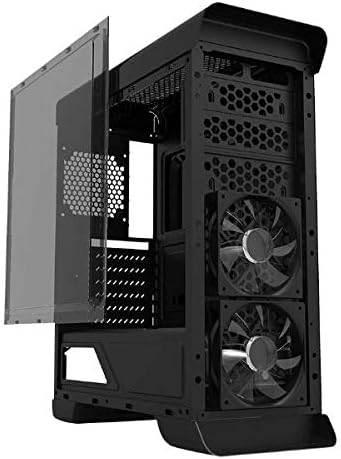
Выява: Збоку view of the Gamemax G503X Elysium case with the transparent acrylic panel detached, showing the internal structure and front fans.
2. Устаноўка мацярынскай платы
- Lay the case on its side.
- Install the necessary motherboard standoffs into the motherboard tray according to your motherboard's form factor (ATX, Micro ATX, Mini-ITX).
- Акуратна ўстаўце матчыну плату на апоры, сумясціўшы адтуліны для шруб.
- Замацуйце матчыну плату з дапамогай прадастаўленых шруб.
3. Устаноўка драйвера
3.1. 5.25" Drive (Optical Drive)
The case features one 5.25" drive bay. Remove the front panel cover, slide the drive into the bay, and secure it with screws or tool-less clips if available.
3.2. 3.5" HDD Drives
Install up to two 3.5" HDDs into the designated drive cages. These typically use trays or direct screw mounting. Ensure they are securely fastened.
3.3. 2.5" SSD Drives
Install up to two 2.5" SSDs onto the dedicated mounting points, usually located behind the motherboard tray or on the PSU shroud. Secure with screws.
4. Усталёўка кулера працэсара
Install your CPU cooler according to its manufacturer's instructions. Ensure the cooler's height does not exceed the maximum supported height of 158mm for this case.
5. Усталёўка відэакарты (GPU)
- Remove the necessary PCI slot covers from the rear of the case (up to 7 slots available).
- Устаўце відэакарту ў адпаведны слот PCIe на матчынай плаце.
- Secure the graphics card with screws. The case supports graphics cards up to 380mm in length.

Выява: Задняя частка view of the Gamemax G503X Elysium case, highlighting the 7 PCI expansion slots and the rear fan mount.
6. Fan Installation and Configuration
The case comes with pre-installed RGB fans. Additional fan mounting options are available:
- Спераду: Up to 3x 120mm fans (2 pre-installed, 1 optional)
- Ззаду: 1x 120mm fan (optional, may be pre-installed)
- Верх: Up to 2x 120mm fans (optional)
Connect all fan power cables to your motherboard or a fan controller. The case includes an integrated fan controller for speed adjustment.
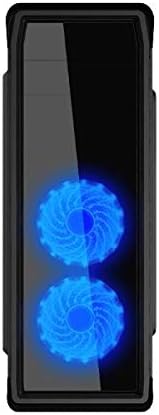
Выява: спераду view of the Gamemax G503X Elysium case, showcasing the two illuminated RGB fans visible through the front panel.
7. Кіраванне кабелем
Utilize the space behind the motherboard tray and the provided cable tie points to route and secure cables. This improves airflow and aesthetics.
8. Падключэнне ўваходных/выхадных элементаў пярэдняй панэлі
Connect the following cables from the case's front panel to the corresponding headers on your motherboard:
- Раз'ём USB 3.0
- Загалоўкі USB 2.0
- HD Audio header (for headphone and microphone jacks)
- Power switch, Reset switch, Power LED, HDD LED headers
Кіраванне корпусам
Уключэнне
Once all components are installed and connected, close the side panel. Connect your monitor, keyboard, mouse, and power cable to the PC. Press the power button on the front panel to start your system.
Кіраванне вентылятарам
The Gamemax G503X Elysium features an integrated fan controller on the top panel. Use this controller to adjust the speed of the connected case fans to High, Low, or Off, depending on your cooling needs and noise preference.
RGB асвятленне
The pre-installed fans feature RGB LEDs. The lighting effects are typically controlled via the motherboard's RGB software or a dedicated controller if included with the fans. Refer to your motherboard manual for RGB software instructions.
Тэхнічнае абслугоўванне
Уборка
Regular cleaning helps maintain optimal performance and extends the lifespan of your components. Use a can of compressed air to remove dust from inside the case, especially from fans and heatsinks. Wipe exterior surfaces with a soft, damp тканіна. Пазбягайце выкарыстання агрэсіўных хімікатаў або абразіўных матэрыялаў.
Periodically check and clean any dust filters (if present) to ensure unrestricted airflow.
Ліквідацыю непаладак
- Сістэма не ўключаецца: Ensure all power cables (motherboard, CPU, GPU, drives) are securely connected. Check that the power supply switch is in the 'ON' position. Verify front panel power switch connection to the motherboard.
- Fans are not spinning: Check fan power connections to the motherboard or fan controller. Ensure the fan controller is set to 'High' or 'Low', not 'Off'.
- Няма вываду на дысплей: Ensure your graphics card is properly seated and connected to the power supply. Verify that your monitor cable is connected to the graphics card, not the motherboard's integrated graphics port (unless using integrated graphics).
- Праблемы з перагрэвам: Ensure all case fans are spinning correctly and oriented for proper airflow (intake/exhaust). Check CPU cooler installation and thermal paste application. Ensure the case is not obstructed.
For further assistance, consult your motherboard and component manuals or contact Gamemax support.
Тэхнічныя характарыстыкі
| Асаблівасць | Спецыфікацыя |
|---|---|
| Тып корпуса | Сярэдняя вежа |
| мадэль | G503X Elysium |
| Колер | Чорны |
| Бакавая панэль | Full Transparent Acrylic |
| Падтрымка мацярынскай платы | ATX, Micro ATX, Mini-ITX |
| Прывадныя адсекі | 1x 5.25", 2x 3.5" HDD, 2x 2.5" SSD |
| PCI слотаў пашырэння | 7 |
| Пярэднія парты I / O | 1x USB 3.0, 2x USB 2.0, HD Audio (Input/Output) |
| Кіраванне вентылятарам | Integrated (High/Off/Low) |
| Папярэдне ўсталяваныя вентылятары | 3x 120mm RGB Fans (typically 2 front, 1 rear) |
| Optional Fan Support | Front: 3x 120mm; Rear: 1x 120mm; Top: 2x 120mm |
| Максімальная вышыня працэсарнага кулера | 158 мм |
| Максімальная даўжыня відэакарты | 380 мм |
| Прастора для пракладкі кабеляў | Yes (behind motherboard tray) |
| Матэрыял | Acrylic (side panel) |
| Вага прадмета | 5.75 кг |
Гарантыя і падтрымка
Gamemax products come with a limited warranty. Please refer to the warranty information provided with your purchase or visit the official Gamemax website for details on warranty terms and conditions. For technical support or inquiries, please contact your retailer or Gamemax customer service.


