1. Уводзіны
The AVMATRIX VS0601 is a compact, multi-format video switcher designed for professional video production. It features a robust metal housing and supports 6 channels of SDI and HDMI inputs, offering versatile video switching, audio mixing, and various transition effects. The unit is engineered for compatibility with diverse equipment, providing flexibility for live events and broadcast applications.
Асноўныя характарыстыкі:
- 6 channel inputs: 4xSDI and 2xHDMI inputs
- 2xSDI & 1xHDMI PGM outputs, 1xSDI AUX output, 1xSDI & 1xHDMI multiview выхады
- T-Bar/ AUTO/ CUT transitions and MIX/ FADE/ WIPE effects
- Picture-in-Picture (PiP) mode with adjustable size and position
- Audio mixer: 3.5mm stereo/ RCA audio & SDI/ HDMI embedded audio
- Інтэрфейс GPIO для жывой сістэмы падліку
- FTB (Fade to Black) function for emergency situations
2. Настройка
2.1 Распакаванне і праверка
Carefully unpack the VS0601 switcher and inspect it for any signs of damage. Ensure all components listed in the packaging are present.
2.2 Падключэнне сілкавання
- Connect the provided DC 12V power adapter to the 'DC 12V' input port on the rear panel of the VS0601.
- Падключыце адаптар сілкавання да адпаведнай электрычнай разеткі.
- Ensure the 'OFF/ON' switch on the rear panel is in the 'OFF' position before connecting power.
2.3 Падключэнні відэаўваходаў
The VS0601 supports both SDI and HDMI video inputs. The device auto-detects the input signal format.
- SDI Inputs: Connect up to four SDI sources (cameras, media players, etc.) to the 'SDI IN' ports (1-4) using BNC cables.
- Уваходы HDMI: Connect up to two HDMI sources to the 'HDMI IN' ports (5-6) using HDMI cables.
2.4 Падключэнні відэавыхадаў
The switcher provides multiple program (PGM) and multiview выхады.
- PGM Outputs: Connect your main display or recording device to the 'PGM OUT' SDI (x2) or HDMI (x1) ports.
- AUX выхад: Use the 'AUX' SDI output for an additional program feed.
- Мультыview Выхады: Connect a monitor to the 'MULTIVIEW OUT' SDI or HDMI ports to view all input sources simultaneously.
2.5 Аўдыё злучэння
- Аўдыё ўваход: Connect external audio sources to the 3.5mm stereo audio input or the RCA (L/R) audio input ports.
- Аўдыявыхад: Connect monitoring headphones or speakers to the 3.5mm stereo audio output or the RCA (L/R) audio output ports.
2.6 Іншыя сувязі
- TALLY: Connect a tally system to the DB-15 GPIO interface for live production cues.
- LAN: Use the RJ45 LAN port for network control and time synchronization.

Figure 2.1: Rear panel connections of the AVMATRIX VS0601. This image displays the various input and output ports including SDI IN, HDMI IN, PGM OUT, MULTIVIEW OUT, AUX, Audio IN/OUT, TALLY, LAN, and DC 12V power input.
3. Інструкцыя па эксплуатацыі
3.1 Уключэнне/выключэнне
- To power on, switch the 'OFF/ON' toggle on the rear panel to the 'ON' position.
- To power off, switch the 'OFF/ON' toggle to the 'OFF' position.
3.2 Элементы кіравання на пярэдняй панэліview
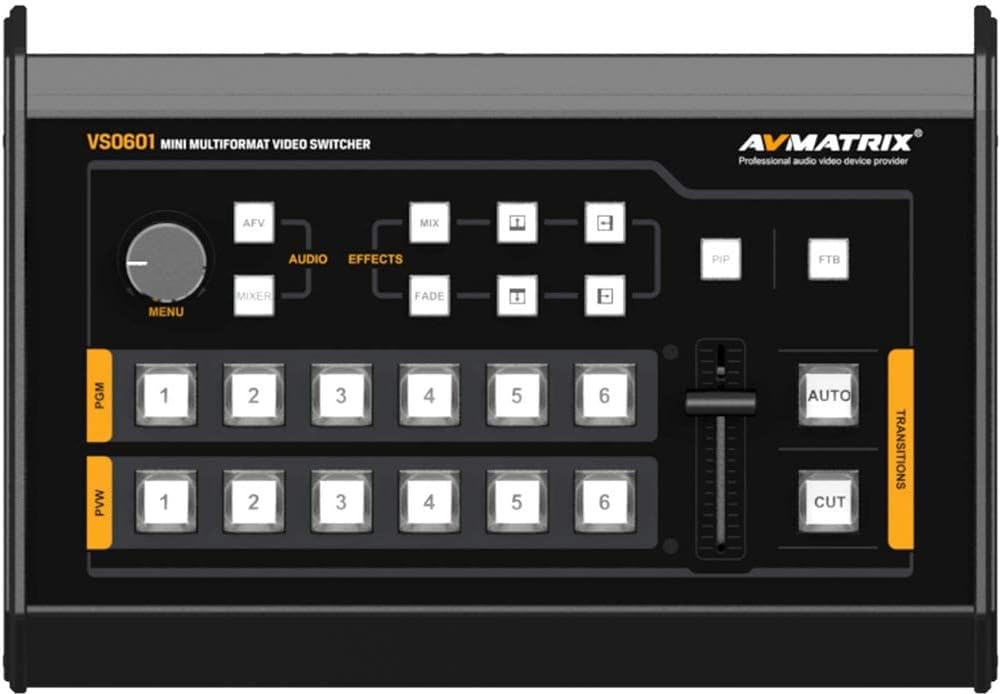
Figure 3.1: Front control panel of the AVMATRIX VS0601. This image highlights the PGM and PVW input selection buttons, T-Bar fader, AUTO/CUT transition buttons, MENU knob, and effect selection buttons (MIX, FADE, WIPE, PiP, FTB).
3.3 Input Selection (PGM & PVW)
The front panel features two rows of numbered buttons (1-6) for Program (PGM) and Preview (PVW) selection.
- PGM (Program): The top row of buttons selects the input currently live on the main output.
- PVW (Preview): The bottom row of buttons selects the input to be prepared for the next transition. This input will be visible on the multiview выхад.
3.4 Пераходы
The VS0601 offers various transition methods and effects.
- ВЫРАЗ: Press the 'CUT' button for an instant, hard cut between the PVW and PGM sources.
- АЎТА: Press the 'AUTO' button to execute a smooth transition (e.g., fade, wipe) between PVW and PGM sources at a preset speed.
- Т-бар: Manually control the transition speed and direction by moving the T-Bar fader. Pushing the T-Bar up or down will transition between the PVW and PGM sources.
- Effects (MIX, FADE, WIPE): Select the desired transition effect (MIX, FADE, WIPE) using the dedicated buttons above the T-Bar. The selected effect will be applied when using the AUTO button or T-Bar.
3.5 Picture-in-Picture (PiP) Mode
Activate PiP mode by pressing the 'PiP' button. Use the 'MENU' knob and associated buttons to adjust the size and position of the PiP window. The PiP source is typically the PVW input, overlaid on the PGM input.
3.6 Звядзенне гуку
The audio mixer allows control over embedded SDI/HDMI audio and external analog audio inputs.
- Use the 'AUDIO' buttons and 'MENU' knob to navigate and adjust audio levels for each input.
- The 3.5mm stereo and RCA inputs can be mixed with embedded audio from video sources.
3.7 FTB (Fade to Black)
Press the 'FTB' button to instantly fade the program output to black. Press it again to return to the previous program source.
4. Тэхнічнае абслугоўванне
4.1 Ачыстка
To maintain optimal performance and appearance, regularly clean the exterior of the VS0601.
- Use a soft, dry cloth to wipe down the unit.
- Для ўстойлівых плям злёгку пачысціцеampen тканіна з вадой або мяккім неабразіўным ачышчальнікам.
- Пазбягайце выкарыстання агрэсіўных хімікатаў, растваральнікаў або абразіўных матэрыялаў, бо яны могуць пашкодзіць пакрыццё.
- Ensure no liquids enter the device through vents or ports.
4.2 Умовы навакольнага асяроддзя
Operate the VS0601 within the specified environmental ranges to prevent damage and ensure longevity.
- Працоўная тэмпература: -20 да 60°C (ад -4 да 140°F)
- Тэмпература захоўвання: -30 да 70°C (ад -22 да 158°F)
- Працоўная вільготнасць: 20%~70% адноснай вільготнасці (без кандэнсацыі)
Avoid exposing the unit to extreme temperatures, direct sunlight, excessive dust, or high humidity.
4.3 Power Supply Care
Always use the original power adapter provided with the unit. Do not use damaged cables or adapters. Disconnect power during electrical storms or when the unit is not in use for extended periods.
5. Выпраўленне непаладак
This section addresses common issues you might encounter with the AVMATRIX VS0601. If problems persist, contact customer support.
5.1 Няма відэавыхаду
- Праверце магутнасць: Ensure the unit is powered on and the power adapter is securely connected.
- Verify Input Sources: Confirm that all video input sources are active and sending a signal.
- Праверце кабелі: Ensure all SDI and HDMI cables are securely connected to both the switcher and the display/recording device. Try swapping cables if possible.
- Выбар уводу: Verify that the correct input is selected on the PGM row of buttons.
- Выхадны фармат: Check if the output format of the VS0601 is compatible with your display/recording device. The PGM output can be scaled.
5.2 Няма аўдыёвыхаду
- Check Audio Connections: Ensure external audio cables are properly connected to the audio input/output ports.
- Узроўні гуку: Verify that audio levels are not muted or set too low in the audio mixer settings.
- Убудаваны аўдыё: If using embedded audio, confirm the source device is sending audio with the video signal.
5.3 Device Freezes or Unexpected Power Loss
- крыніца харчавання: Ensure the power adapter is providing stable 12V, 2A power. An unstable power source can cause interruptions.
- Вентыляцыя: Check that the unit has adequate ventilation and is not overheating. Ensure vents are not blocked.
- Прашыўка: Check the AVMATRIX website for any available firmware updates that may address stability issues.
- Скінуць: Power cycle the device by turning it off, waiting 10 seconds, and then turning it back on.
5.4 мультыview Not Displaying All Inputs
- Мультыview Выходнае злучэнне: Ensure the monitor is correctly connected to the 'MULTIVIEW OUT' port.
- Уваходныя сігналы: Confirm that all connected input sources are active and sending valid video signals.
6. Тэхнічныя характарыстыкі
| Асаблівасць | Спецыфікацыя |
|---|---|
| Відэа ўваходы | 4x 3G/HD/SD-SDI, 2x HDMI |
| Хуткасць відэа SDI | Аўтаматычнае вызначэнне, SD/HD/3G-SDI |
| Адпаведнасць SDI | SMPTE 259M/ SMPTE 292M/ SMPTE 424M |
| PGM выхады | 2x 3G/HD/SD-SDI; 1x HDMI Type A |
| Фармат вываду PGM | 1080p 60/50/30/25/24; 1080i 50/60 |
| Мультыview Выхад | 1x 3G-SDI; 1x HDMI Type A |
| Мультыview Фармат вываду | 1080р 60 |
| Аўдыё ўваход | 1x 3.5mm Stereo audio; 1x RCA (L/R) |
| Аўдыёвыхад | 1x 3.5mm Stereo audio; 1x RCA (L/R) |
| GPIO | Tally, DB-15x1 |
| лакальная сетка | RJ45, Synchronize local time |
| Працоўная тэмпература | -20 да 60°C |
| Тэмпература захоўвання | -30 да 70°C |
| Аперацыя Вільготнасць | 20%~70% адноснай вільготнасці |
| Энергаспажыванне | ≤ 14.5 Вт |
| Электразабеспячэнне | DC 12V, 2A |
| Памеры | 6.78 цалі х 2.17 цалі х 9.81 цалі (17.22 х 5.51 х 24.92 см) |
| Вага | 2.2 фунтаў (1 кг) |
7. Інфармацыя аб гарантыі
Specific warranty terms and conditions for the AVMATRIX VS0601 may vary by region and reseller. Please refer to the warranty card included with your product or contact your point of purchase for detailed information regarding warranty coverage, duration, and service procedures. Keep your proof of purchase for warranty claims.
8. Падтрымка
For technical assistance, troubleshooting beyond this manual, or service inquiries, please contact AVMATRIX customer support or your authorized reseller. You may also visit the official AVMATRIX website for additional resources, FAQs, and firmware updates.
Інтэрнэт-рэсурсы:
- AVMATRIX Official Webсайт: www.avmatrix.net (Звярніце ўвагу: гэта запаўняльнік URL, праверце сапраўдную афіцыйную інфармацыю website for AVMATRIX)


