1. Уводзіны
The ASUS MW203 is a multi-device wireless silent mouse designed for comfort and versatility. It offers seamless connectivity across up to three devices using 2.4GHz RF or Bluetooth 3.0/5.0, features adjustable DPI settings, and boasts a long battery life. This manual provides detailed instructions for setting up, operating, and maintaining your ASUS MW203 mouse.
2. Прадукт скончыўсяview
Familiarize yourself with the components and features of your ASUS MW203 mouse.

Малюнак 2.1: Скончанаview of ASUS MW203 mouse features, including durable switches, battery life, LED indicator, DPI switch, ergonomic shape, silent buttons, and multi-device connectivity.
Асноўныя характарыстыкі:
- Эрганамічны дызайн: Features rubberized sides for comfortable long-term use.
- Трывалыя перамыкачы: Equipped with switches rated for a 10-million-click lifespan.
- Доўгі тэрмін службы батарэі: Up to 13 months of battery life.
- Пераключальнік DPI: Adjustable DPI settings (1000/1600/2400) for precise control.
- Бясшумныя кнопкі: Almost-silent mouse buttons for quiet operation.
- Падключэнне некалькіх прылад: Simultaneously connects with up to 3 devices via 2.4GHz RF, Bluetooth 5.0, and Bluetooth 3.0.
- Святлодыёдны індыкатар: Provides status for DPI switch and low battery.

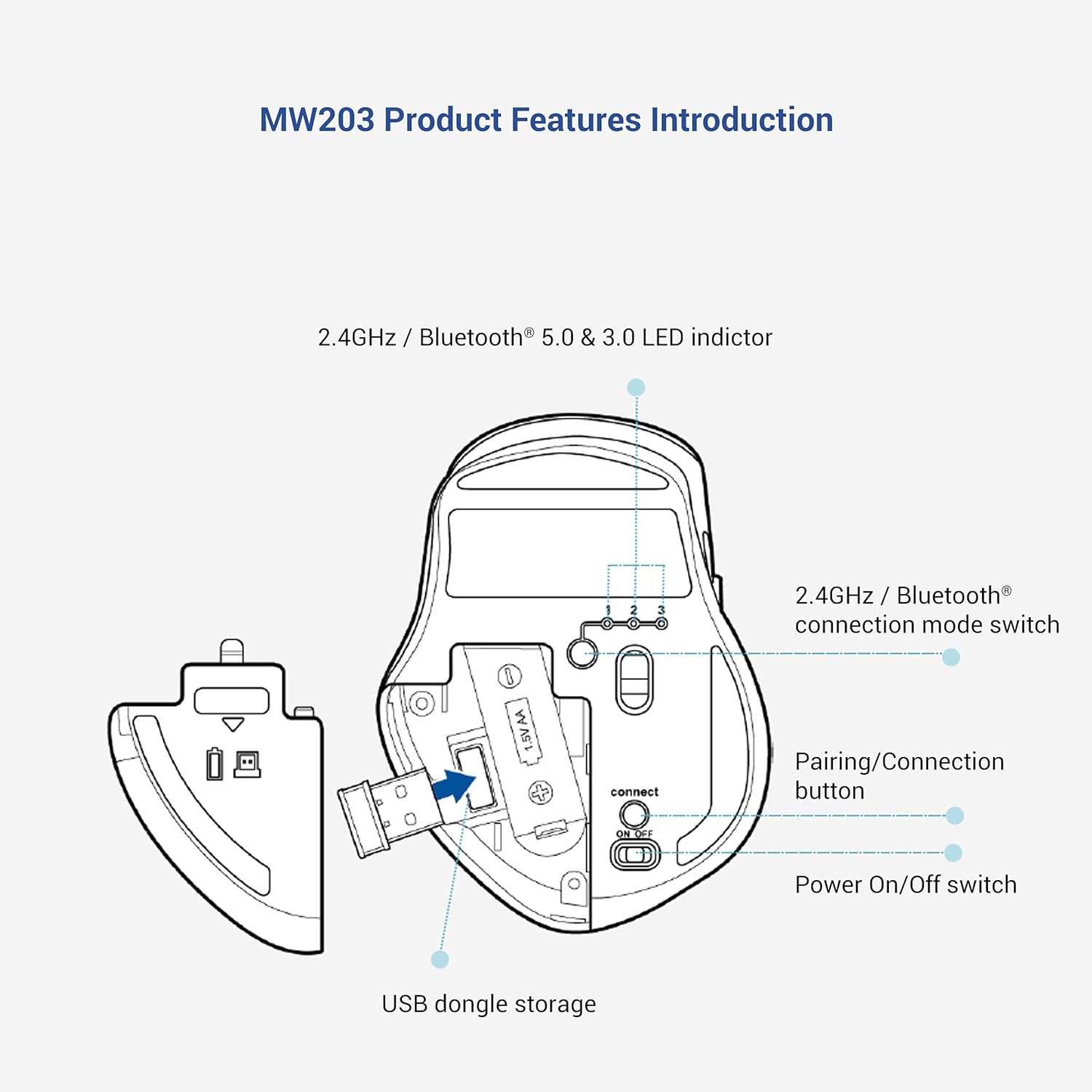
Малюнак 2.2: Знізу view of the ASUS MW203 mouse, showing the battery compartment, USB dongle storage, 2.4GHz/Bluetooth connection mode switch, pairing/connection button, and power on/off switch.
3. Настройка
3.1. Устаноўка акумулятара
- Знайдзіце батарэйны адсек на ніжняй баку мышы.
- Адкрыйце крышку батарэйнага адсека.
- Устаўце адну батарэйку тыпу АА, сачыце за правільнай палярнасцю (+/-).
- Надзейна зачыніце крышку батарэйнага адсека.
3.2. Connecting via 2.4GHz USB Nano Receiver
- Locate the USB Nano Receiver stored inside the battery compartment of the mouse.
- Remove the USB Nano Receiver.
- Plug the USB Nano Receiver into an available USB port on your computer (PC or Laptop).
- Turn on the mouse using the Power On/Off switch on the bottom.
- Set the 2.4GHz / Bluetooth connection mode switch to the "1" position (2.4GHz mode).
- Ваш камп'ютар павінен аўтаматычна выявіць і ўсталяваць неабходныя драйверы. Мыш гатовая да выкарыстання.
3.3. Падключэнне праз Bluetooth
- Turn on the mouse using the Power On/Off switch on the bottom.
- Set the 2.4GHz / Bluetooth connection mode switch to either "2" (Bluetooth 3.0) or "3" (Bluetooth 5.0) depending on your device's compatibility.
- Press and hold the Pairing/Connection button on the bottom of the mouse for 3 seconds until the LED indicator starts blinking, indicating pairing mode.
- On your computer (PC or Laptop) or compatible device (e.g., tablet), navigate to the Bluetooth settings.
- Пошук new devices and select "ASUS MW203" from the list.
- Follow any on-screen prompts to complete the pairing process. The LED indicator will stop blinking once connected.
4. Інструкцыя па эксплуатацыі
4.1. Асноўныя функцыі мышы
- Пстрычка левай кнопкай мышы: Першаснае дзеянне, выбар.
- Пстрыкніце правай кнопкай мышы: Кантэкстнае меню.
- Кола пракруткі: Scroll up/down documents or web старонкі. Таксама можна націснуць для выканання функцыі сярэдняй кнопкай мышы.
- Бакавыя кнопкі: Typically configured for "Back" and "Forward" navigation in web браўзэры і file даследчыкі.

Малюнак 4.1: The ASUS MW203 features almost-silent buttons, allowing for quiet operation in various environments.
4.2. Рэгуляванне DPI
The DPI (Dots Per Inch) button, located below the scroll wheel, allows you to adjust the mouse sensitivity. Press the DPI button to cycle through the available settings:
- 1000 DPI: For precise control and slower cursor movement.
- 1600 DPI: Standard setting for general use.
- 2400 DPI: For faster cursor movement, suitable for larger screens or quick navigation.
Малюнак 4.2: The DPI switch allows selection between 1000, 1600, and 2400 DPI for customized cursor speed.
5. Падключэнне некалькіх прылад
The ASUS MW203 mouse can be paired with up to three different devices. Use the 2.4GHz / Bluetooth connection mode switch on the bottom of the mouse to switch between connected devices.
- Пазіцыя 1: 2.4GHz RF connection (via USB Nano Receiver).
- Пазіцыя 2: Bluetooth 3.0 connection.
- Пазіцыя 3: Bluetooth 5.0 connection.
To switch between devices, simply move the connection mode switch to the desired position. The mouse will automatically connect to the previously paired device for that channel.

Малюнак 5.1: The ASUS MW203 allows convenient switching between three connected devices with a single click of the mode switch.
6. Інфармацыя аб батарэі
The ASUS MW203 mouse operates on one AA battery, providing up to 13 months of usage depending on usage patterns.
6.1. Аўтаматычны рэжым сну
To conserve battery life, the mouse features an auto sleep mode that activates after a period of inactivity. To wake the mouse, simply nudge it or click any button. It will reconnect automatically without delay.

Малюнак 6.1: The auto sleep mode efficiently prolongs battery life up to 13 months.
6.2. Індыкатар разраду батарэі
The LED indicator on the mouse will signal when the battery level is low, prompting you to replace the AA battery.
7. Тэхнічнае абслугоўванне
7.1. Чыстка мышы
To maintain optimal performance, regularly clean your mouse.
- Выкарыстоўвайце мяккую безворсовую тканіну, злёгку dampпрамыйце вадой або мяккім ачышчальным растворам для працірання вонкавай паверхні.
- Пазбягайце выкарыстання агрэсіўных хімікатаў або абразіўных матэрыялаў.
- Сачыце за трапленнем вадкасці ва ўнутраныя кампаненты мышы.
- Clean the optical sensor on the bottom with a dry cotton swab if tracking issues occur.
7.2. Замена батарэі
When the low battery indicator lights up, replace the AA battery as described in Section 3.1. Dispose of used batteries responsibly according to local regulations.
8. Выпраўленне непаладак
- Мышка не рэагуе:
- Пераканайцеся, што мыш уключана.
- Праверце ўзровень зарада батарэі і пры неабходнасці заменіце яе.
- Verify the connection mode switch is set correctly (2.4GHz, BT3.0, or BT5.0).
- For 2.4GHz, ensure the USB Nano Receiver is securely plugged into a working USB port.
- For Bluetooth, ensure Bluetooth is enabled on your device and the mouse is paired. Try re-pairing if connection is lost.
- Перарывістае падключэнне або затрымка:
- Падсуньце мыш бліжэй да прымача/прылады.
- Пазбягайце выкарыстання мышы на металічных паверхнях, якія могуць перашкаджаць бесправадным сігналам.
- Ensure there are no other strong wireless devices causing interference.
- Try a different USB port for the receiver.
- Няправільнае адсочванне:
- Ачысціце аптычны датчык у ніжняй частцы мышы.
- Выкарыстоўвайце мыш на чыстай, небліскучай і аднастайнай паверхні (напрыклад, кілімку для мышы).
- Adjust the DPI setting to a lower value if the cursor is too jumpy.
- Праблемы з колам пракруткі:
- Ensure the scroll wheel is free of debris.
- If the scroll wheel is erratic, try cleaning around it with compressed air.
9. Тэхнічныя характарыстыкі
| Марка | ASUS |
| Назва мадэлі | MW203 |
| Тэхналогія падлучэння | 2.4GHz RF (USB), Bluetooth 5.0, Bluetooth 3.0 |
| Тэхналогія выяўлення руху | Аптычны |
| Налады DPI | 1000 / 1600 / 2400 DPI |
| Колькасць кнопак | 6 (Left, Right, Scroll Wheel, DPI, 2 Side Buttons) |
| Рука арыентацыі | правільна |
| Крыніца харчавання | 1 батарэі АА (у камплекце) |
| Сярэдні тэрмін службы батарэі | Да 13 месяцаў |
| Сумяшчальныя аперацыйныя сістэмы | Windows 10, Chrome OS |
| Сумяшчальныя прылады | Ноўтбук, ПК |
| Вага прадмета | 96 грам |
| Памеры прадмета (Д х Ш) | 10.5 Д х 8 Ш сантыметраў |
| Змесціва скрынкі | 1x ASUS MW203 Wireless Mouse, 1x AA Battery, 1x USB Nano Receiver |
| Матэрыял корпуса | Гумавая |
| Product Finish Type | Матавы |
10. Гарантыя і падтрымка
The ASUS MW203 Multi-Device Wireless Silent Mouse comes with a 1-year hardware warranty прадастаўляецца вытворцам з даты пакупкі.
Падтрымка кліентаў:
For technical assistance, warranty claims, or product inquiries, please contact ASUS customer support.
- Toll-Free Support (India): 1800-209-0365 (Mon - Sat | 9am - 6pm)
- вытворца: ASUS, Dongguan Intech Electronics Corp.
- Імпарцёр (Індыя): ASUS INDIA PRIVATE LIMITED, 402, Supreme chambers, 17/18, Shah Industrial Estate, Veer Desai Road, Andheri (west), Mumbai 400053, India

Малюнак 10.1: ASUS Assurance offers reliable quality support, including worry-free doorstep replacement for ASUS accessories. Scan the QR code for more information: https://qr.asus.com/bccd
11. Відэа пра прадукт
Глядзіце афіцыйнае відэа пра прадукт, каб атрымаць візуальнае ўяўленнеview of the ASUS MW203 Multi-Device Wireless Silent Mouse.
Відэа 11.1: Надview of the ASUS MW203 Multi-Device Wireless Silent Mouse, highlighting its ergonomic design, power source, and operating system compatibility.