1. Уводзіны
The Korg SoundLink MW-1608 is a 16-channel hybrid mixer designed for a wide range of audio applications, including studio recording and live sound reinforcement. This mixer integrates both analog and digital processing to provide comprehensive control over audio signals. It features high-quality components such as HiVolt microphone preamps, Velvet Sound AD/DA converters, and ALPS faders.
Key functionalities include per-channel 3-band equalizers, 1-knob compressors, mute groups, a dedicated monitor section, feedback suppression, all-XLR speaker outputs, a built-in spectrum analyzer, and a suite of Korg digital effects. This manual provides essential information for the proper setup, operation, maintenance, and troubleshooting of your MW-1608 mixer.
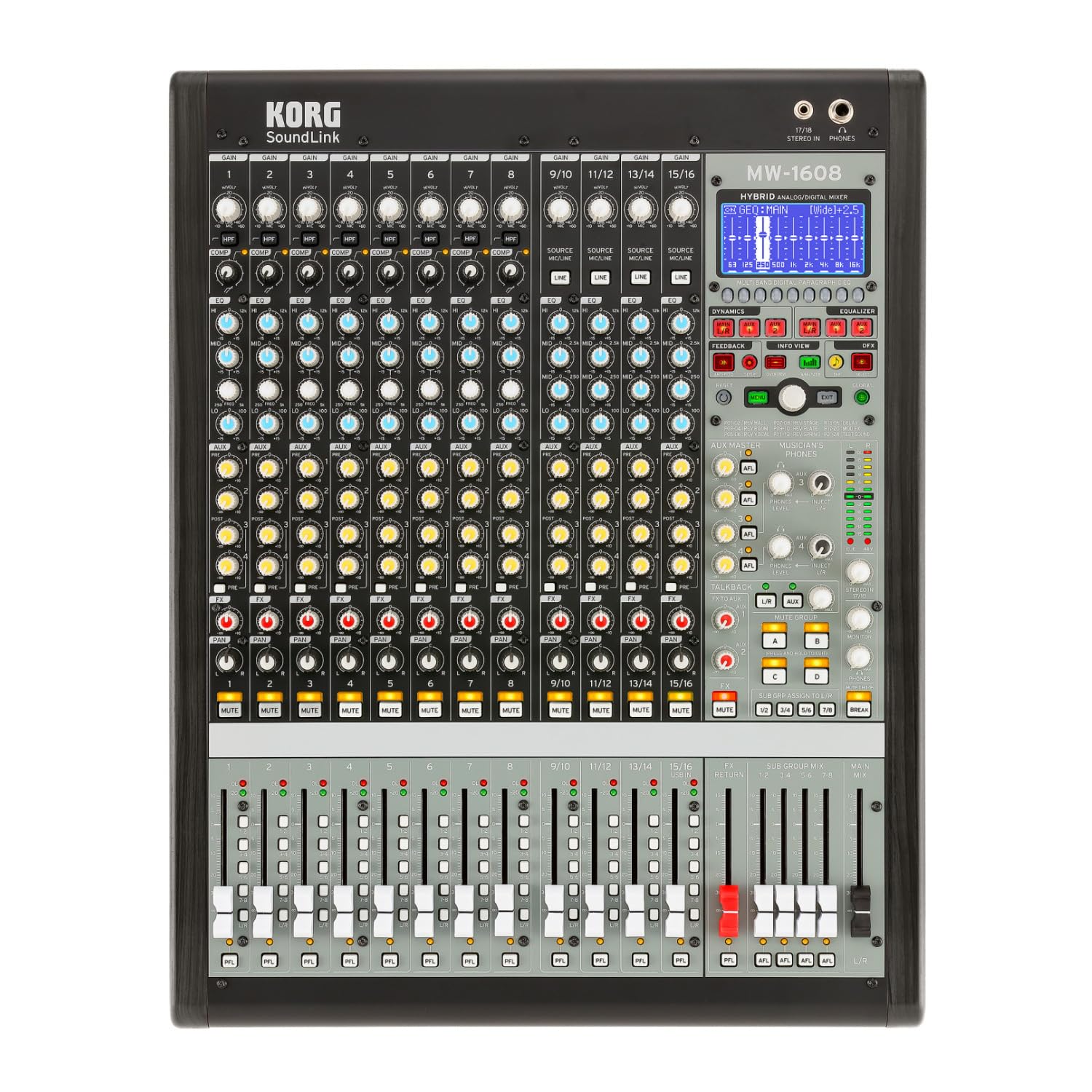
Малюнак 1: Спераду view of the Korg SoundLink MW-1608 mixer, showing the control surface with faders, knobs, and display.
2. Настройка
Before operating the Korg SoundLink MW-1608, ensure all connections are made correctly and securely. This section outlines the basic steps for setting up your mixer.
2.1 Распакоўка і размяшчэнне
- Carefully remove the mixer from its packaging. Retain all packaging materials for future transport or storage.
- Place the mixer on a stable, flat surface with adequate ventilation. Avoid placing it near heat sources or in direct sunlight.
- Ensure sufficient space around the unit for cable connections and heat dissipation.
2.2 Падключэнне харчавання
- The MW-1608 operates on a "Corded Electric" power source.
- Connect the supplied AC power cord to the mixer's power input on the rear panel.
- Plug the other end of the power cord into a suitable electrical outlet. Ensure the power switch is in the OFF position before connecting.
2.3 Аўдыё злучэння
The MW-1608 offers various input and output options. Refer to the rear panel diagram below for connection points.

Малюнак 2: Задняя частка view of the Korg SoundLink MW-1608 mixer, showing various input and output connectors.
- Мікрафонныя ўходы: Connect microphones to the XLR inputs (channels 1-12, 15/16, 13/14, 11/12, 9/10, 7, 6, 5, 4, 3, 2, 1) using balanced XLR cables.
- Лінейныя ўваходы: Connect line-level devices (e.g., keyboards, media players) to the 1/4-inch TRS or RCA line inputs.
- Асноўныя выхады: Падключыце асноўныя дынамікі або блок харчавання amplifier to the MAIN OUT (XLR L/R) connectors. The mixer features "XLR" output connector type.
- Дапаможныя выхады: Use the AUX OUT (XLR) connectors for monitor mixes or external effects processors.
- Group Outputs: Utilize the GROUP OUT (XLR) for sub-mixes.
- Падключэнне USB: The USB port allows for connection to a computer for recording or playback.
3. Інструкцыя па эксплуатацыі
У гэтым раздзеле ёсць надview of the Korg SoundLink MW-1608's operational features and controls.
3.1 Элементы кіравання каналам
- Уваходнае ўзмацненне: Adjust the input sensitivity for each channel to achieve optimal signal levels.
- 3-дыяпазонны эквалайзер: Each channel features a 3-band equalizer for tone shaping. Adjust the HIGH, MID, and LOW frequency bands as needed.
- 1-Knob Compressor: Engage and adjust the built-in compressor on individual channels to control dynamics and add punch.
- Дапаможныя пасылы: Route channel signals to auxiliary outputs for monitor mixes or external effects.
- Панарамаванне: Position the channel's signal within the stereo field.
- Кнопка адключэння: Адключае гук канала.
- Фэйдэр каналаў: Controls the volume level of the individual channel in the main mix.
3.2 Галоўная секцыя
- Фейдэры мікса Main: Кантралюйце агульны ўзровень выхаднога сігналу асноўнага стэрэамікса.
- Group Faders: Adjust the output levels of the 8-bus groups.
- Monitor Section: Provides control over headphone and control room outputs. The "Musician's Phone Feature" allows for dedicated monitoring.
- Лічбавыя эфекты: Access and apply Korg's studio-quality digital effects to your mix.
- Падаўленне зваротнай сувязі: Utilize the integrated feedback suppression system to prevent unwanted audio feedback.
- Аналізатар спектру: The built-in spectrum analyzer provides visual feedback on the frequency content of your audio.
4. Тэхнічнае абслугоўванне
Proper maintenance ensures the longevity and optimal performance of your Korg SoundLink MW-1608 mixer.
- Уборка: Use a soft, dry cloth to wipe down the exterior of the mixer. For stubborn dirt, a slightly damp Можна выкарыстоўваць тканіну з мяккім мылам, а затым сухую тканіну. Пазбягайце абразіўных ачышчальнікаў або растваральнікаў.
- Абарона ад пылу: When not in use, cover the mixer with a dust cover to prevent dust and debris from accumulating on controls and inside the unit.
- Умовы навакольнага асяроддзя: Operate and store the mixer in a clean, dry environment. Avoid extreme temperatures, high humidity, and direct exposure to liquids.
- Кабельнае кіраванне: Пераканайцеся, што кабелі акуратна размешчаны і не нацягнуты, каб пазбегнуць пашкоджання раздымаў і партоў.
5. Выпраўленне непаладак
This section addresses common issues you might encounter with your MW-1608 mixer. If the problem persists after attempting these solutions, contact Korg customer support.
- Няма харчавання:
- Ensure the power cord is securely connected to both the mixer and a working electrical outlet.
- Праверце выключальнік сілкавання на задняй панэлі.
- Праверце працаздольнасць электрычнай разеткі, падключыўшы да яе іншую прыладу.
- Няма выхаду гуку:
- Праверце ўсе злучэнні ўваходных і выходных кабеляў.
- Ensure channel faders, group faders, and main mix faders are raised.
- Verify that channels are not muted.
- Check the gain settings for each input channel.
- Confirm that connected speakers or ampвыратавальныя прылады ўключаны і працуюць.
- Скажонае аўдыя:
- Reduce input gain levels if the signal is clipping (indicated by peak LEDs).
- Check for damaged cables or faulty connectors.
- Ensure output levels are not overdriving connected devices.
- Channel or Group Functionality Issues:
- Verify routing assignments for channels to groups or main mix.
- Ensure mute buttons are disengaged for relevant channels/groups.
- Check if any effects or processing are inadvertently applied.
6. Тэхнічныя характарыстыкі
| Асаблівасць | Дэталь |
|---|---|
| Нумар мадэлі | МВт-1608 |
| Марка | KORG |
| Колькасць каналаў | 16 |
| Тэхналогія падлучэння | Дапаможны |
| Тып выхаднога раздыма | XLR |
| Крыніца харчавання | Правадная электрычная |
| Вага прадмета | 3.41 фунта |
| Памеры прадукту (Д х Ш х У) | 18.9 х 7.36 х 20.91 цалі |
| ASIN | B08FSYXMW9 |
7. Гарантыя і падтрымка
For detailed warranty information, please refer to the warranty card included with your product or visit the official Korg webсайт. Умовы гарантыі могуць адрознівацца ў залежнасці ад рэгіёна.
For technical support, service, or additional product information, please visit the official Korg support website or contact their customer service department. Keep your product's model number (MW-1608) and serial number (if applicable) ready when seeking support.
Official Korg Webсайт: www.korg.com


