Уводзіны
This manual provides essential information for the proper installation, operation, and maintenance of your Zebronics Zeb-D370S DVD Player. Please read this manual thoroughly before using the device to ensure safe and efficient operation. Keep this manual for future reference.
Важная інфармацыя па бяспецы
- Не падвяргайце прыладу ўздзеянню дажджу або вільгаці, каб пазбегнуць пажару або паражэння электрычным токам.
- Не адчыняйце casing. Па ўсіх пытаннях тэхнічнага абслугоўвання звяртайцеся да кваліфікаванага персаналу.
- Забяспечце належную вентыляцыю вакол прылады. Не блакуйце вентыляцыйныя адтуліны.
- Use only the power adapter supplied with the unit or specified by the manufacturer.
- Пазбягайце размяшчэння прылады на няўстойлівых паверхнях.
- Адключайце шнур сілкавання падчас навальніцы або калі прылада не выкарыстоўваецца працяглы час.
Змест пакета
Праверце наяўнасць усіх прадметаў у камплекце:
- Zebronics Zeb-D370S DVD Player Unit
- Пульт дыстанцыйнага кіравання
- AV-кабель
- Сілавы кабель
- Кіраўніцтва па эксплуатацыі
Прадукт скончаныview
The Zebronics Zeb-D370S is a versatile DVD player featuring a built-in stereo speaker and amplifier, HDMI, USB, and SD card support, and dual karaoke microphone inputs. It supports multiple formats and offers 5.1 channel, coaxial, and optical audio outputs.
Элементы кіравання і парты на пярэдняй панэлі
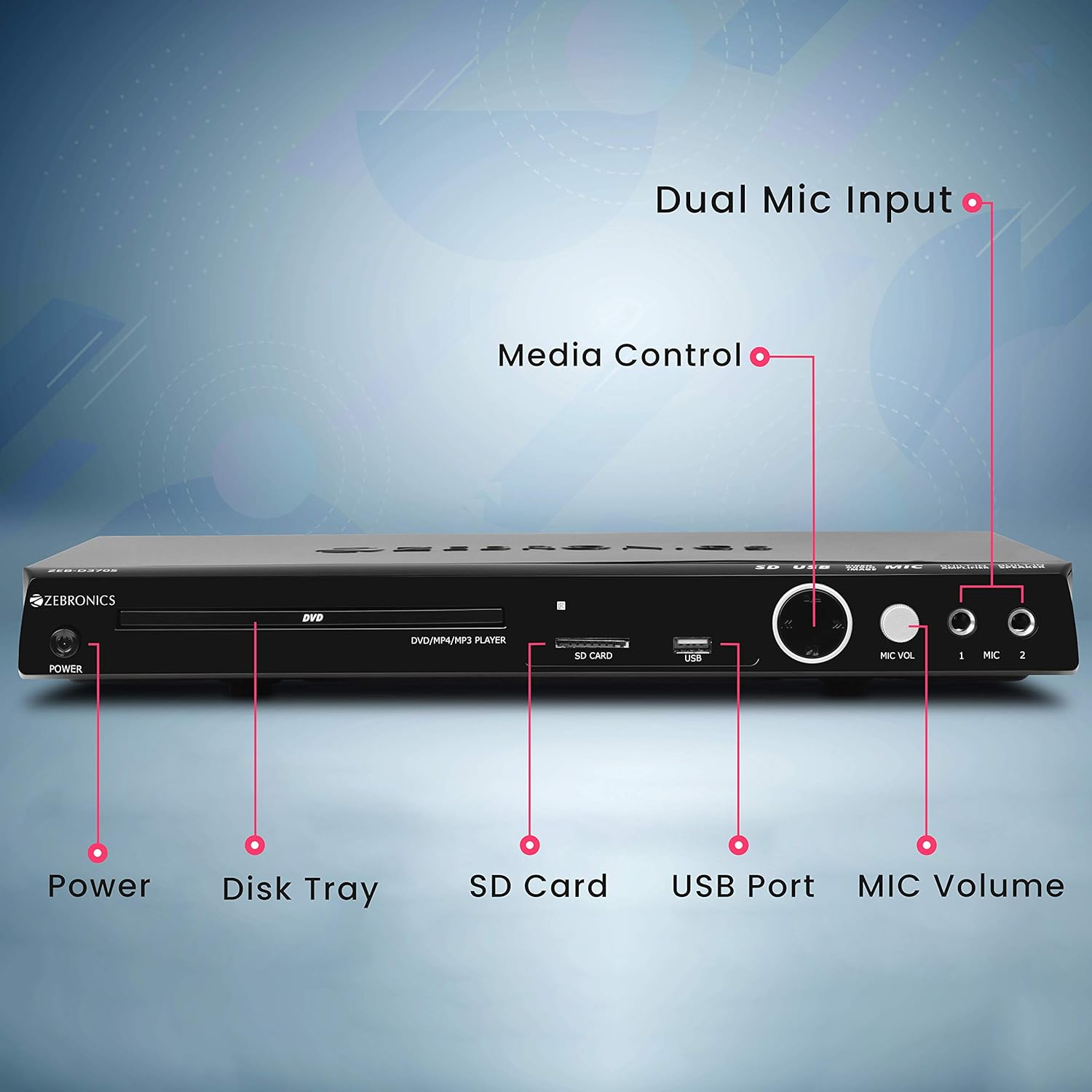
Front panel of the Zebronics Zeb-D370S DVD Player, showing the Power button, Disk Tray, SD Card slot, USB Port, MIC Volume control, and two Microphone inputs (MIC 1, MIC 2).
- Кнопка харчавання: Уключае або выключае прыладу.
- Disk Tray: For inserting DVDs, CDs, VCDs, and SVCDs.
- Слот для SD-карты: Для прайгравання мультымедыя files з SD-карты.
- Порт USB: Для прайгравання мультымедыя files з USB-дыска.
- Гучнасць мікрафона: Рэгулюе гучнасць падлучаных мікрафонаў.
- MIC 1 & MIC 2: Inputs for connecting microphones for karaoke.
- Кнопкі кіравання мультымедыя: Play/Pause, Stop, Skip, etc.
Злучэнні задняй панэлі

Rear panel of the Zebronics Zeb-D370S DVD Player, detailing the Coaxial Output, Optical Output, 5.1 Channel Output, HDMI port, Composite video output, Component video output, S-Video output, and Ext-Audio Output.
- Выхад HDMI: For high-definition video and audio connection to a TV or display.
- Кампазітны відэавыхад: Выхад відэа стандартнай выразнасці.
- Кампанентны відэавыхад: Higher quality analog video output (YPbPr).
- Выхад S-Video: Improved analog video output.
- Digital Audio Output (Optical & Coaxial): For connecting to external audio receivers or sound systems.
- Analog 5.1 Channel Output: For connecting to a 5.1 channel speaker system.
- Ext-Audio Output: Additional audio output connections.
- Выхад на дынамік: Terminals for connecting external speakers, utilizing the built-in ampзадымнік.

Тыл view of the Zebronics Zeb-D370S DVD Player highlighting the built-in amplifier, built-in speaker, and speaker output terminals.
Інструкцыя па наладзе
1. Падключэнне сілкавання
- Ensure the DVD player is placed on a stable, flat surface with adequate ventilation.
- Connect the power cable to the AC input on the rear of the DVD player.
- Plug the other end of the power cable into a standard electrical outlet (110V - 260V AC).
2. Video Connection to TV/Display
Выберыце адзін з наступных спосабаў падлучэння:
- HDMI (Recommended for best quality): Connect an HDMI cable from the HDMI output on the DVD player to an HDMI input on your TV.
- Кампанентнае відэа: Connect component video cables (Red, Green, Blue) from the DVD player's component outputs to the corresponding inputs on your TV.
- Кампазітнае відэа: Connect a composite video cable (Yellow) from the DVD player's composite output to the yellow video input on your TV.
- S-відэа: Connect an S-Video cable from the DVD player's S-Video output to the S-Video input on your TV.
3. Аўдыёзлучэнне
Выберыце адзін з наступных спосабаў падключэння аўдыё:
- HDMI: If using HDMI for video, audio will also be transmitted via the HDMI cable.
- 5.1 Channel Analog Output: Connect RCA cables from the 5.1 channel outputs (Front Left, Front Right, Center, Subwoofer, Surround Left, Surround Right) on the DVD player to a compatible 5.1 channel amplifier або акустычная сістэма.
- Лічбавае аўдыё (аптычны/кааксіяльны): Connect an optical or coaxial cable from the respective output on the DVD player to a digital audio input on your amplifier or home theater system for surround sound.
- Built-in Speaker Output: If using the built-in speakers, ensure no external speakers are connected to the 5.1 channel outputs unless desired.
4. Microphone Connection (Optional)
- Plug your microphones into the MIC 1 and/or MIC 2 inputs on the front panel.
- Adjust the MIC Volume knob to control microphone audio levels.
Інструкцыя па эксплуатацыі

Zebronics Zeb-D370S DVD Player with a disc inserted, remote control, and a visual representation of content playing on a screen, illustrating its multimedia capabilities.
1. Прайграванне дыскаў
- Націсніце Магутнасць кнопку, каб уключыць DVD-плэер.
- Націсніце Адкрыць/зачыніць button (usually on the remote or front panel) to open the disc tray.
- Place a compatible disc (DVD Video, DVD+RW/-RW/+R/-R, Dual Layer Disc, CD Audio, CD-R/-RW, VCD, SVCD) onto the disc tray with the label side facing up.
- Націсніце Адкрыць/зачыніць button again to close the tray. The player will automatically begin playback or display a menu.
- Use the remote control for playback functions such as Play, Pause, Stop, Fast Forward, Rewind, and Chapter Skip.
2. USB/SD Media Playback
- Устаўце USB-назапашвальнік у USB-порт або SD-карту ў слот для SD-карты на пярэдняй панэлі.
- The player should automatically detect the media and display a menu to browse files. If not, select the USB or SD source using the remote control's Крыніца or Увод кнопка.
- Перамяшчайцеся па сваім files (VOB, MP4, DIVX, AVI, MPEG-1, MPEG-2, 3GP, MP3, WMA, AAC, JPEG, TXT) using the remote control and press гуляць каб пачаць прайграванне.
3. Функцыя караоке
- Connect one or two microphones to the MIC 1 and MIC 2 inputs.
- Play a karaoke disc or a media file with instrumental tracks.
- Adjust the MIC Volume knob on the front panel to control the microphone audio level.
4. Пашыраныя функцыі
- CD Ripping: Convert audio CDs to digital formats (refer to on-screen menu for options).
- Picture Slideshow: View JPEG images from disc, USB, or SD card as a slideshow.
- Прагрэсіўная разгортка: Provides a smoother, flicker-free image on compatible displays.
- Zoom IN/OUT: Magnify or reduce the displayed image during playback.
- High Speed Search: Quickly scan through disc or media content.
- Бацькоўскі кантроль: Restrict playback of certain content based on ratings.
- Імгненны паўтор: Пераскок на некалькі секунд назад падчас прайгравання.
- Disc Resume: Resume playback from where it was last stopped on a disc.
Тэхнічнае абслугоўванне
- Ачыстка прылады: Use a soft, dry cloth to clean the exterior of the DVD player. Do not use liquid cleaners or abrasive materials.
- Сыход за дыскамі: Трымайце дыскі за краю. Трымайце іх чыстымі і без драпін. Выкарыстоўвайце мяккую тканіну без ворса, каб праціраць дыскі ад цэнтра да краёў.
- Вентыляцыя: Пераканайцеся, што вентыляцыйныя адтуліны не заблакіраваны, каб прадухіліць перагрэў.
Ліквідацыю непаладак
If you encounter issues with your DVD player, refer to the table below for common problems and solutions:
| праблема | Магчымая прычына | Рашэнне |
|---|---|---|
| Няма ўлады | Сеткавы кабель не падключаны; разетка не працуе | Праверце падключэнне кабеля харчавання; паспрабуйце іншую разетку |
| Няма відэавыхаду | Incorrect video cable connection; Incorrect input selected on TV | Ensure video cables are securely connected; Select the correct input source on your TV (e.g., HDMI 1, AV) |
| Няма аўдыявыхаду | Incorrect audio cable connection; TV/amplifier volume too low; Mute activated | Check audio cable connections; Increase volume; Deactivate mute function |
| Дыск не прайграваецца | Disc is dirty or scratched; Disc format not supported; Disc inserted incorrectly | Clean the disc; Ensure disc is compatible; Insert disc with label side up |
| USB/SD media not detected | USB drive/SD card not inserted correctly; Incompatible file format; Corrupted media | Reinsert USB/SD; Check supported file formats; Try a different USB/SD device |
Тэхнічныя характарыстыкі

Dimensions of the Zebronics Zeb-D370S DVD Player: 360mm (width), 220mm (depth), and 50mm (height).
| Асаблівасць | Дэталь |
|---|---|
| Назва мадэлі | Zeb D370S |
| Марка | ЗЕБРОНІКА |
| Памеры прадукту | 28 x 39 x 82 mm (1.4 kg) |
| дазвол | 1920 x 1080 (Supported resolutions: 480i/576i/480p/576p/720p/1080i/1080p) |
| Асаблівасці | Surround Sound, Built-in Amplifier, Built-in Stereo Speaker, Karaoke Mic Input |
| Рэжым выхаду гуку | Stereo, Surround (2CH / 5.1CH / Virtual Surround Sound) |
| Канфігурацыя каналаў аб'ёмнага гуку дынамікаў | 5.1 |
| Падтрымліваюцца аўдыяфарматы | Dolby Digital, MP3, WMA, AAC |
| Video Playback System | NTSC / PAL / AUTO |
| Тып раздыма | HDMI, USB, SD Slot, MIC 1 & MIC 2, Composite, Component, S-Video, Digital Audio Output (Optical & Coaxial), Analog 5.1Ch Output, Ext-Audio Output x 2 |
| Media Type (Playback Disc) | DVD Video, DVD+RW/-RW/+R/-R, Dual Layer Disc, CD Audio, CD-R/-RW, VCD, SVCD |
| СМІ Files Падтрымліваецца | VOB, MP4, DIVX, AVI, MPEG-1, MPEG-2, 3GP, MP3, WMA, AAC, JPEG, TXT |
| Аперацыйная Voltage | 110 В - 260 В пераменнага току |
| Функцыі | CD Ripping, Picture SlideShow, Progressive scan, Zoom IN/OUT, High speed search, Parental lock, Instant replay, Disc resume |
Гарантыя і падтрымка
For warranty information, technical support, or service inquiries, please refer to the warranty card included with your product or visit the official Zebronics webсайт. Не спрабуйце рамантаваць прыладу самастойна.


