1. паview
The Logitech C505/C505e HD Wired Business Webcam is designed to enhance your video communication experience. It provides crisp, smooth, and colorful widescreen HD 720p video with a 60° diagonal field of view. The webcam features fixed focus and automatic light correction, adapting to various lighting conditions. Its single, omnidirectional microphone incorporates noise-reduction technology, supporting clear conversations up to 3 meters away, even in noisy environments. The extra-long USB-A cable and universal clip offer flexible placement options on your computer or up to 7 feet away.
2. Інструкцыі па ўсталёўцы
Setting up your Logitech C505/C505e webcam is a straightforward plug-and-play process. No additional software installation or charging is required.
- Падключыце Webкамера: Падключыце кабель USB-A ад webcam into an available USB port on your desktop or laptop computer.
- Размясціце Webкамера: Use the universal clip to securely mount the webcam on your monitor, laptop screen, or place it on a flat surface. The extra-long cable allows for flexible positioning.
- Выберыце Webкамера: Ваш кампутар павінен аўтаматычна вызначыць webcam. If you have multiple cameras or microphones, you may need to select the "Logitech C505/C505e" in your application's settings (e.g., video conferencing software, recording applications) or your operating system's device settings.

Image: The Logitech C505/C505e webcam easily clips onto a monitor for convenient placement.
3. Кіраванне Webкамера
Once connected, the Logitech C505/C505e is ready for use with most video conferencing and recording applications.
- Якасць відэа: The webcam delivers HD 720p video at 30 frames per second, providing clear visuals for your calls and recordings.
- Поле в View: Дыяганальнае поле 60° view ensures you are framed appropriately without capturing excessive background.
- Фіксаваны фокус: The fixed focus lens maintains sharpness for subjects within its optimal range, simplifying operation.
- Аўтаматычная карэкцыя святла: The webcam automatically adjusts to the lighting conditions of your environment, helping to ensure you appear well-lit even in varying light. Optimal lighting conditions will yield the best video quality.
- Мікрафон: The integrated omnidirectional microphone with noise-reduction technology is designed to capture your voice clearly from up to 3 meters away, minimizing background distractions.

Image: The Logitech C505/C505e provides HD 720p widescreen video for clear communication.
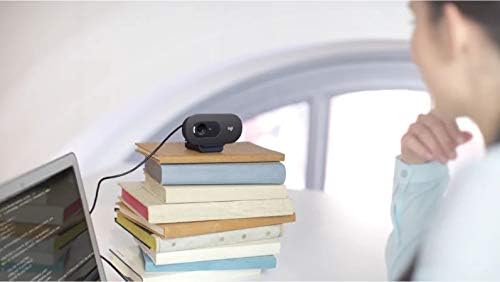
Image: Flexible placement options allow the webcam to be positioned on various surfaces.
4. Тэхнічнае абслугоўванне
To ensure optimal performance and longevity of your Logitech C505/C505e webкулачок, выконвайце гэтыя простыя рэкамендацыі па тэхнічным абслугоўванні:
- Ачыстка аб'ектыва: Акуратна працярыце webаб'ектыў камеры мяккай тканінай без ворса. Пазбягайце выкарыстання агрэсіўных хімічных рэчываў або абразіўных матэрыялаў, якія могуць падрапаць аб'ектыў.
- захоўванне: Калі ён не выкарыстоўваецца, захоўвайце яго webЗахоўвайце камеру ў чыстым, сухім месцы, удалечыні ад экстрэмальных тэмператур і прамых сонечных прамянёў.
- Сыход за кабелем: Avoid sharply bending or crimping the USB cable to prevent internal damage.
5. Выпраўленне непаладак
If you encounter issues with your Logitech C505/C505e webкамерай, паспрабуйце наступныя дзеянні па ліквідацыі непаладак:
- Няма відэа/аўдыё:
- Пераканайцеся, што кабель USB надзейна падключаны да абодвух webкамера і ваш камп'ютар.
- Паспрабуйце падключыць webкамеру ў іншы порт USB.
- Check your application's settings (e.g., Zoom, Microsoft Teams) to confirm the Logitech C505/C505e is selected as the active camera and microphone.
- Verify your operating system's privacy settings allow applications to access the camera and microphone.
- Дрэнная якасць відэа:
- Забяспечце дастатковае асвятленне ў вашым асяроддзі. webcam performs best with good illumination.
- Ачысціць webаб'ектыў камеры мяккай тканінай.
- Праверце на наяўнасць перашкод перад аб'ектывам.
- Дрэнная якасць гуку:
- Забяспечце webcam's microphone is selected in your application and system audio settings.
- Зменшце фонавы шум у вашым асяроддзі.
- Ensure you are within the 3-meter optimal range of the microphone.
- Webcam Not Recognized:
- Перазагрузіце кампутар.
- Праверце дыспетчар прылад (Windows) або «Інфармацыю пра сістэму» (macOS) вашага камп'ютара, каб даведацца, ці webcam is listed. You may need to update or reinstall drivers, though typically the webcam is plug-and-play.
6. Тэхнічныя характарыстыкі
| Марка | Logitech |
| Нумар мадэлі | Logitech C505/C505e |
| Дазвол відэазахопу | 720p |
| Дазвол відэа | 720p |
| Тэхналогія падлучэння | Правадны (USB-A) |
| Тып фокусу | Фіксаваны фокус |
| Viewing кут | 60 градусаў |
| Мікрафон | Omnidirectional with Noise-Reduction |
| Аперацыйная сістэма | Multiple (Windows 8 or later, macOS 10.10 or later, ChromeOS) |
| Убудаваны медыя | USB Cable, Universal Clip |
| Асаблівасці | Automatic Light Correction, Low Light Performance |
7. Гарантыя і падтрымка
Каб атрымаць падрабязную інфармацыю аб гарантыі і тэхнічнай падтрымцы, наведайце афіцыйны сайт падтрымкі Logitech. webсайт. Там вы можаце знайсці драйверы, часта задаваныя пытанні і кантактную інфармацыю службы падтрымкі кліентаў.


