1. Прадукт скончыўсяview
The Cisco Catalyst 9300 C9300-24S-E is a 24-port Gigabit Ethernet SFP modular uplink network switch designed for enterprise-level network deployments. It provides high-performance switching capabilities, advanced security features, and network automation for modern business environments. This manual provides essential information for the safe and efficient installation, operation, and maintenance of your switch.
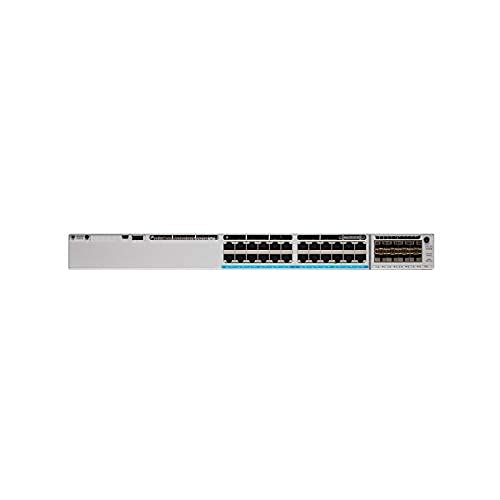
Малюнак 1: Спераду view of the Cisco Catalyst 9300 C9300-24S-E Switch. This image displays the 24 SFP ports and modular uplink slots.
2. Інфармацыя па бяспецы
Read all safety warnings and instructions before installing, operating, or servicing this equipment. Failure to follow these instructions can result in serious injury or equipment damage.
- Электрабяспека: Пераканайцеся, што крыніца харчавання адпавядае гучнасці перамыкачаtage requirements. Always connect the power cord to a grounded outlet. Do not operate the switch with damaged power cords or plugs.
- Вентыляцыя: Maintain adequate airflow around the switch to prevent overheating. Do not block ventilation openings.
- Апрацоўка: This device is heavy. Use proper lifting techniques or assistance when moving or installing.
- Асяроддзе: Выкарыстоўвайце выключальнік у межах указаных дыяпазонаў тэмпературы і вільготнасці. Пазбягайце ўздзеяння вільгаці або экстрэмальных тэмператур.
- Абслугоўванне: Refer all servicing to qualified service personnel. Do not attempt to open or repair the switch yourself.
3. Змесціва ўпакоўкі
Verify that your package contains the following items. If any item is missing or damaged, contact your vendor immediately.
- Cisco Catalyst 9300 C9300-24S-E Switch
- Шнур сілкавання
- Камплект для мантажу ў стойку (кранштэйны, шрубы)
- Кансольны кабель (RJ-45 да DB-9)
- Дакументацыя (Кіраўніцтва па хуткім запуску, Інфармацыя аб бяспецы)
4. Фізічнае апісанне і кампаненты
The C9300-24S-E switch features a robust design with various ports and indicators for network connectivity and status monitoring.
4.1 Пярэдняя панэль
Малюнак 2: падрабязна view of the switch's front panel, highlighting SFP ports and status LEDs.
- 24 x SFP Ports: For Gigabit Ethernet fiber or copper connectivity using SFP transceivers.
- Modular Uplink Slots: Located on the right side, these slots accommodate optional uplink modules for higher bandwidth connections (e.g., 10G, 25G, 40G, 100G).
- Святлодыёды стану: Indicate system status (SYS), redundant power supply (RPS), port status (STAT), and stack status (STACK).
- Порт USB Type-A: For external storage or software upgrades.
- USB Type-C Console Port: For console access and initial configuration.
- Кансольны порт RJ-45: For traditional console access.
4.2 Задняя панэль
Малюнак 3: Задняя частка view of the switch, showing power supply bays and fan modules.
- Адсекі сілкавання: Two bays for redundant power supplies.
- Модулі вентылятараў: Field-replaceable fan modules for cooling.
- StackWise-1T Ports: (If applicable to the specific model variant) For stacking multiple switches.
5. Настройка і ўстаноўка
Follow these steps to properly install your Cisco Catalyst 9300 switch.
5.1 Мантаж у стойку
- Attach the provided rack-mount brackets to the sides of the switch using the included screws.
- Сумясціце камутатар з патрэбным месцам у стойцы абсталявання для блока рычага (RU).
- Secure the switch to the rack using the rack screws.
Figure 4: Illustration of the switch being mounted into a standard equipment rack.
5.2 Падключэнне харчавання
- Insert the AC power cord into the power supply module on the rear of the switch.
- Падключыце другі канец шнура харчавання да заземленай разеткі пераменнага току.
- If using redundant power supplies, repeat for the second power supply.
5.3 Сеткавыя злучэнні
- Insert appropriate SFP transceivers into the 24 SFP ports as needed.
- Connect fiber optic or copper cables from your network devices (servers, workstations, other switches) to the SFP transceivers.
- Install any optional uplink modules into the modular uplink slots and connect them to your core network infrastructure.
6. Інструкцыя па эксплуатацыі
6.1 Уключэнне
Once power is connected, the switch will automatically power on. Observe the system status LEDs on the front panel. The SYS LED should turn green after the boot sequence completes.
6.2 Пачатковая канфігурацыя
For initial configuration, connect a console cable from your computer to the switch's console port (either USB-C or RJ-45). Use a terminal emulation program (e.g., PuTTY, Tera Term) with the following settings:
- Хуткасць бода: 9600
- Біты дадзеных: 8
- Парытэт: Няма
- Стоп-біты: 1
- Кіраванне патокам: Няма
Follow the on-screen prompts to complete the initial setup wizard. For advanced configurations, refer to the Cisco IOS XE documentation for Catalyst 9300 Series switches.
6.3 Святлодыёдныя індыкатары
| святлодыёд | Колер/Стан | Апісанне |
|---|---|---|
| СІСТ (Сістэма) | Зялёны (цвёрды) | Сістэма працуе нармальна. |
| Бурштын (цвёрды) | Сістэмная памылка або збой. | |
| СТАТ (Port Status) | Зялёны (цвёрды) | Спасылка ўстаноўлена. |
| Зялёны (міргае) | Актыўнасць у порце. | |
| Выкл | Ніводнае злучэнне або порт не адключаны. |
7. Тэхнічнае абслугоўванне
Рэгулярнае тэхнічнае абслугоўванне забяспечвае аптымальную прадукцыйнасць і даўгавечнасць вашага выключальніка.
- Уборка: Periodically clean the exterior of the switch with a soft, dry cloth. Ensure ventilation openings are free from dust and debris. Do not use liquid cleaners directly on the switch.
- Абнаўленні прашыўкі: Рэгулярна правярайце службу падтрымкі Cisco website for the latest firmware updates. Applying updates can improve performance, add features, and address security vulnerabilities. Follow Cisco's recommended procedures for firmware upgrades.
- Маніторынг навакольнага асяроддзя: Ensure the operating environment remains within specified temperature and humidity ranges to prevent hardware stress.
8. Выпраўленне непаладак
У гэтым раздзеле прадстаўлены рашэнні распаўсюджаных праблем, з якімі вы можаце сутыкнуцца.
8.1 Няма харчавання
- Праверце шнур сілкавання: Пераканайцеся, што шнур харчавання надзейна падключаны як да выключальніка, так і да разеткі.
- Праверце разетку: Праверце разетку з дапамогай іншай прылады, каб пераканацца ў яе працаздольнасці.
- Статус блока харчавання: Check the power supply LEDs on the rear of the switch. If off or amber, the power supply may be faulty or not receiving power.
8.2 Няма злучэння на порце
- Кабельнае злучэнне: Ensure the network cable is securely connected to both the switch port and the connected device.
- Цэласнасць кабеля: Праверце кабель з іншай прыладай або заменіце яго, каб выключыць няспраўнасць кабеля.
- Прыёмаперадатчык: If using SFP transceivers, ensure they are properly seated and compatible with both the switch and the connected device.
- Канфігурацыя порта: Verify that the switch port is enabled and correctly configured (e.g., speed, duplex settings).
8.3 Праблемы з падключэннем да сеткі
- Канфігурацыя IP: Verify IP addresses, subnet masks, and gateway settings on connected devices and the switch.
- VLAN: If using VLANs, ensure ports are assigned to the correct VLANs and trunk links are properly configured.
- Firewall/ACLs: Check for any Access Control Lists (ACLs) or firewall rules on the switch that might be blocking traffic.
- Праблемы з праграмным забеспячэннем: Consider restarting the switch or checking the system logs for error messages.
9. Тэхнічныя характарыстыкі
Key technical specifications for the Cisco Catalyst 9300 C9300-24S-E switch:
| Асаблівасць | Дэталь |
|---|---|
| Нумар мадэлі | C9300-24S-E |
| Марка | Cisco |
| Тып інтэрфейсу | SFP |
| Колькасць партоў | 24 |
| Сумяшчальныя прылады | Настольны кампутар, ноўтбук, прынтар |
| Памеры прадукту | 21.65 х 22.44 х 9.45 цалі |
| Матэрыял корпуса | Пластыкавыя |
| Верхняя адзнака тэмпературы | 40 градусы па Цэльсіі |
| Вытворца | Сістэмы CISCO - прадпрыемства |
| UPC | 656942062790 |
10. Гарантыя і падтрымка
This Cisco product is typically covered by a limited hardware warranty provided by Cisco Systems. The exact terms and duration of the warranty may vary based on your region and purchase agreement. For detailed warranty information, please refer to the official Cisco warranty statements available on their webсайт або звярніцеся да аўтарызаванага рэсэлера Cisco.
For technical support, documentation, and software downloads, visit the official Cisco Support webсайт. Вам спатрэбіцца серыйны нумар прадукту для рэгістрацыі і доступу да пэўных рэсурсаў падтрымкі.
- Падтрымка Cisco Webсайт: www.cisco.com/go/support
- Звязацца са службай падтрымкі: Звярніцеся да Cisco webсайт для кантактнай інфармацыі ў рэгіёне.


