Уводзіны
Thank you for choosing the JBL Cinema SB190 Soundbar. This manual provides essential information for setting up, operating, and maintaining your soundbar system. Please read it thoroughly to ensure proper use and optimal performance.
Важная інфармацыя па бяспецы
Заўсёды выконвайце гэтыя асноўныя меры бяспекі пры выкарыстанні гукавой панэлі:
- Уважліва прачытайце гэтыя інструкцыі.
- Захоўвайце гэтыя інструкцыі для выкарыстання ў будучыні.
- Звярніце ўвагу на ўсе папярэджанні.
- Выконвайце ўсе інструкцыі.
- Не выкарыстоўвайце гэты прыбор паблізу вады.
- Чысціце толькі сухой анучай.
- Не блакуйце вентыляцыйныя адтуліны. Усталюйце ў адпаведнасці з інструкцыямі вытворцы.
- Не ўстанаўлівайце побач з крыніцамі цяпла, такімі як радыятары, абагравальнікі, пліты або іншыя прылады (у тым ліку ampLifiers), якія вырабляюць цяпло.
- Абараняйце сеткавы шнур ад наступання або заціскання, асабліва ў месцах вілкі, разеткі і месца выхаду з прылады.
- Выкарыстоўвайце толькі насадкі/аксэсуары, указаныя вытворцам.
- Адключайце гэты прыбор ад сеткі падчас навальніцы або калі ён не выкарыстоўваецца на працягу доўгага часу.
- Звяртайцеся да кваліфікаванага абслугоўваючага персаналу. Тэхнічнае абслугоўванне патрабуецца, калі прылада была пашкоджана якім-небудзь чынам, напрыклад, пашкоджаны шнур сілкавання або вілка, была праліта вадкасць або ў прыладу ўпалі прадметы, прылада падвяргалася ўздзеянню дажджу або вільгаці, не працуе належным чынам , або быў адкінуты.
Што ў скрынцы
Your JBL Cinema SB190 package includes the following components:
- Саундбар
- Бесправадны сабвуфер
- Пульт дыстанцыйнага кіравання з батарэйкамі
- Power cords (region specific)
- Кабель HDMI
- Камплект кранштэйнаў для насценнага мацавання з шрубамі
- Кароткае кіраўніцтва
- Гарантыйны талон
- Пашпарт бяспекі

Image: Included accessories for the JBL Cinema SB190, featuring the remote control, HDMI cable, power cords, and wall-mount hardware.
Прадукт скончаныview
Soundbar Front and Top Panel

Выява: спераду view of the JBL Cinema SB190 Soundbar, showcasinг яго элегантны дызайн.
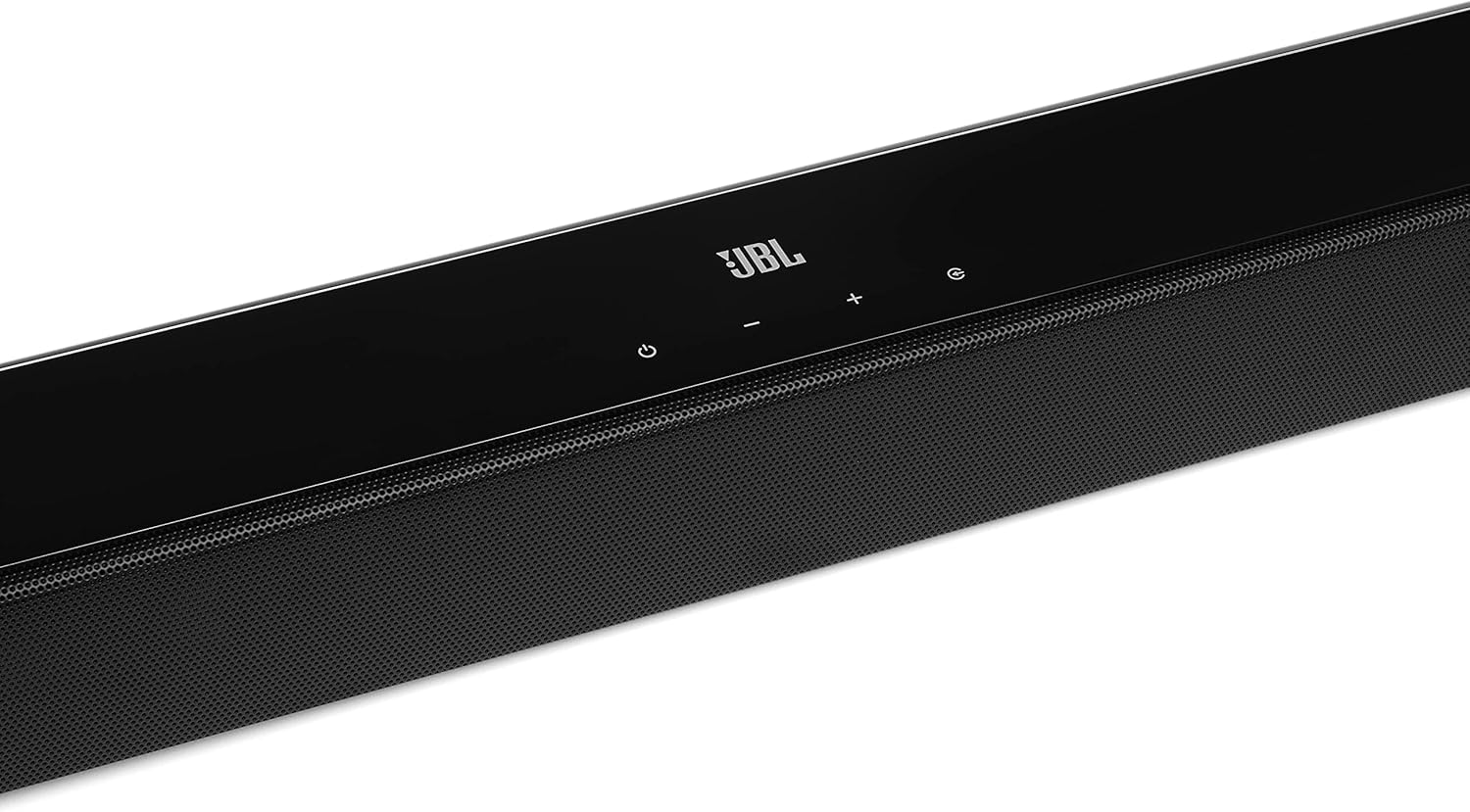
Image: Close-up of the top panel controls on the JBL Cinema SB190 Soundbar, including power, volume, and source selection buttons.
The soundbar features a minimalist design with essential controls located on the top panel for easy access. These include power, volume up/down, and input selection.
Soundbar Rear Panel Connections

Image: Rear panel of the JBL Cinema SB190 Soundbar, showing the power input, HDMI eARC, HDMI In, and Optical In ports.
The rear panel provides various connection options for your audio sources and TV, including HDMI eARC, HDMI In, and Optical In. A power input is also located here.
Бесправадны сабвуфер

Выява: спераду view of the JBL Cinema SB190 Wireless Subwoofer, featuring the JBL logo at the bottom.

Выява: Задняя частка view of the JBL Cinema SB190 Wireless Subwoofer, showing the power input and pairing button.
The wireless subwoofer provides deep bass and connects automatically to the soundbar. Its rear panel includes the power input and a pairing button if manual pairing is required.
Пульт дыстанцыйнага кіравання
The included remote control allows full command over your soundbar system, including power, volume, input selection, sound modes (Music, Movie, News), Voice enhancement, and Bass level adjustment.
Настройка
1. размяшчэнне
Гукавая панэль: Place the soundbar on a flat surface directly in front of your TV, centered. Ensure no objects obstruct the front of the soundbar. Alternatively, you can wall-mount the soundbar using the provided bracket kit.
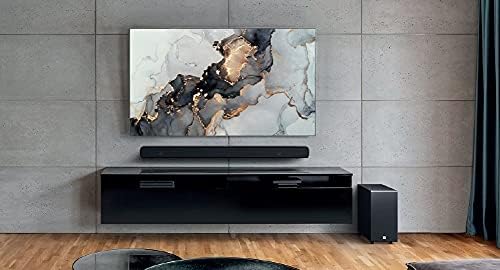
Image: The JBL Cinema SB190 Soundbar positioned below a television, with the wireless subwoofer to the side.
сабвуфер: The wireless subwoofer can be placed anywhere in the room, ideally within 50 feet (15 meters) of the soundbar, for optimal bass distribution. Avoid placing it in a corner directly, as this can sometimes lead to boomy bass.
2. Сувязі
Choose one of the following connection methods to connect your soundbar to your TV:
- HDMI eARC (рэкамендуецца): For the highest quality audio, connect an HDMI cable (included) from the HDMI eARC port on your soundbar to the HDMI eARC port on your TV. This connection supports Virtual Dolby Atmos and allows for TV remote control of the soundbar volume.

Image: HDMI icon, representing the HDMI eARC connection.
- Аптычны ўваход: If your TV does not have an HDMI eARC port, connect an optical cable (not included) from the OPTICAL IN port on your soundbar to the optical output on your TV.

Image: TV icon, indicating connection to a television.
- Уваход HDMI: You can also connect an external device (e.g., Blu-ray player, game console) directly to the HDMI IN port on the soundbar. The video signal will pass through to your TV via the HDMI eARC/ARC connection.
3. Падключэнне сілкавання
- Connect the power cords to the soundbar and subwoofer.
- Plug the power cords into an AC outlet.
- The soundbar and subwoofer will automatically power on and attempt to pair. The subwoofer's LED indicator will turn solid white once successfully paired.
Кіраванне саўндбарам
Уключэнне/выключэнне харчавання
Націсніце Магутнасць кнопку на саўндбары або пульце дыстанцыйнага кіравання, каб уключыць або выключыць сістэму.
Рэгулятар гучнасці
Выкарыстоўвайце Аб'ём + or гучнасць - кнопкі на саўндбары або пульце дыстанцыйнага кіравання для рэгулявання ўзроўню гучнасці.
Выбар уводу
Націсніце Крыніца button on the soundbar or the dedicated input buttons (HDMI IN, HDMI ARC, OPT, BT) on the remote control to switch between audio sources.
Гукавыя рэжымы
The remote control features dedicated buttons for optimizing audio for different content types:
- МУЗЫКА: Enhances audio for music playback.
- ФІЛЬМ: Optimizes sound for cinematic experiences, including Virtual Dolby Atmos effects.
- НАВІНЫ: Enhances vocal clarity for news and dialogue-heavy content.
Voice and Bass Adjustment
The remote control allows for fine-tuning of voice clarity and bass levels:
- ГОЛАС: Press the VOICE button repeatedly to cycle through different levels of voice enhancement. This helps make dialogue clearer.
- БАС: Press the BASS button repeatedly to adjust the subwoofer's bass output level.
Спалучэнне Bluetooth
To stream audio wirelessly from your mobile device:
- Націсніце BT button on the remote control or soundbar. The soundbar's indicator will flash, indicating pairing mode.
- На мабільнай прыладзе ўключыце Bluetooth і абярыце «JBL Cinema SB190» са спісу даступных прылад.
- Once connected, the indicator on the soundbar will turn solid. You can now stream audio from your device.

Image: Bluetooth icon, representing wireless audio streaming.
Тэхнічнае абслугоўванне
To ensure the longevity and optimal performance of your JBL Cinema SB190 Soundbar:
- Уборка: Выкарыстоўвайце мяккую сухую тканіну для чысткі паверхняў саўндбара і сабвуфера. Не выкарыстоўвайце вадкія ачышчальнікі або абразіўныя матэрыялы, бо яны могуць пашкодзіць пакрыццё.
- Вентыляцыя: Ensure that the ventilation openings on the soundbar and subwoofer are not blocked to prevent overheating.
- захоўванне: Калі прылада захоўваецца працяглы час, адключыце яе ад электрычнай разеткі і захоўвайце ў прахалодным, сухім месцы.
Ліквідацыю непаладак
Калі ў вас узніклі праблемы з саўндбарам, звярніцеся да наступных распаўсюджаных праблем і рашэнняў:
Няма гуку з саўндбара
- Пераканайцеся, што саўндбар уключаны, а гучнасць не адключана або ўсталявана занадта нізка.
- Праверце, ці выбрана правільная крыніца ўваходнага сігналу на гукавой панэлі (напрыклад, HDMI ARC, аптычны, Bluetooth).
- Check all cable connections (HDMI, Optical) between the soundbar and your TV/source device. Ensure they are securely plugged in.
- If using HDMI ARC/eARC, ensure your TV's HDMI ARC/eARC feature is enabled in its settings.
- Try restarting both the soundbar and your TV.
Няма гуку з сабвуфера
- Ensure the subwoofer is plugged into a power outlet and powered on.
- Check the LED indicator on the subwoofer. If it's not solid white, it may not be paired with the soundbar.
- Каб падключыць сабвуфер уручную:
- Press and hold the pairing button on the back of the subwoofer until the LED flashes rapidly.
- On the soundbar, press and hold the Магутнасць button for 5 seconds. The soundbar will enter pairing mode.
- Once paired, the LED on the subwoofer will turn solid white.
Audio/Video Sync Issues
- If using HDMI eARC, this feature is designed to minimize sync issues. Ensure your TV's firmware is up to date.
- Some TVs have an audio delay setting (lip-sync) that can be adjusted. Consult your TV's manual.
- If connecting via Optical, audio lag can sometimes occur. Try connecting via HDMI eARC if available.
Праблемы з падключэннем Bluetooth
- Ensure Bluetooth is enabled on your mobile device and the soundbar is in pairing mode.
- Перамясціце прыладу бліжэй да саўндбару.
- Ачысціце спіс спалучэнняў Bluetooth на прыладзе і паспрабуйце зноў падключыць прыладу.
- Пераканайцеся, што іншыя прылады Bluetooth не перашкаджаюць працы.
Тэхнічныя характарыстыкі
| Асаблівасць | Дэталь |
|---|---|
| Назва мадэлі | Кінатэатр SB190 |
| Тып дынаміка | Саундбар |
| Канфігурацыя канала аб'ёмнага гуку | 2.1 |
| Агульная выходная магутнасць дынамікаў | 380 ват |
| Дыяметр сабвуфера | 6.5 цалі |
| Асаблівасці | Bluetooth 5.1 streaming, Dedicated sound mode to enhance voice clarity, HDMI In and Optical In connection, HDMI eARC capable, Virtual Dolby Atmos technology |
| Тэхналогія падлучэння | Bluetooth, Wired (HDMI, Optical) |
| Метад кантролю | Дыстанцыйнае |
| Памеры прадукту (гукавы бар) | 89.9 Ш х 6.2 Г х 6.6 В сантыметраў |
| Вага прадмета | 7.5 Kilograms (Total system) |
| Матэрыял | Пластыкавыя |
| Колер | Чорны |
| Уключаныя кампаненты | Soundbar, Wireless subwoofer, Remote control with batteries, Power cords, HDMI cable, Wall-mount bracket kit with screws, Quick start guide, Warranty card, Safety sheet |
Гарантыя і падтрымка
For detailed warranty information, please refer to the warranty card included in your product package. For technical support, product registration, or further assistance, please visit the official JBL support webсайт або звярніцеся ў службу падтрымкі кліентаў.
Больш падрабязную інфармацыю і рэсурсы падтрымкі можна знайсці на Крама JBL на Amazon.


