1. Уводзіны
This manual provides instructions for the proper use and maintenance of your Sena Parani A20 Bluetooth Intercom Headset. Please read this manual thoroughly before operating the device to ensure optimal performance and safety.
The Parani A20 is designed for motorcycle communication, offering features such as 4-way Bluetooth intercom, HD 2-way intercom, and smartphone connectivity for music and calls.
2. Змесціва ўпакоўкі
The Sena Parani A20 package typically includes the following components:
- Parani A20 Headset Unit
- Набор дынамікаў
- Мікрафон стралы
- Правадной мікрафон
- Мантаж Clamp Камплект
- USB-кабель для зарадкі
- Кіраўніцтва карыстальніка (гэты дакумент)

Выява: Зверхуview of the Sena Parani A20 headset and its included components, such as the main unit, speakers, boom microphone, and wired microphone.
3. Настройка і ўстаноўка
3.1 Зарадка прылады
Before first use, fully charge the Parani A20 headset. Connect the USB charging cable to the headset and a power source. The charging time is approximately 2.5 hours.
3.2 Устаноўка гарнітуры
The Parani A20 can be mounted to most motorcycle helmets using the included clamp kit. Ensure the mounting location allows for clear access to the controls and does not obstruct helmet functionality.
- Choose a suitable location on the left side of your helmet.
- Securely attach the mounting clamp to the helmet shell.
- Slide the Parani A20 main unit onto the mounted clamp пакуль ён не стане на месца.

Image: The Sena Parani A20 headset unit attached to the side of a motorcycle helmet, showing its position relative to the helmet's structure.
3.3 Installing Speakers and Microphones
Install the speakers inside the helmet's ear pockets and route the microphone cable to the front of the helmet. Two microphone options are provided:
- Мікрафон-штамб: Recommended for open-face or modular helmets. Position the microphone close to your mouth.
- Правадной мікрафон: Suitable for full-face helmets. Secure it inside the chin bar.
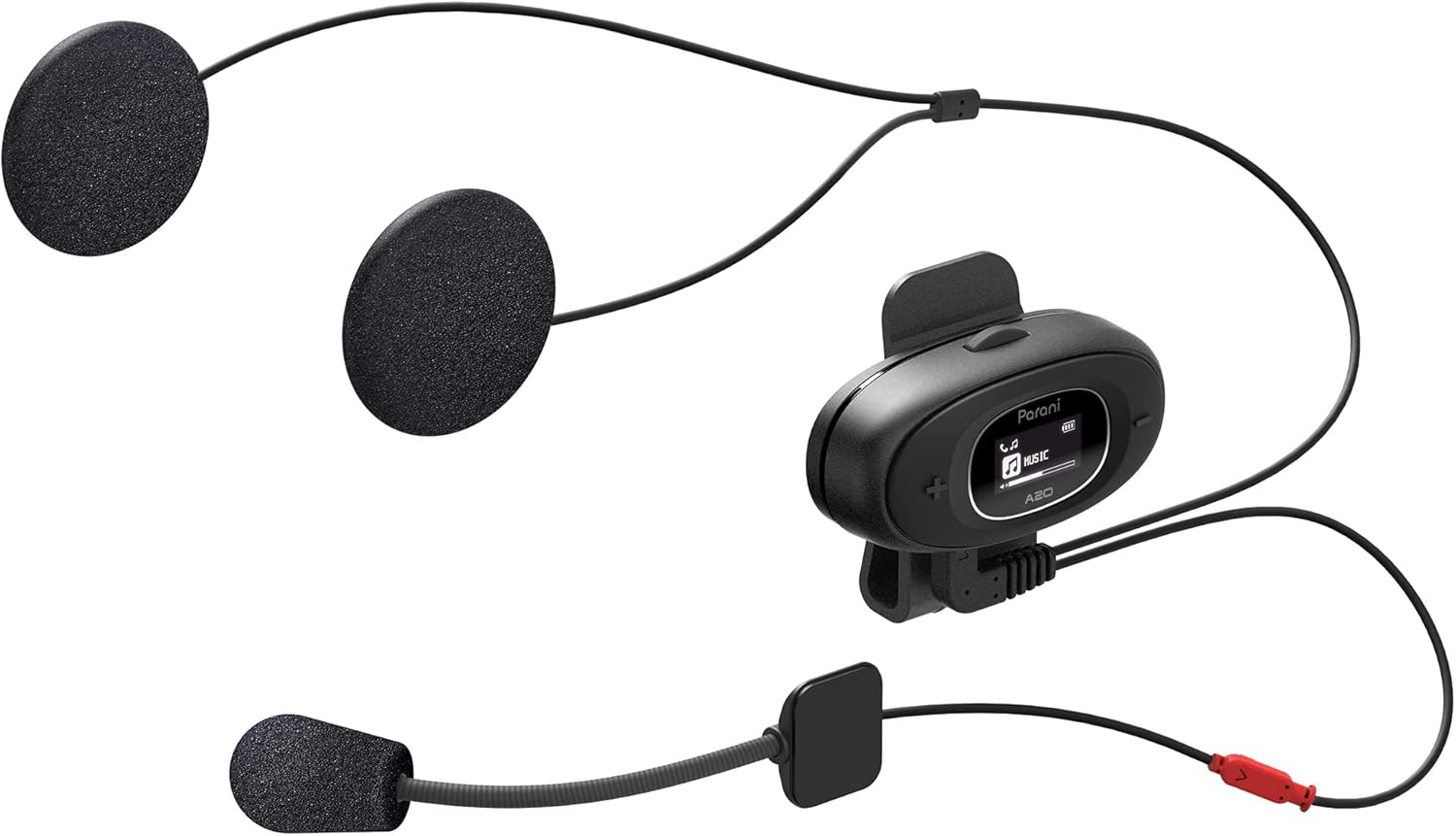
Image: The Sena Parani A20's speakers and both microphone types (boom and wired) are displayed, ready for installation inside a helmet.
4. Інструкцыя па эксплуатацыі
4.1 Уключэнне/выключэнне сілкавання
- Уключэнне: Націсніце і ўтрымлівайце Цэнтральная кнопка на працягу 1 секунд.
- Выключэнне: Націсніце і ўтрымлівайце Цэнтральная кнопка на працягу 5 секунд.
4.2 Bluetooth Pairing with Smartphone
To connect your Parani A20 to a smartphone for music, GPS, or phone calls:
- With the headset off, press and hold the Цэнтральная кнопка for 5 seconds until the LED flashes red and blue, indicating pairing mode.
- On your smartphone, go to Bluetooth settings and select "Parani A20" from the list of available devices.
- Once paired, the LED will flash blue.
4.3 Інтэрком-сувязь
The Parani A20 supports 4-way Bluetooth intercom and HD 2-way intercom with a range of up to 1 km (0.6 miles).
- Starting Intercom: Каротка націсніце Цэнтральная кнопка to initiate intercom with a paired Parani A20 unit.
- Завяршэнне інтэркома: Каротка націсніце Цэнтральная кнопка зноў.
- Multi-way Intercom: Follow the specific pairing instructions in the full manual for connecting multiple units.

Выява: Падрабязны view of the Parani A20 unit, highlighting its LCD screen which displays intercom status and battery level, along with the control buttons.
4.4 Прайграванне музыкі і рэгуляванне гучнасці
- Прайграванне/Паўза: Націсніце Цэнтральная кнопка during music playback.
- Павялічыць гучнасць: Націсніце (+) Кнопка.
- Паменшыць гучнасць: Націсніце (-) Кнопка.
- The Parani A20 offers exceptional sound quality with enhanced bass and clarity.
4.5 Тэлефонныя званкі
- Адказаць на званок: Каротка націсніце Цэнтральная кнопка.
- Завяршыць выклік: Каротка націсніце Цэнтральная кнопка.
- Адхіліць выклік: Націсніце і ўтрымлівайце Цэнтральная кнопка на працягу 2 секунд.

Image: A motorcycle rider on the road, wearing a helmet equipped with the Sena Parani A20 intercom, demonstrating its use in a riding context.
5. Тэхнічнае абслугоўванне і догляд
- Keep the device dry. The Parani A20 is not water-resistant.
- Ачысціце прыладу мяккім, damp тканіна. Не выкарыстоўвайце рэзкія хімікаты або растваральнікі.
- Калі прылада не выкарыстоўваецца, захоўвайце яе ў прахалодным сухім месцы.
- Пераканайцеся, што порт зарадкі чысты ад пылу і смецця.
6. Выпраўленне непаладак
6.1 Прылада не ўключаецца
- Check battery level. Charge the device for at least 30 minutes.
- Ensure the power button is pressed correctly (hold for 1 second).
6.2 No Audio from Speakers
- Verify that the speakers are correctly plugged into the headset unit.
- Check the volume level on both the headset and your connected smartphone.
- Ensure the headset is properly paired with your audio source.
6.3 Інтэрком не падключаецца
- Ensure both units are within the specified intercom range (up to 1 km).
- Re-pair the intercom units if connection issues persist.
- Праверце на наяўнасць перашкод або перашкод.
6.4 Скід да заводскіх налад
If the device is not functioning correctly, a factory reset may resolve the issue. Refer to the full manual for specific instructions on performing a factory reset.
7. Тэхнічныя характарыстыкі
| Назва мадэлі | Parani A20 |
| Версія Bluetooth | 5.1 |
| Дыяпазон дамафонаў | Да 1 км (0.6 міль) |
| Intercom Type | 4-way Bluetooth, HD 2-way |
| Час зарадкі | Прыкладна 2.5 гадзіны |
| Спектр частот | 20 Гц - 20 000 Гц |
| Вага | 240 г |
| Памеры | 18.7 х 11.8 х 6.4 см |
| Матэрыял | Пластыкавыя |
| Воданепранікальнасць | Не водатрывалы |
| Сумяшчальныя прылады | Mobile phones, Motorcycles |
8. Гарантыя і падтрымка
Каб атрымаць інфармацыю аб гарантыі і тэхнічнай падтрымцы, звярніцеся да афіцыйнага сайта Sena. webсайт або звярніцеся да мясцовага дылера. Захоўвайце пацвярджэнне пакупкі для прэтэнзій па гарантыі.
Інтэрнэт-рэсурсы: Наведайце ст Сена webсайт for the latest firmware updates, FAQs, and detailed product manuals.
9. Важная інфармацыя па бяспецы
- Заўсёды надавайце прыярытэт бяспецы дарожнага руху. Не карыстайцеся прыладай такім чынам, каб гэта адцягвала вас ад язды.
- Ensure the device is securely mounted to your helmet.
- Не падвяргайце прыладу ўздзеянню экстрэмальных тэмператур або прамых сонечных прамянёў на працягу доўгага часу.
- Захоўваць у месцах, недаступных дзецям.


