1. Уводзіны
This manual provides comprehensive instructions for the ZIOCOM Bluetooth 30 Pin Receiver Adapter and Ground Loop Noise Isolator. This product is designed to upgrade your existing 30-pin docking stations and audio systems with Bluetooth connectivity and eliminate unwanted ground loop noise.
The Bluetooth adapter allows wireless audio streaming to compatible 30-pin dock speakers, while the ground loop noise isolator ensures clear, uninterrupted sound in car audio or home stereo systems by filtering out electrical interference.
2. Асаблівасці прадукту
- Bluetooth Upgrade for 30-Pin Docks: Adds Bluetooth functionality to Bose SoundDock I, SoundDock II, Portable SoundDock, SoundDock 10, and other 30-pin music docking stations. Supports iOS and Android devices.
- Інавацыйны дызайн: Features a built-in 3.5mm Aux Jack for versatile connections, compatible with most 30-pin docking stations from brands like Sony, JBL, Yamaha, and Philips. Includes an easy-to-use power switch.
- Палепшаная сумяшчальнасць: The SOUL 2 Bluetooth adapter comes with a 3.5mm audio cable, enabling use with non-Bluetooth speakers (not for car use with this specific cable).
- Ground Loop Noise Elimination: Effectively removes buzzing noise caused by ground loops in car audio or home stereo systems when using the Bluetooth receiver.
- Clear Audio Output: Filters out current noise instantly for clear, uninterrupted, and uncompromised sound quality.
3. Змесціва ўпакоўкі
Upon opening your ZIOCOM product package, you should find the following items:
- ZIOCOM Bluetooth 30 Pin Receiver Adapter
- ZIOCOM Ground Loop Noise Isolator
- Аўдыёкабель 3.5 мм

Image 1: The ZIOCOM Bluetooth 30 Pin Receiver Adapter (top) and the Ground Loop Noise Isolator with its attached 3.5mm cable (bottom). These are the primary components included in the package.
4. Настройка і ўстаноўка
4.1. Connecting the Bluetooth 30 Pin Receiver Adapter
To add Bluetooth functionality to your 30-pin docking station:
- Locate the 30-pin dock connector on your speaker system.
- Carefully align the ZIOCOM Bluetooth 30 Pin Receiver Adapter with the 30-pin connector.
- Gently push the adapter onto the connector until it is firmly seated. The adapter will draw power directly from the dock.

Image 2: A hand demonstrating the insertion of the ZIOCOM Bluetooth 30 Pin Receiver Adapter into a compatible speaker dock. Ensure a secure connection for proper operation.

Малюнак 3: Крупны план view of the ZIOCOM 30 Pin Adapter being positioned for insertion into a speaker dock, highlighting the "30 Pin Adapter" label.
4.2. Using the Ground Loop Noise Isolator
The Ground Loop Noise Isolator is used to eliminate buzzing or humming sounds caused by ground loop issues in audio systems, particularly common in car audio or home stereo setups where multiple components share a power source.
To use the noise isolator:
- Identify the audio path where the buzzing noise occurs. This is typically between the audio source (e.g., your phone, Bluetooth receiver) and the amplifier/дынамікі.
- Connect one end of the 3.5mm audio cable from your audio source (or the Bluetooth receiver's output) to one end of the Ground Loop Noise Isolator.
- Connect the other end of the Ground Loop Noise Isolator to the audio input of your ampпад'ёмнік або калонкі.

Image 4: A diagram illustrating the connection of the Ground Loop Noise Isolator. The isolator is placed between the audio source (e.g., Bluetooth Receiver) and the speakers, using 3.5mm audio cables to eliminate noise.

Image 5: The ZIOCOM Ground Loop Noise Isolator connected within a home stereo system, demonstrating its use to achieve clear audio without distortion.
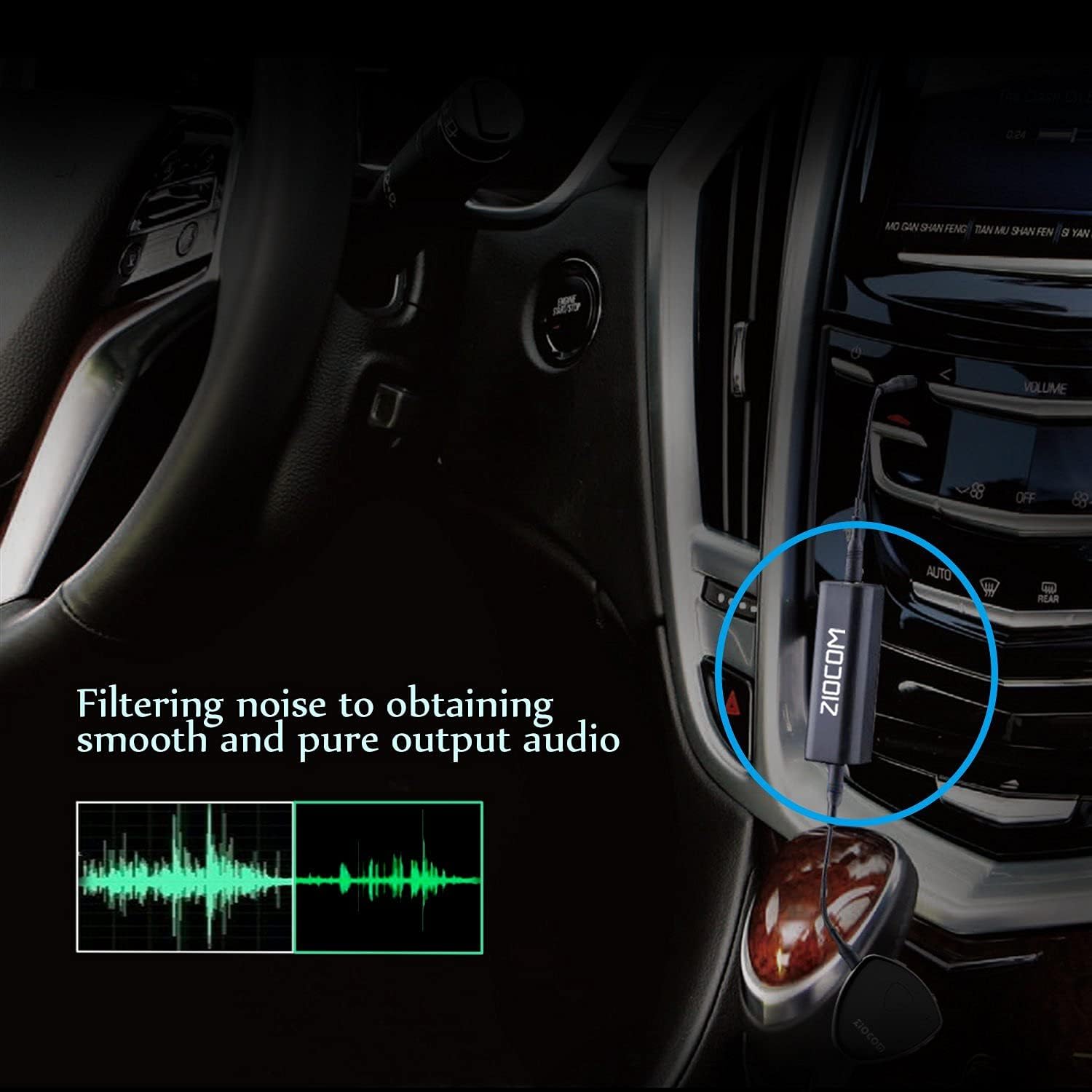
Image 6: The ZIOCOM Ground Loop Noise Isolator integrated into a car audio system, showing its role in filtering noise for smooth and pure audio output.
5. Інструкцыя па эксплуатацыі
5.1. Pairing the Bluetooth Adapter
- Once the ZIOCOM Bluetooth 30 Pin Receiver Adapter is securely connected to your 30-pin dock, it will automatically power on and enter pairing mode. The indicator light on the adapter will typically flash to indicate it's ready to pair.
- На прыладзе з падтрымкай Bluetooth (смартфоне, планшэце і г.д.) перайдзіце ў налады Bluetooth.
- Scan for available devices. You should see "ZIOCOM" or a similar name appear in the list.
- Select "ZIOCOM" to initiate the pairing process.
- Once successfully paired, the indicator light on the adapter will typically turn solid, and your device will confirm the connection.
- You can now play audio from your device, and it will stream wirelessly to your 30-pin dock speakers.

Image 7: A diagram highlighting the features of the ZIOCOM Bluetooth adapter, including the ON/OFF switch, AUX input, indicator light, and 30-pin interface.
5.2. Using with 3.5mm Audio Cable (for non-Bluetooth speakers)
The ZIOCOM Bluetooth adapter also offers a 3.5mm auxiliary input, allowing it to function as a wired receiver for non-Bluetooth audio sources or to connect to the Ground Loop Noise Isolator.
- Connect one end of the provided 3.5mm audio cable to the AUX input on the ZIOCOM Bluetooth adapter.
- Connect the other end of the 3.5mm audio cable to the audio output of your non-Bluetooth device or to the input of the Ground Loop Noise Isolator.
- Ensure your speaker system is set to the correct input source (e.g., AUX input).

Image 8: The ZIOCOM Ground Loop Noise Isolator, showing its compact design and integrated 3.5mm audio cable, ready for connection.

Image 9: A portable speaker setup demonstrating the "Plug and Play" functionality of the ZIOCOM Ground Loop Noise Isolator, indicating no battery is needed for its operation.
6. Выпраўленне непаладак
| праблема | Магчымая прычына | Рашэнне |
|---|---|---|
| No power to Bluetooth adapter. | Adapter not fully seated in 30-pin dock. | Ensure the adapter is firmly pushed into the 30-pin connector. The dock must be powered on. |
| Немагчыма спалучыцца з прыладай Bluetooth. | Adapter not in pairing mode; device too far; previously paired with another device. | Ensure adapter's indicator light is flashing. Move device closer. Turn off Bluetooth on other devices or unpair from them. Restart adapter/dock. |
| Buzzing or humming noise in audio. | Перашкоды зазямлення. | Connect the Ground Loop Noise Isolator between your audio source (e.g., Bluetooth adapter output) and the amplifier/speakers. Ensure all components are properly grounded. |
| Няма гуку пасля спалучэння. | Volume too low; incorrect input selected on speaker; device not playing audio. | Increase volume on both your device and the speaker system. Ensure the speaker system is set to the correct input (e.g., 30-pin dock input). Verify audio is playing on your source device. |
7. Тэхнічныя характарыстыкі
- Марка: ЗІЯКОМ
- Тэхналогія падключэння: Дапаможны, Bluetooth
- Крыніца харчавання: AC Adapter or DC Power Supply (via 30-pin dock)
- колер: Чорны
- Стандарт бесправадной сувязі: Bluetooth
- Мадэль (ASIN): B09MZ7NK48
- Першая даступная дата: 3 снежня 2021 г
8. Тэхнічнае абслугоўванне
To ensure the longevity and optimal performance of your ZIOCOM Bluetooth Adapter and Ground Loop Noise Isolator, please follow these simple maintenance guidelines:
- Уборка: Use a soft, dry cloth to wipe the devices. Do not use liquid cleaners or aerosols, as they may damage the components.
- захоўванне: When not in use, store the devices in a cool, dry place, away from direct sunlight and extreme temperatures.
- Апрацоўка: Handle the devices with care. Avoid dropping them or subjecting them to strong impacts.
- Сувязі: Ensure all cable connections are secure but do not force them.
9. Інфармацыя па бяспецы
Калі ласка, прачытайце і выконвайце наступныя меры бяспекі:
- Avoid placing the device near pacemakers or other medical devices.
- Do not expose the product to excessive heat, moisture, or direct sunlight.
- Трымайце далей ад адкрытага агню.
- Do not attempt to disassemble or modify the device. This will void the warranty and could lead to damage or injury.
- Dispose of the product in accordance with local regulations for electronic waste.
10. Гарантыя і падтрымка
Your ZIOCOM product is covered by a standard manufacturer's warranty. For specific warranty details and duration, please refer to the product packaging or contact ZIOCOM customer support.
For technical support, troubleshooting assistance, or warranty claims, please visit the official ZIOCOM store on Amazon or contact their customer service directly. You can find the ZIOCOM store at: ZIOCOM Amazon Store.


