1. Уводзіны
Thank you for choosing the KSIX Phoenix Smart Sunglasses. These innovative sunglasses combine stylish eye protection with integrated wireless audio technology, designed for active lifestyles. Please read this manual carefully to ensure proper use and maintenance of your device.

Image: KSIX Phoenix Smart Sunglasses with interchangeable dark and clear lenses.
Асноўныя характарыстыкі:
- Dual Microphone System: Enhanced audio quality for calls and music with ambient noise cancellation.
- Інтуітыўнае сэнсарнае кіраванне: Easy management of calls, music playback, and voice assistant activation.
- Sport-Optimized Design: Durable and comfortable for various sports, featuring Category 3 lenses.
- Воданепранікальнасць IPX5: Protected against sweat and light rain, ideal for outdoor activities.
- Зменныя аб'ектывы: Includes UV400 (grey) and UV320 (transparent) lenses for different light conditions.
- Рэгуляваная пасадка: Three sizes of nose pads for personalized comfort.
- Павялічаны тэрмін службы батарэі: Да 6.5 гадзін прайгравання аўдыё на адной зарадцы.
2. Змесціва ўпакоўкі
Калі ласка, пераканайцеся, што ўсе прадметы прысутнічаюць у вашай упакоўцы:
- KSIX Phoenix Smart Sunglasses
- Grey UV400 Lens (pre-installed or separate)
- Transparent UV320 Lens
- Магнітны зарадны кабель
- 3 Pairs of Nose Pads (Small, Medium, Large)
- Кіраўніцтва карыстальніка (гэты дакумент)
3. Усталёўка і першае выкарыстанне
3.1 Charging the Sunglasses
Before first use, fully charge your KSIX Phoenix Smart Sunglasses.
- Connect the magnetic charging cable to the charging port located on the right temple of the sunglasses.
- Падключыце другі канец кабеля да крыніцы харчавання USB (напрыклад, USB-порт кампутара, насценны адаптар USB).
- Індыкатар зарадкі загарыцца. Поўная зарадка займае прыблізна 1.5 гадзіны.
- Пасля поўнай зарадкі адключыце кабель.

Image: Illustration of the magnetic charging port and battery specifications (6.5h playback, 1.5h charge time, 100mAh battery).
3.2 Уключэнне/выключэнне
The KSIX Phoenix Smart Sunglasses feature an automatic power on/off function.
- Каб уключыць: Gently open the right temple of the sunglasses. You will hear an audible confirmation.
- Каб выключыць: Gently close the right temple of the sunglasses. You will hear an audible confirmation.

Image: Visual guide for automatic power on/off by adjusting the right temple.
3.3 Спалучэнне па Bluetooth
To connect your sunglasses to a smartphone or other Bluetooth-enabled device:
- Ensure the sunglasses are powered on.
- На вашым смартфоне ўключыце Bluetooth і знайдзіце даступныя прылады.
- Select "KSIX Phoenix" from the list of devices.
- Once paired, you will hear an audible confirmation.
3.4 Рэгуляванне насавых накладак
For optimal comfort and fit, select the appropriate nose pad size.
- The package includes three sizes: Small, Medium, and Large.
- Gently remove the pre-installed nose pads and replace them with the size that best fits your nose bridge.
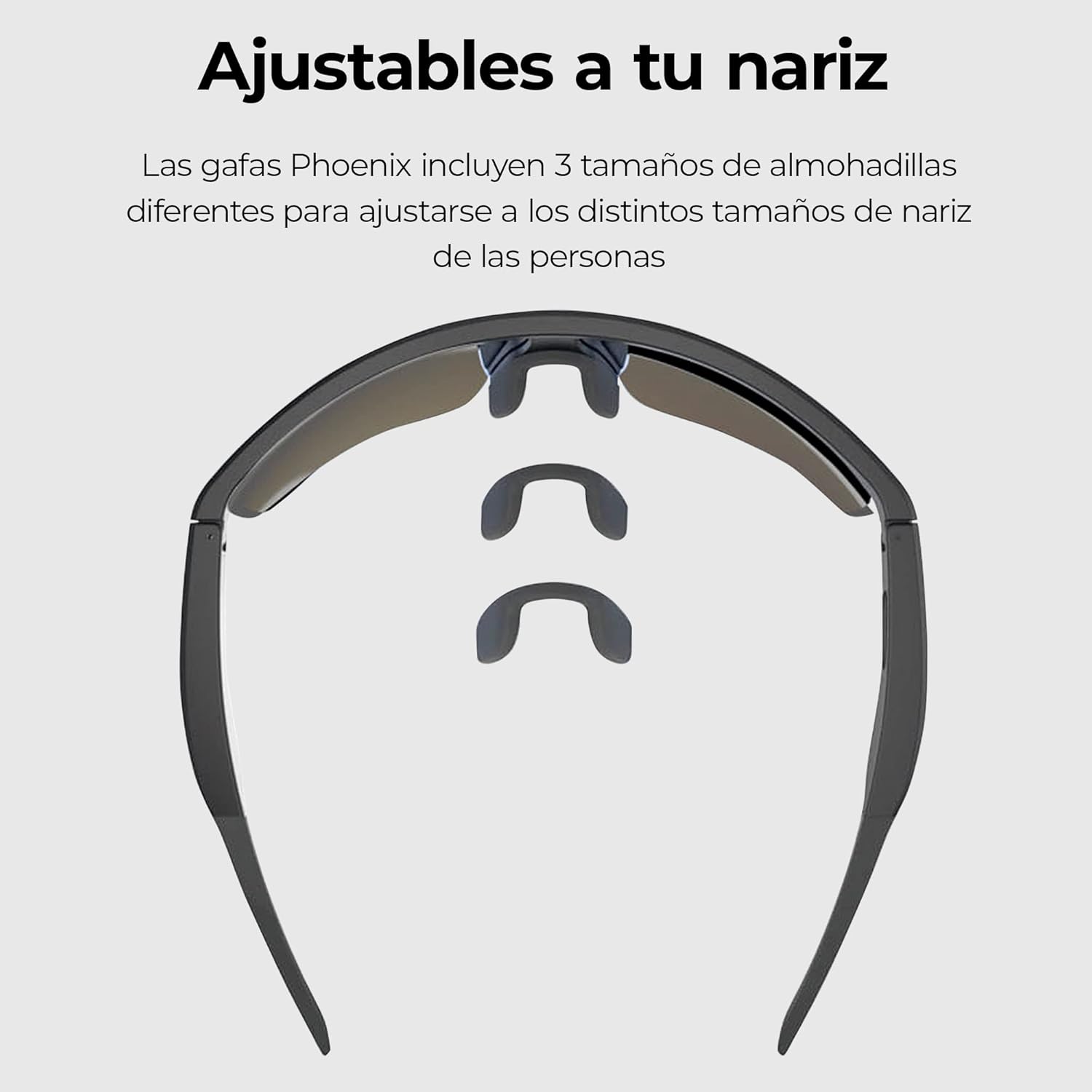
Image: Three interchangeable nose pad sizes (S, M, L) for customized fit.
4. Інструкцыя па эксплуатацыі
4.1 Сэнсарнае кіраванне
The KSIX Phoenix Smart Sunglasses feature intuitive touch controls on the temples for various functions. The high sensitivity allows use even with sports gloves.

Image: Visual guide to touch control gestures on the sunglasses temple.
| Дзеянне | Функцыя |
|---|---|
| Адзін клік | Answer / End Call, Play / Pause Music |
| Націсніце і ўтрымлівайце (2 секунды) | Адхіліць выклік, актываваць галасавы памочнік |
| Двайны клік | Наступная песня |
| Трайны клік | Папярэдняя песня |
4.2 Здзяйсненне і прыём выклікаў
The integrated dual microphones ensure clear communication.
- Адказ на званок: When a call comes in, single-click the touch sensor on either temple.
- Завяршэнне выкліку: During a call, single-click the touch sensor on either temple.
- Адхіленне званка: When a call comes in, press and hold the touch sensor for 2 seconds.
- Галасавы памочнік: Press and hold the touch sensor for 2 seconds to activate your device's voice assistant (e.g., Siri, Google Assistant).

Image: Depiction of the ambient noise-cancelling microphone and the hands-free call microphone.
4.3 Прайграванне музыкі
Control your music directly from your sunglasses.
- Прайграванне/Паўза: Single-click the touch sensor.
- Наступны трэк: Double-click the touch sensor.
- Папярэдні трэк: Triple-click the touch sensor.
4.4 Changing Lenses
The KSIX Phoenix Smart Sunglasses come with interchangeable lenses to adapt to different lighting conditions.
- Grey UV400 Lens: Ideal for bright conditions, offering Category 3 sun protection.
- Transparent UV320 Lens: Suitable for low-light conditions or indoor use, providing basic UV protection.
- To change lenses, carefully detach the current lens from the frame and snap the desired lens into place. Ensure it is securely fastened.

Image: Comparison of the dark and clear interchangeable lenses.
5. Тэхнічнае абслугоўванне і догляд
To ensure the longevity and optimal performance of your KSIX Phoenix Smart Sunglasses, follow these care instructions:
- Чыстка лінзаў: Use a soft, clean microfiber cloth to wipe the lenses. For stubborn smudges, use a lens cleaning spray specifically designed for eyewear. Avoid abrasive materials or harsh chemicals.
- Рамка для чысткі: Працярыце рамку мяккай губкайamp тканіна.
- Воданепранікальнасць (IPX5): The sunglasses are rated IPX5, meaning they are protected against low-pressure water jets from any direction. This makes them resistant to sweat and light rain. Do not submerge the sunglasses in water or expose them to high-pressure water.
- захоўванне: Калі сонцаахоўныя акуляры не выкарыстоўваюцца, захоўвайце іх у ахоўным чахле, каб пазбегнуць драпін і пашкоджанняў.
- тэмпература: Avoid exposing the sunglasses to extreme temperatures (hot or cold) for extended periods, as this can affect battery life and electronic components.

Image: KSIX Phoenix Smart Sunglasses demonstrating IPX5 water resistance against splashes.
6. Выпраўленне непаладак
If you encounter any issues with your KSIX Phoenix Smart Sunglasses, please refer to the following common problems and solutions:
| праблема | Магчымая прычына | Рашэнне |
|---|---|---|
| Sunglasses do not power on. | Low battery. Right temple not fully opened. | Charge the sunglasses fully. Ensure the right temple is fully opened to activate. |
| Немагчыма падключыцца праз Bluetooth. | Sunglasses not in pairing mode. Bluetooth off on device. Interference. | Ensure sunglasses are powered on. Turn Bluetooth off and on again on your device. Move closer to the device. |
| Няма гуку або якасць гуку нізкая. | Volume too low. Not properly paired. Obstruction. | Increase volume on both sunglasses and connected device. Re-pair the device. Ensure nothing is blocking the speakers. |
| Сэнсарныя элементы кіравання не рэагуюць. | Dirty sensor. Software glitch. | Clean the touch sensor area. Power off and on the sunglasses. |
| Акумулятар хутка разраджаецца. | High volume usage. Old battery. | Reduce volume. Ensure sunglasses are powered off when not in use. |
7. Тэхнічныя характарыстыкі
| Асаблівасць | Дэталь |
|---|---|
| Нумар мадэлі | BXBGS01 |
| Марка | KSIX smart your tech |
| акумулятар | Літый-палімерны 100 мАг |
| Тэрмін службы батарэі | Да 6.5 гадзін (пры гучнасці 50%) |
| Час зарадкі | Прыбл. 1.5 гадзіны |
| Воданепранікальнасць | IPX5 (Resistant to sweat and light rain) |
| Lens Protection (Grey) | UV400, Category 3 |
| Lens Protection (Transparent) | UV320 |
| Мікрафоны | Dual (Ambient Noise Cancellation, Call Microphone) |
| Сувязь | Бесправадная сувязь (Bluetooth) |
| Краіна паходжання | Кітай |
8. Інфармацыя аб гарантыі
KSIX products are designed and manufactured to the highest quality standards. This product is covered by a limited warranty from the date of purchase. Please retain your proof of purchase for warranty claims. The warranty covers manufacturing defects but does not cover damage caused by misuse, accidents, unauthorized modifications, or normal wear and tear. For specific warranty terms and conditions, please refer to the warranty card included with your product or visit the official KSIX webсайт.
9. Падтрымка і кантакты
If you require further assistance or have questions not covered in this manual, please contact KSIX customer support:
- Webсайт: Visit the official KSIX webсайт з часта задаванымі пытаннямі, рэгістрацыяй прадуктаў і рэсурсамі падтрымкі.
- электронная пошта: Refer to your product packaging or the KSIX webсайт для адрасоў электроннай пошты службы падтрымкі кліентаў.
- тэлефон: Contact details for regional support may be available on the KSIX webсайт.
Please have your product model number (BXBGS01) and proof of purchase ready when contacting support.


