1. Уводзіны
This user manual provides comprehensive instructions for the installation, operation, and maintenance of the Axis Communications AXIS Q6225-LE PTZ Camera. Please read this manual thoroughly before using the product to ensure proper functionality and safety. This camera is designed for robust outdoor surveillance in challenging conditions.
2. Інфармацыя па бяспецы
Observe the following safety precautions to prevent damage to the product or injury to personnel:
- Ўстаноўка: Installation must be performed by qualified personnel in accordance with all local and national electrical and building codes.
- крыніца харчавання: Use only the specified power supply (60 watts) for this device. Ensure the power source is stable and meets the camera's requirements.
- Асяроддзе: The camera is designed for outdoor use. However, avoid exposing it to extreme conditions beyond its specified operating range.
- Уборка: Адключыце сілкаванне перад чысткай. Выкарыстоўвайце мяккую сухую тканіну. Не выкарыстоўвайце вадкія або аэразольныя ачышчальнікі.
- Мадыфікацыі: Do not attempt to modify or disassemble the camera. This may void the warranty and pose safety risks.
3. Змесціва ўпакоўкі
Праверце наяўнасць усіх прадметаў у камплекце:
- PTZ-камера AXIS Q6225-LE
- Кіраўніцтва па ўстаноўцы
- Мантажны кранштэйн і абсталяванне
- Network Cable Connector
- Кампакт-дыск з дакументацыяй і праграмным забеспячэннем (пры наяўнасці)
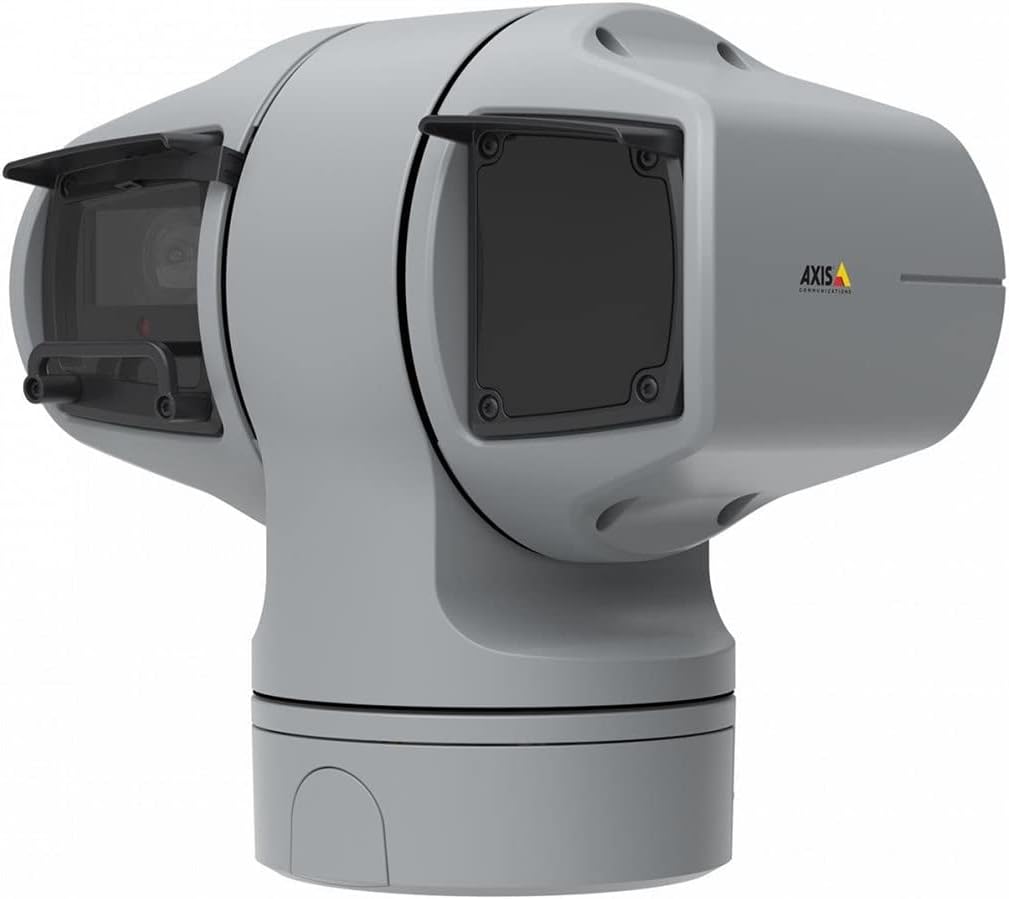
Малюнак 1: AXIS Q6225-LE PTZ Camera. This image displays the grey-colored PTZ camera unit, highlighting its robust housing and integrated lens system, designed for outdoor surveillance.
4. Настройка і ўстаноўка
4.1 Мантаж камеры
The AXIS Q6225-LE is designed for wall mount installation. Ensure the mounting surface is strong enough to support the camera's weight and withstand environmental conditions.
- Выберыце падыходнае месца мантажу, якое забяспечвае патрэбнае поле view і знаходзіцца ў межах дасяжнасці электрасеткі і падключэння да сеткі.
- Use the provided mounting template to mark drill holes on the wall.
- Drill pilot holes and secure the mounting bracket using appropriate screws and anchors.
- Attach the camera to the mounting bracket, ensuring it is firmly locked in place.
4.2 Падключэнне да электрасілкавання і сеткі
Connect the camera to power and network as follows:
- Магутнасць: Connect the power cable to a 60-watt power source. Ensure the connection is secure and weatherproof.
- Сетка: Connect an Ethernet cable from your network switch or router to the camera's network port. The camera supports Wi-Fi for wireless communication. Refer to the network configuration section for wireless setup.
4.3 Пачатковая канфігурацыя
After physical installation and connection, access the camera's web interface for initial configuration:
- Адкрыйце a web browser on a computer connected to the same network as the camera.
- Enter the camera's IP address in the browser's address bar. If the IP address is unknown, use the AXIS IP Utility tool to discover it.
- Follow the on-screen prompts to set up a new password for the administrator account.
- Configure basic network settings, date/time, and video stream settings.
5. Кіраванне камерай
5.1 Кіраванне панарамаваннем, нахілам і маштабаваннем (PTZ)
The AXIS Q6225-LE camera features full PTZ capabilities, allowing remote adjustment of its viewing angle and zoom level. Control is typically performed via the camera's web interface or compatible video management software (VMS).
- Пан: Rotate the camera horizontally to cover a wider area.
- Нахіл: Adjust the camera vertically to view objects at different heights.
- аптычны зум: Use the optical zoom feature to magnify distant objects without loss of image quality.
5.2 Выяўленне руху і абвесткі
The camera supports motion-only alerts. Configure motion detection zones and sensitivity settings in the web interface to trigger recordings or notifications when movement is detected.
5.3 Інфрачырвонае (ІЧ) выпраменьванне
Equipped with infrared light sources, the camera provides clear video surveillance in low-light or complete darkness. IR illumination activates automatically or can be manually controlled.
6. Тэхнічнае абслугоўванне
6.1 Ачыстка
Regular cleaning of the camera lens and housing is recommended to ensure optimal performance, especially in dusty or harsh environments.
- Gently wipe the lens with a soft, lint-free cloth. For stubborn dirt, use a lens cleaning solution specifically designed for optical surfaces.
- Ачысціце корпус камеры ад рэкламыamp тканінай. Пазбягайце абразіўных ачышчальнікаў або растваральнікаў.
6.2 Абнаўленне прашыўкі
Перыядычна правярайце Axis Communications website for firmware updates. Keeping the camera's firmware up-to-date ensures access to the latest features, security enhancements, and bug fixes.
7. Выпраўленне непаладак
This section addresses common issues you might encounter with your AXIS Q6225-LE camera.
| праблема | Магчымая прычына | Рашэнне |
|---|---|---|
| Няма відэаканала | Power disconnected, network issue, incorrect IP address. | Check power connection. Verify network cable or Wi-Fi connection. Confirm camera's IP address. |
| Дрэнная якасць выявы | Dirty lens, improper focus, low light conditions. | Clean the lens. Adjust focus via web interface. Ensure adequate lighting or verify IR functionality. |
| PTZ controls unresponsive | Network latency, software glitch, motor issue. | Check network connection. Restart the camera. If problem persists, contact support. |
8. Тэхнічныя характарыстыкі
| Асаблівасць | Дэталь |
|---|---|
| Нумар мадэлі | 02316-002 |
| Марка | Axis Communications |
| Тып мацавання | Насценнае мацаванне |
| Колер | Белы |
| Матэрыял | Метал |
| Ватtage | 60 ват |
| Тэхналогія падлучэння | Бесправадная сувязь, Wi-Fi |
| Выкарыстанне ў памяшканні/на вуліцы | На адкрытым паветры |
| Метад кантролю | Дыстанцыйнае |
| Тэхналогія фотадатчыка | CMOS |
| Фармат захопу відэа | MPEG-4 |
| Тып крыніцы святла | Інфрачырвоны |
| Тып абвесткі | Толькі рух |
| Тып маштабавання | Аптычны зум |
| Вага прадмета | 0.01 кілаграма (0.352 унцыі) |
| Уключаныя кампаненты | Камера/Аксэсуары |
9. Гарантыя і падтрымка
For warranty information and technical support, please refer to the official Axis Communications webсайт або звярніцеся да аўтарызаванага дылера. Захоўвайце чэк аб куплі як пацверджанне пакупкі.
Інтэрнэт-рэсурсы: www.axis.com