1. Уводзіны
This manual provides comprehensive instructions for the safe and effective use of the Flashpoint R2 XPro II 2.4GHz TTL Wireless Flash Trigger for Sony Cameras. This device is designed to provide reliable wireless control over compatible flash units, offering advanced features such as TTL, Manual, and Multi-flash modes, High-Speed Sync (HSS), and a robust 2.4GHz radio system.
Калі ласка, уважліва прачытайце гэтую інструкцыю перад выкарыстаннем прылады, каб забяспечыць яе належную працаздольнасць і пазбегнуць пашкоджанняў.
2. Тэхніка бяспекі
- Do not disassemble or modify the device. Unauthorized modifications can lead to malfunction or electric shock.
- Keep the device dry. Do not expose it to rain, moisture, or high humidity.
- Avoid strong impacts or vibrations. Dropping the device may cause internal damage.
- Захоўваць у месцах, недаступных дзецям.
- Use only specified batteries. Incorrect battery types may cause leakage or explosion.
- Do not operate in environments with flammable gases or liquids.
- Turn off the device when not in use or during cleaning.
3. Кампаненты і элементы кіравання прадукту
The Flashpoint R2 XPro II features an intuitive layout for easy operation. Familiarize yourself with the various parts and controls:
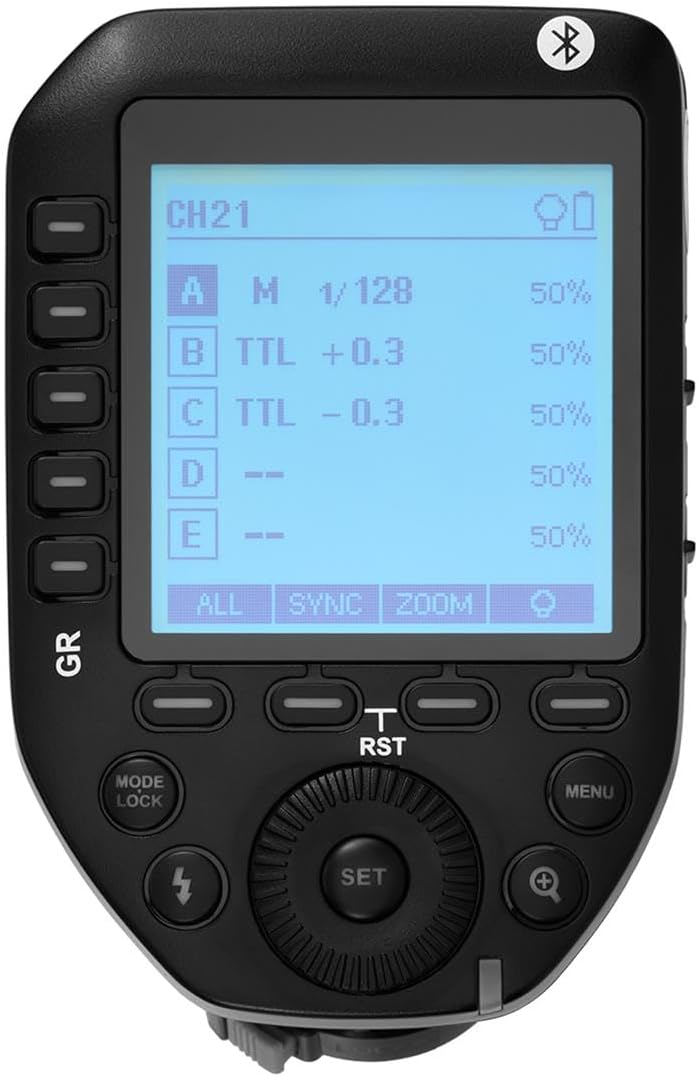
Малюнак 3.1: Верх view of the Flashpoint R2 XPro II, highlighting the large dot matrix LCD display and various control buttons including Group (GR), Mode/Lock, Set, Menu, and Zoom.

Малюнак 3.2: Пад вуглом view of the Flashpoint R2 XPro II, illustrating the hot shoe mount for camera attachment and the power ON/OFF switch located on the side.
Key Controls:
- ВК-дысплей: Large dot matrix display with adjustable backlight for clear visibility of settings.
- Group (GR) Buttons: Control individual flash groups (A, B, C, D, E).
- Mode/Lock Button: Switches between flash modes (TTL, Manual, Multi) and locks settings.
- Кнопка ўстаноўкі: Confirms selections and enters sub-menus.
- Кнопка меню: Accesses system settings and advanced options.
- Кнопка маштабавання: Adjusts flash zoom settings for specific groups.
- Набраць: Navigates menus and adjusts values.
- Выключальнік сілкавання: Уключае/выключае прыладу.
- Мацаванне гарачага башмака: Connects the trigger securely to your camera's hot shoe.
4. Настройка і ўстаноўка
4.1 Устаноўка батарэі
The R2 XPro II uses two AA batteries (not included). Ensure correct polarity when inserting.

Figure 4.1: The battery compartment of the Flashpoint R2 XPro II, with the cover removed, illustrating the correct orientation for inserting AA batteries.
- Знайдзіце вечка батарэйнага адсека на ніжняй частцы прылады.
- Адкрыйце крышку.
- Insert two AA batteries, matching the positive (+) and negative (-) indicators inside the compartment.
- Надзейна зачыніце крышку батарэйнага адсека.
4.2 Мацаванне на камеру
Attach the trigger to your Sony camera's hot shoe for seamless integration.

Малюнак 4.2: унізе view of the Flashpoint R2 XPro II, displaying the hot shoe mount and the instant flip locking mechanism designed for secure camera connection.
- Ensure the trigger is turned OFF.
- Slide the hot shoe mount of the R2 XPro II into your camera's hot shoe.
- Secure the trigger by engaging the locking mechanism (typically a lever or dial) on the hot shoe mount.
- Turn on the trigger and your camera.
5. Інструкцыя па эксплуатацыі
The R2 XPro II offers various modes and settings for precise flash control.
5.1 Уключэнне/выключэнне
Use the ON/OFF switch located on the side of the unit to power the trigger.
5.2 Basic Screen Navigation
The large LCD display shows current settings for channels, groups, and flash modes. Use the dial to navigate and adjust values, and the SET button to confirm.
5.3 Flash Modes (TTL / M / Multi)
Націсніце Рэжым/Блакіроўка кнопка для пераключэння паміж даступнымі рэжымамі ўспышкі:
- TTL (праз аб'ектыў): Automatic exposure control. The trigger communicates with the camera to determine optimal flash output.
- М (ручны): Allows manual adjustment of flash power output (e.g., 1/1 to 1/128).
- Мульты (страбаскапічны): Вырабляе серыю хуткіх успышак для стварэння творчых эфектаў.
The R2 XPro II also features TCM (TTL Converted to Manual) fusion, which allows you to capture an exposure in TTL mode and then convert that exposure value to a manual setting for consistent repeat shots.
5.4 Channel and Group Management
The trigger supports 32 channels and multiple groups (A, B, C, D, E) for managing complex lighting setups.
- Выкарыстоўвайце GR (Group) buttons to select and adjust individual flash groups.
- Access the menu to change the wireless channel to avoid interference.
5.5 Высокахуткасная сінхранізацыя (HSS)
The R2 XPro II supports High-Speed Sync up to 1/8000s, enabling you to use flash with fast shutter speeds, ideal for overpowering ambient light or freezing fast motion.
5.6 Smartphone APP Control (Bluetooth)
The built-in Bluetooth allows for smartphone app control of flash functions. Download the compatible Flashpoint R2 app to manage settings remotely.

Figure 5.1: Illustration of the R2 Wireless System, demonstrating the Flashpoint R2 XPro II's ability to work with a complete family of Flashpoint speedlights, monolights, and strobe lights, and transmit atop any Sony DSLR, MSLR, or M Series body.
6. Тэхнічнае абслугоўванне і догляд
- Уборка: Use a soft, dry cloth to clean the exterior of the unit. Do not use solvents or abrasive cleaners.
- захоўванне: Калі прылада не выкарыстоўваецца працяглы час, выміце батарэйкі, каб прадухіліць уцечку. Захоўвайце яе ў прахалодным, сухім месцы, удалечыні ад прамых сонечных прамянёў і экстрэмальных тэмператур.
- Абнаўленні прашыўкі: Перыядычна правярайце інфармацыю вытворцы website for available firmware updates to ensure optimal performance and compatibility. The unit is Mac and PC firmware updatable.
7. Выпраўленне непаладак
If you encounter issues with your Flashpoint R2 XPro II, refer to the following common problems and solutions:
| праблема | Магчымая прычына | Рашэнне |
|---|---|---|
| Прылада не ўключаецца. | Батарэйкі разраджаныя або няправільна ўстаўленыя. | Заменіце батарэйкі або пераканайцеся ў правільнай палярнасці. |
| Flash unit does not fire. | Incorrect channel/group settings; flash unit not compatible; trigger not securely mounted. | Verify channel and group settings on both trigger and flash; ensure flash is compatible with R2 system; re-mount trigger securely. |
| Inconsistent flash firing. | Interference from other wireless devices; low battery. | Change to a different wireless channel; replace batteries. |
| TTL exposure is inaccurate. | Environmental factors; flash unit limitations. | Adjust flash exposure compensation on the trigger or camera; consider switching to Manual mode. |
8. Тэхнічныя характарыстыкі
| Асаблівасць | Дэталь |
|---|---|
| мадэль | R2 XPro II |
| Бесправадная сістэма | Flashpoint R2 / Godox X - 2.4GHz Radio System |
| Сумяшчальнасць | Sony Cameras (TTL support) |
| Далёкасць перадачы | 300-400 футаў (прыблізна 90-120 метраў) |
| Каналы | 32 |
| Групы | 5 (A, B, C, D, E) |
| рэжымы ўспышкі | TTL, ручны, мульты |
| Высокахуткасная сінхранізацыя (HSS) | Да 1/8000 с |
| Дысплей | Large Dot Matrix LCD with Adjustable Backlight |
| Сувязь | Built-in Bluetooth for Smartphone APP Control |
| Абнаўленне прашыўкі | Mac and PC Updatable via USB-C port |
| Крыніца харчавання | 2 батарэек тыпу АА |
| Памеры прадукту | 5.15 х 4 х 2.8 цалі |
| Вага прадмета | 8.8 унцыі |
9. Інфармацыя аб гарантыі
Flashpoint products are designed and manufactured to the highest quality standards. For specific warranty terms and conditions, please refer to the warranty card included with your product or visit the official Flashpoint webсайт. Захоўвайце чэк аб куплі як пацвярджэнне пакупкі для гарантыйных прэтэнзій.
10. Падтрымка кліентаў
For technical assistance, troubleshooting, or service inquiries, please contact Flashpoint customer support. You can find contact information on the official Flashpoint webна сайце або праз вашага прадаўца.
Інтэрнэт-рэсурсы: Flashpoint Official Store on Amazon


