1. Прадукт скончыўсяview
The Taiahiro Low Profile Mechanical Keyboard is an ultra-slim 87-key keyboard designed specifically for Mac users, offering a compact 80% layout. It features ultra-low profile brown switches for a tactile and responsive typing experience. This wired keyboard provides full support for Mac function keys and customizable white backlighting.
Асноўныя характарыстыкі
- Нізкі Profile Brown Switches for tactile feedback.
- 87-key (TKL) compact design.
- Full Mac Function Keys Support.
- Detachable Type-C connection.
- 18-Modes LED White Backlighting with 4 adjustable brightness levels.
- Durable Aluminum Alloy Panel construction.
- Double Shot Injection Keycaps for comfortable typing.
- Ergonomic design for comfortable angle.
Змест пакета
- Тайахіра Лоў Праfile Механічная клавіятура
- Кабель USB-C да USB-A
- Кіраўніцтва карыстальніка
Схема прадукту

Малюнак 1: Закончанаview of the Taiahiro Low Profile Mechanical Keyboard, highlighting its compact design and key layout.
2. Кіраўніцтва па наладцы
Падключэнне клавіятуры
- Знайдзіце порт USB-C на задняй панэлі клавіятуры.
- Падключыце адзін канец кабеля USB-C, які ўваходзіць у камплект, да порта USB-C клавіятуры.
- Connect the other end of the USB-C cable to an available USB-A port on your computer (MacBook Pro/Air, iMac, Mac Mini, or PC).
- Клавіятура падключаецца па тэхналогіі «падключы і працуй» і павінна аўтаматычна распазнавацца вашай аперацыйнай сістэмай.
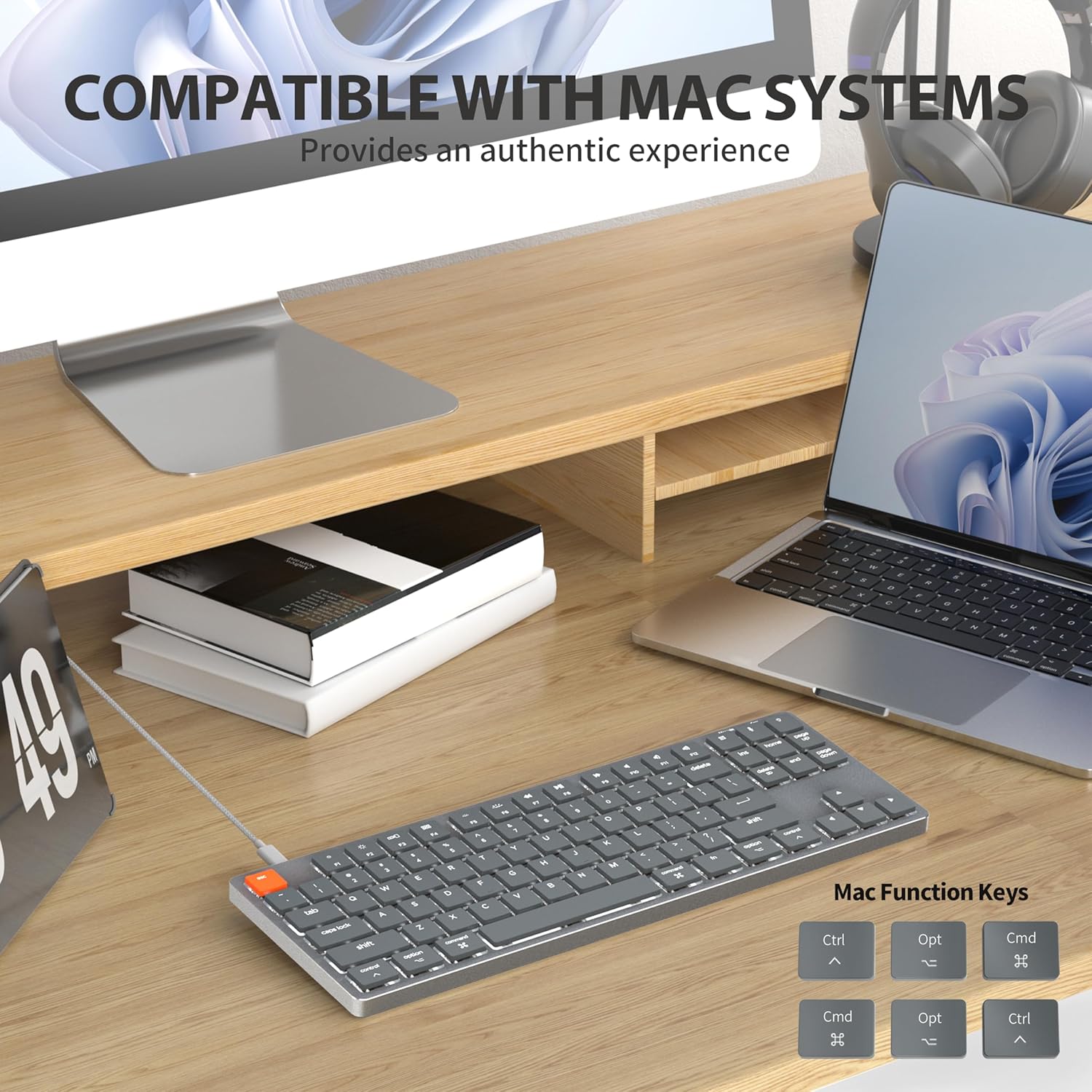
Figure 2: Connecting the detachable Type-C cable to the keyboard for convenience and efficiency.
Сумяшчальнасць сістэмы
This keyboard is designed for full compatibility with Mac OS and Windows operating systems. It supports Mac Mini, MacBook Air, MacBook Pro, PC, and iMac devices.

Figure 3: The keyboard seamlessly integrated with a Mac system, providing an authentic user experience.
3. Інструкцыя па эксплуатацыі
Асноўны набор тэксту
Нізкапрафесійныfile brown switches provide a quiet yet responsive typing experience with satisfying tactile feedback. The ultra-thin design and high-quality keycaps enhance fingertip comfort during extended use.
Кіраванне падсветкай
The keyboard features 18 distinct LED white backlighting modes. You can cycle through these modes and adjust brightness levels using the dedicated function keys. Refer to the keyboard's layout for specific key combinations, typically involving the 'Fn' key combined with other keys (e.g., Fn + F1/F2 for brightness, Fn + arrow keys for modes).

Figure 4: The keyboard's 18-modes LED white backlighting, offering customizable illumination.
Mac Function Keys Support
The keyboard is specifically designed to support Mac function keys, allowing you to easily control system functions such as screen brightness, volume, and media playback directly from the keyboard. These functions are typically accessed by pressing the 'Fn' key in combination with the corresponding F-keys (F1-F12).
Клавішы хуткага доступу
The keyboard includes multifunctional shortcut keys for enhanced productivity. These keys provide quick access to various commands, including multimedia controls. Consult the keycap legends for specific shortcut functions.

Figure 5: The keyboard's multifunctional shortcut keys, providing 100% fully loaded functionality.
4. Тэхнічнае абслугоўванне і догляд
Чыстка клавіятуры
- Адключыце клавіятуру ад кампутара перад чысткай.
- Выкарыстоўвайце мяккую безворсовую тканіну, злёгку dampпрамыйце вадой або мяккім ачышчальным растворам, каб працерці клавішы і паверхню.
- Для выдалення пылу і смецця паміж клавішамі выкарыстоўвайце сціснутае паветра або невялікую шчотку.
- Пазбягайце выкарыстання агрэсіўных хімікатаў, абразіўных ачышчальнікаў або празмернай вільготнасці.
Захоўванне
When not in use for extended periods, store the keyboard in a cool, dry place away from direct sunlight and extreme temperatures to prevent damage.
5. Выпраўленне непаладак
Клавіятура не адказвае
- Праверце злучэнне: Пераканайцеся, што кабель USB-C надзейна падключаны як да клавіятуры, так і да кампутара.
- Паспрабуйце іншы порт: Plug the keyboard into a different USB port on your computer.
- Перазагрузіце кампутар: Часам просты перазапуск сістэмы можа вырашыць праблемы з падключэннем.
- Праверце кабель: If possible, try using a different USB-C cable to rule out a faulty cable.
Праблемы з падсветкай
- Enable Backlight: Ensure the backlight is not turned off. Use the designated function keys (e.g., Fn + backlight key) to toggle it on/off.
- Наладзіць яркасць: Cycle through brightness levels using the appropriate function keys (e.g., Fn + F1/F2) to ensure it's not set to the lowest level.
- Змяніць рэжым: Try cycling through different backlight modes to see if the issue persists across all modes.
Mac Compatibility Concerns
- Версія аперацыйнай сістэмы: Ensure your Mac OS is up to date or meets the minimum requirements for peripheral compatibility.
- Тып працэсара: While designed for Mac, some specific processor architectures (e.g., M2/ARM) might require updated drivers or system settings. Check Taiahiro's official support page for any specific driver downloads or compatibility notes.
- Рэжым клавіятуры: If your keyboard has a physical switch or key combination to toggle between Mac/Windows mode, ensure it is set to Mac mode.
6. Тэхнічныя характарыстыкі
| Асаблівасць | Дэталь |
|---|---|
| Нумар мадэлі | 201 |
| Марка | Тайахіра |
| Тып клавіятуры | Нізкі Profile Механічная клавіятура |
| Тып перамыкача | Brown Switch |
| Колькасць ключоў | 87 |
| Сувязь | Правадны (USB-C) |
| Падсвятленне | 18-Modes LED White Backlighting |
| Матэрыял | Панэль з алюмініевага сплаву |
| Колер | Black-Gray |
| Памеры прадукту | 12.5 х 1.8 х 34.59 см (4.92 х 0.71 х 13.62 цалі) |
| Вага прадмета | 971 г |
| Сумяшчальная АС | Mac OS, Windows |
Dimensions and Profile

Figure 6: Detailed dimensions of the 87-key ultra-thin mechanical keyboard, illustrating its compact and slim profile.
Тэхналогія пераключэння

Figure 7: Comparison of Ultra Low Profile Brown Switch with standard mechanical switches, highlighting shorter actuation point for faster and more precise input.
Keycap Design

Figure 8: The ultra-thin double shot injection keycaps, designed for comfortable and durable typing.
Эрганоміка
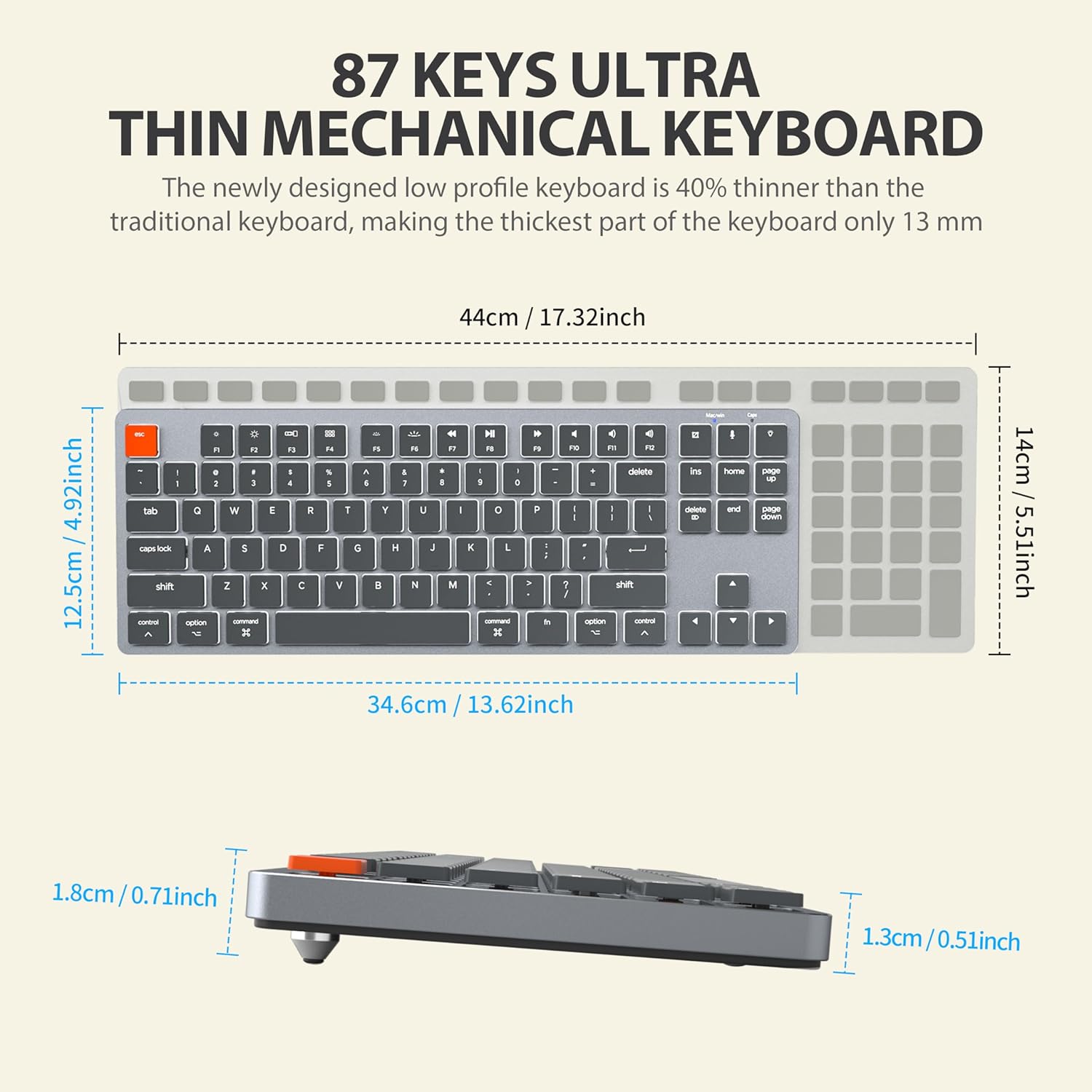
Figure 9: The ergonomic design of the keyboard, providing a comfortable angle for extended typing sessions.
7. Гарантыя і падтрымка
Інфармацыя аб гарантыі
This Taiahiro product comes with a standard manufacturer's warranty. Please refer to the product packaging or the official Taiahiro website for specific warranty terms and conditions, including coverage period and claim procedures.
Падтрымка кліентаў
For technical assistance, troubleshooting, or any product-related inquiries, please visit the official Taiahiro webсайт або звярніцеся ў аддзел абслугоўвання кліентаў. Кантактную інфармацыю звычайна можна знайсці на ўпакоўцы прадукту або на афіцыйным сайце брэнда ў Інтэрнэце.


