1. Уводзіны
This manual provides essential information for the installation, operation, and maintenance of the Cisco Catalyst 9800-L Copper Uplink Wireless LAN Controller (Model C9800-L-C-K9). Please read this manual thoroughly before using the device to ensure proper functionality and safety.
2. Важная інфармацыя па бяспецы
Выконвайце наступныя меры бяспекі, каб пазбегнуць траўмаў і пашкоджання прылады:
- Пераканайцеся, што прылада ўсталявана ў добра вентыляваным памяшканні, каб пазбегнуць перагрэву.
- Выкарыстоўвайце толькі крыніцу сілкавання, прадугледжаную для гэтай прылады.
- Не падвяргайце прыладу ўздзеянню вільгаці або экстрэмальных тэмператур.
- Адключыце электраэнергію перад выкананнем любога тэхнічнага абслугоўвання або чысткі.
- Звяртайцеся да кваліфікаванага абслугоўваючага персаналу.
3. Змесціва ўпакоўкі
Праверце наяўнасць усіх прадметаў у камплекце:
- Cisco Catalyst 9800-L Wireless LAN Controller
- CD (containing documentation or software)
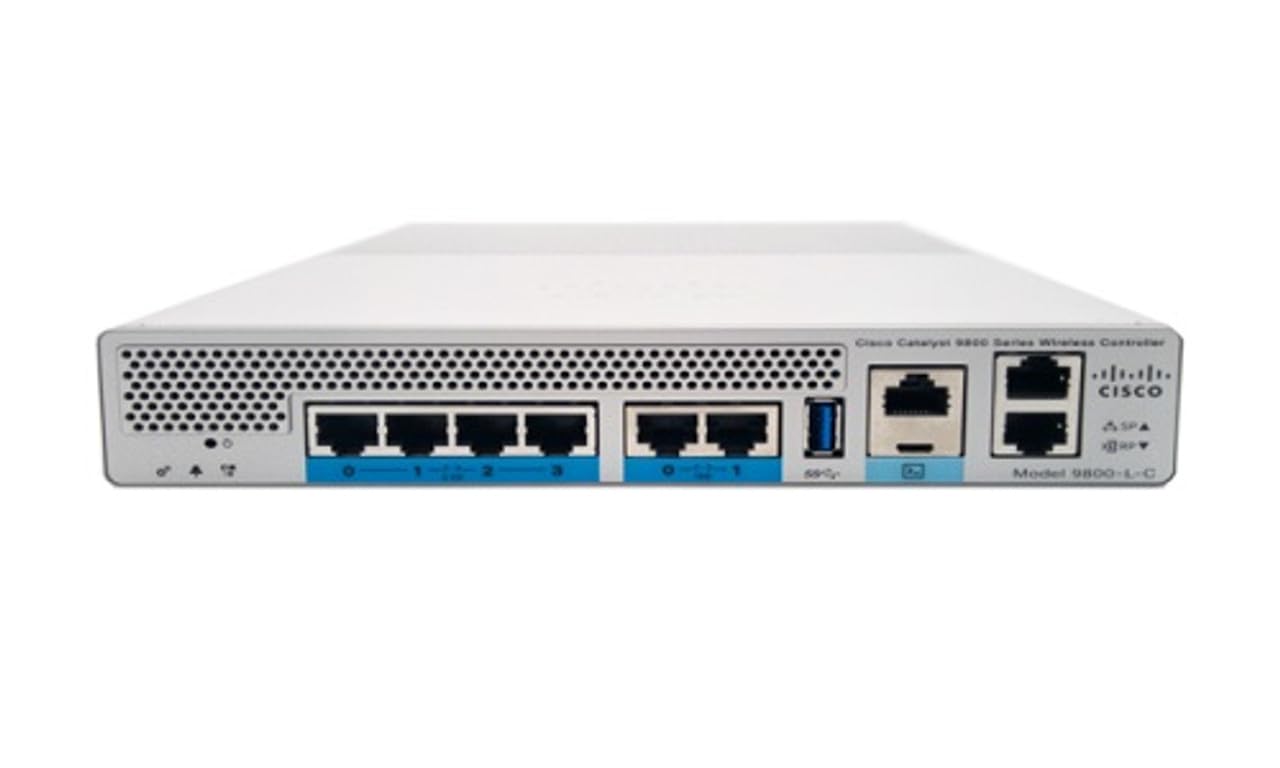
Малюнак 1: Спераду view of the Cisco Catalyst 9800-L Wireless LAN Controller. This image shows the compact design and port layout of the device.
4. Прадукт скончыўсяview
The Cisco Catalyst 9800-L is a compact, fixed-configuration wireless LAN controller designed for small to medium-sized deployments. It provides centralized control for Cisco Aironet access points, offering robust wireless network management capabilities.
Асноўныя характарыстыкі:
- Managed, Layer 2.5 (Wireless Controller) functionality
- Copper uplink interfaces
- RJ45 interface type
- 11 ports for connectivity
- Designed for desktop environments
5. Настройка
5.1 Распакаванне і праверка
- Асцярожна дастаньце кантролер з упакоўкі.
- Inspect the device for any signs of physical damage. If damage is found, contact your supplier immediately.
5.2 Фізічная ўстаноўка
- Place the controller on a stable, flat surface, such as a desktop.
- Ensure adequate clearance around the device for proper airflow and ventilation.
5.3 Падключэнне харчавання
- Connect the power cord to the power input on the rear of the controller.
- Plug the other end of the power cord into a grounded electrical outlet (220 Volts).
5.4 Сеткавае падключэнне
- Connect Ethernet cables from your network infrastructure to the RJ45 uplink ports on the controller.
- Connect access points to the appropriate downlink ports as required by your network design.
5.5 Пачатковы доступ да канфігурацыі
- Refer to the included CD or Cisco's official documentation for detailed instructions on initial console access and software configuration.
- Typically, this involves connecting a console cable to the device and using a terminal emulator.
6. Кіраванне кантролерам
6.1 Асноўныя аперацыі
Once powered on and initially configured, the controller will begin managing connected access points. Monitor the status indicators on the device for operational status.
6.2 Кіраванне кропкамі доступу
The Cisco Catalyst 9800-L automatically discovers and provisions Cisco Aironet access points. Use the controller's management interface (CLI or GUI) to configure wireless networks, security policies, and guest access.
6.3 Канфігурацыя сеткі
Detailed network configuration, including VLANs, QoS, and routing, is performed through the controller's operating system. Consult Cisco's official documentation for advanced configuration guides.
7. Рэкамендацыі па тэхнічным абслугоўванні
- Абнаўленні прашыўкі: Regularly check for and apply the latest firmware updates from Cisco to ensure optimal performance and security.
- Уборка: Keep the device clean and free of dust. Use a soft, dry cloth for cleaning. Do not use liquid or aerosol cleaners.
- Умовы навакольнага асяроддзя: Ensure the operating environment remains within specified temperature and humidity ranges to prevent hardware failure.
- Канфігурацыя рэзервовага капіявання: Periodically back up your controller's configuration to prevent data loss.
8. Выпраўленне непаладак
У гэтым раздзеле разглядаюцца распаўсюджаныя праблемы, з якімі вы можаце сутыкнуцца:
| праблема | Магчымая прычына | Рашэнне |
|---|---|---|
| Кантролер не ўключаецца | Power cable disconnected; Power outlet failure | Check power cable connections; Test power outlet with another device. |
| Access points not connecting | Incorrect network configuration; APs not discovered | Verify network settings on the controller; Ensure APs are on the same network segment or reachable via IP. |
| Slow wireless performance | Interference; Overloaded channels; Outdated firmware | Perform a site survey to identify interference; Optimize channel selection; Update controller and AP firmware. |
9. Тэхнічныя характарыстыкі
| Спецыфікацыя | Дэталь |
|---|---|
| Марка | Cisco |
| Нумар мадэлі | C9800-L-C-K9 |
| Колькасць партоў | 11 |
| Інтэрфейс | RJ45 |
| Тып перамыкача | Managed, Layer 2.5 (Wireless Controller) |
| Платформа | Дзета |
| Тып матэрыялу корпуса | медзь |
| тtage | 220 вольт |
| Сумяшчальныя прылады | Працоўны стол |
| Колер | Сіні |
| Вага прадмета | 3.09 кілаграма |
| UPC | 657768416101 |
| ASIN | B0C3FQPCY4 |
10. Інфармацыя аб гарантыі
This Cisco Catalyst 9800-L Wireless LAN Controller (Renewed) comes with a 90 дзён абмежаванай гарантыі. For specific terms and conditions, please refer to the warranty documentation provided with your purchase or contact your reseller.
11. Падтрымка кліентаў
For technical assistance, troubleshooting, or further inquiries regarding your Cisco Catalyst 9800-L Wireless LAN Controller, please visit the official Cisco support website or contact your authorized Cisco reseller. Ensure you have your model number (C9800-L-C-K9) and serial number available when seeking support.


