Уводзіны
Thank you for choosing the Epson EB-L210SF projector. This manual provides essential information for the safe and efficient use of your projector. Please read it thoroughly before operating the device and keep it for future reference.
The Epson EB-L210SF is a 3LCD Full-HD projector designed for clear and vibrant image projection. It features a laser light source for long-lasting performance.
Важная інфармацыя па бяспецы
- Лазерная бяспека: Do not look directly into the projector lens when the laser light source is active. Avoid direct eye exposure to the laser beam.
- Вентыляцыя: Ensure adequate ventilation around the projector. Do not block ventilation openings. Overheating can cause damage.
- Крыніца харчавання: Выкарыстоўвайце толькі крыніцу сілкавання, прызначаную для гэтага праектара.
- Апрацоўка: Асцярожна звяртайцеся з праектарам. Пазбягайце падзення або моцных удараў.
- Уборка: Адключыце шнур сілкавання ад сеткі перад чысткай. Выкарыстоўвайце мяккую сухую тканіну. Не выкарыстоўвайце вадкія або аэразольныя ачышчальнікі.
Настройка
1. Распакаванне і размяшчэнне
Carefully remove the projector and all accessories from the packaging. Place the projector on a stable, level surface. Ensure there is sufficient space around the projector for proper ventilation.

Малюнак 1: Пярэдняя і бакавая часткі view of the Epson EB-L210SF projector, showing the lens and ventilation grilles.
2. Падключэнне сілкавання
- Падключыце шнур сілкавання з камплекта да разеткі пераменнага току праектара.
- Падключыце другі канец шнура сілкавання да заземленай электрычнай разеткі.
3. Падключэнне крыніц уваходнага сігналу
The projector supports various input sources. Connect your device (computer, Blu-ray player, etc.) to the appropriate port on the projector's rear panel.

Figure 2: Rear panel of the projector, displaying various input and output ports including HDMI, Computer (VGA), Video, USB, and Audio connections.
- HDMI: Connect an HDMI cable from your device to one of the HDMI ports (HDMI 1 or HDMI 2).
- Камп'ютар (VGA): Connect a VGA cable from your computer to the Computer 1 or Computer 2 port. For audio, connect a separate audio cable to Audio 1 or Audio 2.
- Відэа: Connect composite video and audio cables to the Video and Audio (R/L) ports.
- USB: Use the USB-A port for connecting USB storage devices or the USB-B port for display over USB.
- LAN: Падключыце кабель Ethernet для кіравання сеткай і маніторынгу.
4. Initial Power On and Image Adjustment
- Press the power button on the projector or remote control to turn on the device. The power indicator will illuminate.
- Адрэгулюйце кольца факусіроўкі around the lens until the image is sharp and clear.
- Выкарыстоўвайце zoom lever (if available) to adjust the image size.
- Калі выява мае форму трапецыі, выкарыстоўвайце карэкцыя трапецеідальных скажэнняў feature (manual or automatic) to square the image. Refer to the Operating section for details on menu navigation.
Кіраванне праектарам
1. Панэль кіравання скончанаview
The control panel on top of the projector allows access to various functions and settings.
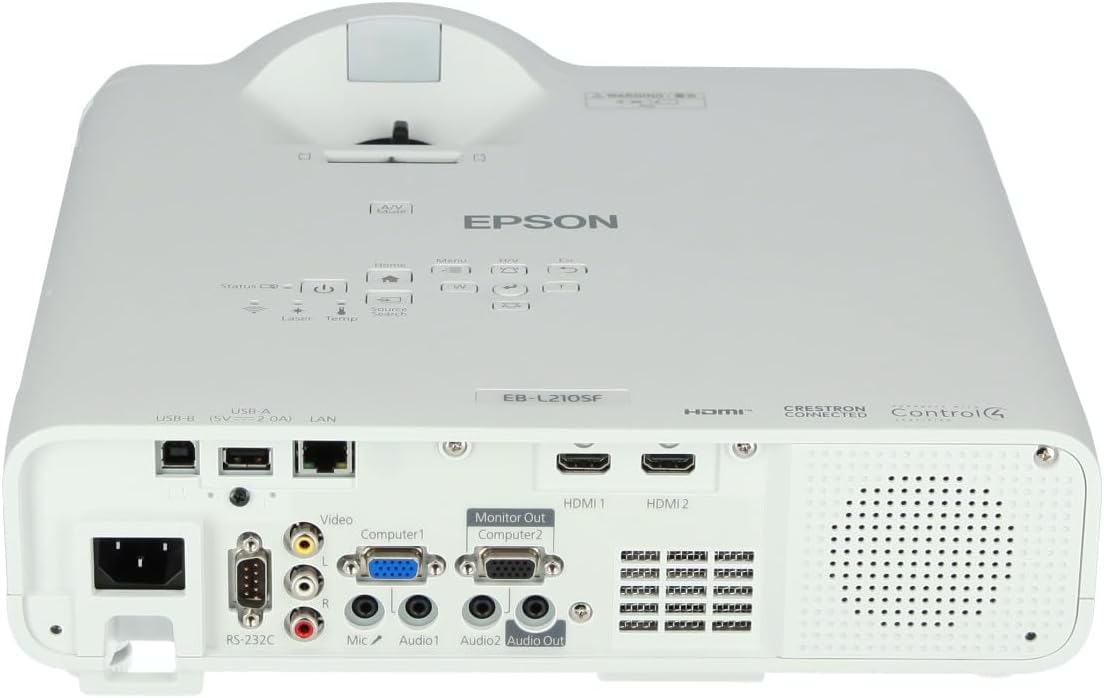
Малюнак 3: Верх view of the projector, highlighting the control panel with buttons for power, menu, source selection, and navigation.
- Кнопка харчавання: Уключае або выключае праектар.
- Пошук па крыніцах: Цыклічнае пераключэнне даступных крыніц уваходнага сігналу.
- Кнопка меню: Адкрывае экраннае меню (OSD).
- Navigation Buttons (Arrow keys): Выкарыстоўваецца для навігацыі па пунктах меню.
- Кнопка ўводу: Пацвярджае выбар у меню.
- Кнопка Esc: Выхад з бягучага меню або вяртанне да папярэдняга экрана.
- Кнопка дадому: Accesses the home screen or quick settings.
- Адключэнне гуку A/V: Temporarily mutes audio and blanks the screen.
2. Выбар крыніцы ўваходнага сігналу
Націсніце Пошук крыніц button on the control panel or remote control to cycle through the connected input sources (e.g., HDMI 1, HDMI 2, Computer 1, Video). The projector will automatically detect and display the active source.
3. Adjusting Image and Audio Settings
Націсніце Меню button to access the projector's on-screen display (OSD) menu. Use the navigation buttons to browse categories such as:
- выява: Adjust brightness, contrast, color, tint, sharpness, and color temperature.
- Сігнал: Configure input signal settings, aspect ratio, and overscan.
- Налады: General projector settings like language, display options, and power management.
- Аўдыё: Adjust volume, mute, and audio input selection.
Выберыце опцыю і націсніце Увайдзіце to modify its value. Press Esc каб выйсці з меню.
Тэхнічнае абслугоўванне
1. Чыстка праектара
- Знешні выгляд: Wipe the projector's exterior with a soft, dry, lint-free cloth. For stubborn dirt, dampen the cloth slightly with water, then wipe dry.
- Аб'ектыў: Gently wipe the lens with a lens cleaning cloth or lens paper. Avoid using abrasive materials or excessive force.
- Паветраны фільтр: Regularly check and clean the air filter to prevent dust buildup, which can affect performance and cause overheating. Refer to the projector's on-screen menu for filter maintenance reminders.
2. Laser Light Source
The Epson EB-L210SF uses a laser light source, which offers a long operational life and does not require lamp replacement. No user maintenance is typically required for the laser light source itself.
Ліквідацыю непаладак
Калі ў вас узніклі праблемы з праектарам, звярніцеся да наступных распаўсюджаных праблем і рашэнняў:
| праблема | Магчымая прычына / рашэнне |
|---|---|
| Няма праецыравання выявы |
|
| Выява размытая або не ў фокусе |
|
| Выява скажоная (трапецападобная) |
|
| Няма гуку |
|
| Projector is not wireless | The Epson EB-L210SF is not inherently a wireless projector. Wireless functionality typically requires an optional external wireless adapter, which is sold separately. Please consult Epson's official website or your retailer for compatible wireless adapters. |
| Overheating warning (Temp indicator) |
|
Тэхнічныя характарыстыкі
| Асаблівасць | Дэталь |
|---|---|
| Нумар мадэлі | V11HA75080 |
| Дазвол дысплея | 1920 x 1080 (Full HD) |
| Тэхналогія падлучэння | HDMI, VGA, USB, LAN |
| Памеры прадукту | 11.81 х 11.81 х 11.81 цалі |
| Вага прадмета | 10.14 фунта |
| Крыніца святла | Лазерная |
| Вытворца | Epson |
| Рэкамендуемае выкарыстанне | Маніторынг |
| Асаблівасць | Лёгкі |
| Патрабуюцца батарэі | 1 AAAA (for remote control, not included with projector unit) |
| Дата першай даступнасці | 14 лістапада 2023 г |
Гарантыя і падтрымка
Каб атрымаць падрабязную інфармацыю пра гарантыю, звярніцеся да гарантыйнага талона, які пастаўляецца з вашым прадуктам, або наведайце афіцыйны сайт Epson. webсайт. Умовы гарантыі могуць адрознівацца ў залежнасці ад рэгіёна.
For technical support, product registration, or to download the latest drivers and software, please visit the official Epson support website or contact Epson customer service in your region. Contact information can typically be found on the Epson webсайт.


