1. Уводзіны
The Emerson EMT-1200 Multimedia Recorder is designed to effortlessly digitize and preserve your cherished memories by converting various media formats into modern digital files. This manual provides comprehensive instructions for setting up, operating, and maintaining your device.
2. Што ў скрынцы
- Emerson EMT-1200 Multimedia Recorder
- Адаптар пераменнага току
- Кароткае кіраўніцтва
- AV-кабель
- Кіраўніцтва карыстальніка
3. Прадукт скончыўсяview
The Emerson EMT-1200 is a versatile multimedia recorder featuring a 4.3-inch LCD screen, multiple input/output options, and app integration for seamless media conversion and playback.

Image: The Emerson EMT-1200 Multimedia Recorder shown with various media sources like phones, DVDs, and USB drives, highlighting its multi-functionality.
Key Features and Components:
- 4.3-цалевы ВК-экран: Для папярэдviewing recordings and navigating menus.
- Аўдыёўваход (RCA): Red and white ports for stereo audio input.
- Video In (RCA): Yellow port for composite video input.
- HD Out (HDMI): Для падлучэння да знешніх дысплеяў.
- Порт USB: Для падлучэння USB-назапашвальнікаў.
- Слот для карты: Для ўстаўкі SD-карт.
- DVD/CD Drive: For disc media.
- Кнопка харчавання: Каб уключыць/выключыць прыладу.
- Кнопка вываду: To open/close the disc tray.
- Кнопка запісу: To start/stop recording.
- Navigation Buttons (ENTER, RETURN, UP/DOWN/LEFT/RIGHT): For menu control.

Выява: Уверсе view of the Emerson EMT-1200, highlighting the 4.3-inch LCD screen and the central control panel with navigation and function buttons.

Выява: спераду view of the Emerson EMT-1200, showing the Audio In, Video In, HD Out, and USB ports on the left side.

Выява: Збоку view of the Emerson EMT-1200 with the DVD/CD tray open, ready for disc insertion.
4. Настройка
- Place the Recorder: Position the EMT-1200 on a clean, stable surface.
- Падключыце харчаванне: Connect the AC power adapter to the DC IN 5V port on the recorder and plug the adapter into a wall outlet or surge protector.
- Уключэнне: Press the Power button on the device. The Emerson logo will appear on the screen.
Video: This video demonstrates the basic setup process for the Emerson EMT-1200 Multimedia Recorder, including connecting power and initial boot-up.
5. Інструкцыя па эксплуатацыі
5.1 Recording from VHS
- Connect VHS Player: Use the AV cable to connect the LINE OUT ports of your VHS player to the AUDIO IN (Red/White) and VIDEO IN (Yellow) ports on the EMT-1200.
- Устаўце VHS-касету: Place the VHS tape you wish to record into your VHS player.
- Выберыце крыніцу: On the EMT-1200, navigate to the main menu and select "Video -> USB/Card" or "Video -> DVD" depending on your desired output.
- Пачаць запіс: Begin playback on your VHS player, then press the REC button on the EMT-1200 to start recording. Press REC again to stop.

Image: The Emerson EMT-1200 connected to a VHS player via AV cables, illustrating the process of converting VHS tapes to digital formats.
Video: This video demonstrates how to record content from a VHS player to the Emerson EMT-1200 Multimedia Recorder.
5.2 Recording from DVD/CD
- Insert Source Disc: Eject the disc tray and insert the DVD or CD you wish to record from. Close the tray.
- Выберыце крыніцу: From the main menu, select "CD/DVD -> USB/Card" or "CD/DVD -> Memory" based on your desired storage.
- Пачаць запіс: Play the content on the disc, then press the REC button on the EMT-1200 to start recording. Press REC again to stop.
Video: This video guides you through the process of recording content from a DVD to the Emerson EMT-1200 Multimedia Recorder.
Video: This video demonstrates how to record audio from a CD to the Emerson EMT-1200 Multimedia Recorder.
5.3 Recording from USB/SD Card
- Insert Storage: Insert a USB drive into the USB port or an SD card into the CARD slot.
- Выберыце крыніцу: From the main menu, select "USB/Card -> DVD" or "USB/Card -> CD" to transfer files from your USB/SD to a disc.
- Пачаць запіс: Follow the on-screen prompts to select files and initiate the transfer.
Video: This video explains how to record files from a USB drive to a DVD using the Emerson EMT-1200 Multimedia Recorder.
5.4 Перадача Files from iOS/Android App
- Спампаваць прыкладанне: Download the "Friendly Memories" app from the App Store (iOS) or Google Play Store (Android).
- Падключыцеся да Wi-Fi: Power on the EMT-1200. On your smartphone/tablet, go to Wi-Fi settings and connect to the device's Wi-Fi network (e.g., "DVD_SERVER_XXXX"). Enter the password found in your user manual.
- Даць доступ: In your phone's settings, ensure the "Friendly Memories" app has access to the photos and videos you wish to transfer.
- Загрузіць Files: Open the "Friendly Memories" app, select the files you want to transfer, and choose your desired destination (USB, SD Card, or DVD) on the EMT-1200.

Image: An iPhone displaying the "Friendly Memories" app interface, connected wirelessly to the Emerson EMT-1200 for file перадача.
Video: This video demonstrates how to use the iOS app to transfer files to the Emerson EMT-1200 Multimedia Recorder.
5.5 Media Playback & HD Output
- Падключэнне да дысплея: Connect an HDMI cable from the HD OUT port on the EMT-1200 to your TV or monitor's HDMI input.
- Выберыце ўвод: On your TV/monitor, select the corresponding HDMI input source.
- Select Media Player: On the EMT-1200, navigate to the main menu and select "Media Player".
- Choose Source: Select the source (USB, Card, or CD/DVD) where your media files захоўваюцца.
- Прайграць медыяфайлы: Праглядзіце і выберыце патрэбны file гуляць.

Image: The Emerson EMT-1200 connected to a larger TV screen via HDMI, allowing users to view their digitized media on an external display.
Video: This video demonstrates the media player functionality and HD output capabilities of the Emerson EMT-1200 Multimedia Recorder.
6. Налады
Access the "Setup" menu from the main menu to configure various device settings:
- Фармат запісу: Choose between MPG (for Blu-ray players) or MP4 (for computers and DVD players).
- DVD Burn Type: Select "Data" for data-only files or "Video" for video format compatible with DVD/Blu-ray players.
- Якасць запісу: Adjust the recording quality to High, Medium, or Low. Note that higher quality results in larger file sizes and longer recording times.
- Auto Stop Timer: Set a preset time (e.g., 30 minutes, 60 minutes, 2 hours) for the recording to stop automatically.
- Auto Chapter: Enable this feature to automatically break recordings into chapters at specified intervals (e.g., 5, 10, or 15 minutes).
- Сістэма колераў: Set the video color system (e.g., NTSC).
- Мова экраннага меню: Select the On-Screen Display language (English, Deutsch, Français, Nederlands, Español).
- Налада даты: Adjust the current date.
- Настройка часу: Адрэгулюйце бягучы час.
- Налады па змаўчанні: Скінуць усе налады да заводскіх.
7. Выпраўленне непаладак
If you encounter issues with your Emerson EMT-1200, please refer to the following common troubleshooting tips:
- Няма харчавання: Ensure the AC power adapter is securely connected to both the device and a working power outlet.
- Няма сігналу на дысплеі: Verify all AV or HDMI cables are correctly connected to both the recorder and the external display. Ensure the correct input source is selected on your TV/monitor.
- Праблемы з запісам: Check that the source media (VHS, DVD, etc.) is playing correctly. Ensure the destination media (USB, SD card, blank DVD) has sufficient space and is compatible with the device.
- Праблемы з падключэннем праграмы: Confirm your smartphone/tablet is connected to the EMT-1200's Wi-Fi network and the correct password has been entered. Check app permissions for media access.
- Disc Ejection Issues: If a disc does not eject, ensure the device is powered on and press the Eject button firmly. Do not force the disc tray.
For more detailed troubleshooting, please consult the full user manual or visit the Emerson support webсайт.
8. Тэхнічныя характарыстыкі
| Асаблівасць | Дэталь |
|---|---|
| Марка | Эмерсан |
| Назва мадэлі | ЕМТ-1200 |
| Асаблівасць | USB Recording (DVR) |
| дазвол | 1280×720 |
| Тып раздыма | Micro USB |
| Тэхналогія падлучэння | USB |
| Вага прадмета | 1 фунта |
| Памеры прадукту | 6.1 см Д х 1.85 см Ш х 6.1 см В |
| Дазвол відэа выхаду | 1080p |
| Сумяшчальныя прылады | Тэлевізар, смартфон |
| Тып кантролера | Кіраванне кнопкамі |
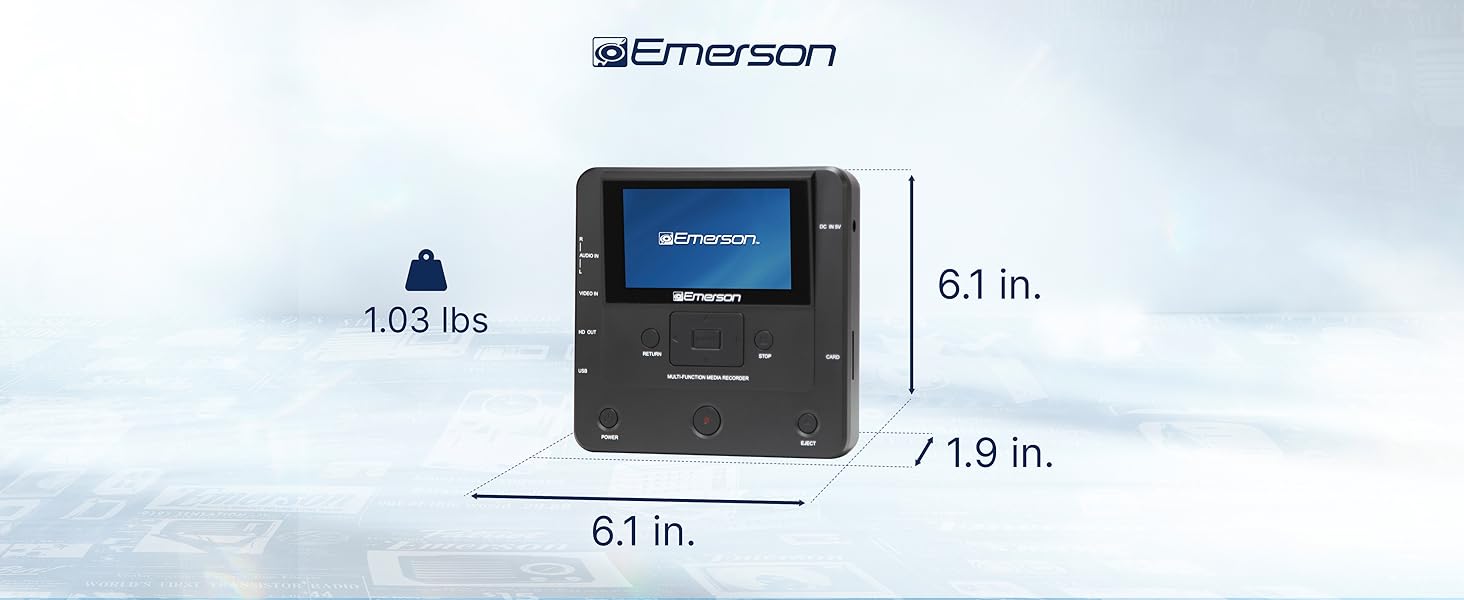
Image: The Emerson EMT-1200 Multimedia Recorder with its dimensions labeled: 6.1 inches Length, 1.9 inches Width, 6.1 inches Height, and a weight of 1.03 pounds.
9. Тэхнічнае абслугоўванне
To ensure the longevity and optimal performance of your Emerson EMT-1200 Multimedia Recorder, follow these maintenance guidelines:
- Уборка: Use a soft, dry cloth to clean the exterior of the device. Avoid using liquid cleaners, aerosols, or solvents.
- захоўванне: Захоўвайце прыладу ў прахалодным, сухім месцы, удалечыні ад прамых сонечных прамянёў і экстрэмальных тэмператур.
- Сыход за дыскамі: Handle discs by their edges to avoid fingerprints and scratches. Keep discs in their protective sleeves when not in use.
- Вентыляцыя: Ensure the device's ventilation openings are not blocked to prevent overheating.
10. Гарантыя і падтрымка
Your Emerson EMT-1200 Multimedia Recorder comes with a limited warranty to ensure your satisfaction.
- Гарантыйны тэрмін: 1 Year Parts, 90 Days Labor.
- вытворца: Кампанія Naxa Electronics, Inc.
For warranty claims, product updates, extended support documentation, or frequently asked questions, please visit the official Emerson Audio webсайт або звярніцеся ў службу падтрымкі кліентаў.