Уводзіны
This manual provides detailed instructions for the safe and efficient operation of your boAt Partypal 390 Bluetooth Speaker. Please read this manual thoroughly before using the product and retain it for future reference. The Partypal 390 is a powerful portable speaker designed for various audio needs, featuring 160W boAt Signature Sound, multiple connectivity options, and integrated LED lighting.
Інфармацыя па бяспецы
- Не падвяргайце дынамік уздзеянню экстрэмальных тэмператур, прамых сонечных прамянёў або высокай вільготнасці.
- Пазбягайце падзення дынаміка і не падвяргайце яго моцным ударам.
- Не спрабуйце разбіраць, рамантаваць або мадыфікаваць дынамік самастойна. Звярніцеся па дапамогу да кваліфікаванага абслугоўваючага персаналу.
- Keep the speaker away from water and other liquids. Although it is waterproof, prolonged submersion or exposure to high-pressure water jets should be avoided.
- Выкарыстоўвайце толькі зарадны кабель, які пастаўляецца ў камплекце, або яго сертыфікаваны эквівалент.
- Забяспечце належную вентыляцыю падчас працы дынаміка.
- Працірайце дынамік мяккай сухой тканінай. Не выкарыстоўвайце абразіўныя ачышчальнікі або растваральнікі.
Змест пакета
Праверце, ці ёсць у вашай упакоўцы ўсе пералічаныя ніжэй прадметы:
- boAt Partypal 390 Speaker
- Зарадны кабель
- Кіраўніцтва карыстальніка
- Гарантыйны талон
Прадукт скончаныview
The boAt Partypal 390 is a versatile Bluetooth speaker featuring powerful audio output and dynamic LED lighting. Below are key visual references and descriptions of its components.
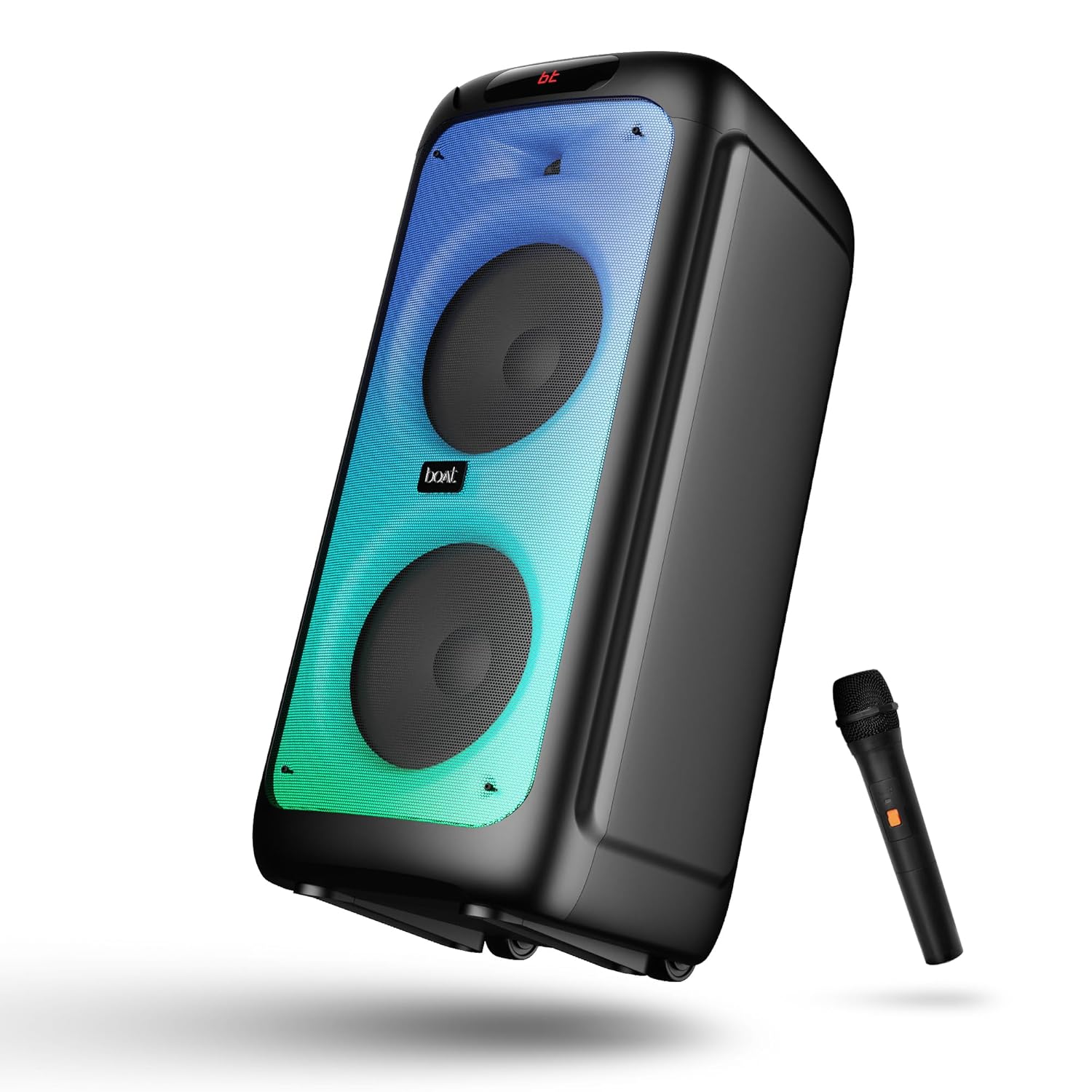
Малюнак 1: Фронт view of the boAt Partypal 390 speaker, showcasing its dual speaker design, integrated flame LEDs, and the included wired microphone.

Малюнак 2: Top panel of the speaker displaying the control buttons and various input ports including USB, AUX, Guitar In, Mic 1, Mic 2, and the USB Type-C charging port. Also shown are dedicated controls for Bass/Treble, LED modes, and volume.
Асноўныя характарыстыкі:
- 160-ватны фірмовы гук boAt: Забяспечвае магутны і чысты гук.
- Flame LEDs: Dynamic lighting effects to enhance the listening experience.
- Некалькі падключэнняў: Bluetooth v5.3, AUX, USB, and TF card support.
- Функцыянальнасць караоке: Two microphone input ports for vocal performances.
- Гітарны ўваход: Dedicated port for connecting a guitar.
- Рэжымы эквалайзера: Pre-set sound modes (Normal, Party, Pop, Rock, Jazz) for different audio preferences.
- Рэжым TWS: Allows wireless connection of two Partypal speakers for stereo sound.
- Рэгулятары нізкіх і высокіх частот: Adjustable audio settings for personalized sound.
- Працяглае прайграванне: Да 6 XNUMX гадзін аўтаномнай працы.
Настройка
1. Зарадка дынаміка
Before first use, fully charge the speaker. Connect the provided USB Type-C charging cable to the speaker's charging port and the other end to a compatible USB power adapter (not included). The charging indicator will show the charging status. A full charge provides up to 6 hours of playback.

Малюнак 3: The speaker in an outdoor setting, illustrating its portability and battery life.
2. Уключэнне/выключэнне харчавання
- To power on, press and hold the Power button located on the control panel until the display illuminates.
- To power off, press and hold the Power button again until the display turns off.
3. Пачатковае спалучэнне Bluetooth
- Ensure the speaker is powered on and in Bluetooth mode. The display will show "bt" and the Bluetooth indicator will flash, indicating it's ready for pairing.
- На мабільнай прыладзе ўключыце Bluetooth і знайдзіце даступныя прылады.
- Select "boAt Partypal 390" from the list of devices.
- Once paired, the speaker will emit a confirmation sound, and the Bluetooth indicator will stop flashing.
Інструкцыя па эксплуатацыі
1. Выбар рэжыму
Press the "Mode" button on the control panel to cycle through available input modes: Bluetooth, AUX, USB, and TF Card.
2. Рэжым Bluetooth
- Пасля паспяховага спалучэння гук з падлучанай прылады будзе прайгравацца праз дынамік.
- Use the volume knob on the speaker or your connected device to adjust the volume.
- Выкарыстоўвайце кнопкі «Папярэдні/Наступны», каб пераключаць трэкі.
- Націсніце кнопку прайгравання/паўзы, каб кіраваць прайграваннем.
3. AUX рэжым
- Connect an audio device to the AUX input port using a 3.5mm audio cable.
- Switch the speaker to AUX mode using the "Mode" button.
- Кіруйце прайграваннем і гучнасцю з падлучанай прылады.
4. USB/TF Card Mode
- Insert a USB flash drive into the USB port or a TF card into the TF card slot.
- Дынамік аўтаматычна пераключыцца ў рэжым USB або TF-карты і пачне прайграваць аўдыё files. If not, switch manually using the "Mode" button.
- Use the Previous/Next buttons to navigate tracks and Play/Pause for playback control.
5. Karaoke Function (Microphone Input)
- Connect up to two wired microphones to the "MIC 1" and "MIC 2" input ports.
- Adjust microphone volume using the dedicated MIC VOL knob.
- Adjust microphone echo effect using the ECHO knob.
6. Гітарны ўваход
- Connect a guitar to the "GUITAR IN" port.
- Adjust guitar volume using the dedicated GUITAR VOL knob.
7. Рэжымы эквалайзера
The speaker offers several pre-set equalizer modes to optimize audio for different content types. Press the "EQ" button to cycle through:
- Нармальны
- Партыя
- Поп
- Рок
- Джаз

Малюнак 4: Visual representation of the available EQ modes for sound customization.
8. TWS (True Wireless Stereo) Mode
To connect two Partypal 390 speakers for a stereo audio experience:
- Пераканайцеся, што абедзве калонкі ўключаны і знаходзяцца ў рэжыме Bluetooth, але яшчэ не падключаны да якой-небудзь прылады.
- On one speaker (this will be the primary speaker), press and hold the TWS button. The speaker will emit a sound indicating it's searching for another speaker.
- Два дынамікі аўтаматычна падключацца адзін да аднаго. Гукавы сігнал пацверджання будзе пацверджаны паспяховым спалучэннем TWS.
- Now, pair your mobile device to the primary speaker via Bluetooth as described in the "Initial Bluetooth Pairing" section. Audio will play in stereo through both speakers.

Малюнак 5: Two Partypal 390 speakers wirelessly connected, demonstrating the TWS feature.
9. Святлодыёдны кантроль
Press the "LED Mode" button to cycle through different flame LED lighting effects or to turn them off.
10. Bass and Treble Controls
Use the dedicated Bass and Treble knobs on the control panel to adjust the low and high frequencies of the audio output according to your preference.
Тэхнічнае абслугоўванне
- Уборка: Use a soft, dry, lint-free cloth to clean the speaker's exterior. Do not use liquid cleaners, aerosols, or solvents.
- захоўванне: Калі дынамік не выкарыстоўваецца працяглы час, захоўвайце яго ў прахалодным, сухім месцы, удалечыні ад прамых сонечных прамянёў і экстрэмальных тэмператур.
- Сыход за батарэяй: Каб падоўжыць тэрмін службы батарэі, пазбягайце частай поўнай разрадкі дынаміка. Рэгулярна зараджайце яго, нават калі ён не выкарыстоўваецца.
Ліквідацыю непаладак
| праблема | Магчымая прычына | Рашэнне |
|---|---|---|
| Дынамік не ўключаецца. | Нізкі ўзровень зарада батарэі; кнопка харчавання націснута няправільна. | Цалкам зарадзіце дынамік. Націсніце і ўтрымлівайце кнопку харчавання некалькі секунд. |
| Няма гуку. | Занадта ціхая гучнасць; няправільны рэжым уводу; прылада не падключана. | Increase speaker and device volume. Ensure correct mode is selected (Bluetooth, AUX, USB, TF). Re-pair Bluetooth device or check cable connections. |
| Збой спалучэння Bluetooth. | Дынамік не ў рэжыме спалучэння; прылада занадта далёка; перашкоды. | Ensure speaker is in Bluetooth pairing mode (flashing "bt"). Move device closer to speaker. Turn off other Bluetooth devices. Forget "boAt Partypal 390" on your device and try pairing again. |
| Не працуе мікрафон. | Microphone not connected properly; MIC VOL too low. | Ensure microphone is securely plugged into MIC 1 or MIC 2 port. Increase the MIC VOL knob. |
| Памылка падключэння TWS. | Дынамікі ўжо падключаны да прылады; дынамікі размешчаны занадта далёка адзін ад аднаго. | Ensure both speakers are not connected to any Bluetooth device. Place speakers within close proximity. Repeat TWS pairing steps. |
Тэхнічныя характарыстыкі
Below are the technical specifications for the boAt Partypal 390 speaker:
| Назва мадэлі | Partypal 390 |
| Тып дынаміка | Multimedia, Floor Standing |
| Выхадная магутнасць гуку | 160 ват |
| Тэхналогія падлучэння | Bluetooth v5.3, AUX, USB, TF-карта |
| Дыяпазон Bluetooth | Да 10 метраў |
| Тэрмін службы батарэі | Да 6 гадзін |
| Ёмістасць батарэі | 7500 mAh (Lead Acid) |
| Памеры прадукту (Д х Ш х У) | 70 Г х 32 Ш х 32 В сантыметраў |
| Вага прадмета | 10.8 кг |
| Узровень воданепранікальнасці | Воданепранікальны |
| Уключаныя кампаненты | Speaker, Charging Cable, User Manual, Warranty Card |

Малюнак 6: Diagram illustrating the physical dimensions of the Partypal 390 speaker.
Гарантыя і падтрымка
Your boAt Partypal 390 speaker comes with a limited warranty. Please refer to the included Warranty Card for specific terms and conditions, including the warranty period and coverage details. For technical support, service, or warranty claims, please contact boAt customer service through their official webсайт або кантактную інфармацыю, указаную ў гарантыйным талоне.
For more information, visit the official boAt store: boAt Store on Amazon


