1. Прадукт скончыўсяview
The NEJE R5 Individual A-Axis Rotary Module is a high-precision, multifunctional accessory designed to expand the capabilities of your NEJE laser engraver. This module enables precise engraving on cylindrical and irregularly shaped objects, offering independent control for detailed surface sculpting.
It is an essential tool for engraving items such as mugs, vacuum cups, tumblers, baseballs, and vases, providing stable rotation and accurate positioning for consistent results.

Малюнак 1: Галоўны view of the NEJE R5 Rotary Module.
2. Сумяшчальнасць
The NEJE R5 Rotary Module is compatible with the following NEJE laser engraver models:
- NEJE Max 4
- NEJE Max 3
- NEJE Max 3 V2
- NEJE 3
- NEJE 3 плюс
For detailed usage tutorials and specific model instructions, please refer to the official NEJE documentation, including the User Guide (PDF) available on the product page.
3. Налада і падключэнне
The rotary shaft features an external drive for easy integration. It is designed for seamless compatibility with various NEJE devices.
3.1 Connecting to Newer NEJE Devices (5-pin Expansion Interface)
Connect the rotary module using the provided adapter cables to the 5-pin expansion interface on your laser engraver:
- NEJE 3 and NEJE 3 Plus: Connect to the 5-pin Z-axis expansion interface.
- NEJE Max4 and NEJE 3Max-V2: Connect to the 5-pin A-axis expansion interface.
3.2 Connecting to Older NEJE Devices (Y-axis Conversion)
For older NEJE devices, such as the NEJE 2 and NEJE 2s series, the rotation axis can be directly connected to the motor, allowing the Y-axis to be reconfigured for rotary operation.

Малюнак 2: бок view of the NEJE R5 Rotary Module, showing connection ports.

Figure 3: Rotary module set up with a cylindrical object for engraving.
4. Інструкцыя па эксплуатацыі
Once the NEJE R5 Rotary Module is properly connected and secured, you can begin engraving cylindrical objects. Ensure your engraving software is configured to utilize the rotary axis.
4.1 Object Placement
Place the cylindrical object securely in the chuck of the rotary module. Adjust the tailstock support to ensure the object is level and stable throughout the engraving process. The chuck holds the object firmly to prevent slippage.

Figure 4: Illustrates the laser path on a cylindrical object during engraving.
4.2 Канфігурацыя праграмнага забеспячэння
Refer to your laser engraver's software manual for specific instructions on enabling and configuring the rotary axis. This typically involves selecting the rotary mode and inputting the diameter of your object.
4.3 Меры бяспекі
For safety reasons, it is strongly recommended to operate the rotary module without the laser installed during initial setup and testing. Only activate the laser after all settings have been confirmed and the module is securely positioned.

Figure 5: Close-up of the chuck mechanism, showing how it grips the object.

Figure 6: Close-up of the tailstock mechanism, providing support for the object.
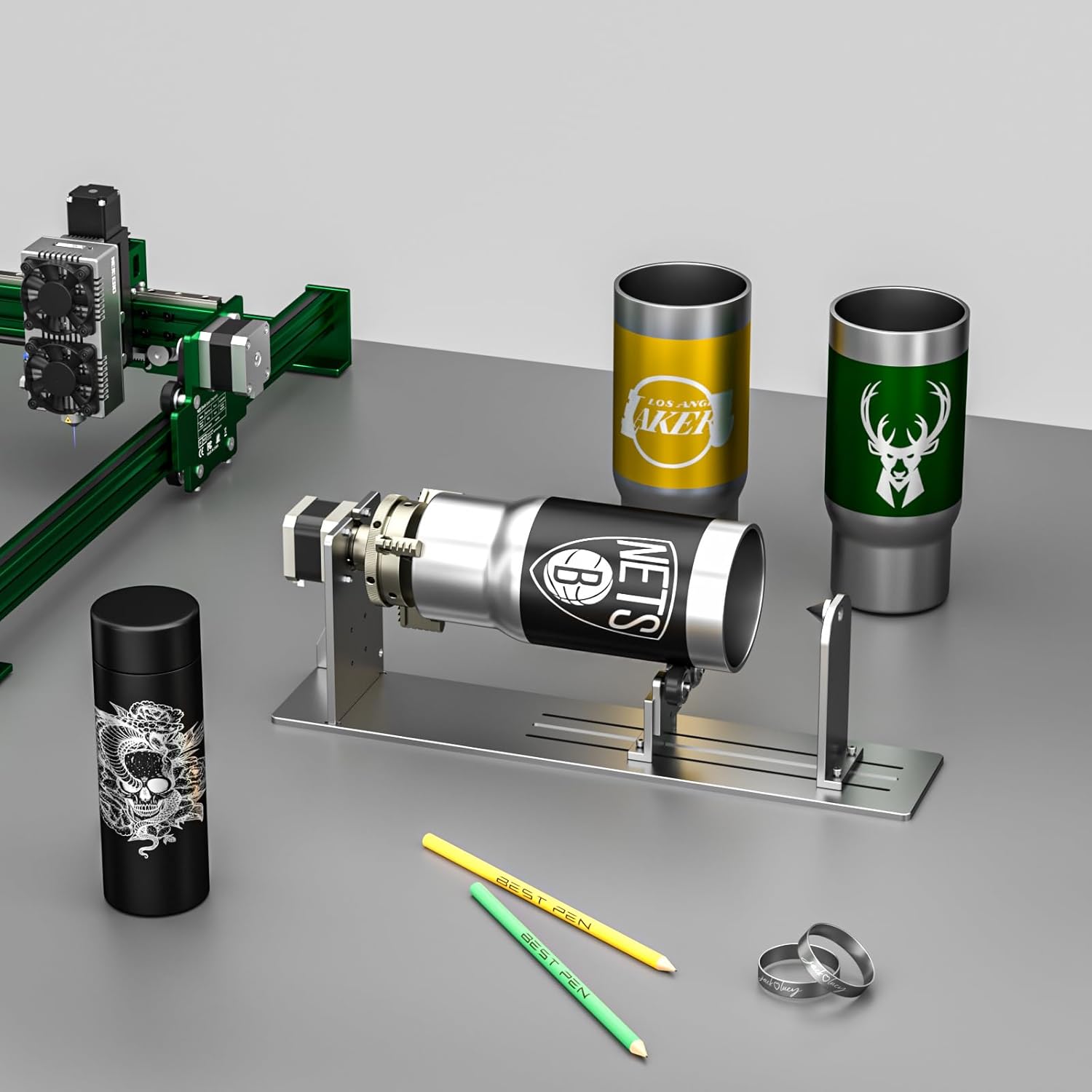
Малюнак 7: Выпamples of cylindrical items successfully engraved with the rotary module.
5. Тэхнічнае абслугоўванне
To ensure the longevity and optimal performance of your NEJE R5 Rotary Module, follow these general maintenance guidelines:
- Уборка: Regularly clean the module to remove dust, debris, and engraving residue. Use a soft, dry cloth. Avoid abrasive cleaners or solvents.
- змазка: Periodically check the moving parts, such as the chuck and rollers, for smooth operation. Apply a small amount of appropriate lubricant if necessary, following general guidelines for precision mechanical components.
- Сувязі: Ensure all electrical connections remain secure. Loose connections can lead to intermittent operation or damage.
- захоўванне: When not in use, store the module in a clean, dry environment away from direct sunlight and extreme temperatures.
6. Выпраўленне непаладак
This section addresses common issues you might encounter with the NEJE R5 Rotary Module.
6.1 Rotary Module Not Rotating Smoothly or Skipping
- Праверце наяўнасць перашкод: Ensure there are no physical obstructions preventing smooth rotation of the chuck or rollers.
- змазка: Apply a small amount of lubricant to the moving parts if they appear stiff or dry.
- Object Secureness: Verify that the object is securely clamped in the chuck and properly supported by the tailstock. An unstable object can cause uneven rotation.
- Кабельнае злучэнне: Ensure the adapter cables are firmly connected to both the rotary module and the laser engraver's expansion port.
6.2 Laser Head Clearance Issues (Module Sits Too High)
- Adjust Z-Axis: Maximize the Z-axis height of your laser head.
- Elevate Engraver: If maximum Z-axis adjustment is insufficient, consider elevating your entire laser engraver assembly to provide more clearance above the rotary module.
- Work Surface Modification: For advanced users, creating a recessed area in your work surface where the rotary module can sit lower might be an option, provided it does not compromise the stability of your setup.
If you encounter issues not covered here or require further assistance, please visit the official NEJE support website for professional technical support.
7. Тэхнічныя характарыстыкі
| Асаблівасць | Спецыфікацыя |
|---|---|
| Памеры прадукту | 17.52 х 7.87 х 5.51 цалі |
| Нумар мадэлі тавару | NEJE00664 |
| Вага прадмета | 4.4 фунта |
| Вытворца | ShenZhen ZhiXinJie Technology.,Ltd |
| Дата першай даступнасці | 26 верасня 2023 г |
8. Падтрымка
For any questions, technical assistance, or support regarding your NEJE R5 Individual A-Axis Rotary Module, please visit the official NEJE support website. NEJE is committed to providing timely and professional technical support to all customers.
Вы таксама можаце звярнуцца да Кіраўніцтва карыстальніка (PDF) for additional information and detailed instructions.


