1. Уводзіны
This manual provides essential information for the safe and efficient operation of your Metz MUD8500Z 43-inch 4K UHD Google Smart TV. Please read these instructions thoroughly before using the television and retain them for future reference. This television features a 43-inch Direct LED display with UHD 4K HDR resolution, integrated Google TV operating system, and a built-in soundbar with Wonder Audio technology.
2. Што ў скрынцы
Акуратна распакуйце тэлевізар і праверце, ці ёсць усе наступныя рэчы:
- Metz MUD8500Z 43-inch Smart TV
- Адаптар сілкавання
- Пульт дыстанцыйнага кіравання
- Кіраўніцтва карыстальніка (гэты дакумент)
- Камплектуючыя падстаўкі пад тэлевізар (пры наяўнасці)
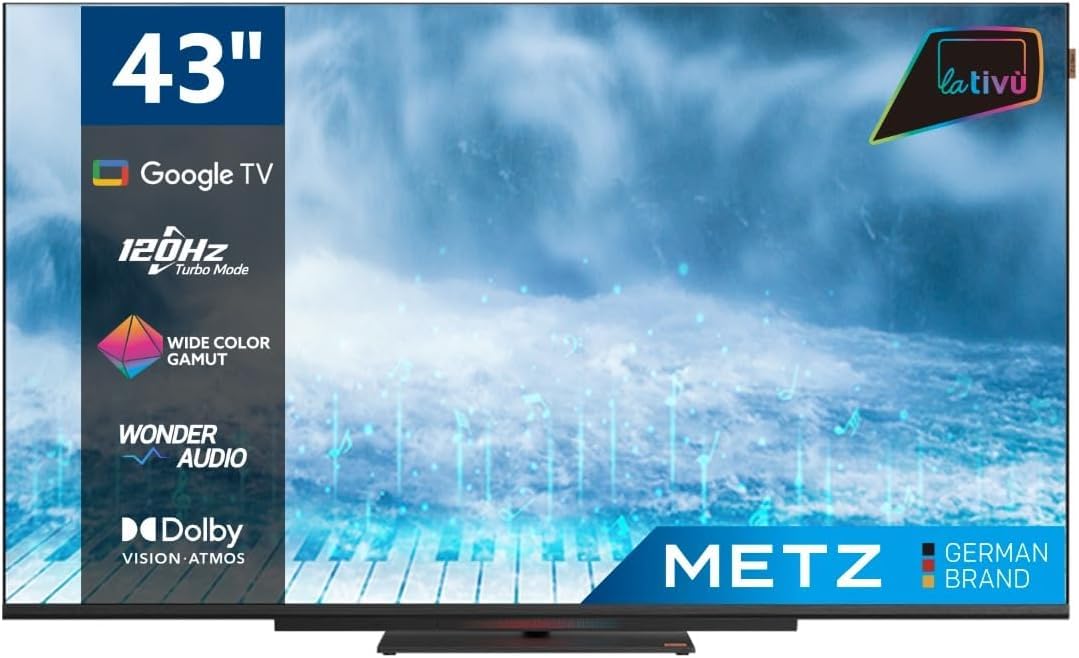
Выява: спераду view of the Metz MUD8500Z 43-inch Smart TV.
3. Настройка
3.1. Распакаванне і размяшчэнне
Remove the TV from its packaging. Place the TV on a stable, flat surface or mount it on a wall using a compatible VESA mount (sold separately). Ensure adequate ventilation around the TV.

Image: Diagram showing the dimensions of the Metz MUD8500Z TV (96.6cm width, 57cm height, 11cm depth).
3.2. Падключэнне сілкавання
Connect the power adapter to the TV's power input, then plug the adapter into a wall outlet. The TV will enter standby mode.
3.3. Пачатковая налада (Google TV)
Пры першым уключэнні тэлевізар правядзе вас праз працэс пачатковай налады. Гэта ўключае ў сябе:
- Выбар мовы: Выберыце пераважную мову.
- Падключэнне да сеткі: Connect the TV to your home Wi-Fi network or via an Ethernet cable.
- Уваход у ўліковы запіс Google: Увайдзіце ў свой уліковы запіс Google, каб атрымаць доступ да функцый Google TV, праграм і персаналізаваных рэкамендацый.
- Сканаванне каналаў: Сканіраванне даступных тэлеканалаў (антэна/кабель).
4. Інструкцыя па эксплуатацыі
4.1. Асноўныя функцыі тэлевізара
- Уключэнне/выключэнне харчавання: Націсніце кнопку харчавання на пульце дыстанцыйнага кіравання або тэлевізары.
- Рэгулятар гучнасці: Выкарыстоўвайце кнопкі павелічэння/памяншэння гучнасці на пульце дыстанцыйнага кіравання.
- Выбар канала: Выкарыстоўвайце кнопкі пераключэння каналаў уверх/уніз або лічбавую клавіятуру.
- Крыніца ўводу: Press the 'Input' button to select HDMI, AV, or other connected devices.
4.2. Google TV Navigation
The Google TV interface provides access to streaming services, apps, and live TV. Use the directional pad and 'OK' button on your remote to navigate menus and select items.

Image: Remote control for the Metz Smart TV, highlighting dedicated buttons for popular streaming services and Google Assistant.
4.3. Google Assistant
Your TV has an integrated Google Assistant. Press the Google Assistant button on your remote or use the built-in microphone for voice commands to search for content, control smart home devices, and more.
4.4. App Access
Access a wide range of applications from the Google Play Store directly on your TV. Navigate to the 'Apps' section on the Google TV home screen to browse, download, and manage your applications.

Image: Screenshot of the Google TV interface displaying various streaming applications.
5. Асаблівасці
5.1. UHD 4K Resolution and HDR
Experience stunning visuals with a resolution of 3840x2160 pixels, providing exceptional clarity and detail. The 4K HDR (High Dynamic Range) support enhances contrast and color accuracy for a more lifelike picture.
5.2. Wide Color Gamut
The Wide Color Gamut technology allows the TV to display a broader spectrum of colors, resulting in more vibrant and realistic images.

Image: A visual comparison demonstrating the enhanced color range with Wide Color Gamut versus normal display.
5.3. Wonder Audio Soundbar
The integrated soundbar with Wonder Audio technology delivers an immersive and clear audio experience. This advanced sound processing algorithm improves treble and bass, offering a more realistic virtual surround sound.

Image: Diagram illustrating the internal structure of the Surging Soundbar, showing increased diaphragm area and net sound cavity volume.
5.4. Google TV Operating System
Powered by Google TV, this television provides a personalized experience with easy access to your favorite movies, shows, live TV, and apps from across your subscriptions. It also offers smart recommendations based on your viewныя звычкі.
5.5. 120Hz Turbo Mode
The 120Hz Turbo Mode enhances motion clarity, making fast-paced scenes and gaming content appear smoother and more fluid.

Image: Visual representation of the 120Hz Turbo Mode, illustrating enhanced smoothness for dynamic content.
5.6. Dolby Vision and Dolby Atmos
Enjoy cinematic picture quality with Dolby Vision, offering incredible brightness, contrast, and color. Dolby Atmos provides immersive, multi-dimensional audio that flows around you.
6. Сувязі
Your Metz MUD8500Z TV offers various ports for connecting external devices:
- HDMI (x3): Падключыце Blu-ray прайгравальнікі, гульнявыя прыстаўкі, тэлевізійныя прыстаўкі і г.д.
- USB 2.0 (x2): Падключыце USB-назапашвальнікі для прайгравання медыяфайлаў.
- Лакальная сетка (Ethernet): Для праваднога падключэння да Інтэрнэту.
- AV IN: Connect older devices with composite video and stereo audio outputs.
- RF Input (Antenna/Satellite): Connect your terrestrial or satellite antenna.
- Аптычны выхад: For digital audio output to a sound system or soundbar.
- Слот CI: Для модуляў агульнага інтэрфейсу (напрыклад, для паслуг платнага тэлебачання).

Выява: Падрабязная view of the rear panel connections, including CI, AV IN, RF Input, USB 2.0, HDMI, Optical Out, and LAN ports.
7. Тэхнічныя характарыстыкі
| Параметр | Каштоўнасць |
|---|---|
| Нумар мадэлі | MUD8500Z (S9147779) |
| Памер экрана | 43 цалі (108 см) |
| Тэхналогія адлюстравання | святлодыёд |
| дазвол | 4K UHD (3840x2160) |
| Частата абнаўлення | 60 Hz (with 120Hz Turbo Mode) |
| Суадносіны бакоў | 16:9 |
| Сувязь | Ethernet, HDMI (x3), USB (x2), Wi-Fi |
| Асаблівасці | Flat Screen, Google TV, Google Assistant, Wonder Audio Soundbar, HDR, Wide Color Gamut |
| Памеры прадукту (ШxГxВ) | 96.6 х 10.9 х 56.9 см |
| Вага | 8.2 кг |
| Клас энергаэфектыўнасці (SDR) | F |
| Спажыванне энергіі (SDR) | 50.0 Вт |
| Клас энергаэфектыўнасці (HDR) | G |
| Спажыванне энергіі (HDR) | 90.0 Вт |
| Магутнасць у рэжыме чакання | 0.4 Вт |
For detailed energy information, please refer to the official EU energy label: https://eprel.ec.europa.eu/qr/1530402
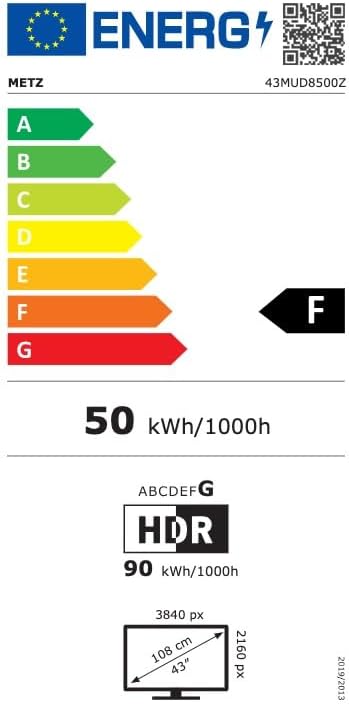
Image: EU Energy Label for the Metz MUD8500Z television, showing energy efficiency class F.
8. Выпраўленне непаладак
If you encounter issues with your TV, consult the following common problems and solutions:
- Няма харчавання:
- Ensure the power cable is securely connected to both the TV and the wall outlet.
- Check if the wall outlet is functioning by plugging in another device.
- Press the power button on the remote or TV. - Няма выявы/гуку:
- Verify the correct input source is selected (e.g., HDMI 1, AV).
- Check all cable connections between the TV and external devices.
- For no sound, ensure volume is not muted or too low. - Пульт дыстанцыйнага кіравання не працуе:
- Заменіце батарэйкі ў пульце дыстанцыйнага кіравання.
- Пераканайцеся, што паміж пультам дыстанцыйнага кіравання і ІЧ-датчыкам тэлевізара няма перашкод.
- Point the remote directly at the TV. - Праблемы з падключэннем да сеткі:
- Перазагрузіце свой Wi-Fi маршрутызатар.
- Check Wi-Fi password and ensure it is entered correctly.
- Try connecting via an Ethernet cable if Wi-Fi issues persist. - Праблемы з якасцю выявы (напрыклад, размытасць, скажэнне):
- Check the resolution settings of the input source.
- Ensure the signal source (antenna, cable box, streaming) is stable.
- Adjust picture settings in the TV menu (brightness, contrast, sharpness).
Калі праблема не знікне пасля выкарыстання гэтых рашэнняў, звярніцеся ў службу падтрымкі кліентаў.
9. Тэхнічнае абслугоўванне
9.1. Ачыстка экрана
Акуратна працярыце экран мяккай тканінай без ворса. Для ўстойлівых плям злёгку працярыцеampПрацярыце тканіну вадой або спецыяльным сродкам для чысткі экранаў. Не выкарыстоўвайце агрэсіўныя хімікаты або абразіўныя матэрыялы.
9.2. Чыстка шафы
Wipe the TV cabinet with a soft, dry cloth. Avoid using liquid cleaners directly on the TV.
9.3. Вентыляцыя
Пераканайцеся, што вентыляцыйныя адтуліны на задняй панэлі тэлевізара не заблакаваныя. Належная цыркуляцыя паветра прадухіляе перагрэў і падаўжае тэрмін службы тэлевізара.
10. Гарантыя і падтрымка
The Metz MUD8500Z television comes with a standard manufacturer's warranty. According to specifications, the minimum general warranty duration provided by the supplier is 2 years.
For warranty claims, technical assistance, or further support, please refer to the contact information provided with your purchase documentation or visit the official METZ CONNECT webсайт.


