1. Уводзіны
Thank you for choosing the VirtuFit VF11007 Vibration Plate Fitness machine. This manual provides essential information for the safe and effective use of your new fitness equipment. Please read it thoroughly before operation and retain it for future reference.

Малюнак 1: The VirtuFit VF11007 Vibration Plate, including the remote control and resistance bands.
2. Інфармацыя па бяспецы
Before using the vibration plate, please observe the following safety precautions:
- Пракансультуйцеся з лекарам, перш чым пачынаць любую новую праграму фізічных практыкаванняў, асабліва калі ў вас ёсць ранейшыя захворванні.
- Ensure the vibration plate is placed on a stable, level surface.
- Не карыстайцеся прыладай, калі вы цяжарныя, маеце кардыёстымулятар або пакутуеце ад цяжкага астэапарозу, эпілепсіі або вострага тромбозу.
- Трымайце дзяцей і хатніх жывёл далей ад машыны падчас працы.
- Заўсёды апранайце адпаведны спартыўны абутак.
- Неадкладна спыніце практыкаванні, калі вы адчуваеце галавакружэнне, млоснасць або боль.
- Адключайце машыну ад сеткі, калі яна не выкарыстоўваецца, і перад чысткай.
3. Настройка
The VirtuFit VF11007 Vibration Plate requires minimal setup. Follow these steps:
- Распакаванне: Carefully remove all components from the packaging. Verify that all parts are present: the vibration plate, remote control, power cable, and resistance bands.
- Размяшчэнне: Position the vibration plate on a flat, stable, and non-slip surface. Ensure there is enough clear space around the unit for safe operation.
- Падключэнне сілкавання: Plug the power cable into the vibration plate's power input, then into a suitable electrical outlet.
- Resistance Bands (Optional): If desired, attach the resistance bands to the designated attachment points on the sides of the vibration plate.
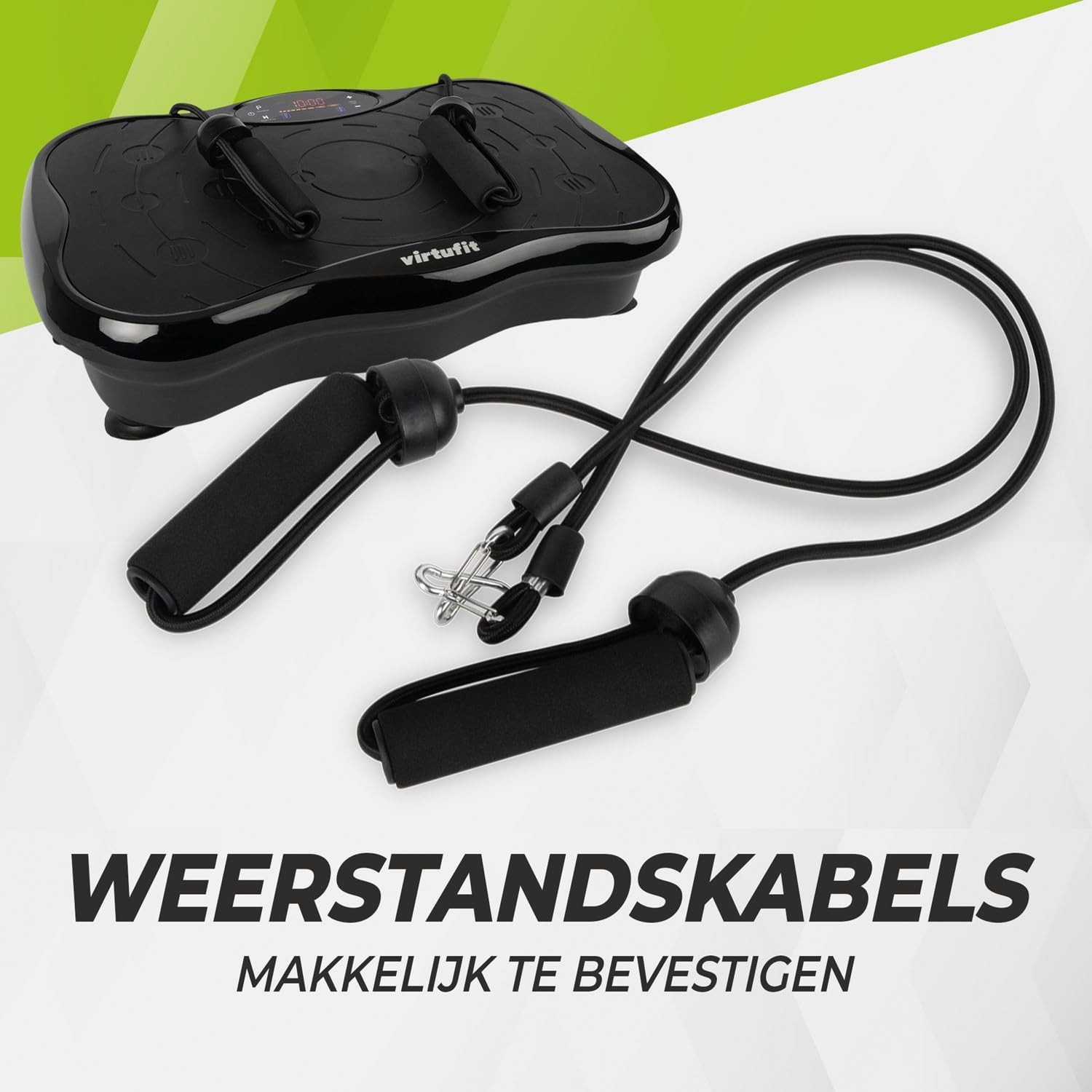
Малюнак 2: Resistance bands ready for attachment to the vibration plate.
4. Інструкцыя па эксплуатацыі
The VirtuFit VF11007 features an intuitive display and a convenient remote control for easy operation.
4.1. Панэль кіравання і дысплей
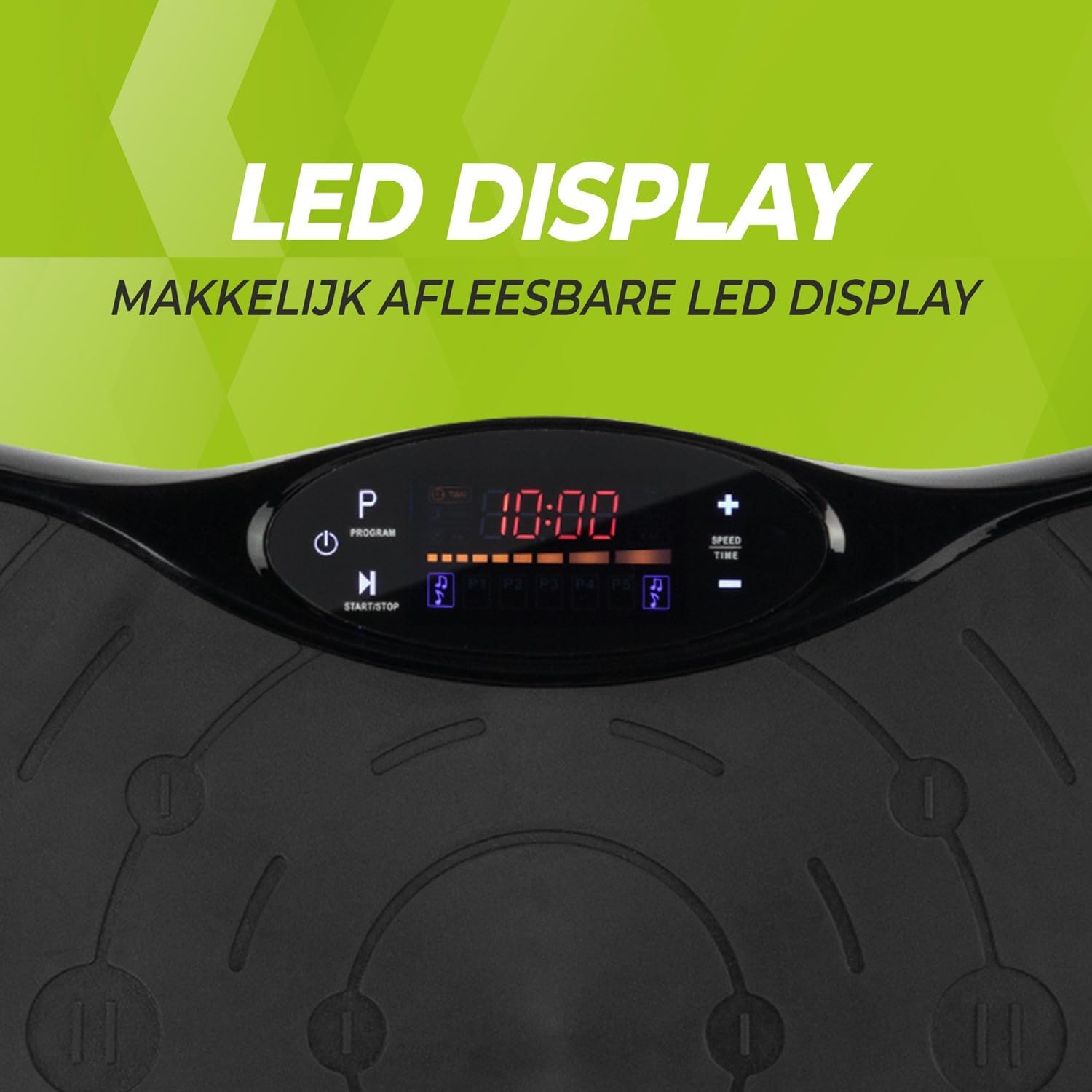
Малюнак 3: Падрабязны view of the LED display, showing time, program, and speed settings.
The integrated computer features an LED display showing time, speed, and program information. Buttons on the panel allow for basic control.
- Кнопка харчавання: Уключае/выключае прыладу.
- Кнопка Пуск/Стоп: Initiates or pauses manual operation.
- Кнопка праграмы (P): Cycles through the pre-set programs.
- Кнопкі хуткасці +/-: Adjusts the vibration speed in manual mode.
- Кнопкі часу +/-: Adjusts the exercise duration in manual mode.
4.2. Пульт дыстанцыйнага кіравання
The remote control provides full functionality, allowing you to adjust settings without interrupting your workout.

Малюнак 4: The remote control for convenient adjustment of settings.
- Кнопка харчавання: Уключае/выключае прыладу.
- Кнопка Пуск/Стоп: Initiates or pauses manual operation.
- Кнопка праграмы (P): Selects one of the 5 automatic programs or the manual program.
- Кнопкі хуткасці +/-: Increases or decreases the vibration speed (99 levels).
- Кнопкі часу +/-: Adjusts the exercise duration.
- Элементы кіравання музыкай: Play/Pause, Next/Previous track, Volume +/- for Bluetooth audio.
4.3. Exercise Programs
The vibration plate offers 10 training programs, including 5 automatic programs (P1-P5) and a manual program.
- Automatic Programs (P1-P5): These programs automatically vary the speed over a 10-minute duration. Select the desired program using the 'P' button on the control panel or remote.
- Ручная праграма: Allows you to set your preferred speed (1-99) and duration. Use the Speed +/- and Time +/- buttons to customize your workout.
Program Speed Examples (for a 10-minute duration):
| праграма | Speed Progression (Exampле) |
|---|---|
| P1 | 10 - 30 - 40 - 50 |
| P2 | 15 - 25 - 20 - 30 |
| P3 | 20 - 40 - 60 - 80 |
| P4 | 25 - 45 - 50 - 85 |
| P5 | 30 - 50 - 70 - 90 |
Note: These are example speed progressions. Actual speeds may vary slightly.
4.4. Bluetooth Speaker and USB Port
The vibration plate includes an integrated Bluetooth speaker and a USB charging port.

Малюнак 5: Location of the integrated Bluetooth speaker.
- Злучэнне Bluetooth: Turn on the vibration plate. Activate Bluetooth on your smartphone or tablet and search for "VirtuFit" or a similar device name. Pair your device.
- Прайграванне музыкі: Once connected, you can play music through the integrated speakers. Use your device or the remote control to manage playback and volume.
- USB-зарадка: Connect your phone or tablet to the USB port to charge it during your workout.
5. Тэхнічнае абслугоўванне
Regular maintenance ensures the longevity and optimal performance of your VirtuFit Vibration Plate.
- Уборка: Wipe the surface of the vibration plate with a soft, damp тканінай пасля кожнага выкарыстання. Не выкарыстоўвайце абразіўныя ачышчальнікі або растваральнікі.
- захоўванне: Захоўвайце прыладу ў прахалодным сухім месцы, удалечыні ад прамых сонечных прамянёў і вільгаці.
- агляд: Periodically check the power cord for any damage. Ensure all connections are secure.
- Супрацьслізготная паверхня: The anti-slip rubber surface is designed for durability. Keep it clean to maintain its grip.

Малюнак 6: The durable anti-slip rubber surface for secure footing.
6. Выпраўленне непаладак
If you encounter any issues with your VirtuFit Vibration Plate, refer to the following common problems and solutions:
| праблема | Магчымая прычына | Рашэнне |
|---|---|---|
| Машына не ўключаецца. | Сеткавы шнур падключаны няправільна; разетка не працуе. | Ensure the power cord is securely plugged into both the machine and the wall outlet. Test the outlet with another device. |
| Няма вібрацыі. | Machine is paused; Speed setting is too low; Program not started. | Press the Start button. Increase the speed setting. Ensure a program is selected and running. |
| Не працуе пульт дыстанцыйнага кіравання. | Batteries are dead or incorrectly inserted; Obstruction between remote and sensor. | Replace batteries with new ones, ensuring correct polarity. Remove any obstructions. Point the remote directly at the display sensor. |
| Bluetooth не падключаецца. | Bluetooth on device is off; Incorrect pairing. | Ensure Bluetooth is enabled on your device. Forget the device on your phone/tablet and re-pair. Ensure the vibration plate is powered on. |
Калі праблема не знікне, звярніцеся ў службу падтрымкі кліентаў.
7. Тэхнічныя характарыстыкі
Key technical specifications for the VirtuFit VF11007 Vibration Plate:
- Нумар мадэлі: VF11007
- Марка: VirtuFit
- Памеры (Д х Ш х У): 54 х 12.5 х 32 см
- Вага: 7.5 кг
- матэрыял: ABS rubber
- Тып кіравання: Пульт дыстанцыйнага кіравання
- Тып дысплея: Graphic display (LED)
- Maximum Speed Levels: 99
- Колькасць праграм: 10
- Рэжым працы: Аўтаматычны / ручной
- Крыніца харчавання: Электрычны кабель
- Інтэграваныя функцыі: Bluetooth speaker, USB charging port
8. Інфармацыя аб гарантыі
VirtuFit products are manufactured to high-quality standards. This product is covered by the standard legal warranty applicable in your region. Please retain your proof of purchase for any warranty claims.
For specific warranty terms and conditions, please refer to the VirtuFit official webсайт або звярніцеся да прадаўца.
9. Падтрымка кліентаў
Should you require assistance, have questions, or need to report an issue, please contact VirtuFit customer support or your authorized retailer.
For more information, visit the official VirtuFit webсайт: VirtuFit Brand Store


