
Уводзіны
This manual provides detailed instructions for the installation, operation, and maintenance of your FITNATE HS0434S-CA Fingerprint Door Knob with Keypad. This smart door knob offers multiple unlocking methods including fingerprint recognition, password entry, mobile application control, and traditional physical keys, enhancing security and convenience for various indoor applications.
Асаблівасці прадукту
- 4 спосабаў разблакіроўкі ў адным: Fingerprint, Password, App Control (Tuya App compatible), and Physical Key.
- Аддаленае разблакіроўка праграмы: Control and manage your lock remotely via the mobile application.
- Зручны доступ без ключа: Fast biometric fingerprint identification (under 0.1s) and touch-to-open functionality.
- Стыльны і трывалы дызайн: Crafted from high-quality aluminum alloy with a sensitive LED keyboard for day and night operation.
- Аварыйнае харчаванне: USB Type-C port for emergency power in case of battery depletion.
Што ў скрынцы
Калі ласка, пераканайцеся, што ўсе кампаненты наяўныя, перш чым пачаць усталёўку.
- Fingerprint Door Lock Assembly
- Ударная скрынка
- Ключы (x2)
- Шрубы (x6)
- Адвёртка
- Кіраўніцтва карыстальніка
- Усталявальная карта
- Gloves (x2)
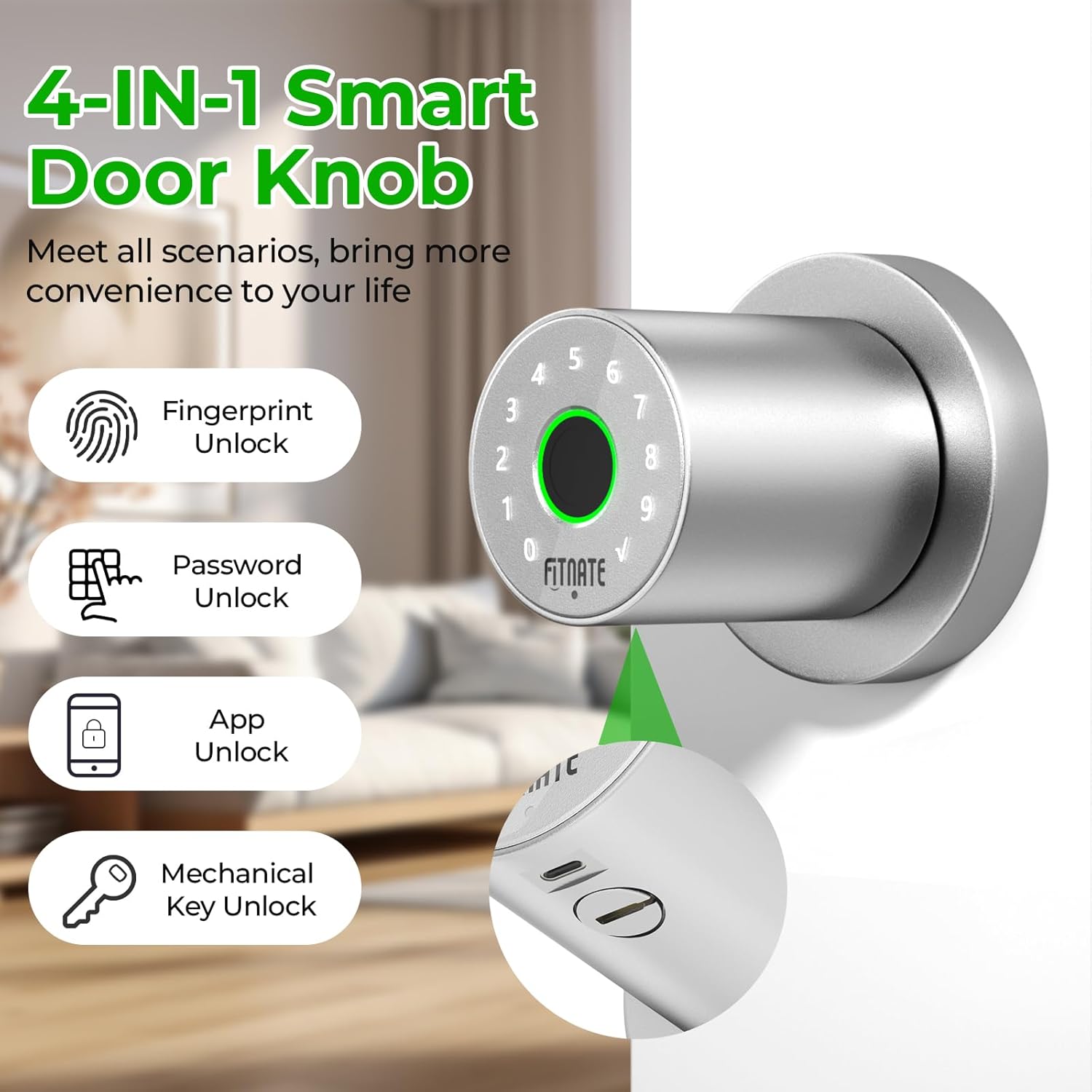
Image: All components included in the FITNATE Fingerprint Door Knob package.
Кіраўніцтва па ўстаноўцы
Before installation, ensure your door dimensions are compatible with the lock. The door hole diameter should be 2 1/8" (54mm), hole diameter 1" (25mm), door thickness 1 3/8" - 2 1/8" (35-54mm), and backset 2 3/8" or 2 3/4" (60 or 70mm).
1. Падрыхтуйце дзверы
Verify door dimensions using the provided template. Ensure the existing door holes match the required specifications.

Image: Diagram showing required door hole diameter, thickness, and backset measurements for installation.
2. Усталюйце зашчапку
- Remove the existing latch if present.
- Insert the new latch into the door hole and secure it with screws.
3. Install Exterior Door Handle
- Carefully align the exterior door handle with the latch mechanism and door holes.
- Ensure the spindle is correctly inserted into the latch.
4. Install Interior Door Handle
- Pass the power cord from the exterior handle through the rear door handle.
- Connect the power cord to the interior handle.
- Secure the interior door handle with screws.
5. Усталюйце батарэі
- Insert four AA batteries (not included) into the interior handle, observing the correct positive (+) and negative (-) terminals.
- Plug in the power cord to the battery compartment.
- Install the door lock top cover.
Video: Detailed installation steps for the FITNATE Door Knob HS0434.
Налада і праца праграмы
The FITNATE smart door knob can be controlled via the Tuya Smart App. Follow these steps to set up and operate your lock using the app.
1. Спампуйце прыкладанне
Scan the QR code below or search for "SMART LIFE" or "TUYA SMART" in the App Store (iOS) or Google Play (Android) to install the application.

Image: QR code and links to download the Tuya Smart App for iOS and Android.
2. Connect the Lock to the App
- Open the Tuya Smart App and create an account or log in.
- Click the "+" icon in the upper right corner to add a device.
- Ensure Bluetooth is enabled on your phone. Touch the fingerprint screen of the lock to enable Bluetooth for easier connection.
- Select the discovered device (e.g., "JB-ZAM") and click "Add".
- Wait for successful connection. You can rename the lock for easy identification.

Image: Screenshot illustrating the process of adding the smart door knob to the Tuya Smart App via Bluetooth.
3. Метады разблакоўкі
- Разблакіроўка адбіткам пальца: Place your registered finger on the sensor. The lock will unlock if the fingerprint is recognized. Collect six fingerprints from different directions with the same finger for optimal recognition.
- Разблакіроўка пароля: Enter your registered password on the keypad and press the checkmark.
- Разблакіроўка праграмы: Open the Tuya Smart App, select your lock, and tap the unlock icon.
- Mechanical Key Unlocking: Insert the physical key into the keyhole (located under the exterior knob) and turn to unlock. This is for emergency use.

Image: A finger being placed on the fingerprint sensor for unlocking.

Image: A hand entering a password on the illuminated keypad of the smart door knob.

Image: Mobile app screen displaying the unlock function for the smart door knob.
Video: Demonstration of fingerprint, app, and key unlocking methods for the FITNATE Fingerprint Door Knob.
4. Асаблівасці прыкладання
- Кіраванне ўдзельнікамі: Add or remove users, assign administrator or regular user roles.
- Дадаць адбітак пальца: Follow in-app instructions to register new fingerprints. Ensure your finger fully contacts the recognition area and is rotated for complete capture.
- Дадаць пароль: Create 6-10 digit passwords for keypad entry.
- Add One-Time Password: Generate temporary codes for guests or service providers.
- Рэжым праходжання: Enable this mode to keep the door unlocked for frequent access. The lock will remain in the normally open state.
- Рэжым адключэння гуку: Silence locking and unlocking sounds via the app settings.
- Unlock History: View a record of when the lock was opened and by which user.
- Напамін аб нізкім зарадзе батарэі: The app will notify you when the battery is low. Replace batteries within a week to ensure proper function. The door lock requires four LR6/AA/1.5V alkaline batteries.
Індыкатар стану
The smart door knob uses indicator lights to communicate its status:
- Рэжым праходжання: Purple fingerprint light flashes twice.
- Unlock Success: Green fingerprint light, keypad lights off from 9 to 0.
- Unlock Error: Red fingerprint light.
- Нізкі зарад батарэі: Red warning light, seven rapid beeps.
Тэхнічнае абслугоўванне
- Замена батарэі: Replace all four AA batteries when the low battery warning appears. Do not mix old and new batteries.
- Уборка: Wipe the lock surface with a soft, dry cloth. Avoid abrasive cleaners or solvents that could damage the finish or electronic components.
- Датчык адбіткаў пальцаў: Keep the fingerprint sensor clean and dry for optimal performance.
- Механічныя часткі: Periodically check screws and connections to ensure they are secure.
Ліквідацыю непаладак
| праблема | Магчымая прычына | Рашэнне |
|---|---|---|
| Блакаванне не рэагуе. | Селі акумулятары. | Replace all four AA batteries. Use the USB Type-C port for emergency power. |
| Адбітак пальца не распазнаны. | Finger is wet, dirty, or improperly placed. Fingerprint not registered correctly. | Ensure finger is clean and dry. Place finger firmly on the sensor, covering the entire area. Re-register fingerprint if issues persist, ensuring multiple angles are captured. |
| Праграма не можа падключыцца да замка. | Bluetooth is off. Lock is not in pairing mode. App permissions. | Ensure Bluetooth is enabled on your phone. Touch the lock's fingerprint sensor to activate Bluetooth. Check app permissions for Bluetooth access. Restart the app and try again. |
| Не падсвятляецца клавіятура. | Батарэі разраджаны або разраджаны. | Заменіце батарэі. |
| Lock is not securing properly. | Latch misalignment. Mechanical obstruction. | Check the alignment of the latch and strike plate. Ensure no debris is obstructing the latch mechanism. |
Тэхнічныя характарыстыкі
| Асаблівасць | Дэталь |
|---|---|
| Марка | ПАДАДЗЕНЫ |
| Нумар мадэлі | HS0434S-CA |
| Тып замка | Biometric, Keypad, App, Key |
| Матэрыял | Метал (алюмініевы сплаў) |
| Колер | матавы нікель |
| Памеры прадмета (Д х Ш х У) | 7.95 х 3.23 х 3.23 цалі |
| Крыніца харчавання | 4 батарэйкі АА (не ўключаны) |
| Аварыйнае харчаванне | USB Type-C |
| Сувязь | Bluetooth (App Control) |
| Захоўванне адбіткаў пальцаў | Да 19 адбіткаў пальцаў |
| Сумяшчальнасць таўшчыні дзвярэй | 1 3/8" - 2 1/8" (35-54mm) |
| Сумяшчальнасць з задняй часткай | 2 3/8" or 2 3/4" (60 or 70mm) |
Гарантыя і падтрымка
For warranty information and technical support, please refer to the contact details provided with your product packaging or visit the official FITNATE webсайт. Захоўвайце чэк аб пакупцы на выпадак прэтэнзій па гарантыі.