Уводзіны
The Mytrix Tac Master Wireless Gaming Headset is designed to provide a high-quality audio experience for gaming across multiple platforms. Featuring 2.4GHz lossless wireless technology, Bluetooth 5.3, and a 3.5mm wired connection, this headset offers versatile connectivity, low latency, and immersive surround sound. The detachable noise-canceling microphone ensures clear communication, while the ergonomic design and long battery life provide comfort for extended use.
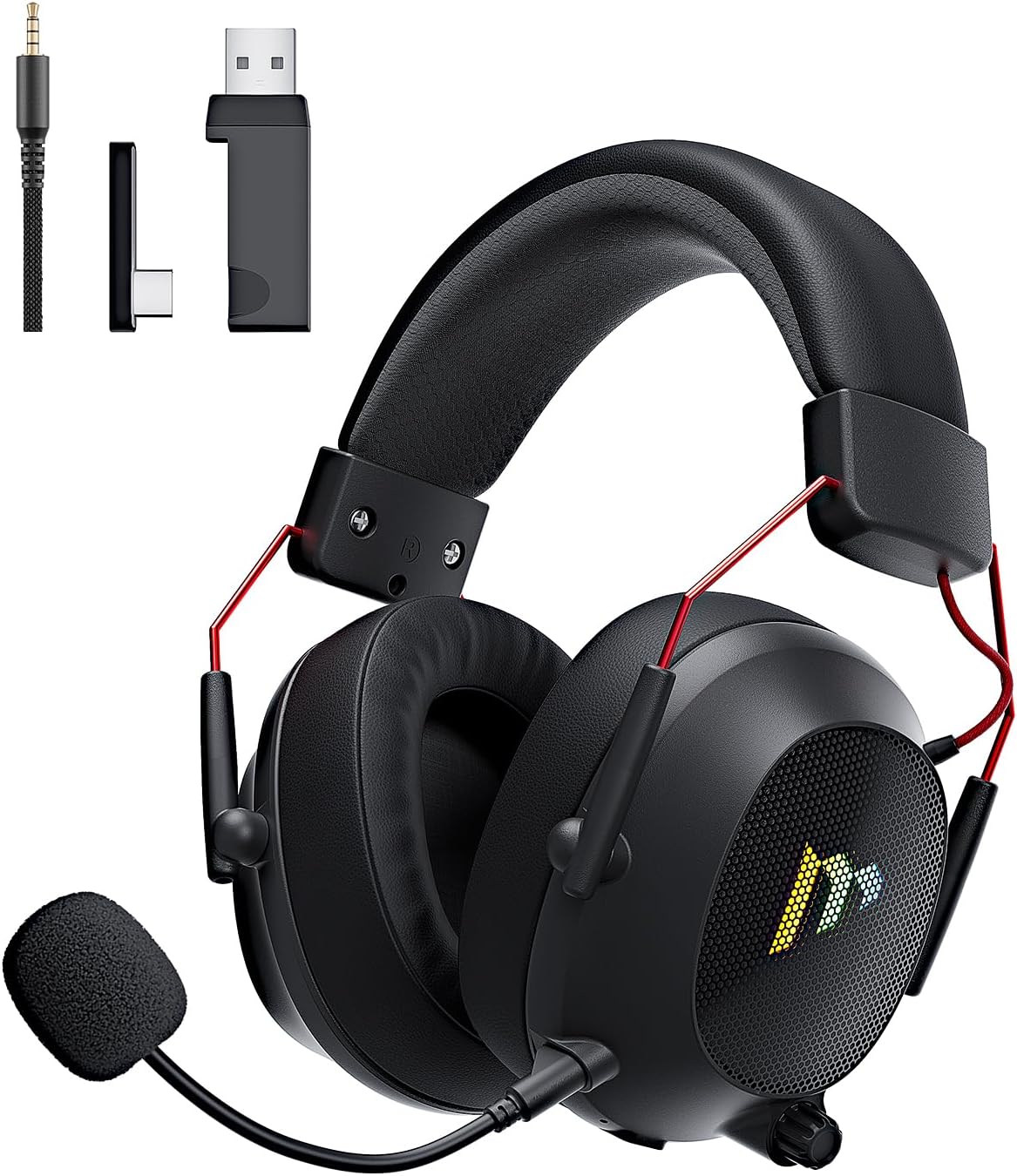
Image: The Mytrix Tac Master Wireless Gaming Headset, showcasing its sleek black design with red accents, detachable microphone, and included USB dongle and Type-C adapter.
Змест пакета
Калі ласка, пераканайцеся, што ўсе пералічаныя ніжэй прадметы ўваходзяць у ваш пакет:
- Mytrix Tac Master Wireless Gaming Headset
- Здымны мікрафон з шумапрыглушэннем
- 2.4GHz USB-A Wireless Dongle
- USB Type-C Transmitter
- Аўдыёкабель 3.5 мм
- USB-кабель для зарадкі (USB-A да USB-C)
- Кіраўніцтва карыстальніка (гэты дакумент)
Headset Controls and Components
Familiarize yourself with the various controls and components of your Mytrix Tac Master headset:

Image: Diagram illustrating the location and function of controls on the Mytrix Tac Master headset, including power button, volume wheel, microphone mute button, and mode switch.
- Кнопка харчавання: Press and hold for 3 seconds to turn on/off. Single press to pause/play audio.
- Кнопка рэжыму (M): Single press to toggle microphone on/off. Double press to switch between Bluetooth and 2.4G wireless modes. Press and hold for 3 seconds to turn RGB lights on/off.
- Кола гучнасці: Rotate up to increase volume, rotate down to decrease volume.
- Порт мікрафона: For attaching the detachable microphone.
- 3.5 мм аўдыяраз'ём: Для праваднога падключэння.
- Порт для зарадкі USB-C: Для зарадкі гарнітуры.
- RGB асвятленне: Located on the earcups.
Настройка
1. Зарадка гарнітуры
Before first use, fully charge the headset. Connect the USB charging cable to the headset's USB-C port and the other end to a USB power source (e.g., computer USB port, USB wall adapter). The LED indicator will show charging status and turn off when fully charged. A full charge takes approximately 3 hours and provides up to 48 hours of battery life.

Image: Visual representation of the headset's long-lasting battery life, indicating approximately 50 hours of use and a 3-hour charging time.
2. Падключэнне мікрафона
Insert the detachable microphone into the microphone port on the left earcup. Ensure it is securely seated. The microphone is flexible and omni-directional, allowing for angle adjustment.
3. Параметры падключэння
The Mytrix Tac Master headset offers multiple connection methods for broad compatibility:

Image: Diagram illustrating the four connection modes: 2.4GHz Dongle (USB-A and USB-C), Bluetooth 5.3, and 3.5mm Wired, along with compatible devices for each mode.
3.1. 2.4GHz Wireless Connection (Recommended for PC, PS4, PS5, Switch Docked Mode)
- Identify the appropriate dongle for your device:
- For devices with a USB-A port (PC, PS4, PS5, Switch Docked): Use the 2.4GHz USB-A dongle.
- For devices with a USB-C port (Switch Handheld, Laptops, Tablets): Use the USB Type-C transmitter.
- Plug the selected 2.4GHz dongle/transmitter into an available USB port on your device.
- Уключыце гарнітуру, націснуўшы і ўтрымліваючы кнопку харчавання на працягу 3 секунд.
- Ensure the headset is in 2.4GHz mode. If not, double-press the 'M' button to switch modes until the headset connects to the dongle. The headset will automatically pair with the dongle.
- На прыладзе выберыце гарнітуру ў якасці прылады ўводу і вываду гуку.
3.2. Bluetooth 5.3 Connection (Recommended for Mobile Phones, Tablets, Laptops)
- Уключыце гарнітуру, націснуўшы і ўтрымліваючы кнопку харчавання на працягу 3 секунд.
- Double-press the 'M' button to switch the headset to Bluetooth pairing mode. The LED indicator will flash, indicating it's ready to pair.
- On your device, enable Bluetooth and search for "Mytrix Tac Master" in the list of available devices.
- Select "Mytrix Tac Master" to connect. Once connected, the LED indicator will stop flashing.
3.3. 3.5mm Wired Connection (Recommended for Xbox, Game Console Controllers, Devices without USB/Bluetooth)
- Падключыце адзін канец аўдыёкабеля 3.5 мм да раздыма 3.5 мм на гарнітуры.
- Connect the other end of the 3.5mm audio cable to the audio jack on your device (e.g., Xbox controller, phone).
- In wired mode, the headset's microphone and RGB lighting functions are not active.
Інструкцыя па эксплуатацыі
Уключэнне/выключэнне харчавання
- Каб уключыць: Press and hold the Power button for approximately 3 seconds until the headset powers on.
- Каб выключыць: Press and hold the Power button for approximately 3 seconds until the headset powers off.
Рэгулятар гучнасці
- Павялічыць гучнасць: Rotate the Volume wheel upwards.
- Паменшыць гучнасць: Rotate the Volume wheel downwards.
Кіраванне мікрафонам
- Выключыць/уключыць мікрафон: Single press the 'M' button.
- The detachable microphone features noise cancellation for clear voice chat.
Кіраванне RGB асвятленнем
- Turn RGB Lights On/Off: Press and hold the 'M' button for approximately 3 seconds.
Кіраванне прайграваннем аўдыё
- Прайграванне/Паўза аўдыё: Аднаразовае націсканне кнопкі харчавання.
Аб'ёмны гук
The headset features 7.1 stereo surround sound for an immersive audio experience, allowing for precise positioning of sound details in games.

Выява: Выбухнула view of the headset's 50mm drivers, illustrating the components that contribute to its 7.1 stereo surround sound capability.
Тэхнічнае абслугоўванне
- Уборка: Use a soft, dry cloth to clean the headset. Do not use abrasive cleaners or solvents. For earcups, gently wipe with a damp тканінай і дайце цалкам высахнуць на паветры перад выкарыстаннем.
- захоўванне: Store the headset in a cool, dry place away from direct sunlight and extreme temperatures. If storing for an extended period, ensure the battery is partially charged (around 50%) to preserve battery health.
- Сыход за батарэяй: Avoid fully discharging the battery frequently. Charge the headset regularly, even if not in constant use, to maintain battery longevity.
- Сыход за мікрафонам: Handle the detachable microphone gently. Avoid excessive bending or twisting.
Ліквідацыю непаладак
| праблема | Магчымая прычына | Рашэнне |
|---|---|---|
| Няма гуку з гарнітуры. | Headset not powered on, low battery, incorrect audio output selected, connection issue. | Ensure headset is powered on and charged. Check device's audio settings to confirm "Mytrix Tac Master" is selected as output. Re-establish 2.4GHz or Bluetooth connection. For wired mode, ensure cable is fully inserted. |
| Не працуе мікрафон. | Microphone muted, not properly attached, incorrect audio input selected, wired mode limitation. | Single press the 'M' button to unmute. Ensure microphone is securely attached. Check device's audio settings to confirm "Mytrix Tac Master" is selected as input. Note: Microphone does not function in 3.5mm wired mode. |
| Немагчыма падключыцца праз бесправадную сувязь 2.4 ГГц. | Dongle not recognized, headset not in 2.4GHz mode, interference. | Ensure dongle is fully inserted into a working USB port. Double-press 'M' button to switch headset to 2.4GHz mode. Try a different USB port. Move closer to the dongle to reduce interference. |
| Немагчыма падключыцца праз Bluetooth. | Гарнітура не ў рэжыме спалучэння, Bluetooth адключаны на прыладзе, ужо падключана да іншай прылады. | Double-press 'M' button to enter Bluetooth pairing mode (LED flashes). Ensure Bluetooth is enabled on your device. Disconnect from other Bluetooth devices if necessary. |
| RGB-падсветка не працуе. | Lights turned off, low battery, wired mode limitation. | Press and hold the 'M' button for 3 seconds to toggle RGB lights. Ensure headset has sufficient battery. Note: RGB lights do not function in 3.5mm wired mode. |
Тэхнічныя характарыстыкі
| Асаблівасць | Дэталь |
|---|---|
| Назва мадэлі | Gaming Headset (G901) |
| Тэхналогія падлучэння | Бесправадная сувязь 2.4 ГГц, Bluetooth 5.3, правадны раз'ём 3.5 мм |
| Гняздо для навушнікаў | 3.5 мм Jack |
| Далёкасць бесправадной сувязі | Up to 50 feet (in open spaces) |
| Затрымка | ≤20ms (2.4GHz) |
| Тып аўдыё драйвера | Дынамічныя драйверы 50 мм |
| Асаблівасці гуку | 7.1 Stereo Surround Sound |
| Мікрафон | Detachable, Omni-directional, Noise-Canceling |
| Тэрмін службы батарэі | Да 48 гадзін |
| Час зарадкі | Прыбл. 3 гадзіны |
| Тып батарэі | 1 літый-іённы акумулятар (у камплекце) |
| Форма навушніка | Над вухам |
| Асаблівасці | Ergonomic Design, RGB Lighting, Foldable & Portable |
| Памеры прадукту | 5.91 х 3.94 х 5.91 цалі |
| Вага прадмета | 13.4 унцыі |
| Вытворца | Mytrix |
Гарантыя і падтрымка
Mytrix products are manufactured to high quality standards. For information regarding warranty coverage, technical support, or service inquiries, please refer to the warranty card included with your product or visit the official Mytrix website. You may also contact Mytrix customer support directly for assistance with your Tac Master Gaming Headset.
Каб атрымаць дадатковую дапамогу, наведайце Mytrix Store on Amazon.
Важная інфармацыя па бяспецы
- Не падвяргайце гарнітуру ўздзеянню экстрэмальных тэмператур, вільготнасці або вадкасцей.
- Пазбягайце падзення або моцных удараў гарнітуры.
- Не спрабуйце разбіраць або рамантаваць гарнітуру самастойна. Гэта прывядзе да анулявання гарантыі.
- Каб пазбегнуць пашкоджання слыху, слухайце на ўмераным узроўні гучнасці. Працяглае ўздзеянне гучных гукаў можа прывесці да незваротнай страты слыху.
- Захоўваць у месцах, недаступных дзецям.