Уводзіны
This manual provides comprehensive instructions for the HP 255 Dual Wireless Mouse (Model 8R3U1UT). This device offers dual-mode connectivity via 2.4 GHz wireless (USB-A dongle) and Bluetooth 5.0, ensuring compatibility with Windows, ChromeOS, and macOS. It features a 1600 DPI optical sensor for precise control and is designed for comfortable, ambidextrous use.
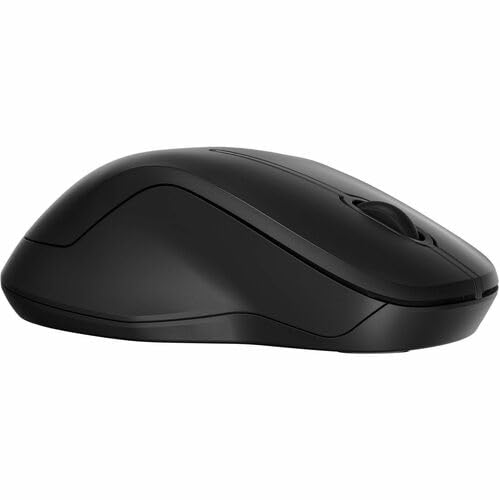
Выява: зверху ўніз view of the HP 255 Dual Wireless Mouse, showcasing its symmetrical black design.
Змест пакета
Праверце наяўнасць усіх прадметаў у камплекце:
- HP 255 Dual Wireless Mouse
- USB-A Wireless Dongle (typically stored inside the mouse)
- Кароткае кіраўніцтва карыстальніка (калі ўключана)
- Заўвага: 1 AA battery is required and not included.
Настройка
1. Устаноўка батарэі
- Знайдзіце вечка адсека для батарэй на ніжняй частцы мышы.
- Зрушыце або падніміце вечка, каб адкрыць адсек.
- Устаўце адну батарэйку тыпу АА, сачыце за правільнай палярнасцю (+/-).
- Надзейна зачыніце крышку батарэйнага адсека.
The mouse requires one AA battery for operation. Batteries are not included with the product.
2. Connecting via 2.4 GHz Wireless (USB-A Dongle)
- Remove the USB-A wireless dongle from its storage slot, typically located inside the battery compartment or near it.
- Plug the USB-A dongle into an available USB-A port on your computer (Windows, ChromeOS, or macOS).
- Уключыце мыш з дапамогай выключальніка харчавання на яе ніжняй панэлі.
- The mouse should automatically connect to your computer. No additional drivers are typically required for this plug-and-play connection.
3. Connecting via Bluetooth 5.0
- Пераканайцеся, што Bluetooth на вашым кампутары ўключаны.
- Уключыце мыш з дапамогай выключальніка харчавання на яе ніжняй панэлі.
- Press and hold the Bluetooth pairing button (often located on the underside of the mouse, or combined with the mode switch) until the indicator light starts blinking, indicating pairing mode.
- On your computer, navigate to Bluetooth settings:
- Windows: Settings > Devices > Bluetooth & other devices > Add Bluetooth or other device.
- MacOS: System Settings > Bluetooth.
- ChromeOS: Quick Settings panel > Bluetooth.
- Select "HP 255 Mouse" or a similar name from the list of available devices and follow any on-screen prompts to complete pairing.
- The indicator light on the mouse will stop blinking and remain solid (or turn off) once successfully paired.
Інструкцыя па эксплуатацыі
Кнопкі мышкі
The HP 255 Dual Wireless Mouse features 3 buttons:
- Левая кнопка мышы: Primary function for selecting items, opening links, etc.
- Правая кнопка мышы: Secondary function for context menus and additional options.
- Scroll Wheel / Middle Button: Выкарыстоўваецца для пракруткі дакументаў і web pages. Pressing it down often acts as a middle-click button for specific functions.
DPI (кропак на цалю)
The mouse operates at a fixed resolution of 1600 DPI, providing smooth and precise cursor control across various surfaces.
Кіраванне харчаваннем
- Выключальнік сілкавання: Use the ON/OFF switch on the underside of the mouse to conserve battery life when not in use.
- Аўтаматычны рэжым сну: The mouse enters a low-power sleep mode after a period of inactivity to extend battery life. Move the mouse or click a button to wake it up.
- Тэрмін службы батарэі: A single AA battery can provide up to 12 months of usage, depending on usage patterns.
Тэхнічнае абслугоўванне
- Уборка: Для чысткі мышы выкарыстоўвайце мяккую сухую тканіну. Для ўстойлівага бруду злёгкуampпрамыйце тканіну вадой. Пазбягайце агрэсіўных хімічных рэчываў або абразіўных ачышчальнікаў.
- Ачыстка датчыка: Periodically clean the optical sensor on the underside of the mouse with a soft, lint-free cloth to ensure optimal tracking performance.
- Замена батарэі: Replace the AA battery when the mouse performance degrades or the low battery indicator (if present) illuminates.
- захоўванне: When not in use for extended periods, turn off the mouse and consider removing the battery to prevent leakage. Store the USB dongle inside the mouse for safekeeping.
Ліквідацыю непаладак
Мыш не рэагуе
- Праверце акумулятар: Пераканайцеся, што батарэйка тыпу АА ўсталявана правільна і мае дастатковы зарад. Пры неабходнасці замяніце яе.
- Выключальнік сілкавання: Verify the mouse is turned ON.
- USB Dongle (2.4 GHz):
- Ensure the dongle is securely plugged into a working USB-A port.
- Try plugging the dongle into a different USB-A port.
- Ensure the dongle is within range (typically up to 10 meters) and not obstructed.
- Bluetooth (Bluetooth 5.0):
- Пераканайцеся, што Bluetooth на вашым кампутары ўключаны.
- Re-attempt the pairing process as described in the "Connecting via Bluetooth 5.0" section.
- Ensure the mouse is within Bluetooth range (typically up to 10 meters).
- Выдаліце мыш са спісу прылад Bluetooth вашага кампутара і зноў падключыце яе.
- Паверхня: Ensure you are using the mouse on a suitable surface. Highly reflective or transparent surfaces may affect optical tracking.
Няроўны рух курсора
- Ачысціце аптычны датчык на ніжняй частцы мышы.
- Паспрабуйце выкарыстоўваць мыш на іншай паверхні.
- Пераканайцеся, што паблізу няма моцных электрамагнітных перашкод.
Тэхнічныя характарыстыкі
| Назва мадэлі | HP 255 Dual Wireless Mouse (8R3U1UT) |
| Тэхналогія падлучэння | Wireless (2.4 GHz via USB-A dongle), Bluetooth 5.0 |
| Выяўленне руху | Аптычны |
| Дазвол руху | 1600 DPI |
| Колькасць кнопак | 3 (злева, справа, кола пракруткі/пасярэдзіне) |
| Рука арыентацыі | Амбідэкстр |
| Крыніца харчавання | 1 батарэі АА (не ўключаны) |
| Тэрмін службы батарэі | Да 12 месяцаў |
| Сумяшчальныя аперацыйныя сістэмы | Windows, ChromeOS, macOS |
| Матэрыял | 50% перапрацаванага пластыку |
| Памеры (Д х Ш) | 5.3"Д х 3.4"Ш (прыблізна) |
Гарантыя і падтрымка
Каб атрымаць інфармацыю аб гарантыі і тэхнічнай падтрымцы, звярніцеся да дакументацыі, якая пастаўляецца з вашым прадуктам, або наведайце афіцыйны сайт падтрымкі HP. webсайт:
Keep your purchase receipt and product model number (8R3U1UT) handy when contacting support.