1. Уводзіны
This manual provides essential information for the safe and efficient use of your Metzler VDM10 Video Intercom 2.0. Please read these instructions carefully before installation and operation, and retain them for future reference. The Metzler VDM10 is designed to enhance security and convenience for family homes, featuring a high-definition camera, RFID access, and smartphone integration.
2. Інфармацыя па бяспецы
Заўсёды выконвайце наступныя меры бяспекі, каб пазбегнуць траўмаў або пашкоджання прылады:
- Пераканайцеся, што ўсе электрычныя падключэнні выкананы кваліфікаваным спецыялістам і адпавядаюць мясцовым электрычным нормам.
- Disconnect power before performing any installation, maintenance, or repair work.
- Do not expose the device to extreme temperatures, humidity, or direct water spray.
- Use only Metzler-approved accessories and replacement parts.
- Захоўвайце прыладу ў месцах, недаступных дзецям.
3. Змесціва ўпакоўкі
Праверце наяўнасць усіх кампанентаў у камплекце:
- Outdoor station with HD camera
- Pro doorbell button(s) (2 for this model)
- 1 RFID card
- Surface and flush mounting box
- Мантажныя аксэсуары
- Кіраўніцтва карыстальніка
4. Прадукт скончыўсяview
The Metzler VDM10 Video Intercom 2.0 is a sophisticated entry system designed for modern homes. It integrates a high-resolution camera, a secure RFID reader for keyless entry, and robust LAN POE connectivity for reliable performance. The system supports communication with indoor stations and smartphone applications, allowing remote access and control.
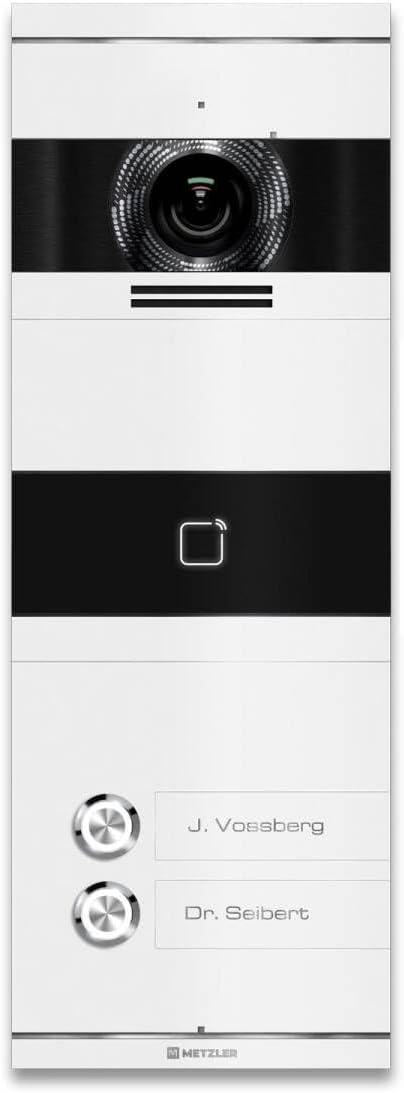
Малюнак 1: Фронт view of the Metzler VDM10 Video Intercom 2.0, displaying the integrated camera, RFID reader symbol, and two illuminated doorbell buttons with customizable nameplates.

Малюнак 2: Angled close-up view of the Metzler VDM10 intercom camera, showcasing the intricate lens design and the brushed metal finish around it.
5. Настройка
5.1 Mounting the Outdoor Station
The Metzler VDM10 supports both surface and flush mounting using the provided universal mounting box. Choose a suitable location near your entrance, ensuring optimal camera visibility and accessibility for wiring.
- Select Mounting Type: Decide between surface or flush mounting based on your wall structure and aesthetic preference.
- Падрыхтуйце месца мантажу: For flush mounting, create an opening in the wall according to the dimensions of the mounting box. For surface mounting, ensure a flat, stable surface.
- Усталюйце мантажную скрынку: Securely fasten the mounting box to the wall using the provided screws and anchors.
- Праводка: Route the necessary cables (LAN/POE, power, door opener) through the mounting box.
- Attach Outdoor Station: Connect the cables to the outdoor station as per the wiring diagram (refer to the detailed diagram in the separate installation guide). Secure the outdoor station to the mounting box.

Малюнак 3: The Metzler VDM10 intercom seamlessly installed on a white exterior wall, adjacent to a contemporary dark grey entrance door, demonstrating its discreet and functional placement.
5.2 Падключэнне да электрасілкавання і сеткі
The VDM10 supports Power over Ethernet (POE) for simplified installation, allowing both power and data to be transmitted over a single LAN cable. Alternatively, a separate power supply can be used.
- Падключэнне POE: Connect a POE-enabled network switch or injector to the LAN port of the outdoor station using an Ethernet cable.
- Non-POE Connection: If not using POE, connect a 12V DC power adapter (not included) to the power input terminals and an Ethernet cable to a standard network switch.
5.3 Initial Configuration (Easy UI 2.0)
The VDM10 features Easy UI 2.0 for PC-free configuration. Refer to the separate network configuration guide for detailed steps on setting up network parameters, indoor station pairing, and smartphone app integration.
6. Інструкцыя па эксплуатацыі
6.1 Прыём званка
When a visitor presses a doorbell button on the outdoor station, a call will be initiated to the paired indoor stations and/or the configured smartphone application.
- Indoor Station: The indoor station will ring and display the video feed from the outdoor camera. You can answer the call, speak to the visitor, and open the door.
- Прыкладанне для смартфона: Your smartphone will receive a notification. Opening the app allows you to view the live video, communicate with the visitor, and remotely unlock the door.

Малюнак 4: A user interacting with the Metzler VDM10 intercom via a smartphone app, demonstrating the ability to see and communicate with a visitor, such as a delivery person, remotely.
6.2 Door Opening Function
The VDM10 allows for electronic door unlocking. This function can be activated from:
- Indoor Station: Press the designated unlock button on your Metzler indoor station during a call or in live view.
- Прыкладанне для смартфона: Tap the unlock icon within the smartphone application.
6.3 RFID Access
The integrated RFID reader provides convenient keyless entry.
- Register RFID Cards: Follow the instructions in the configuration guide to register your RFID cards with the system.
- Using RFID: Present a registered RFID card to the RFID reader area on the outdoor station. The door will unlock automatically.
7. Тэхнічнае абслугоўванне
Regular maintenance ensures optimal performance and longevity of your Metzler VDM10 intercom.
- Уборка: Wipe the outdoor station with a soft, damp тканіна. Не выкарыстоўвайце абразіўныя ачышчальнікі або растваральнікі.
- Аб'ектыў камеры: Gently clean the camera lens with a microfiber cloth to ensure clear image quality.
- Абнаўленні прашыўкі: Periodically check the Metzler website for firmware updates to ensure your system has the latest features and security enhancements.
8. Выпраўленне непаладак
If you encounter issues with your Metzler VDM10, refer to the following common problems and solutions:
| праблема | Магчымая прычына | Рашэнне |
|---|---|---|
| Няма відэаканала | Network connection issue, power issue, camera fault. | Check LAN/POE connection. Verify power supply. Restart the system. |
| Дзверы не адмыкаюцца | Wiring issue, incorrect settings, faulty door strike. | Check door strike wiring. Verify unlock settings in configuration. Test door strike independently. |
| RFID card not working | Card not registered, faulty card, RFID reader issue. | Ensure card is properly registered. Try another registered card. Contact support if issue persists. |
| No audio during call | Microphone/speaker issue, network latency. | Check network connection stability. Restart the system. |
If the problem persists after attempting these solutions, please contact Metzler customer support for further assistance.
9. Тэхнічныя характарыстыкі
Detailed technical specifications for the Metzler VDM10 Video Intercom 2.0:
| Асаблівасць | Спецыфікацыя |
|---|---|
| Марка | Metzler |
| мадэль | ВДМ10 |
| Энергаспажыванне | 4 ват |
| Памеры (Д х Ш х У) | 0.05 x 13.3 x 37.8 cm (Product); 13.3 x 37.8 cm (Item) |
| Вага | 2.12 кілаграма |
| Матэрыял | Нержавеючая сталь |
| Тып камеры | HD Camera with Infrared Technology |
| Vision Area | 146° (па гарызанталі) x 82° (па вертыкалі) |
| Асаблівасці | Счытвальнік RFID |
| Атэстацыя | Easy UI 2.0 - PC-free Configuration |
| Сумяшчальныя прылады | Metzler indoor stations |
| Крыніца харчавання | Mains power (LAN POE supported) |
| Тып кантролера | Indoor station, smartphone app & PC + Mac |
| Тып мацавання | Universal mounting box for surface and flush mounting |
| Тып ўстаноўкі | Mounting box for surface and flush mounting |

Малюнак 5: Поле в view diagram for the VDM10, indicating a 146° horizontal and 82° vertical coverage. The diagram also suggests an optimal mounting height between 145 cm and 160 cm (measured from the top edge of the front plate) for comprehensive visitor visibility.
10. Гарантыя і падтрымка
For warranty information, technical support, or service inquiries, please refer to the warranty card included with your product or visit the official Metzler webсайт. Захоўвайце чэк аб куплі як пацверджанне пакупкі.


