Уводзіны
Welcome to the GOBOULT Mirage Smart Watch user manual. This guide provides detailed instructions on how to set up, operate, and maintain your new smartwatch. Please read this manual thoroughly to ensure optimal performance and longevity of your device.
Прадукт скончаныview
The GOBOULT Mirage Smart Watch is a feature-rich device designed to enhance your daily life with advanced health monitoring, communication, and fitness tracking capabilities. It features a vibrant 1.39-inch HD display, Bluetooth calling, and a durable zinc alloy frame.
Асноўныя характарыстыкі:
- 1.39-цалевы HD-дысплей: Bright and clear screen with 500 nits brightness and 360x360 pixel resolution.
- Званкі па Bluetooth: Make and receive calls directly from your wrist with a built-in speaker and microphone.
- Комплексны маніторынг здароўя: Includes SpO2, heart rate, blood pressure, sleep tracking, breath training, and menstrual cycle tracking.
- 120+ спартыўных рэжымаў: Track a wide range of physical activities with detailed metrics.
- Галасавы памочнік AI: Hands-free control and access to features.
- Воданепранікальнасць IP67: Designed to withstand splashes and dust.
- Наладжвальныя цыферблаты: Over 300 cloud-based watch faces to personalize your device.
- Разумныя апавяшчэнні: Атрымлівайце апавяшчэнні аб званках, паведамленнях і апавяшчэннях праграм.
- Доўгі тэрмін службы батарэі: Да 7 дзён звычайнага выкарыстання.
Што ў скрынцы:
- GOBOULT Mirage Smart Watch (Coal Black)
- Зарадны кабель
- Кіраўніцтва карыстальніка
- Гарантыйны талон

Выява: Зверхуview of the GOBOULT Mirage Smart Watch highlighting its main features.
Кіраўніцтва па ўстаноўцы
1. Зарадка разумнага гадзінніка
- Connect the magnetic charging cable to the charging pins on the back of your smartwatch.
- Падключыце USB-кабель да стандартнага USB-адаптара сілкавання (рэкамендуецца 5 В/1 А) або да USB-порта кампутара.
- The watch display will show a charging indicator. A full charge takes approximately 120 minutes.
- Перад зарадкай пераканайцеся, што зарадныя кантакты чыстыя і сухія, каб прадухіліць карозію.
2. Уключэнне / выключэнне харчавання
- Уключэнне: Press and hold the side button (digital crown) for a few seconds until the GOBOULT logo appears.
- Выключэнне: From the watch face, swipe down to access quick settings, or navigate to the settings menu. Select "Power Off" and confirm. Alternatively, press and hold the side button until the power off option appears.
3. Спалучэнне са смартфонам
- Download the official GOBOULT companion app from your smartphone's app store (available for iOS and Android).
- Пераканайцеся, што Bluetooth уключаны на вашым смартфоне.
- Open the GOBOULT app and follow the on-screen instructions to create an account or log in.
- У дадатку абярыце «Дадаць прыладу» або падобную опцыю, каб знайсці свой разумны гадзіннік.
- Select "GOBOULT Mirage" from the list of available devices.
- Пацвердзіце запыт на спалучэнне як на смартфоне, так і на разумным гадзінніку.
- Пасля спалучэння гадзіннік сінхранізуе дадзеныя з вашым тэлефонам, і вы зможаце наладзіць параметры праз праграму.
Інструкцыя па эксплуатацыі
Асноўная навігацыя:
- Сэнсарны экран: Правядзіце пальцам улева/управа, уверх/уніз, каб перамяшчацца па меню і апавяшчэннях. Націсніце, каб выбраць элементы.
- Digital Crown (Side Button):
- Націсніце адзін раз: Return to the watch face from any screen, or wake the screen.
- Націсніце і ўтрымлівайце: Power on/off, or access the AI Voice Assistant (configurable).
- Паварот: Scroll through menus, lists, or adjust settings.
- Кнопка хуткага доступу: The second physical button on the side can be customized for quick access to specific functions, such as launching sports modes.

Image: Digital crown and button functionalities for navigation and quick access.
Маніторынг здароўя
The GOBOULT Mirage Smart Watch offers a comprehensive suite of health tracking features. For accurate readings, ensure the watch is worn snugly on your wrist, about one finger's width from your wrist bone.
- Маніторынг сардэчнага рытму: The watch continuously tracks your heart rate. View дадзеныя ў рэжыме рэальнага часу на гадзінніку або падрабязныя тэндэнцыі ў дадатку.
- Маніторынг SpO2 (кіслароду ў крыві): Measure your blood oxygen levels on demand. Navigate to the SpO2 function on your watch and remain still for accurate results.
- Маніторынг артэрыяльнага ціску: Access the blood pressure feature on your watch for readings.
- Маніторынг сну: Wear your watch to bed to track your sleep patterns, including deep sleep, light sleep, and awake times. Data is available in the app.
- Breath Training Mode: Follow guided breathing exercises to help reduce stress and improve relaxation.
- Адсочванне актыўнасці: Адсочвае крокі, адлегласць і спаленыя калорыі на працягу дня.
- Напамін пра пітную ваду: Set reminders in the app to ensure you stay hydrated.
- Сядзячы напамін: Receive alerts when you've been inactive for too long, encouraging you to move.
- Адсочванне менструальнага цыклу: For female users, track and predict menstrual cycles through the companion app.

Image: The watch's health sensors and a summary of its health monitoring capabilities.
Спартыўныя рэжымы
The GOBOULT Mirage Smart Watch supports over 120 sports modes to accurately track your workouts. From running to yoga, you can monitor your performance and progress.
Using Sports Modes:
- Access the sports mode menu from the watch's main interface or by using the dedicated shortcut button.
- Scroll through the list and select your desired activity (e.g., Running, Cycling, Yoga, Cricket, Badminton, Basketball).
- Tap to start the activity. The watch will begin recording data such as duration, heart rate, calories burned, and distance (where applicable).
- To pause or end an activity, swipe right or press the side button and follow the on-screen prompts.
- Review your workout summaries on the watch or in detail within the companion app.

Image: The watch interface showing various sports modes and quick access options.
Bluetooth-званкі і разумныя апавяшчэнні
With Bluetooth 5.3 connectivity, your GOBOULT Mirage Smart Watch allows you to manage calls and receive notifications directly on your wrist.
Званкі па Bluetooth:
- Ensure your watch is paired with your phone via Bluetooth.
- Здзяйсненне званкоў: Каб пачаць званок, адкрыйце панэль набору нумара або спіс кантактаў на гадзінніку.
- Прыём званкоў: When a call comes in, the watch will display the caller ID. You can answer or reject the call directly from your wrist using the built-in speaker and microphone.
- Сінхранізацыя кантактаў: Synchronize your phone contacts with the watch through the companion app for easy access.
Разумныя апавяшчэнні:
- Enable app notifications in the GOBOULT companion app on your smartphone.
- Your watch will display incoming messages, social media alerts, and other app notifications.
- Swipe up or down on the watch face to view гісторыя вашых апавяшчэнняў.

Image: Bluetooth calling features and interface on the smartwatch.

Image: Smart notifications and other quick access features like calculator and voice assistant.
Налада
Гадзіннік:
Personalize your GOBOULT Mirage Smart Watch with over 300 cloud-based watch faces. You can change the watch face directly from the device or through the companion app.
- На гадзінніку: From the watch face, press and hold the screen. Swipe left or right to browse available watch faces and tap to select.
- Праз прыкладанне: Open the GOBOULT app, navigate to the watch face section, and explore a wider selection of designs. Download and apply your preferred watch face.

Малюнак: Examples of customizable watch faces available for the smartwatch.
Дадатковыя магчымасці
Галасавы памочнік AI:
Activate the AI Voice Assistant (compatible with Hey Siri and Ok Google) by long-pressing the digital crown or through a dedicated menu option. Use voice commands to perform various tasks hands-free.
Знайсці мой тэлефон:
If your paired smartphone is misplaced, use the "Find My Phone" feature on your watch to make it ring or vibrate, helping you locate it quickly.
- Go to the watch menu.
- Select the "Find Phone" option.
- The connected phone will ring or vibrate.
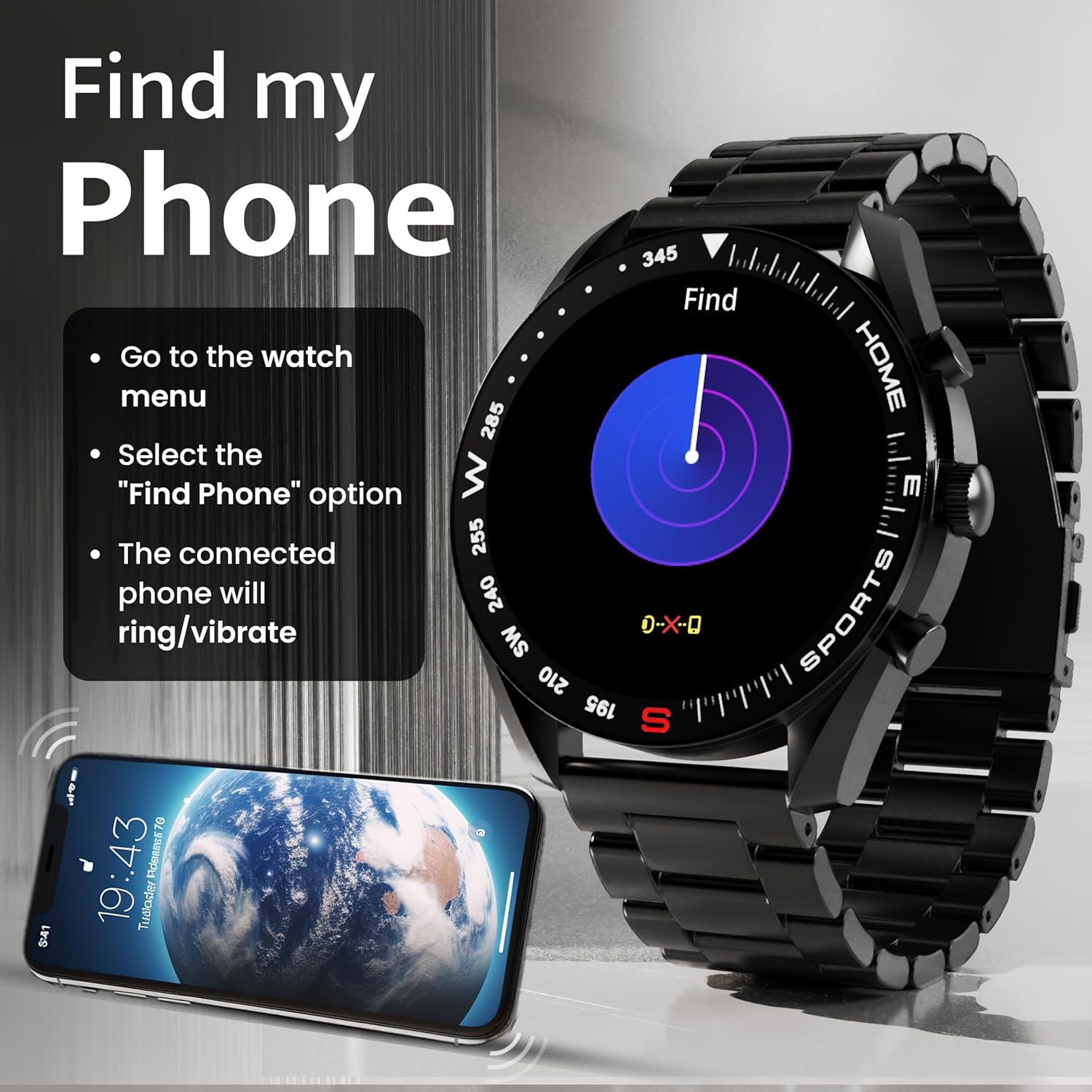
Image: How to use the 'Find My Phone' feature on the smartwatch.
Міні гульні:
The watch includes several mini-games for entertainment, such as 2048, Battleship, Hamster, and Young Bird.

Малюнак: Examples of mini-games available on the smartwatch.
Тэхнічнае абслугоўванне
Чыстка вашага разумнага гадзінніка:
- Працярыце экран і корпус гадзінніка мяккай тканінай без ворса.
- Для ўстойлівага бруду злёгку ачысціцеampпрамыйце тканіну вадой. Пазбягайце выкарыстання агрэсіўных хімічных рэчываў або абразіўных матэрыялаў.
- Clean the charging pins regularly with a dry cloth or cotton swab to ensure proper charging.
Воданепранікальнасць (IP67):
The GOBOULT Mirage Smart Watch is IP67 water-resistant, meaning it is protected against dust ingress and can withstand immersion in water up to 1 meter for up to 30 minutes. However, it is not suitable for swimming, showering with hot water, or diving. Avoid exposure to high-pressure water or corrosive liquids.

Image: Information regarding the IP67 water and dust resistance of the smartwatch.
Рэгуляванне папружкі:
The watch comes with a metallic strap adjustment tool. Refer to the included instructions or a professional for adjusting the strap length to ensure a comfortable and secure fit.

Image: The watch's zinc alloy frame and the metallic strap adjustment tool.
Ліквідацыю непаладак
- Гадзіннік не ўключаецца: Ensure the watch is fully charged. Connect it to the charging cable and allow it to charge for at least 30 minutes before attempting to power it on again.
- Немагчыма спалучыць прыладу з тэлефонам:
- Пераканайцеся, што Bluetooth уключаны на вашым тэлефоне і гадзінніку.
- Ensure the watch is within the Bluetooth range (up to 10 meters).
- Перазагрузіце тэлефон і разумны гадзіннік.
- Ачысціце кэш Bluetooth на тэлефоне або забудзьце прыладу і паспрабуйце падключыць яе зноў.
- Ensure the GOBOULT companion app is updated to the latest version.
- Недакладныя дадзеныя пра здароўе: Пераканайцеся, што гадзіннік шчыльна прылягае да запясця, не занадта туга і не занадта свабодна. Ачысціце датчыкі на задняй панэлі гадзінніка. Пазбягайце празмерных рухаў падчас вымярэнняў.
- Апавяшчэнні не з'яўляюцца:
- Check if notifications are enabled for the specific apps in the GOBOULT companion app.
- Ensure your phone's notification settings allow the GOBOULT app to display alerts.
- Verify that the watch is properly connected to your phone via Bluetooth.
- Кароткі тэрмін службы батарэі: Reduce screen brightness, disable unnecessary features like continuous heart rate monitoring if not needed, and limit the number of active notifications. Ensure the watch is fully charged.
- Сэнсарны экран не рэагуе: Перазапусціце гадзіннік. Калі праблема не знікне, пераканайцеся, што экран чысты і сухі.
Тэхнічныя характарыстыкі
| Асаблівасць | Дэталь |
|---|---|
| Назва мадэлі | Міраж |
| Памер дысплея | 1.39 цалі HD |
| Дазвол дысплея | 360 х 360 пікселяў |
| Яркасць | 500 Nits Peak Brightness |
| Сувязь | Bluetooth 5.3 |
| Воданепранікальнасць | IP67 |
| Матэрыял каркаса | Сплаў цынку |
| Тып батарэі | Літый-палімерны |
| Сярэдні тэрмін службы батарэі | Да 7 дзён |
| Час зарадкі | Прыкладна 120 хвілін |
| Сумяшчальнасць аперацыйнай сістэмы | iOS, Android |
| Вага прадмета | 106 г |
| Уключаныя кампаненты | Смарт-гадзіннік, кабель для зарадкі, кіраўніцтва карыстальніка, гарантыйны талон |
Гарантыя і падтрымка
Інфармацыя аб гарантыі:
Your GOBOULT Mirage Smart Watch comes with a manufacturer's warranty. Please refer to the included Warranty Card for specific terms, conditions, and duration of the warranty. Keep your purchase receipt as proof of purchase.
Падтрымка кліентаў:
If you encounter any issues or have questions not covered in this manual, please contact GOBOULT customer support. Contact details can typically be found on the Warranty Card or the official GOBOULT webсайт.


