1. Уводзіны
This manual provides detailed instructions for the proper use, setup, and maintenance of your Pard NV009-850nm Digital Night Vision Monocular. Please read this manual thoroughly before operating the device to ensure optimal performance and longevity. This device is designed for wildlife observation, hunting, and general outdoor viewздымак у розных умовах асвятлення.

Image 1.1: The Pard NV009-850nm Digital Night Vision Monocular. This image displays the compact and ergonomic design of the monocular, highlighting its main body, objective lens, and eyepiece.
2. Прадукт скончыўсяview
2.1 Змест пакета
Пасля распакавання пераканайцеся, што ўсе пералічаныя ніжэй элементы наяўныя:
- Pard NV009-850nm Digital Night Vision Monocular
- Ахоўны футляр для пераноскі
- USB-кабель для зарадкі
- Wrist Strap / Neck Strap
- Кіраўніцтва карыстальніка (гэты дакумент)

Image 2.1: Contents of the Pard NV009-850nm package. This image shows the monocular, its carrying case, charging cable, straps, and the user manual, all neatly arranged.
2.2 Асноўныя магчымасці
- Daytime and Nighttime Operation: Seamless transition between full-color daytime viewing and monochrome night vision mode.
- Выява з высокім дазволам: Features a 1920x1080 FHD CMOS image sensor and a 1024x768 OLED display for clear, detailed visuals.
- Adjustable IR Illuminator: Integrated 850nm IR illuminator with three intensity levels, providing effective illumination up to 200 meters.
- Фота- і відэазапіс: Capture 2608x1944 resolution photos and 1920x1080 Full HD videos directly to a Micro SD card.
- Аптычны і лічбавы зум: Offers 4.7x optical magnification and 1.5x-3.0x digital zoom for precise target observation.
- Падключэнне Wi-Fi: Connects to smart mobile devices via the "PardVision" app for remote viewing and data transfer.
- Picture-in-Picture (PIP) Mode: Provides a magnified inset view of the central area for enhanced detail without losing the wider field of view.
- Трывалы дызайн: IP67 waterproof rating ensures reliability in various outdoor conditions.

Image 2.2: Comparison of day and night vision modes. This image illustrates the monocular's capability to provide full-color images during the day and clear monochrome images at night, featuring a fox in both scenarios.

Image 2.3: Nighttime viewing range illustration. This graphic demonstrates the monocular's effective viewing distance of up to 200 meters (656 feet) in low-light conditions, showing a wild boar as an example target.

Image 2.4: Enhanced image quality demonstration. This image compares a blurred, lower-quality image with a sharp, enhanced image, illustrating the effectiveness of the PARD Visual Light Enhancement Algorithm (VLEA) and OLED display.
3. Настройка
3.1 Устаноўка батарэі
- Locate the battery compartment cover, typically on the underside or side of the monocular.
- Адкрыйце вечка, павярнуўшы або зрушыўшы яго ў адпаведнасці з індыкатарам.
- Insert a fully charged 18650 type battery (not included) with the correct polarity (+/-) as indicated inside the compartment.
- Надзейна зачыніце крышку батарэйнага адсека.
3.2 Устаўка карты Micro SD
The device supports Micro SD cards for storing photos and videos.
- Locate the Micro SD card slot, usually protected by a rubber cover.
- Gently insert the Micro SD card into the slot until it clicks into place. Ensure the card is oriented correctly.
- Зачыніце гумовую вечка, каб абараніць слот ад пылу і вільгаці.
3.3 Initial Power On and Focus Adjustment
- Націсніце і ўтрымлівайце кнопку харчавання, каб уключыць прыладу.
- Adjust the diopter ring on the eyepiece until the on-screen display (OSD) text appears sharp and clear to your eye.
- Rotate the objective lens focus ring to bring the observed image into sharp focus.
4. Інструкцыя па эксплуатацыі
4.1 Уключэнне/выключэнне сілкавання
- Уключэнне: Націсніце і ўтрымлівайце кнопку харчавання прыблізна 3 секунды.
- Выключэнне: Press and hold the Power button for approximately 3 seconds until the device shuts down.
4.2 Mode Selection (Day/Night)
The NV009-850nm automatically adjusts to ambient light, but you can manually switch modes:
- У асноўным viewing interface, short press the Mode button to toggle between Day (color) and Night (monochrome) vision modes.
4.3 IR Illuminator Adjustment
The integrated IR illuminator enhances visibility in complete darkness.
- Activate the IR illuminator by pressing its dedicated button (if available) or through the menu.
- Short press the IR button to cycle through the three intensity levels (Low, Medium, High) or to turn it off.

Image 4.1: IR Illuminator functionality. This graphic illustrates the 200m adjustable beam IR illuminator with its three intensity levels, showing how it illuminates a target in darkness.
4.4 Аперацыя маштабавання
- Use the designated zoom buttons (often '+' and '-') to adjust the digital magnification. The optical magnification is fixed at 4.7x.
4.5 Фота- і відэаздымка
- фота: In viewing mode, short press the Photo button to capture an image.
- Відэа: Short press the Video button to start recording. Press again to stop recording.

Image 4.2: Video recording and playback function. This image shows the monocular's ability to capture and play back high-definition video, with a simulated screen displaying a recorded scene of a fox.
4.6 Прайграванне
- Enter the Playback menu via the main menu.
- Navigate through your recorded photos and videos using the directional buttons.
- Select an item to view it on the OLED display.
4.7 Wi-Fi Connectivity (PardVision App)
- Download the "PardVision" app from your device's app store (Apple App Store or Google Play Store).
- On the monocular, enable Wi-Fi through the system settings. The device will broadcast a Wi-Fi network.
- Connect your smartphone or tablet to the monocular's Wi-Fi network.
- Open the PardVision app to view a live feed, control settings, and transfer files.
4.8 Рэжым «карцінка ў карцінцы» (PIP)
- Activate PIP mode through the quick menu or system settings.
- A magnified window will appear on the main display, showing a zoomed-in view of the central area.
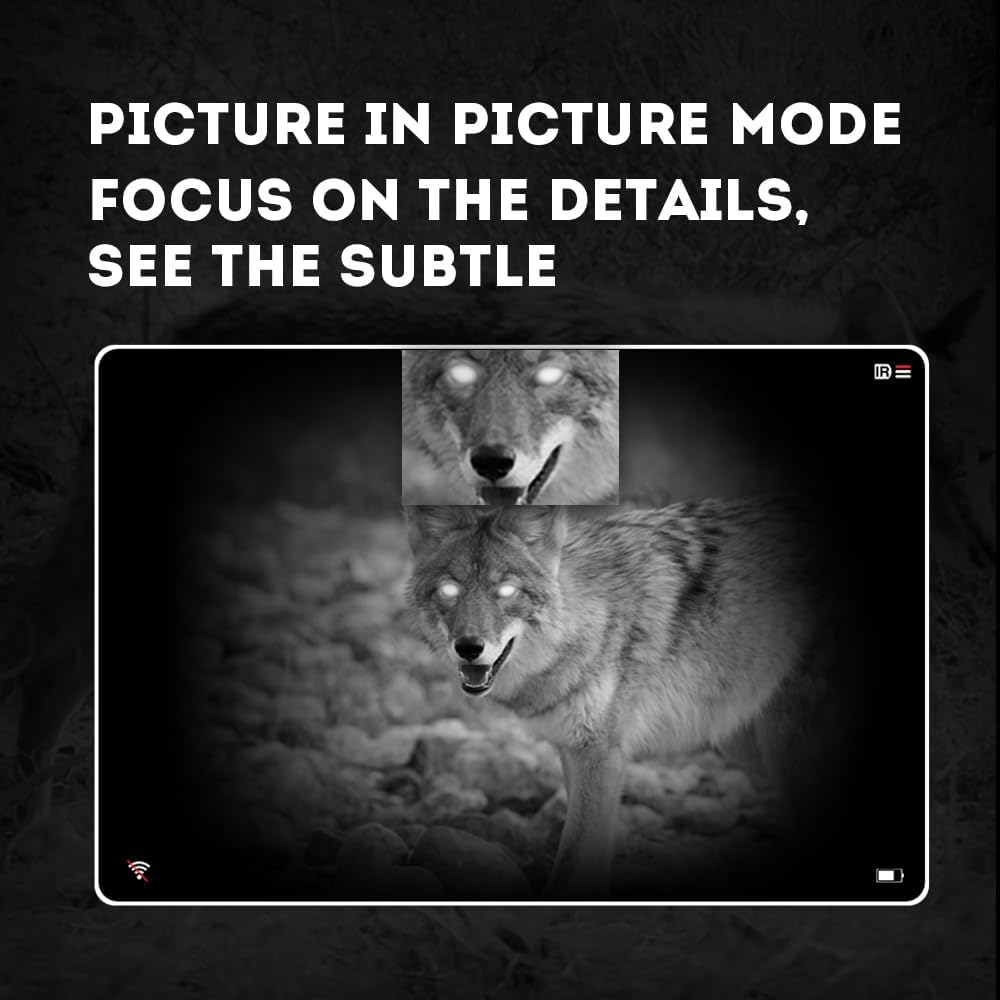
Image 4.3: Picture-in-Picture (PIP) mode. This image demonstrates how PIP mode allows users to focus on specific details within the main view, showing a magnified inset of a coyote's face.
5. Тэхнічнае абслугоўванне
5.1 Ачыстка прылады
- Лінзы: Use a soft, lint-free cloth specifically designed for optical lenses. For stubborn smudges, use a small amount of lens cleaning solution. Avoid abrasive materials.
- Цела: Працярыце корпус монакуляра мяккай тканінайamp тканіна. Не выкарыстоўвайце рэзкія хімікаты або растваральнікі.
5.2 Сыход за акумулятарам
- Always use high-quality, rechargeable 18650 batteries.
- Выміце батарэю, калі прылада не будзе выкарыстоўвацца на працягу доўгага часу.
- Захоўвайце батарэі ў прахалодным сухім месцы.
5.3 Захоўванне
- Store the monocular in its protective carrying case when not in use.
- Захоўвайце прыладу ў сухім месцы, удалечыні ад прамых сонечных прамянёў і экстрэмальных тэмператур.
6. Выпраўленне непаладак
If you encounter issues with your Pard NV009-850nm, refer to the following common problems and solutions:
| праблема | Магчымая прычына | Рашэнне |
|---|---|---|
| Прылада не ўключаецца | Low or depleted battery; Incorrect battery installation | Charge or replace the battery; Reinstall battery with correct polarity. |
| Відарыс размыты | Improper focus adjustment; Dirty lens | Adjust the diopter and objective lens focus rings; Clean the lenses. |
| No image in night mode | IR illuminator is off or set too low | Turn on the IR illuminator and adjust its intensity. |
| Праблемы з падключэннем да Wi-Fi | Wi-Fi not enabled on device; Incorrect app settings | Ensure Wi-Fi is enabled on the monocular; Check app permissions and settings. |
| Cannot record photos/videos | No Micro SD card; SD card full or corrupted | Insert a Micro SD card; Delete old files or format the card (backup important data first). |
If the problem persists after attempting these solutions, please contact Pard customer support.
7. Тэхнічныя характарыстыкі
| Асаблівасць | Дэталь |
|---|---|
| Марка | Пард |
| Назва мадэлі | PARD Night Vision Monocular |
| Нумар мадэлі | NV009-850nm |
| Колер | Чорны |
| Памеры прадукту (ДxШxВ) | 7.16 цалі х 2.24 цалі х 2.79 цалі (18.19 см х 5.69 см х 7.09 см) |
| Вага прадмета | 340 грам |
| Матэрыял | Алюміній |
| Дыяметр лінзы аб'ектыва | 25 міліметра |
| Зрэнкі | 25 міліметра |
| Магчымасць начнога бачання | так |
| IR Illuminator Wavelength | 850nm (with 940nm option available in other variants) |
| CMOS Sensor Resolution | 1920x1080 пікселяў |
| Экран дысплея | 1024x768 OLED |
| Аптычнае павелічэнне | 4.7x |
| Лічбавы зум | 1.5x-3.0x |
| Дазвол фота | 2608x1944 пікселяў |
| Дазвол відэа | 1920x1080 пікселяў |
| Рэйтынг воданепранікальнасці | IP67 |
| Сумяшчальныя прылады | Camera (for recording) |
| Тып мацавання | Rail Mount (if applicable for accessories) |
8. Гарантыя і падтрымка
8.1 Інфармацыя аб гарантыі
The Pard NV009-850nm Digital Night Vision Monocular comes with a Гарантыя 1 год з даты пакупкі. Гэтая гарантыя распаўсюджваецца на вытворчыя дэфекты і няспраўнасці пры нармальным выкарыстанні. Яна не распаўсюджваецца на пашкоджанні, выкліканыя няправільным выкарыстаннем, аварыямі, несанкцыянаванымі мадыфікацыямі або няправільным абслугоўваннем.
Калі ласка, захавайце доказы пакупкі для прэтэнзій па гарантыі.
8.2 Падтрымка кліентаў
For technical assistance, warranty claims, or any questions regarding your device, please contact Pard customer support through the official Pard website or your retailer. When contacting support, please have your model number (NV009-850nm) and purchase date available.


