1. Уводзіны
Thank you for choosing the Taiahiro Bk6301 Wireless Mechanical Gaming Keyboard and Mouse Combo. This manual provides detailed instructions for setting up, operating, and maintaining your new peripheral devices. This combo offers versatile connectivity options including 2.4G wireless, Bluetooth 5.0, and wired USB-C, ensuring compatibility with various devices.
2. Змесціва ўпакоўкі
Калі ласка, пераканайцеся, што ўсе прадметы прысутнічаюць у вашай упакоўцы:
- Taiahiro Bk6301 Wireless Mechanical Gaming Keyboard
- Taiahiro Wireless Gaming Mouse
- USB 2.4G Receiver (stored in mouse battery compartment)
- USB-C да USB-A кабель для зарадкі/дадзеных
- Кіраўніцтва карыстальніка
- 1 AA Battery (for mouse, may be pre-installed or included separately)

Image 2.1: Contents of the Taiahiro Bk6301 Keyboard and Mouse Combo package, including the keyboard, mouse, USB receiver, and USB-C cable.
3. Прадукт скончыўсяview
3.1 Функцыі клавіятуры
- Раскладка з 98 клавішамі: Compact design with a full numeric keypad.
- Механічныя сінія перамыкачы: Provide tactile and audible feedback for typing.
- RGB-падсветка: Наладжвальныя светлавыя эфекты.
- Рэгуляваная падстаўка для клавіятуры: Allows for ergonomic positioning.
- Шматрэжавае падключэнне: Supports 2.4G wireless, Bluetooth 5.0, and wired USB-C.
- Акумулятарная батарэя: Built-in 2000mAh battery for wireless operation.
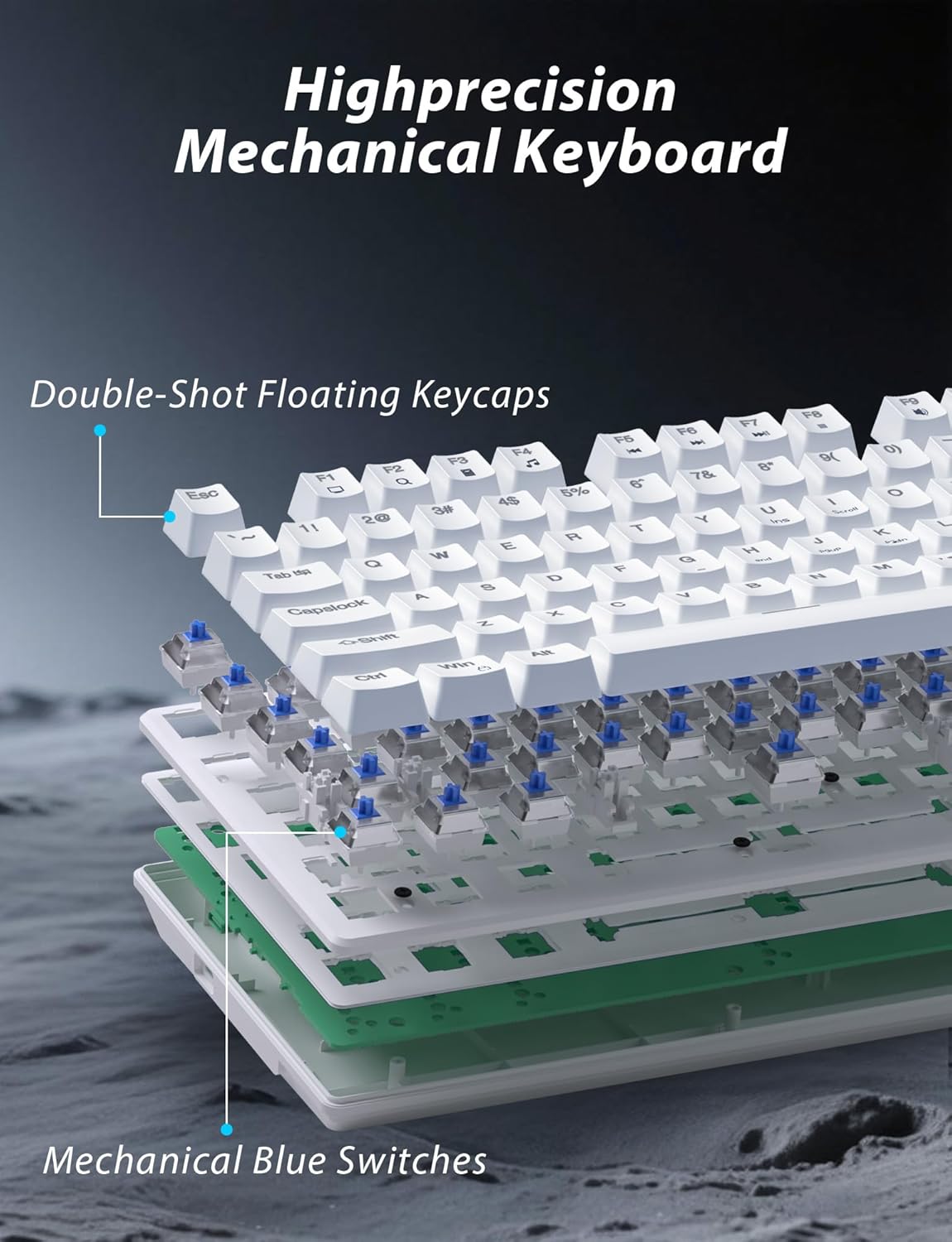
Малюнак 3.1: У разабраным выглядзе view illustrating the internal structure of the mechanical keyboard, highlighting the double-shot floating keycaps and mechanical blue switches.

Малюнак 3.2: Збоку view of the keyboard demonstrating its ergonomic design and adjustable stand for comfortable use.
3.2 Функцыі мышы
- Эрганамічны дызайн: Shaped for comfortable grip.
- Рэгуляваны DPI: Four levels (800/1600/2400/3200) for precision control.
- Кнопкі «Наперад»/«Назад»: Convenient side buttons for navigation.
- Двухрэжымнае падключэнне: Supports 2.4G wireless and Bluetooth.

Image 3.3: The wireless gaming mouse, highlighting its ergonomic shape and four adjustable DPI levels.
4. Інструкцыі па ўсталёўцы
4.1 Keyboard Connection
The keyboard supports three connection modes: 2.4G wireless, Bluetooth, and wired USB-C.

Image 4.1: The keyboard displaying its three connectivity options: Bluetooth, 2.4GHz wireless, and USB-C wired connection.
Бесправадны рэжым 2.4G:
- Locate the USB 2.4G receiver, typically stored in the mouse's battery compartment.
- Устаўце USB-прыёмнік у свабодны порт USB на вашым кампутары.
- On the keyboard, slide the mode switch (usually located on the top edge or bottom) to the '2.4G' position.
- Клавіятура павінна падключыцца аўтаматычна.
Рэжым Bluetooth:
- Slide the mode switch on the keyboard to the 'BT' (Bluetooth) position.
- The keyboard's indicator light will flash, indicating it is in pairing mode.
- On your device (computer, laptop, smartphone), open Bluetooth settings and search for new devices.
- Select "Taiahiro Bk6301" or a similar name from the list of available devices to pair.
- Пасля спалучэння індыкатар пачне гарэць пастаянна.
Wired USB-C Mode:
- Падключыце кабель USB-C з камплекта да порта USB-C клавіятуры.
- Connect the other end (USB-A) to an available USB port on your computer.
- The keyboard will function as a wired device and will charge simultaneously.
4.2 Mouse Connection
The mouse supports 2.4G wireless and Bluetooth connectivity.

Image 4.2: The underside of the mouse, illustrating the battery compartment for one AA battery and the storage slot for the tiny USB receiver.
Ўстаноўка батарэі:
- Адкрыйце батарэйны адсек на ніжняй частцы мышы.
- Insert one AA battery, ensuring correct polarity.
- Зачыніце батарэйны адсек.
Бесправадны рэжым 2.4G:
- Ensure the USB 2.4G receiver is plugged into your computer.
- Slide the mode switch on the underside of the mouse to the '2.4G' position.
- Мышка павінна падключыцца аўтаматычна.
Рэжым Bluetooth:
- Slide the mode switch on the underside of the mouse to the 'BT' (Bluetooth) position.
- The mouse will enter pairing mode.
- На прыладзе адкрыйце налады Bluetooth і знайдзіце новыя прылады.
- Select "Taiahiro Mouse" or a similar name from the list to pair.
5. Інструкцыя па эксплуатацыі
5.1 Функцыі клавіятуры
Кіраванне падсветкай:
The keyboard features customizable RGB backlighting.
- Змяніць рэжым падсветкі: Прэса Fn + Галоўная каб пераключацца паміж 18 рознымі светлавымі эфектамі.
- Наладзіць яркасць: Прэса Fn + ↑ (стрэлка ўверх) or Fn + ↓ (стрэлка ўніз) to adjust between 5 brightness levels.
- Адрэгуляваць хуткасць: Прэса Fn + ← (стрэлка ўлева) or Fn + → (стрэлка ўправа) to adjust between 5 lighting speed levels.

Image 5.1: Keyboard layout highlighting the function key combinations for controlling backlight modes, brightness, and speed.
Мультымедыйныя функцыі:
Access multimedia controls by pressing the Fn key in combination with the designated F-keys (F1-F12).
- Fn+F1: Медыяплэер
- Fn+F2: Памяншэнне гучнасці
- Fn+F3: Павялічыць гучнасць
- Fn+F4: Адключыць гук
- Fn+F5: Стоп
- Fn+F6: Папярэдні трэк
- Fn+F7: Прайграванне/Паўза
- Fn+F8: Наступны трэк
- Fn+F9: Электронная пошта
- Fn+F10: Web Браўзэр
- Fn+F11: Мой кампутар
- Fn+F12: Калькулятар
5.2 Функцыі мышы
Рэгуляванне DPI:
Націсніце Кнопка DPI (located behind the scroll wheel) to cycle through the four DPI settings: 800, 1600, 2400, and 3200. Each press changes the sensitivity, allowing you to adjust cursor speed to your preference.
6. Тэхнічнае абслугоўванне
6.1 Ачыстка
- Клавіятура: Use a soft, dry cloth to wipe the surface. For deeper cleaning, use compressed air to remove debris from between keys. Avoid using harsh chemicals or abrasive materials.
- Мыш: Працярыце паверхню мышы мяккай, злёгку злёгкуamp тканінай. Сачыце за тым, каб вадкасць не патрапіла ўнутр.
6.2 Кіраванне батарэяй
- Клавіятура: The keyboard has a built-in rechargeable battery. Connect the USB-C cable to a power source (e.g., computer USB port, USB wall adapter) to charge. The indicator light will show charging status.
- Мыш: The mouse uses one AA battery. Replace the battery when the mouse performance degrades or it stops responding. Ensure proper polarity when inserting a new battery.
7. Выпраўленне непаладак
If you encounter issues with your Taiahiro keyboard and mouse combo, please refer to the following solutions:
| праблема | Магчымае рашэнне |
|---|---|
| Keyboard/Mouse not responding (2.4G) |
|
| Keyboard/Mouse not connecting (Bluetooth) |
|
| Keyboard backlight not working or stuck |
|
| Keys not responding or double-typing |
|
8. Тэхнічныя характарыстыкі
| Асаблівасць | Дэталь |
|---|---|
| Нумар мадэлі | Bk6301 |
| Сувязь | Bluetooth 5.0, бесправадная сувязь 2.4G, правадны USB-C |
| Тып клавіятуры | Механічная гульнявая клавіятура |
| Раскладка клавіш | 98 Keys (with Numeric Keypad) |
| Тып перамыкача | Механічныя блакітныя выключальнікі |
| Падсвятленне клавіятуры | RGB (18 modes, 5 brightness, 5 speed levels) |
| Акумулятар клавіятуры | 2000mAh Акумулятарная |
| Узроўні DPI мышы | 800/1600/2400/3200 |
| Акумулятар мышкі | 1 х АА батарэя |
| Сумяшчальныя прылады | Personal Computer, Laptop, Smartphone |
| Вага прадмета | 2.72 фунта (камбінацыя) |
| Памеры ўпакоўкі | 15 х 5.59 х 3.11 цалі |
9. Гарантыя і падтрымка
9.1 Інфармацыя аб гарантыі
Taiahiro products are covered by a limited warranty from the date of purchase. Please refer to the warranty card included in your package or visit the official Taiahiro website for detailed warranty terms and conditions. This warranty typically covers manufacturing defects and material faults under normal use.
9.2 Падтрымка кліентаў
For technical assistance, troubleshooting, or any questions regarding your Taiahiro Bk6301 combo, please contact our customer support team. You can find contact information on the Taiahiro official website or through your purchase platform. When contacting support, please have your product model number (Bk6301) and purchase details ready.


