1. Уводзіны
This manual provides essential information for setting up, operating, and maintaining your DOOGEE Tab A9 Pro Android 15 Tablet. Please read it thoroughly to ensure proper usage and to maximize your device's capabilities.
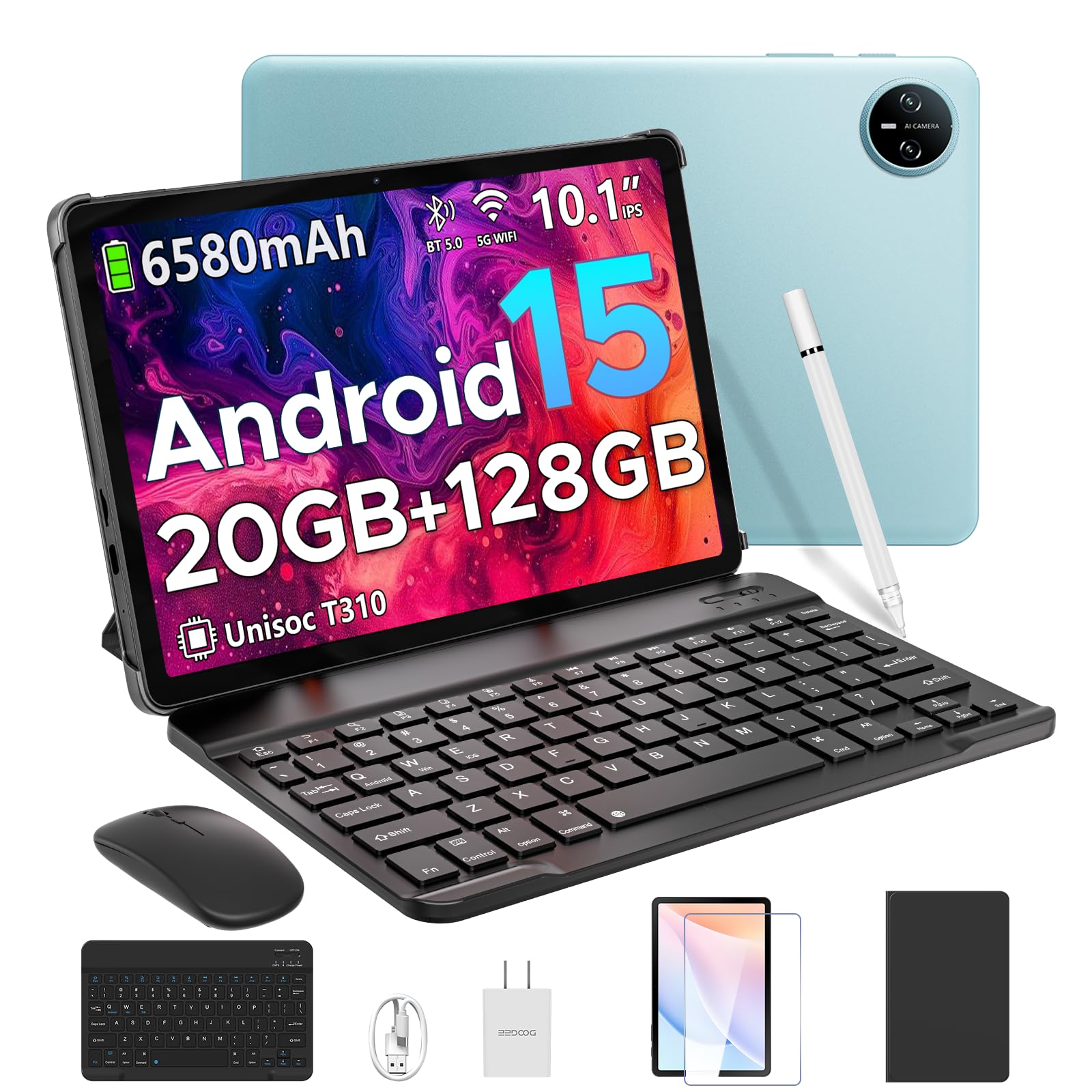
Image 1.1: The DOOGEE Tab A9 Pro Tablet.
2. Што ў скрынцы
Your DOOGEE Tab A9 Pro package includes the following items:
- DOOGEE Tab A9 Pro Tablet (x1)
- USB-кабель тыпу C (1 шт.)
- Зарадная прылада (x1)
- Кіраўніцтва (x1)
- Гарантыйны талон (x1)
- Bluetooth Keyboard (VIP Edition)
- Bluetooth Mouse (VIP Edition)
- Stylus (VIP Edition)
- Leather Protective Cover (VIP Edition)
- Tempered Film (VIP Edition)

Image 2.1: All items included in the DOOGEE Tab A9 Pro package.
3. Прадукт скончыўсяview
The DOOGEE Tab A9 Pro features a sleek design with essential components for user interaction and connectivity.
3.1 Фізічныя асаблівасці
- Дысплей: 10.1-inch IPS HD Ultra-Clear Display.
- Камеры: 8-мегапіксельная асноўная камера (задняя) і 5-мегапіксельная франтальная камера.
- Аўдыё: High-Quality Dual Speakers and a 3.5mm Audio Jack.
- парты: Type-C USB port for charging and data transfer.
- кнопкі: Power button and volume controls located on the side.

Малюнак 3.1: ззаду view of the DOOGEE Tab A9 Pro, highlighting the camera module.

Малюнак 3.2: Збоку view of the tablet, illustrating the power button, volume controls, and ports.
Відэа 3.1: Кароткі відэаролікasing the ultra-thin body and design of the DOOGEE Tab A9 Pro.
4. Настройка
4.1 Першапачатковая зарадка
Before first use, fully charge your tablet using the provided Type-C USB cable and charger. The battery indicator on the screen will show charging progress.
4.2 Уключэнне/выключэнне сілкавання
- Каб уключыць: Press and hold the power button until the DOOGEE logo appears.
- Каб выключыць: Press and hold the power button, then select 'Power off' from the options that appear on the screen.
4.3 Майстар пачатковай налады
Upon first power-on, follow the on-screen instructions to complete the initial setup, including language selection, Wi-Fi connection, and Google account login.
5. Operating System (Android 15)
The DOOGEE Tab A9 Pro runs on the Android 15 operating system, offering a smart, fluid, and secure user experience with enhanced privacy features.

Image 5.1: Visual representation of the Android 15 system interface.
Відэа 5.1: Оверview of the DOOGEE Tab A9 Pro running Android 15.
6. Прадукцыйнасць і захоўванне
The tablet is designed for smooth operation and ample ёмістасць для захоўвання.
Працэсар 6.1
Powered by the energy-efficient Unisoc T310 octa-core processor, the tablet ensures seamless performance for various tasks.

Image 6.1: Diagram illustrating the Unisoc T310 Quad-Core Processor.
6.2 Аператыўная памяць і назапашвальнік
The tablet features 20GB of RAM (4GB physical + 16GB virtual) and 128GB of internal storage. Storage can be expanded up to 2TB using a microSD card (sold separately).

Image 6.2: Visual representation of the tablet's RAM and ROM configuration.
7. Display & Audio
Experience vibrant visuals and clear sound with your tablet.
7.1 Дысплей
The 10.1-inch IPS HD display offers wide viewing angles and a resolution of 1280x800 for an immersive visual experience.

Image 7.1: The 10.1-inch IPS HD display with key specifications.
7.2 Аўдыё
Built-in dual speakers deliver clear and dynamic sound for movies, music, and video calls.

Image 7.2: Illustration of the tablet's dual speaker system.
8. Камеры
Capture moments and conduct video calls with the integrated cameras.
8.1 Асноўная камера
The 8MP main camera allows you to take sharp photos.

Image 8.1: Close-up of the 8MP main camera on the tablet's rear.
8.2 Пярэдняя камера
Фронтальная камера на 5 Мп падыходзіць для сэлфі і відэазванкоў.

Image 8.2: The 5MP front camera in use for a video call.
9. Сувязь
Stay connected with various wireless options.
9.1 Wi-Fi
Supports 2.4G/5G dual-band Wi-Fi for smooth, high-speed internet access.

Image 9.1: Features of WiFi 5 connectivity on the tablet.
Bluetooth 9.2
Equipped with Bluetooth 5.0 for connecting wireless accessories.
9.3 GPS
Built-in GPS provides accurate navigation for travel and outdoor activities.
10. Аксэсуары
The DOOGEE Tab A9 Pro comes with a suite of accessories to enhance its functionality.
10.1 Клавіятура Bluetooth
Connect the Bluetooth keyboard for a desktop-like typing experience, ideal for productivity tasks.

Image 10.1: The tablet connected to its Bluetooth keyboard for efficient typing.
10.2 Mouse and Stylus
The included mouse and stylus further enhance navigation and interaction, especially for note-taking and creative tasks.

Image 10.2: The tablet shown with its accompanying keyboard and mouse.

Image 10.3: The tablet being used with the stylus for precise input.
10.3 Ахоўны футляр
The protective case shields your tablet from drops and scratches and can also function as a stand.

Image 10.4: The tablet securely placed within its protective case.
11. Кіраванне батарэяй
The tablet is equipped with a high-capacity battery for extended use.
11.1 Ёмістасць батарэі
Features a long-lasting 6580mAh battery, providing hours of power for various activities without frequent recharging.

Image 11.1: Diagram showing the 6580mAh battery inside the tablet.
Video 11.1: A video highlighting the large battery capacity of the DOOGEE Tab A9 Pro.
12. Функцыі бяспекі
Protect your device and data with built-in security options.
12.1 Распазнаванне тварам
Effortlessly unlock your tablet using facial recognition technology.

Image 12.1: Illustration of the facial recognition unlock feature.
12.2 Fortified Privacy Shield
Android 15 provides enhanced privacy controls, robust data encryption, timely security patches, and proactive app screening for unbreakable security.

Выява 12.2: Канецview of Android 15's privacy features.
13. Multitasking & Productivity
Optimize your workflow and entertainment with these features.
13.1 Split-Screen Multitasking
Run two applications simultaneously side-by-side for enhanced productivity.

Image 13.1: The tablet displaying two apps in split-screen mode.
13.2 Built-in WPS Office
The tablet comes with WPS Office pre-installed, providing PC-level productivity for documents, spreadsheets, and presentations (Note: WPS Office feature may be unavailable in certain regions).

Малюнак 13.2: Прэзентацыя планшэтаasing WPS Office applications.
Video 13.1: A video demonstrating the DOOGEE Tab A9 Pro's capabilities for learning and work.
14. Тэхнічнае абслугоўванне
14.1 Ачыстка
Выкарыстоўвайце мяккую тканіну без ворса для чысткі экрана і корпуса планшэта. Пазбягайце выкарыстання агрэсіўных хімічных рэчываў або абразіўных матэрыялаў.
14.2 Абнаўленне праграмнага забеспячэння
Рэгулярна правярайце наяўнасць абнаўленняў сістэмы і ўсталёўвайце іх, каб забяспечыць аптымальную прадукцыйнасць, бяспеку і доступ да новых функцый. Перайдзіце да Налады > Сістэма > Абнаўленне сістэмы каб праверыць наяўнасць абнаўленняў.
15. Выпраўленне непаладак
У гэтым раздзеле разглядаюцца распаўсюджаныя праблемы, з якімі вы можаце сутыкнуцца пры выкарыстанні планшэта.
15.1 Планшэт не ўключаецца
- Пераканайцеся, што планшэт дастаткова зараджаны. Падключыце яго да зараднай прылады як мінімум на 30 хвілін.
- Націсніце і ўтрымлівайце кнопку харчавання на працягу 10-15 секунд, каб выканаць прымусовы перазапуск.
15.2 Павольная праца
- Зачыніце непатрэбныя фонавыя праграмы.
- Ачысціце кэш часта выкарыстоўваных праграм.
- Ensure sufficient storage space is available. Delete old files or transfer them to external storage.
- Перазапусціце планшэт.
15.3 Праблемы з падключэннем да Wi-Fi
- Перазагрузіце Wi-Fi-роўтар і планшэт.
- Забудзьцеся пра сетку Wi-Fi і падключыцеся зноў.
- Пераканайцеся, што вы знаходзіцеся ў зоне дзеяння сігналу Wi-Fi.
15.4 Аксесуары не падключаюцца
- Ensure Bluetooth is enabled on the tablet and the accessory.
- Check if the accessory is charged and in pairing mode.
- Refer to the accessory's individual manual for specific pairing instructions.
16. Тэхнічныя характарыстыкі
| Асаблівасць | Спецыфікацыя |
|---|---|
| Марка | ДУГІ |
| Назва мадэлі | TABA9PRO |
| Нумар мадэлі тавару | Планшэт A9 Pro |
| Аперацыйная сістэма | Android 15 |
| Памер пастаяннага экрана | 10.1 цалі |
| Дазвол экрана | 1280*800 HD |
| Максімальны дазвол экрана | 1280*800 пікселяў |
| Марка працэсара | Унісоц |
| Графічны супрацэсар | Mali-G52 1-Core-2EE |
| Ёмістасць памяці | 128 ГБ (пашырэнне да 2 ТБ з дапамогай карты microSD) |
| АЗП | 20 ГБ (4 ГБ фізічнай + 16 ГБ віртуальнай) |
| Бесправадны тып | 802.11ac, 802.11n (2.4G/5G Dual-band WiFi) |
| Bluetooth | 5.0 |
| Ёмістасць батарэі | Літый-палімерны акумулятар ёмістасцю 6580 мАг (у камплекце) |
| Сярэдні тэрмін службы батарэі | Up to 2 years (estimated lifespan) |
| Вага прадмета | 1.05 фунта |
| Памеры прадукту | 9.55 х 6.33 х 0.31 цалі |
| Колер | Blue (other colors available) |
| Дата першай даступнасці | 23 красавіка 2025 г |
17. Гарантыя і падтрымка
17.1 Інфармацыя аб гарантыі
Your DOOGEE Tab A9 Pro comes with a 2-Year Limited Warranty. Please refer to the included Warranty Card for detailed terms and conditions.
17.2 Падтрымка кліентаў
For any questions or technical assistance, please contact our support team. We aim to respond within 24 hours.
- Інтэрнэт-падтрымка: Даступна кругласутачна.
- Вяртае: 30-day money-back guarantee and free returns.


