1. Уводзіны
Дэсview P17 Teleprompter is a professional-grade device designed to assist with video production by displaying scripts directly in the line of sight of the camera lens. Constructed from durable aluminum alloy, it features a 17-inch high-definition beam splitter glass, ensuring clear text visibility without obstructing the camera's view. This teleprompter is compatible with a wide range of devices, including DSLR cameras, mirrorless cameras, camcorders, iPads, tablets, and smartphones, making it a versatile tool for various video recording scenarios. Its design emphasizes ease of use, with no complex assembly required, and includes a dedicated carrying case for portability and protection.
2. Што ў скрынцы
- Корпус тэлесуфлёра
- Пульт дыстанцыйнага кіравання Bluetooth
- Анучка для чысткі
- Кіраўніцтва карыстальніка
- Чахол для пераноскі
- Detachable Sun Hood
- Camera Mounting Plate (with 1/4" and 3/8" screws)
- Трымальнік для планшэта/смартфона

Image: Contents of the Desview P17 Teleprompter package, including the main unit, remote, and accessories.
3. Асноўныя магчымасці
- Шырокая сумяшчальнасць: Supports DSLR/mirrorless cameras, camcorders, iPads, tablets (up to 15 inches), and smartphones.
- High-Definition Display Mirror: Features industry-standard 7H hardness beam split glass with 70/30 visible light transmission for clear text reading even in bright conditions.
- Дыстанцыйнае кіраванне і кіраванне праграмай: Includes a Bluetooth remote for controlling text scrolling, speed, and other settings via the free "Desview" app (available on App Store and Google Play).
- Шырокавугольная здымка: Designed to support 35mm horizontal and vertical shooting without vignetting, adaptable to various camera lenses with a detachable sun hood.
- Трывалая канструкцыя: Made from premium aluminum alloy for a sturdy and professional feel, ensuring longevity and stability.
- Пераноснасць: Comes with a padded carry case for easy and safe transport.
4. Настройка
4.1 Распакоўка і першапачатковая зборка
- Remove the teleprompter from its included carry case. The unit is designed for quick setup.
- Mount the teleprompter onto a tripod using the bottom screw. Ensure it is securely fastened.
- Unfold the teleprompter unit and adjust the mirror angle as needed.

Image: Visual guide for the initial setup of the teleprompter, showing it being removed from its case, mounted on a tripod, and unfolded.
4.2 Attaching Your Device (Tablet/Smartphone)
- Extend the telescopic handle on the teleprompter's base.
- Place your iPad, tablet, or smartphone (up to 15 inches) onto the holder. Adjust the clamp tension to secure the device.

Image: The teleprompter's base with an extended holder, demonstrating compatibility with different mobile devices.
4.3 Устаноўка камеры
- Attach your DSLR, mirrorless camera, or camcorder to the camera mounting plate. The plate supports both 1/4" and 3/8" screws.
- Adjust the camera's height and position using the red knobs to ensure the lens is centered with the beam splitter glass.
- Secure the camera within the detachable sun hood to prevent light leakage and ensure clear reflection.
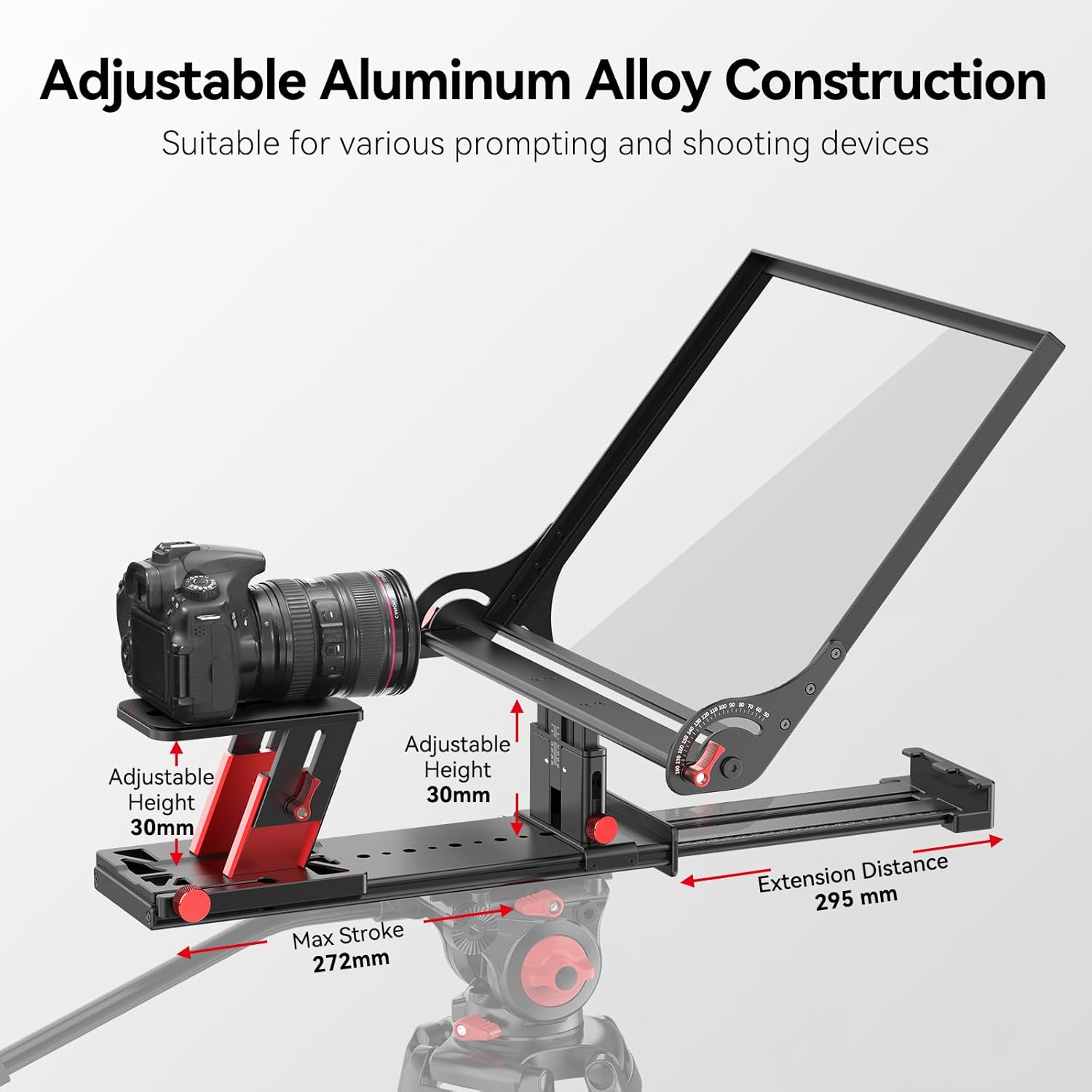
Image: A DSLR camera mounted on the teleprompter, highlighting the adjustable aluminum alloy construction for optimal positioning.

Image: The teleprompter configured for both horizontal and vertical DSLR camera shooting, demonstrating its versatility.
5. Інструкцыя па эксплуатацыі
5.1 Загрузка праграмы і падключэнне
- Спампаваць бясплатную праграму «Des»view" app from the App Store (iOS) or Google Play (Android) on your tablet or smartphone.
- Pair the included Bluetooth remote control with your device.
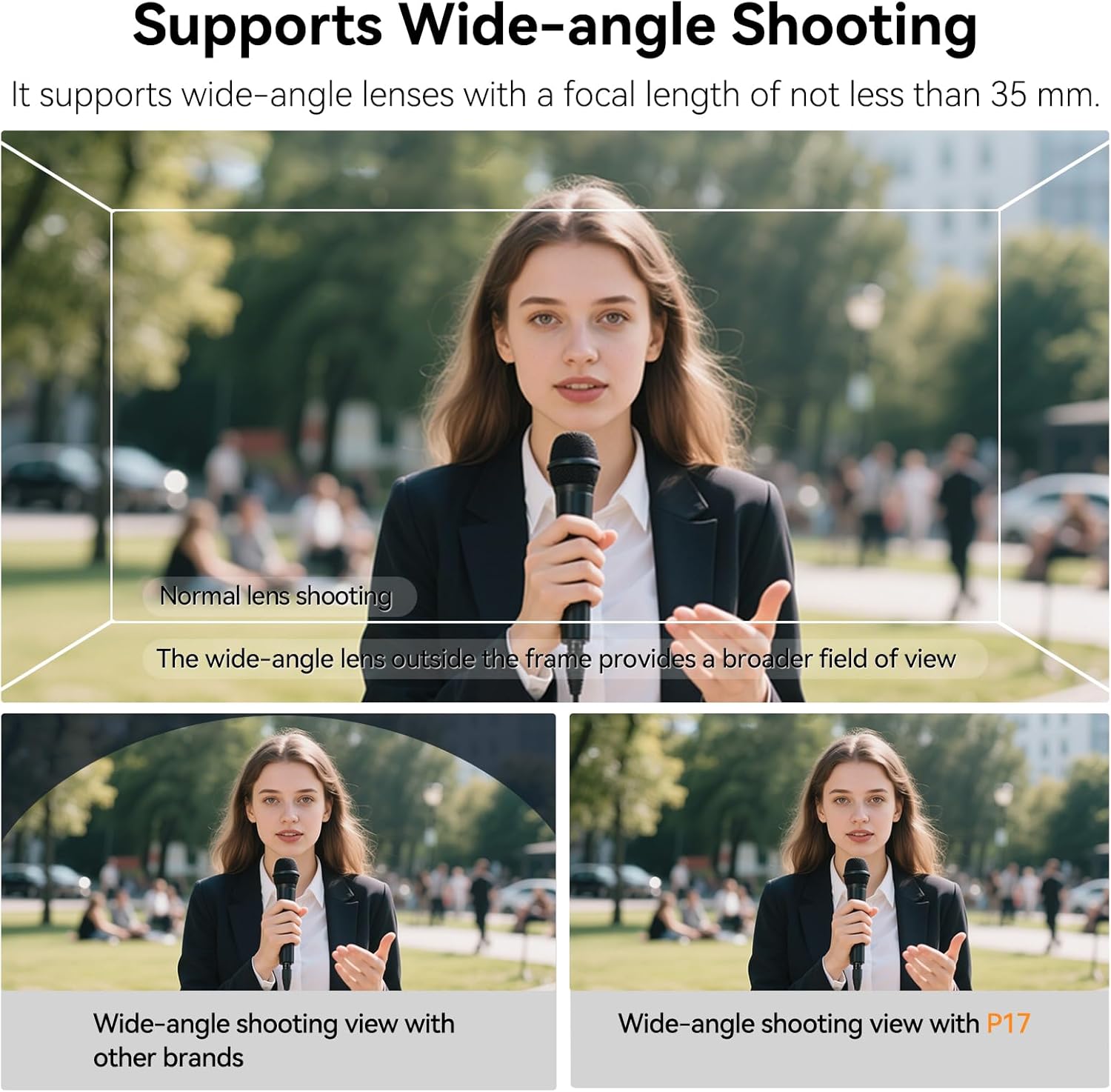
Image: The Desview app displayed on a tablet, illustrating text input and control features, alongside the Bluetooth remote.
5.2 Using the Teleprompter App and Remote
- Input or copy your script into the Desview дадатак.
- Use the Bluetooth remote to control text scrolling (up/down), playback speed, pause, and adjust text size, font, and background color.
- The app supports multi-language playback and adapts to your phone's system language.
Video: Demonstration of the Desview Teleprompter APP features, including text input, scrolling, and customization options.
Відэа: Скончанаview of the Desview P17 Teleprompter in action, showcasing its ease of use and functionality with a tablet and remote.
5.3 Wide-Angle Shooting
The teleprompter is designed to support wide-angle lenses with a focal length of not less than 35mm, ensuring a broader field of view without vignetting. The detachable sun hood helps to optimize the shooting environment.

Image: Visual comparison demonstrating the enhanced wide-angle shooting capability when using the Desview Тэлесуфлёр P17.
6. Тэхнічнае абслугоўванне
- Ачыстка шкла: Use the provided cleaning cloth or a soft, lint-free cloth with a mild glass cleaner to gently wipe the beam splitter glass. Avoid abrasive materials that could scratch the surface.
- Генеральная ўборка: Wipe down the aluminum alloy body and fabric components with a dry or slightly damp тканіна.
- захоўванне: Always store the teleprompter in its dedicated carry case when not in use to protect it from dust, scratches, and impacts.
- Замена батарэі: Replace the AAA batteries in the Bluetooth remote control as needed to ensure optimal performance.
7. Выпраўленне непаладак
- Text not clear/ghosting: Ensure the beam splitter glass is clean. Adjust the lighting in your shooting environment. Verify that your camera lens is properly aligned with the glass.
- Пульт не падключаецца: Check if the remote's batteries are charged and correctly inserted. Ensure Bluetooth is enabled on your device and attempt to re-pair the remote.
- Vignetting (dark corners in video): Confirm that your camera lens is not wider than 35mm. Adjust the camera's position and height to ensure it is centered and not obstructed by the teleprompter's housing or sun hood.
- Праблемы з праграмай: Ensure the Desview app is updated to the latest version. Restart the app or your device if functionality issues persist.
8. Тэхнічныя характарыстыкі
| Асаблівасць | Дэталь |
|---|---|
| Нумар мадэлі | P17 |
| Памер дысплея | 17 inches (compatible with tablets up to 15 inches) |
| Матэрыял | Прэміум алюмініевы сплаў |
| Beam Splitter Glass | Цвёрдасць 7H, прапусканне бачнага святла 70/30 |
| Сумяшчальнасць | DSLR/Mirrorless Cameras, Camcorders, iPads, Tablets, Smartphones |
| Кантроль | Bluetooth Remote, "Desview" App (iOS/Android) |
| Wide-Angle Support | Lenses ≥ 35mm focal length (no vignetting) |
| Вага прадмета | 9.55 фунта |
| Памеры ўпакоўкі | 18.54 х 18.07 х 6.02 цалі |
9. Гарантыя і падтрымка
For warranty information, technical support, or service inquiries, please refer to the documentation included with your product or visit the official Desview webсайт. Захоўвайце чэк аб пакупцы на выпадак прэтэнзій па гарантыі.


