1. Прадукт скончыўсяview
The E-ACE 4.3-inch Dual Lens Car DVR Rearview Mirror Dash Cam is designed to enhance driving safety by providing comprehensive video recording of your journeys. This device integrates a front-facing camera and supports an optional rear-facing camera, offering a wide field of view and continuous recording capabilities. Its sleek design replaces your existing rearview mirror, providing a discreet and integrated solution for vehicle surveillance.
Key features include a 4.3-inch high-definition display, dual-lens recording, night vision, loop recording, and a G-sensor for automatic incident detection.

Image: The E-ACE rearview mirror dash cam displaying both front and rear camera feeds on its integrated screen.
2. Змесціва ўпакоўкі
Калі ласка, праверце ўпакоўку на наяўнасць наступных прадметаў:
- E-ACE Rearview Блок відэарэгістратара ў люстэрку
- Аўтамабільная зарадная прылада
- Fixed Bandages (for mounting)
- Кіраўніцтва карыстальніка
- Счытвальнік карт
- Optional: Rear View Camera + Cable (6M or 10M, depending on variant)
- Optional: Buck Line (for parking monitoring power)
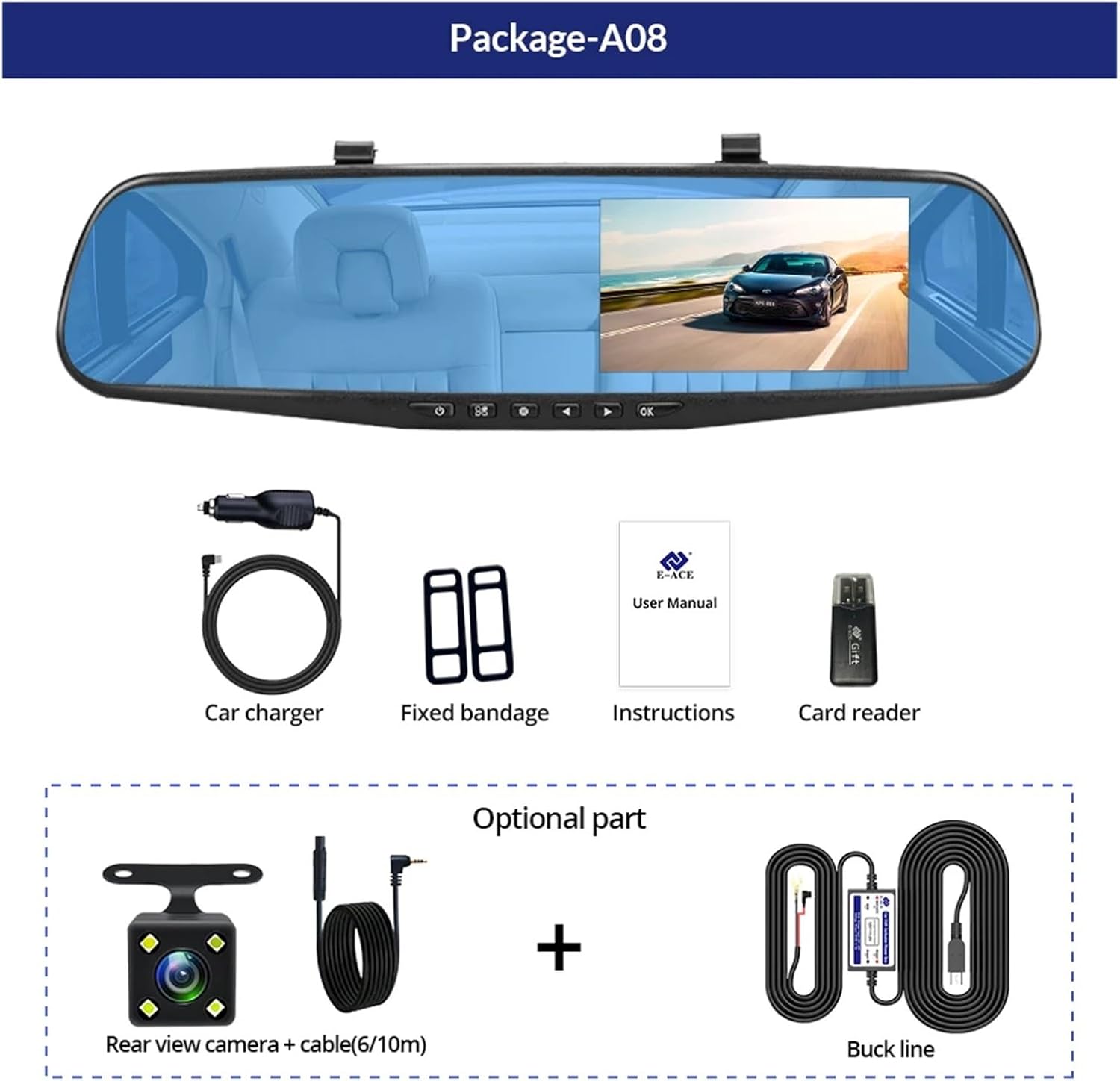
Image: A visual representation of the items included in the E-ACE dash cam package, showing the main unit and accessories.
3. Асаблівасці прадукту
- 4.3-inch High-Definition Display: Provides clear visibility for real-time monitoring and playback.
- Dual Lens Design: Captures both front and rear footage simultaneously for comprehensive coverage.
- Built-in Night Vision Technology: Ensures clear recordings in low-light conditions.
- Зручная ўстаноўка: Sleek rearview mirror design integrates seamlessly into your vehicle.
- цыклічны запіс: Аўтаматычна перазапісвае найстарэйшы footagе., калі карта памяці запоўнена, што забяспечвае бесперапынны запіс.
- G-Sensor Feature: Detects sudden movements or impacts and automatically locks the current video file каб прадухіліць яго перазапіс.
- Маніторынг паркоўкі: Records video when motion or impact is detected while the vehicle is parked (requires buck line connection).
- 170-Degree Wide Angle: Забяспечвае шырокі view дарогі наперадзе.
- Выява адваротнага боку: Displays the rear camera view with parking guidelines when reversing.
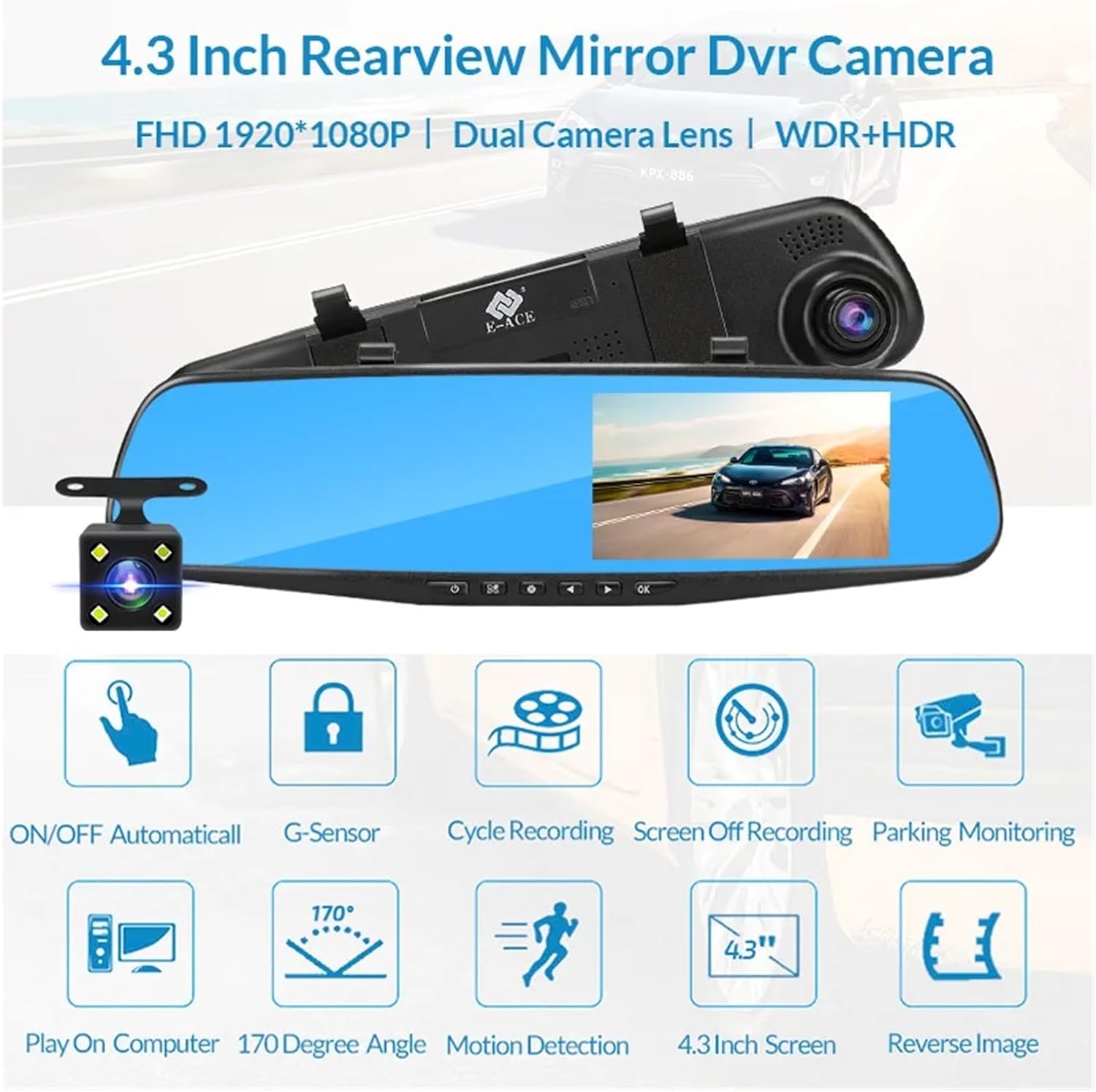
Image: An illustration highlighting the various functional features of the E-ACE dash cam.
4. Ідэнтыфікацыя кампанентаў
Familiarize yourself with the various parts and controls of your E-ACE dash cam:

Image: A detailed diagram identifying the buttons, ports, and features on the E-ACE dash cam unit.
- Кнопка ON/OFF: Уключае або выключае прыладу.
- Кнопка меню: Доступ да налад і опцый.
- Кнопка рэжыму: Switches between video recording, photo, and playback modes.
- Кнопка UP: Navigates up in menus or adjusts settings.
- Кнопка ўніз: Navigates down in menus or adjusts settings.
- Кнопка ОК: Пацвярджае выбар або пачынае/спыняе запіс.
- Слот TF карты: Insert your MicroSD (TF) card here.
- Порт AV-IN: Connects the rear camera.
- Порт USB: Для харчавання і перадачы дадзеных.
- Кнопка скіду: Resets the device to factory settings (use a thin pin).
- Мікрафон: Запісвае гук у салоне аўтамабіля.
5. Настройка і ўстаноўка
5.1 Устаўка карты памяці
Before installation, insert a high-speed MicroSD (TF) card (Class 10 or higher, up to 64GB recommended) into the TF Card Slot (7) with the contacts facing the screen. Ensure the card is inserted correctly until it clicks into place.
5.2 Устаноўка відэарэгістратара
- Attach the fixed bandages to the back of the dash cam unit.
- Securely strap the dash cam over your vehicle's existing rearview mirror using the fixed bandages. Ensure it is centered and stable.
5.3 Падключэнне блока харчавання
- Connect the car charger to the USB Port (9) on the dash cam.
- Падключыце другі канец аўтамабільнай зараднай прылады да гнязда прыпальвальніка вашага аўтамабіля.
- Route the power cable neatly along the windshield trim to avoid obstructing your view.
5.4 Усталёўка задняй камеры (дадаткова)
- Connect the rear camera cable to the AV-IN Port (8) on the dash cam.
- Route the rear camera cable from the dash cam to the rear of your vehicle. This typically involves tucking the cable under the headliner and along the side pillars.
- Mount the rear camera on the rear windshield or near the license plate using its adhesive or screws. Ensure it has a clear view дарогі ззаду.
- If using the reverse image function, connect the red wire from the rear camera cable to your vehicle's reverse light power supply.
6. Інструкцыя па эксплуатацыі
6.1 Уключэнне/выключэнне сілкавання
- Аўтаматычна: The dash cam will automatically power on and start recording when your vehicle's ignition is turned on (if connected to a switched power source).
- Кіраўніцтва: Press and hold the ON/OFF Button (1) to manually power the device on or off.
6.2 Асноўныя аперацыі
- Пераключэнне рэжымаў: Press the Mode Button (3) to cycle between Video Recording, Photo, and Playback modes.
- Доступ да меню: In any mode, press the Menu Button (2) to enter the settings menu. Use the UP (4) and Down (5) buttons to navigate, and OK (6) to select.
- Пачаць/спыніць запіс: In Video Recording mode, press the OK Button (6) to manually start or stop recording.
6.3 Рэжымы адлюстравання
While recording, you can typically switch between different display views by pressing the UP or Down buttons:
- Front Camera Only
- Rear Camera Only
- Picture-in-Picture (Front main, Rear sub-window)
- Picture-in-Picture (Rear main, Front sub-window)
6.4 Запіс цыкла
Set the loop recording duration (e.g., 1, 3, or 5 minutes) in the settings menu. When the memory card is full, the oldest unlocked fileбудуць перазапісаны новымі запісамі.
6.5 G-датчык
The G-sensor automatically detects collisions or sudden braking. When triggered, it locks the current video file, preventing it from being overwritten by loop recording. Adjust sensitivity in the settings.
6.6 Parking Monitoring (Optional)
If the buck line is installed, the dash cam can monitor your vehicle while parked. When motion or impact is detected, it will automatically record a short video. Enable this feature in the settings.
6.7 Устаноўка даты і часу
It is important to set the correct date and time in the system settings for accurate timestamps on your recordings.
7. Тэхнічнае абслугоўванне
- Уборка: Use a soft, dry cloth to clean the lens and screen. Avoid abrasive cleaners or solvents.
- Карта памяці: Format the MicroSD card regularly (e.g., once a month) within the dash cam's settings to maintain optimal performance and prevent data corruption. Back up important files перад фарматаваннем.
- тэмпература: Avoid exposing the device to extreme temperatures, as this can affect battery life and component integrity.
- Абнаўленні прашыўкі: Праверце вытворцы webперыядычна правяраць сайт на наяўнасць абнаўленняў прашыўкі, якія могуць палепшыць прадукцыйнасць або дадаць новыя функцыі.
8. Выпраўленне непаладак
| праблема | Магчымая прычына | Рашэнне |
|---|---|---|
| Відэарэгістратар не ўключаецца. | No power supply; faulty charger; loose connection. | Check car charger connection and vehicle's cigarette lighter. Try a different USB cable/charger. |
| Запіс спыняецца аўтаматычна. | Memory card full; slow memory card; G-sensor sensitivity too high. | Format the memory card. Use a Class 10 or higher MicroSD card. Lower G-sensor sensitivity in settings. |
| Відэа фуtagе размытае. | Ахоўная плёнка на аб'ектыве; брудны аб'ектыў; няправільны фокус. | Remove any protective film. Clean the lens with a soft cloth. |
| Не адлюстроўваецца выява з задняй камеры. | Loose connection; faulty cable/camera. | Check the AV-IN connection. Ensure the rear camera is properly installed. |
| Device freezes or crashes. | Software issue; memory card error. | Press the Reset Button (10) with a thin pin. Format the memory card. |
9. Тэхнічныя характарыстыкі
- Назва мадэлі: DMMRUTXB
- Дысплей: 4.3 цаляў
- Камера: Dual Lens (Front & Rear support)
- Дазвол відэа: FHD 1920x1080P (Front)
- Асаблівасці: Loop Recording, G-Sensor, Night Vision, Parking Monitoring, 170-degree wide angle
- захоўванне: Supports MicroSD (TF) card, Class 10 or higher (up to 64GB)
- Падключэнне: USB, AV-IN (for rear camera)
- Вага прадмета: Прыкладна 1.76 унцый (50 грамаў)
- Памеры ўпакоўкі: Прыкладна 0.39 х 0.39 х 0.39 цалі
- вытворца: DMMRUTXB
10. Гарантыя і падтрымка
For warranty information and technical support, please refer to the documentation provided with your purchase or contact the retailer/manufacturer directly. Keep your purchase receipt as proof of purchase.


