Уводзіны
Thank you for choosing the GOBOULT Soniq Over Ear Bluetooth Headphones. These headphones are designed to provide a superior audio experience with features like 70 hours of playtime, 40mm bass drivers, Zen™ ENC microphone, Type-C fast charging, and dual device pairing. This manual will guide you through the setup, operation, and maintenance of your new headphones to ensure optimal performance.
Што ў скрынцы
Калі ласка, праверце змесціва пакета, каб пераканацца ў наяўнасці ўсіх прадметаў:
- Soniq Headphone
- Зарадны кабель Type-C
- Кіраўніцтва карыстальніка
- Амбушуры (папярэдне ўсталяваныя)
- Гарантыйны талон
Характарыстыкі прадукту скончаныview
The GOBOULT Soniq headphones come equipped with several advanced features:
- Падоўжаны час прайгравання: Да 70 гадзін прайгравання аўдыё на адной зарадцы.
- Customizable EQ Modes: Наладзьце гукавую праграмуfiles for bass boost, balanced audio, or vocal clarity.
- Падаўленне шуму навакольнага асяроддзя (ENC): Паляпшае выразнасць гуку пры званках, памяншаючы фонавы шум.
- Спалучэнне двух прылад: Seamlessly connect and switch between two devices simultaneously.
- Powerful Audio Drivers: 40mm bass-boosted drivers for rich sound.
- Найноўшая тэхналогія Bluetooth: Bluetooth 5.4 for faster pairing and stable connections.
- Зручны дызайн: Lightweight build with cushioned earcups for prolonged wear.
- Воданепранікальнасць: IPX5 rating for splash, rain, and sweat protection.
- Tactile Controls: Easy-to-use physical buttons for volume, playback, and mode switching.
- Падтрымка галасавога памочніка AI: Compatible with Google Assistant and Siri.

Выява: Зверхуview of key features including 70H battery, EQ modes, ENC, dual pairing, 40mm drivers, and Bluetooth 5.4.

Image: Close-up of the GOBOULT Soniq headphone earcup highlighting the 40mm power-packed bass neodymium drivers with BoomX™ Technology and Memory Foam.
Кіраўніцтва па ўстаноўцы
1. Зарадка навушнікаў
Before first use, fully charge your GOBOULT Soniq headphones. Use the provided Type-C charging cable to connect the headphones to a compatible USB power source.
- Поўнай зарадкі хапае на 70 гадзін прайгравання.
- Fast charging feature: 10 minutes of charge provides approximately 8 hours of playtime.
- Святлодыёдны індыкатар будзе паказваць стан зарадкі і выключацца або змяняць колер пры поўнай зарадцы.

Image: GOBOULT Soniq headphones connected via Type-C cable, illustrating 70 hours playtime and fast charging capability.
2. Уключэнне / выключэнне харчавання
To power on, press and hold the Power button for approximately 3 seconds until the LED indicator lights up. To power off, press and hold the Power button again for 3 seconds until the LED indicator turns off.
3. Спарванне Bluetooth
Выканайце наступныя дзеянні, каб падключыць навушнікі да прылады з падтрымкай Bluetooth:
- Пераканайцеся, што навушнікі цалкам зараджаныя і выключаныя.
- Націсніце і ўтрымлівайце кнопку харчавання на працягу 5-7 секунд, пакуль святлодыёдны індыкатар не пачне міргаць па чарзе чырвоным і сінім колерамі, што паказвае на рэжым спалучэння.
- На вашай прыладзе (смартфоне, планшэце, ноўтбуку) уключыце Bluetooth і знайдзіце даступныя прылады.
- Select "GOBOULT Soniq" from the list of found devices.
- Once connected, the LED indicator will flash blue slowly or remain solid blue.

Image: GOBOULT Soniq headphones highlighting Bluetooth 5.4 for fast and stable connection.
Інструкцыя па эксплуатацыі
1. Асноўныя элементы кіравання
The headphones feature tactile buttons for easy control:
- Кнопка харчавання: Націсніце і ўтрымлівайце, каб уключыць/выключыць прыладу. Кароткатэрміновае націсканне — для прайгравання/паўзы.
- Павялічыць гучнасць (+): Кароткае націсканне для павелічэння гучнасці. Доўгае націсканне для наступнай кампазіцыі.
- Памяншэнне гучнасці (-): Кароткае націсканне для памяншэння гучнасці. Доўгае націсканне для папярэдняга трэка.
- Multi-function Button (often combined with Power or a dedicated button): Answer/End calls, activate voice assistant.

Image: Close-up of the right earcup showing tactile button controls for volume and play/pause.
2. Рэжымы эквалайзера
Customize your audio experience with multiple EQ modes. Press the dedicated EQ button (or a specific combination, refer to quick start guide if available) to cycle through modes:
- Рэжым узмацнення басоў: Паляпшае нізкія частоты для атрымання больш глыбокага гучання басаў.
- Збалансаваны рэжым: Забяспечвае нейтральны гук, прафесійныfile suitable for various genres.
- Вакальны рэжым: Optimizes mid-range frequencies for clearer vocals.
- Рэжым гульні: Reduces latency for a more synchronized gaming audio experience (60ms ultra-low latency).
- Рэжым музыкі: Стандартны прафесійны аўдыёfile для праслухоўвання музыкі ў цэлым.
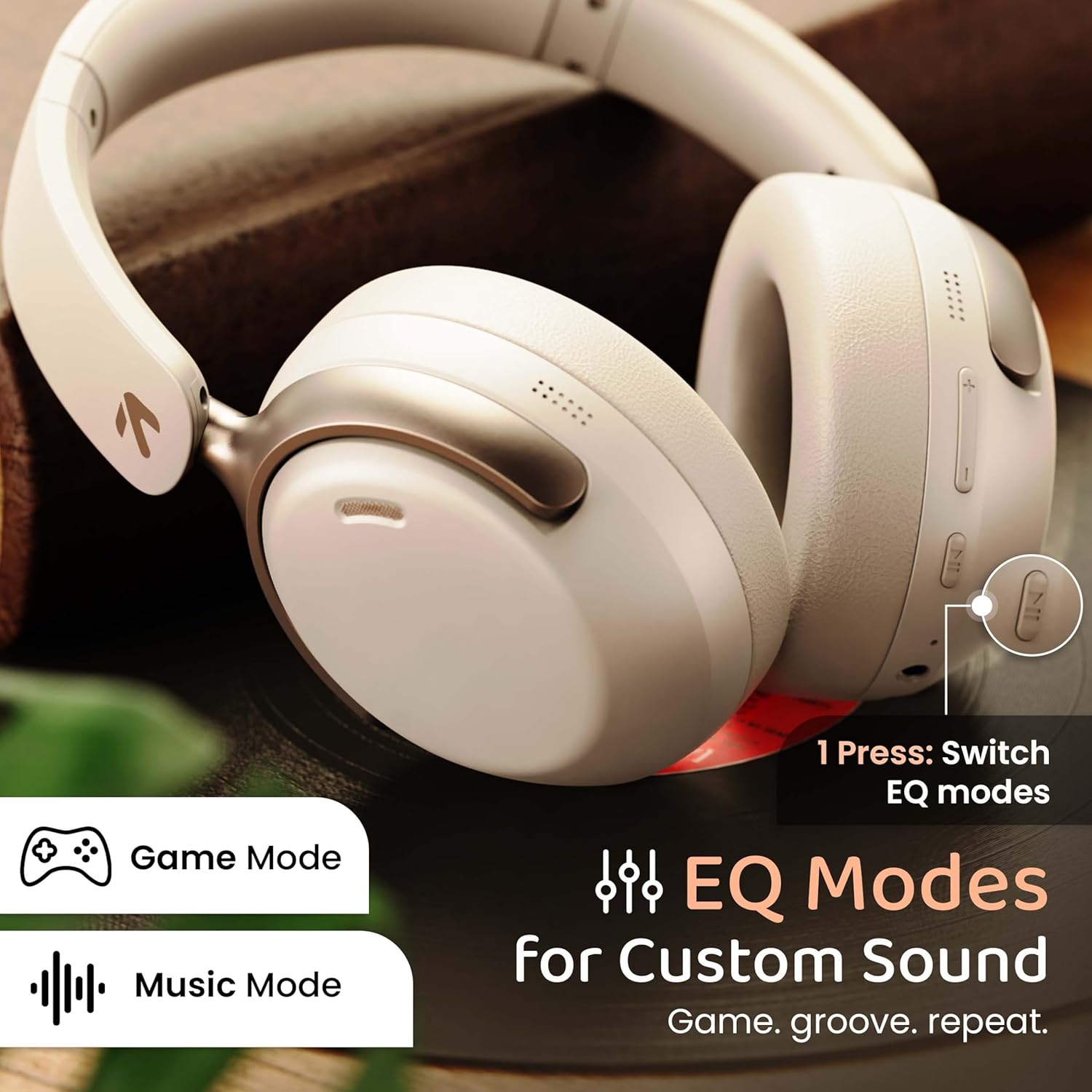
Image: GOBOULT Soniq headphones illustrating the EQ modes for custom sound, including Game Mode and Music Mode.

Image: GOBOULT Soniq headphones highlighting Combat™ Gaming Mode with 60ms ultra-low latency, tailored for mobile gaming and real-time sound accuracy.
3. Спалучэнне двух прылад
The headphones support dual device pairing, allowing you to connect to two devices simultaneously and switch between them seamlessly.
- Pair the headphones with the first device as described in the "Bluetooth Pairing" section.
- Адключыце Bluetooth на першай прыладзе.
- Спалучыце навушнікі з другой прыладай.
- Зноў уключыце Bluetooth на першай прыладзе. Навушнікі павінны аўтаматычна падключыцца да абедзвюх прылад.
- Audio will play from the device currently active. To switch, pause audio on the first device and start playing on the second.

Image: GOBOULT Soniq headphones demonstrating dual device connectivity with a laptop and a smartphone.
4. Правадны рэжым (AUX)
For a wired connection, use a standard 3.5mm AUX cable (not included) to connect the headphones to your audio source. In wired mode, the headphones operate passively, and the built-in microphone will not function.

Image: GOBOULT Soniq headphones showing the option for wireless mode and an optional wired mode via AUX cable, noting that the mic is off in wired mode.
5. Падаўленне шуму навакольнага асяроддзя (ENC) для званкоў
The Zen™ ENC microphone technology helps reduce ambient noise during calls, ensuring clearer conversations. This feature is automatically active during phone calls.

Image: Close-up of the GOBOULT Soniq headphone earcup highlighting the Zen™ ENC Mic for processed calling, ambient noise isolation, enhanced call experience, and sharper voice clarity.
6. Галасавы памочнік
Activate your device's voice assistant (Google Assistant or Siri) by pressing the multi-function button (or specific button, refer to quick start guide) for approximately 2 seconds.

Image: GOBOULT Soniq headphones with icons for Google Assistant and Siri, indicating personalized AI assistant support.
Тэхнічнае абслугоўванне і догляд
- Уборка: Працірайце навушнікі мяккай сухой тканінай. Не выкарыстоўвайце абразіўныя ачышчальнікі або растваральнікі.
- Воданепранікальнасць: The headphones are IPX5 water resistant, meaning they are protected against splashes, rain, and sweat. Do not submerge them in water or expose them to strong jets of water.
- захоўванне: Калі навушнікі не выкарыстоўваюцца, захоўвайце іх у прахалодным, сухім месцы, удалечыні ад прамых сонечных прамянёў і экстрэмальных тэмператур. Складаная канструкцыя забяспечвае кампактнае захоўванне.
- Сыход за батарэяй: Каб падоўжыць тэрмін службы батарэі, не разраджайце навушнікі цалкам часта. Рэгулярна зараджайце іх, нават калі яны не выкарыстоўваюцца пастаянна.
Image: GOBOULT Soniq headphones illustrating IPX5 water resistance, indicating protection against splash, rain, and sweat.

Image: GOBOULT Soniq headphones showcasing their adjustable headband, foldable design, and movable earcups for maximum comfort and portability.
Ліквідацыю непаладак
| праблема | Магчымае рашэнне |
|---|---|
| Навушнікі не ўключаюцься. | Пераканайцеся, што навушнікі зараджаныя. Падключыце іх да крыніцы харчавання з дапамогай кабеля Type-C. |
| Немагчыма спалучыць прыладу. |
|
| Няма гуку або нізкі ўзровень гучнасці. |
|
| Microphone not working in wired mode. | The built-in microphone is not active when using the AUX wired connection. This is normal operation. |
| Перарывістае злучэнне. |
|
Тэхнічныя характарыстыкі
| Асаблівасць | Дэталь |
|---|---|
| Назва мадэлі | AirBass |
| Тэхналогія падлучэння | Bluetooth, Wired, Wireless |
| Тэхналогія бесправадной сувязі | Bluetooth 5.4 |
| Дыяпазон Bluetooth | 10 метраў |
| Памер аўдыё драйвера | 40 міліметраў |
| Тып аўдыё драйвера | Дынамічны драйвер |
| Тэрмін службы батарэі | 40 гадзін |
| Порт для зарадкі | Раз'ём для хуткай зарадкі Type-C |
| Кантроль шуму | Падаўленне экалагічнага шуму (ENC) |
| Узровень воданепранікальнасці | IPX5 (Splash, Rain, Sweat Proof) |
| Затрымка аўдыя | 60 мілісекунд (гульнявы рэжым) |
| Форма навушніка | Над вухам |
| Матэрыял | Memory Foam (Ear Cushions) |
| Вага прадмета | 227 грам |
| Памеры прадукту (ДxШxВ) | 17 х 5.5 х 19 сантыметраў |
| Тып кантролера | Button, Google Assistant |
| Імпеданс | 32 Ом |
| Адчувальнасць | 118 дБ |
Гарантыя і падтрымка
Your GOBOULT Soniq Over Ear Bluetooth Headphones come with a Гарантыя ад вытворцы 1 год from the date of purchase. This warranty covers manufacturing defects and ensures the reliability of your product.
For warranty claims, technical support, or any inquiries, please refer to the contact information provided on the warranty card included in your package or visit the official GOBOULT support webсайт.
Калі ласка, захавайце чэк аб куплі ў якасці пацверджання пакупкі для пацверджання гарантыі.


