1. Уводзіны
The COMFAST WR773BE WiFi 7 Repeater is a high-performance wireless device designed to extend the coverage and enhance the speed of your existing WiFi network. Utilizing the latest 802.11be (WiFi 7) standard, it offers dual-band connectivity (2.4 GHz and 5 GHz) with speeds up to 3600 Mbps, providing a stable and fast internet experience for multiple connected devices. This manual will guide you through the setup, operation, and maintenance of your repeater.
1.1 Прадукт скончыўсяview

Фронт view of the COMFAST WR773BE WiFi 7 Repeater, highlighting its compact design and four external antennas. The device features LED indicators for power, network port, and WiFi status.
1.2 Змест пакета
Калі ласка, уважліва праверце змесціва ўпакоўкі. Калі які-небудзь прадмет адсутнічае або пашкоджаны, звярніцеся да прадаўца.
- COMFAST WR773BE WiFi 7 Repeater Unit
- Кіраўніцтва карыстальніка
- Кабель Ethernet RJ45
- Адаптар харчавання (вілка ЕС)
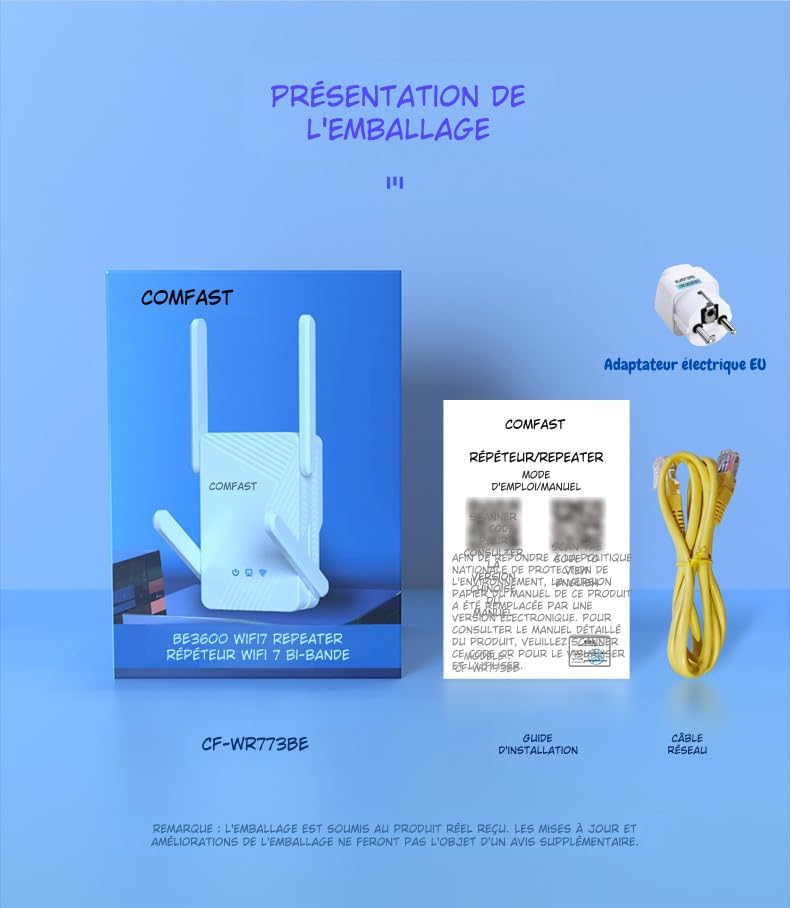
The package includes the COMFAST WR773BE WiFi 7 Repeater unit, a user manual, an RJ45 Ethernet cable, and an EU power adapter. Ensure all components are present upon unboxing.
2. Кіраўніцтва па наладцы
Follow these steps to set up your COMFAST WR773BE WiFi 7 Repeater.
2.1 Базавая ўстаноўка
- Уключэнне: Plug the repeater into an electrical outlet near your main router. Wait for the Power LED to turn solid blue.
- пазіцыянаванне: For optimal performance, place the repeater halfway between your router and the area where you want to improve WiFi coverage. Avoid obstacles like thick walls or large metal objects.
- падключэнне: The repeater can be configured via WPS or a web браўзер.
2.2 Configuration via WPS (Recommended)
WPS (Wi-Fi Protected Setup) is the easiest way to connect your repeater to your router.
- Падключыце рэтранслятар да разеткі.
- Націсніце кнопку WPS на галоўным маршрутызатары.
- Within two minutes, press the WPS button on the COMFAST WR773BE repeater.
- The WiFi Status LED on the repeater will blink during connection and turn solid blue when successfully connected.
2.3 Канфігурацыя праз Web Браўзэр
If your router does not support WPS, or if you prefer manual setup, use a web браўзер.
- Падключыце рэтранслятар да разеткі.
- Connect your computer or smartphone to the repeater's default WiFi network (e.g., "COMFAST_XXXX"). No password is required initially.
- Адкрыйце a web браўзер і ўвядзіце IP-адрас па змаўчанні (звычайна 192.168.10.1 or repeater.net) in the address bar. Refer to the manual for the exact default IP.
- Увайдзіце, выкарыстоўваючы імя карыстальніка і пароль па змаўчанні (звычайна адмін/адмін).
- Follow the on-screen instructions to select your router's WiFi network and enter its password.
- Configure the repeater's extended network name (SSID) and password.
- Save the settings and wait for the repeater to restart. The WiFi Status LED will turn solid blue upon successful connection.
3. Рэжымы працы
The COMFAST WR773BE supports multiple operating modes to suit various network requirements.
3.1 Рэжым рэтранслятара
In Repeater Mode, the device extends the range of your existing WiFi network, eliminating dead zones. This is the most common mode for home users.
3.2 Рэжым кропкі доступу (AP)
In AP Mode, the device connects to your wired network via an Ethernet cable and broadcasts a new wireless network. This is useful for adding WiFi capability to a wired-only network.
3.3 Рэжым маршрутызатара
In Router Mode, the device acts as a primary router, connecting to your modem and creating a new private network. This mode is suitable for small offices or homes without an existing router.
4. Святлодыёдныя індыкатары
The LED indicators provide real-time status of the repeater's operation.
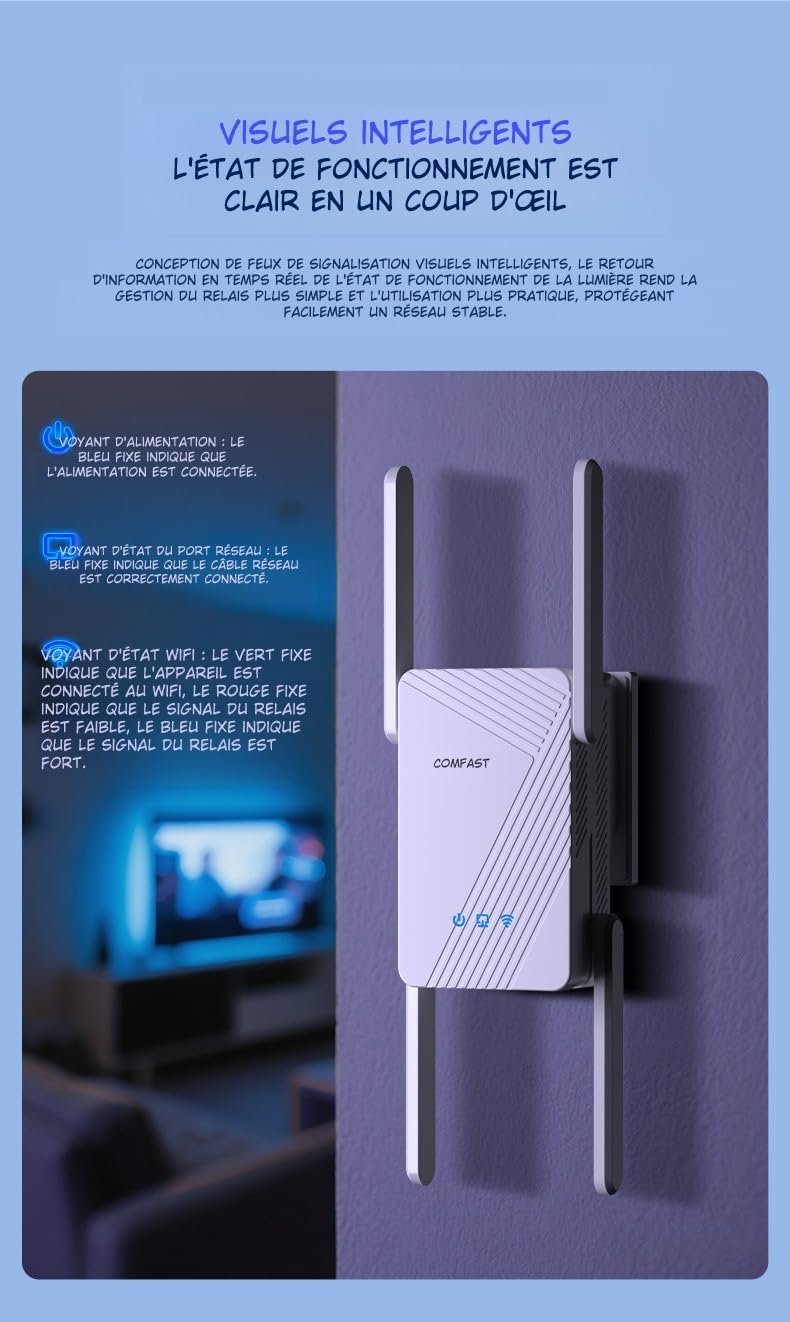
This image illustrates the LED indicators on the repeater. The Power LED (blue) indicates power status, the Network Port LED (blue) shows Ethernet cable connection, and the WiFi Status LED (red for weak, blue for strong) indicates signal strength.
| Індыкатар | Статус | Апісанне |
|---|---|---|
| Індыкатар харчавання | Суцэльны сіні | The device is powered on and operating correctly. |
| Network Port LED | Суцэльны сіні | An Ethernet cable is correctly connected to the RJ45 port. |
| WiFi Status LED | Цвёрды чырвоны | The WiFi signal from the main router is weak. Consider repositioning the repeater closer to the router. |
| WiFi Status LED | Суцэльны сіні | The WiFi signal from the main router is strong, and the repeater is working optimally. |
5. Тэхнічнае абслугоўванне
Proper maintenance ensures the longevity and optimal performance of your repeater.
5.1 Сыход і чыстка
- Трымайце прыладу чыстай і без пылу. Выкарыстоўвайце для чысткі мяккую сухую тканіну.
- Do not use liquid or aerosol cleaners, as they may damage the device.
- Avoid exposing the repeater to extreme temperatures, humidity, or direct sunlight.
5.2 Вентыляцыя
The COMFAST WR773BE is designed with efficient heat dissipation to maintain stable operation.

The repeater features an efficient heat dissipation design with ventilation openings to maintain stable operation and prevent overheating, ensuring long-term performance.
- Пераканайцеся, што вентыляцыйныя адтуліны не заблакаваныя.
- Размесціце прыладу ў добра вентыляваным памяшканні, каб прадухіліць перагрэў.
6. Выпраўленне непаладак
If you encounter issues with your repeater, refer to the following common problems and solutions.
- Няма харчавання:
- Ensure the power adapter is securely plugged into the repeater and a working electrical outlet.
- Check if the Power LED is solid blue. If not, try a different outlet.
- Слабы сігнал або яго адсутнасць:
- Reposition the repeater closer to your main router.
- Check the WiFi Status LED. If it's red, the signal from the router is weak.
- Ensure there are no major obstructions (e.g., thick walls, metal objects) between the repeater and the router.
- Немагчыма атрымаць доступ Web Старонка кіравання:
- Ensure your device is connected to the repeater's WiFi network.
- Verify that you are entering the correct IP address (e.g., 192.168.10.1) or domain name (e.g., repeater.net) in the browser.
- Ачысціце кэш і файлы cookie браўзера або паспрабуйце іншы браўзер.
- Забыты пароль:
- Perform a factory reset by pressing and holding the reset button (usually a small pinhole) for about 5-10 seconds until the LEDs flash. The device will revert to factory default settings.
7. Тэхнічныя характарыстыкі
Detailed technical specifications for the COMFAST WR773BE WiFi 7 Repeater.

The back of the repeater displays key technical specifications, including data rates, antenna gain, wireless speeds for 2.4GHz and 5GHz bands, power consumption, and supported functionalities like AP, Repeater, and Router modes.
| Асаблівасць | Дэталь |
|---|---|
| Нумар мадэлі | WR773BE |
| бесправадной стандарт | IEEE 802.11be (WiFi 7) |
| Хуткасць перадачы даных | Да 3600 Мбіт/с |
| Дыяпазон частот | Двухдыяпазонны (2.4 ГГц і 5 ГГц) |
| Хуткасць 2.4 ГГц | Да 688 Мбіт/с |
| Хуткасць 5 ГГц | Да 2882 Мбіт/с |
| Антэны | 4*5dBi High-Gain Antennas |
| Парты | 1 x 10/100/1000Mbps RJ45 WAN/LAN Port |
| Рэжымы працы | Repeater, AP, Router |
| Энергаспажыванне | 18 Вт |
| Памеры (Д х Ш х У) | 4.8 см (Ш x Ш x В) |
| Колер | Белы |
| Сумяшчальныя прылады | Surveillance Camera, Game Console, PC, Laptop, Smartphone, Tablet, Smart TV |
8. Гарантыя і падтрымка
Information regarding spare parts availability and software updates for this product is not available at this time. For warranty claims or technical support, please refer to the purchase documentation or contact your retailer directly.


